

Microsoft introduced Active Directory Web Services (ADWS) in Windows Server 2008 R2 as a method to provide an interface to instances for querying and managing Active Directory over a network. The service runs on domain controllers by default on TCP port 9389 and communication is performed via the Simple Object Access Protocol (SOAP). Administrators typically utilize the Web Service through the active directory administrative center or Active Directory PowerShell modules.
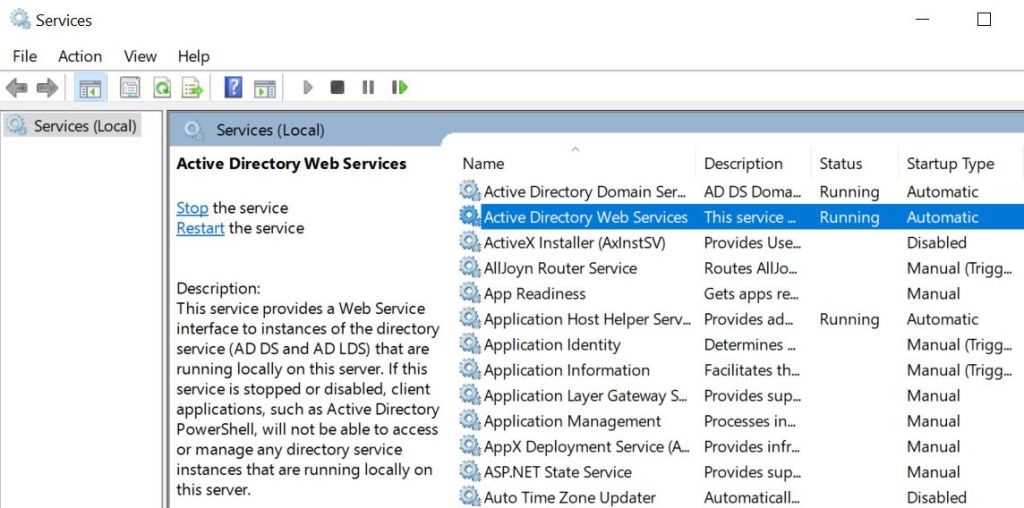
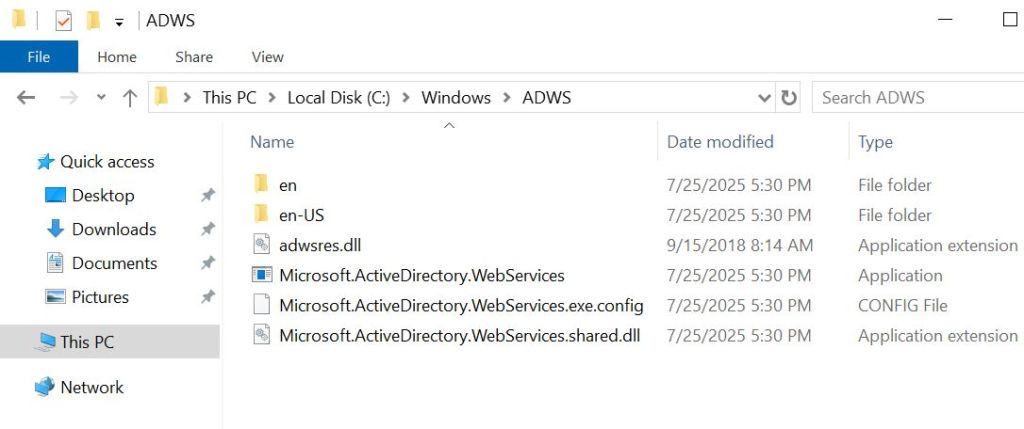
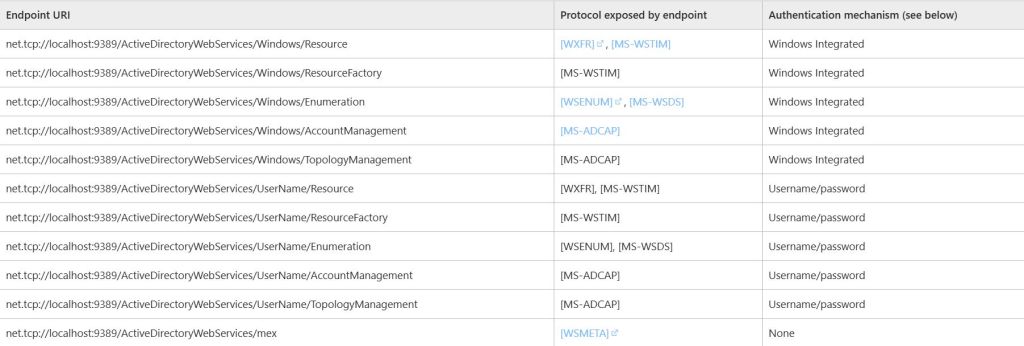
Microsoft has exposed specific endpoints that are used by the Active Directory Web Services and are demonstrated below:
The Microsoft.ActiveDirectoryWebServices.exe process is running on the domain controller and is listening on port 9389.

Communication from clients is performed through accessing specific endpoints over the TCP port 9389 on the domain controller.
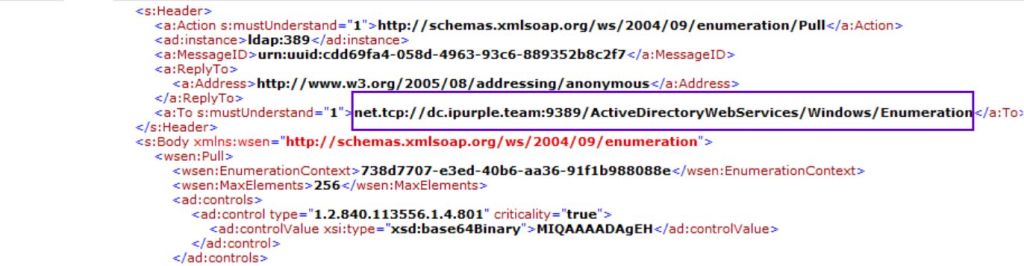
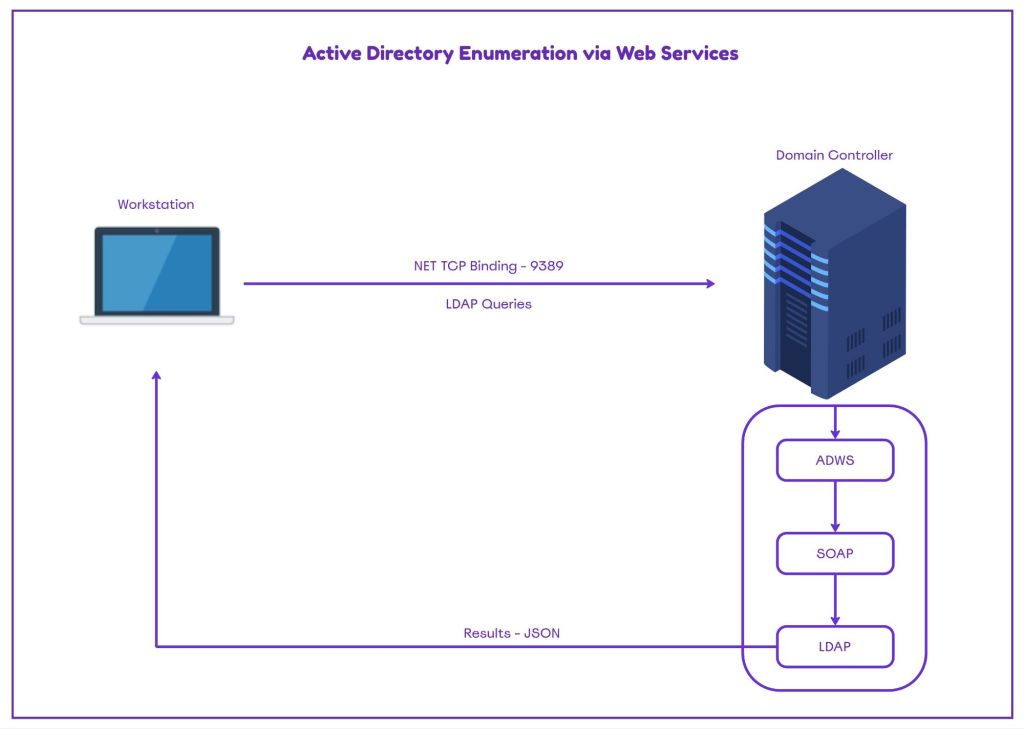
LDAP queries are wrapped in SOAP envelope messages and are forwarded internally to the domain controller for processing by the Directory Services and Lightweight Directory Services (LDS).

Enumeration of Active Directory objects is a critical step during Red Team exercises. The information retrieved from this stage, defines the path that will be followed to achieve objectives. For years, Active directory reconnaissance was performed through SharpHound, the data ingestor of BloodHound. Endpoint Detection and Response solutions and other security controls can detect the presence of SharpHound, and tools with similar capability. Red Team operators have shift their approach on Active Directory enumeration to a more stealthier technique which utilize the Web Services to pass LDAP queries. By default visibility is lacking through this approach and additional logging and monitoring is required by the defensive teams to capture arbitrary traffic towards the Domain Controller Web Services.
The workflow of enumeration via Active Directory Web Services consists of the following steps:
- Authentication: Kerberos or NTLM
- Query Construction: LDAP filters embedded in SOAP messages
- Data Retrieval: Active Directory Web Services processes the queries internally via LDAP. Results are returned in XML/JSON format.
- Output Handing: Results formatted and exported in JSON files.
The following diagram demonstrates the workflow of Active Directory enumeration via Web Services.
Playbook
FalconForce demonstrated in the public domain how Active Directory Web Services could be leveraged for enumeration of Active Directory by releasing a data collector tool called SOAPHound. The proof of concept can send a number of LDAP queries to the Active Directory Web Services embedded in SOAP messages. The ADWS server will unwrap the LDAP queries and forward them to the LDAP server running on the same domain controller. Specifically, SOAPHound uses the credentials of the user to establish the connection on port 9389.
    internal class ADWSConnector
    {
        string BaseUri { get; set; }
        NetworkCredential Credentials { get; set; }
        NetTcpBinding Binding { get; set; }
        MessageVersion Version { get; set; }
        public ADWSConnector(string Host, NetworkCredential Credentials)
        {
            UriBuilder uriBuilder = new UriBuilder();
            uriBuilder.Scheme = "net.tcp";
            uriBuilder.Host = Host;
            uriBuilder.Port = 9389;
            this.BaseUri = uriBuilder.ToString();
Active Directory information is retrieved via a connection in two of the Web Services endpoints: Resource and Enumeration.
 public ADInfo GetADInfo()
        {
            ADInfo adInfo = new ADInfo();
            var endpointAddress = GetEndpointAddress("ActiveDirectoryWebServices/Windows/Resource");
            var resourceClient = new ADWS.ResourceClient(this.Binding, endpointAddress);
            UpdateCredentials(resourceClient.ClientCredentials);
   public List<ADObject> Enumerate(string ldapBase, string ldapFilter, List<string> properties, int batchSize = 1000)
        {
            List<ADObject> list = new List<ADObject>();
            var endpointAddress = new System.ServiceModel.EndpointAddress(this.BaseUri + "ActiveDirectoryWebServices/Windows/Enumeration");
            var searchClient = new ADWS.SearchClient(this.Binding, endpointAddress);
            UpdateCredentials(searchClient.ClientCredentials);
SOAPHound has a predefined set of LDAP queries embedded in the tool to collect Active Directory information. The output of these queries is exported as JSON files in a path locally.
 case "dns":
                    banner = "Gathering DNS data";
                    ldapquery = "(&(ObjectClass=dnsNode))";
                    properties = new string[] { "Name", "dnsRecord" };
                    ldapbase = "CN=MicrosoftDNS,DC=DomainDnsZones,";
                    break;
                case "cache":
                    banner = "Generating cache";
                    ldapquery = "(!soaphound=*)";
                    properties = new string[] { "objectSid", "objectGUID", "distinguishedName" };
                    break;
                case "pkicache":
                    banner = "Gathering PKI cache";
                    ldapquery = "(!soaphound=*)";
                    properties = new string[] { "name", "certificateTemplates" };
                    ldapbase = "CN=Configuration,";
                    break;
                case "pkidata":
                    banner = "Gathering PKI data";
                    ldapquery = "(!soaphound=*)";
                    properties = new string[] { "name", "displayName", "nTSecurityDescriptor", "objectGUID", "dNSHostName", "nTSecurityDescriptor", "certificateTemplates", "cACertificate", "msPKI-Minimal-Key-Size", "msPKI-Certificate-Name-Flag", "msPKI-Enrollment-Flag", "msPKI-Private-Key-Flag", "pKIExtendedKeyUsage", "pKIOverlapPeriod", "pKIExpirationPeriod" };
                    ldapbase = "CN=Configuration,";
                    break;
                case "ad":
                    banner = "Gathering AD data";
                    ldapquery = "(!soaphound=*)";
                    if (nolaps)
                    {
                        properties = new string[] { "name", "sAMAccountName", "cn", "dNSHostName", "objectSid", "objectGUID", "primaryGroupID", "distinguishedName", "lastLogonTimestamp", "pwdLastSet", "servicePrincipalName", "description", "operatingSystem", "sIDHistory", "nTSecurityDescriptor", "userAccountControl", "whenCreated", "lastLogon", "displayName", "title", "homeDirectory", "userPassword", "unixUserPassword", "scriptPath", "adminCount", "member", "msDS-Behavior-Version", "msDS-AllowedToDelegateTo", "gPCFileSysPath", "gPLink", "gPOptions" };
                    }
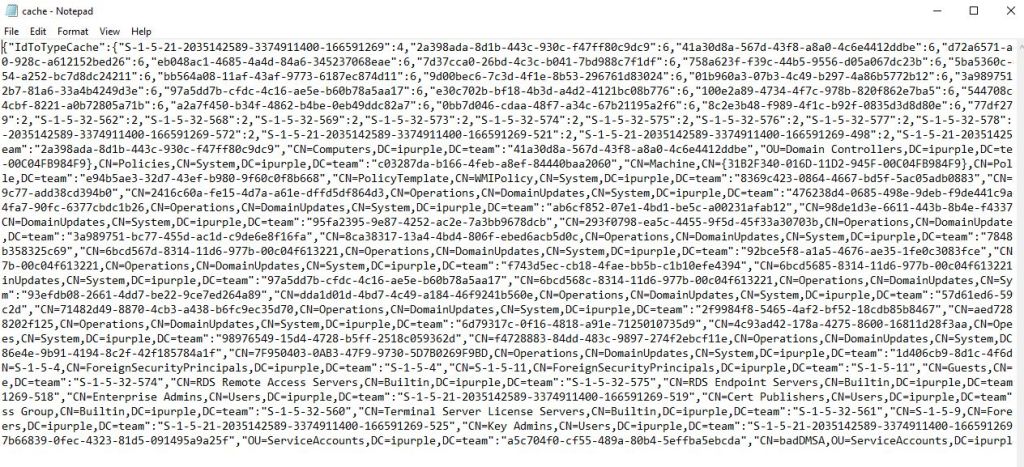
During red or purple team operations the tool can be executed in memory from command and control frameworks that support loading of assemblies. The cache file stores information related to the Security Identifier (SID), Distinguished Name (DN) and GUID.
dotnet inline-execute /home/kali/SOAPHound.exe --buildcache -c C:\temp\cache.txt
Information stored in the cache file is needed for crafting the relationships between active directory objects during bloodhound and certificate data collection. The following image demonstrates the contents of the cache file:
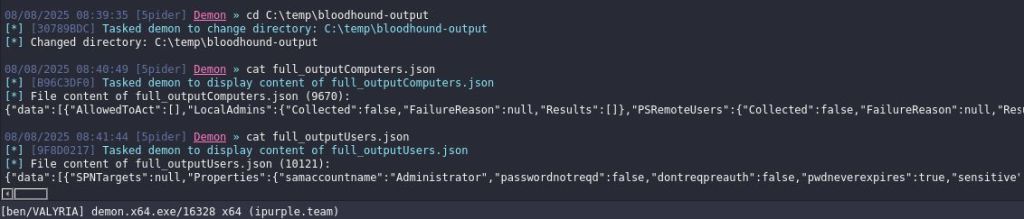
Threat actors or red teams can retrieve active Directory information such as Users, Groups, Computers, Domains, Group Policy Objects and their relationships by utilizing the –bhdump flag. The output of the execution will be stored locally in the form of JSON files that can be ingested to BloodHound.
dotnet inline-execute /home/kali/SOAPHound.exe --buildcache -c C:\temp\cache.txt --bhdump -o C:\temp\bloodhound-output --nolaps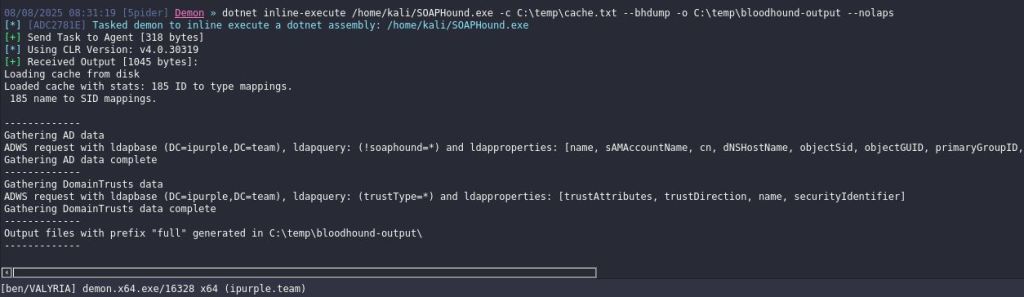
Furthermore, there is also support for collection of DNS related information.
dotnet inline-execute /home/kali/SOAPHound.exe --dnsdump -o C:\temp\dns-output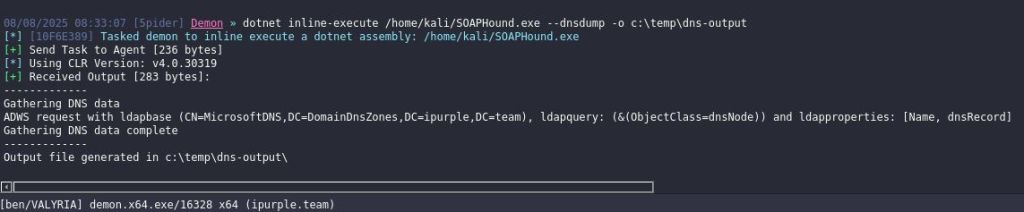
DNS information will be recorded in a text file. Reading the file could lead to identification of other hosts such as other domain controllers and endpoints via SOA (Start of Authority), SRV (Service) and A records.
cat DNS.txt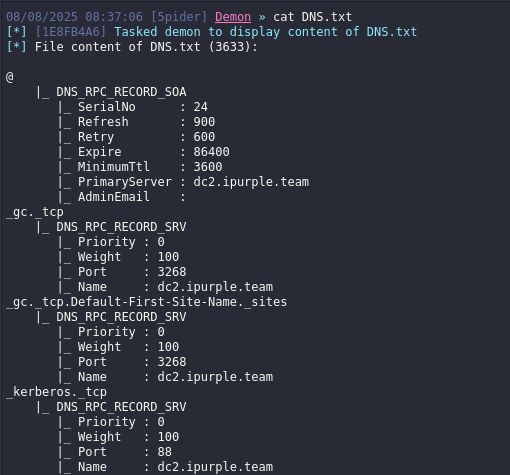

Another tool that has similar enumeration capabilities has been developed by Logan Goins. The tool called SoaPy is a based in Python and enables operators to perform the enumeration from Linux based hosts. The flag –users executes a query to retrieve information about the users in the domain.
soapy ipurple.team/Ben:'Password123'@10.0.0.1 --users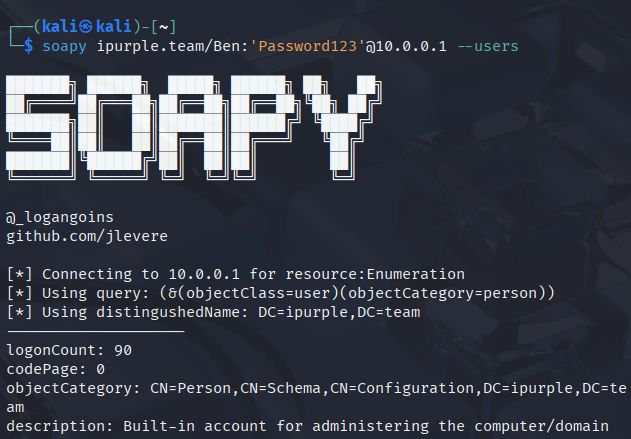
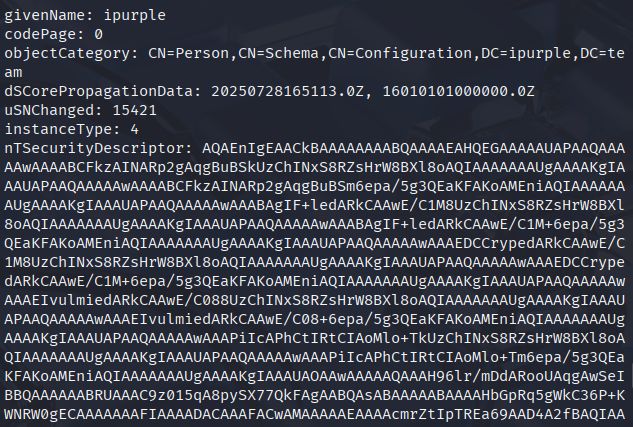
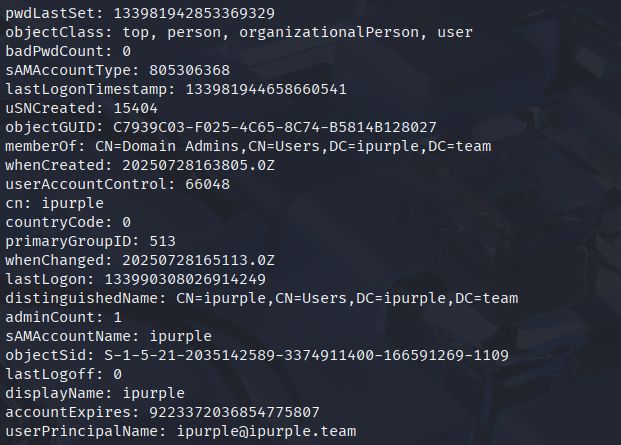
The –query flag allows the execution of custom LDAP queries. Enumeration of computer objects in the domain can be performed via the objectClass=computer LDAP query.
soapy ipurple.team/Ben:'Password123'@10.0.0.1 --query '(objectClass=computer)' --filter "samaccountname,objectsid"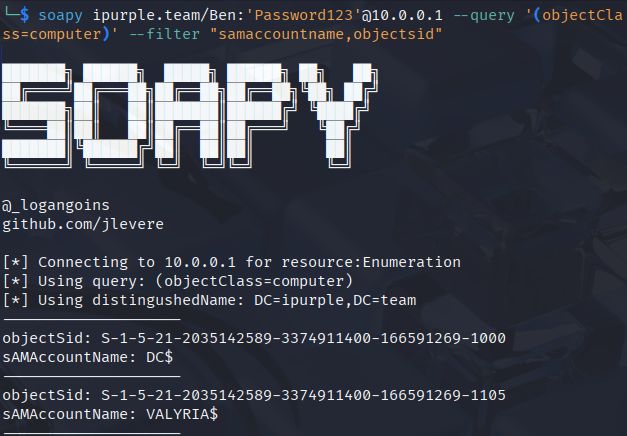

Another use case to mimic the behavior is through a set of PowerShell scripts developed by Yehuda Smirnov called ShadowHound. Performing the Active Directory enumeration through a PowerShell console eliminates the need to introduce ShadowHound and enables operators to use an approach that blends in with the environment. However, detection engineers could utilise command line as data source to develop rules associated with LDAP filters to identify indicators of ShadowHound. The output is extracted in a text file on disk.
ShadowHound-DS -OutputFile "C:\temp\ldap_output.txt"
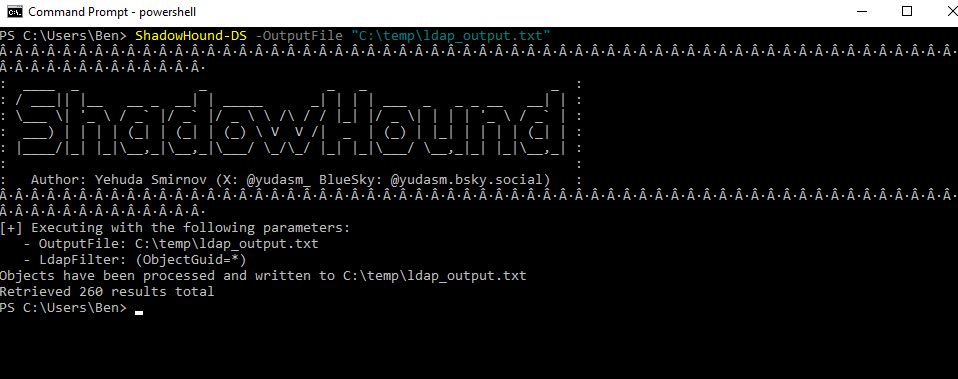

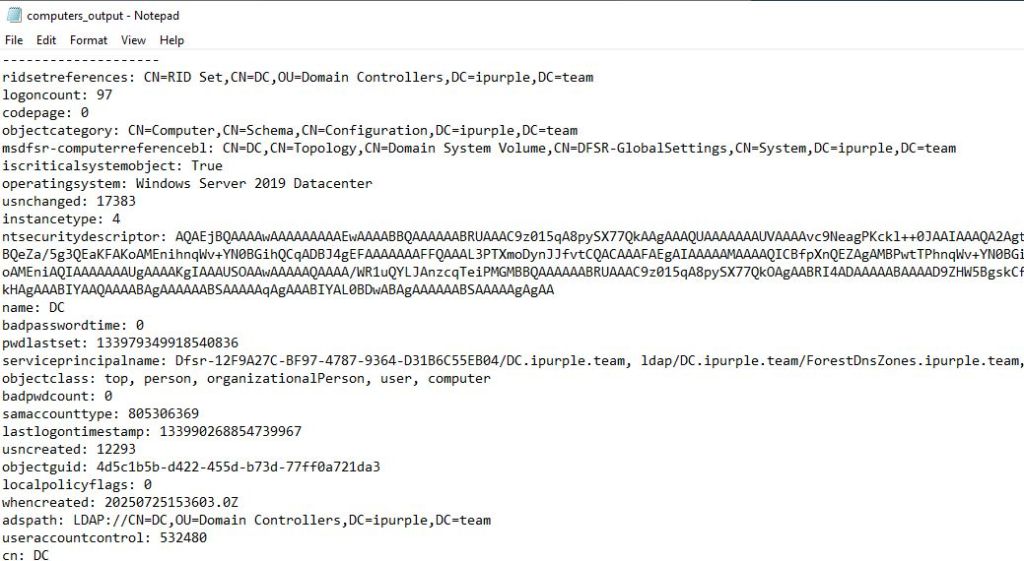
Similar to SoaPy, ShadowHound accept custom LDAP filters for enumeration of Active Directory objects.
ShadowHound-DS -OutputFile "C:\temp\computers_output.txt" -LdapFilter "(objectClass=computer)"

The following playbook contains information to simulate Active Directory enumeration via Web Services.
[[Playbook.ActiveDirectoryWebServices]]
id = "1.0.0"
name = "1.0.0 - ActiveDirectoryWebServices"
description = "Enumeration via Active Directory Web Services"
tooling.name = "SOAPHound"
tooling.references = [
    "https://github.com/FalconForceTeam/SOAPHound"
]
executionSteps = [
    "dotnet inline-execute /path/SOAPHound.exe --buildcache -c C:\temp\cache.txt",
    "dotnet inline-execute /path/SOAPHound.exe --buildcache -c C:\temp\cache.txt --bhdump -o C:\temp\bloodhound-output --nolaps",
    "dotnet inline-execute /path/SOAPHound.exe --dnsdump -o C:\temp\dns-output"
]
executionRequirements = [
    "None"
]
[[Playbook.ActiveDirectoryWebServices]]
id = "1.1.0"
name = "1.1.0 - ActiveDirectoryWebServices"
description = "Enumeration via Active Directory Web Services"
tooling.name = "SoaPy"
tooling.references = [
    "https://github.com/xforcered/SoaPy"
]
executionSteps = [
    "soapy <domain>/<username>:'<password>'@<IP-Address> --users",
    "soapy <domain>/<username>:'<password>'@<IP-Address> --query '(objectClass=computer)' --filter "samaccountname,objectsid""
]
executionRequirements = [
    "None"
]
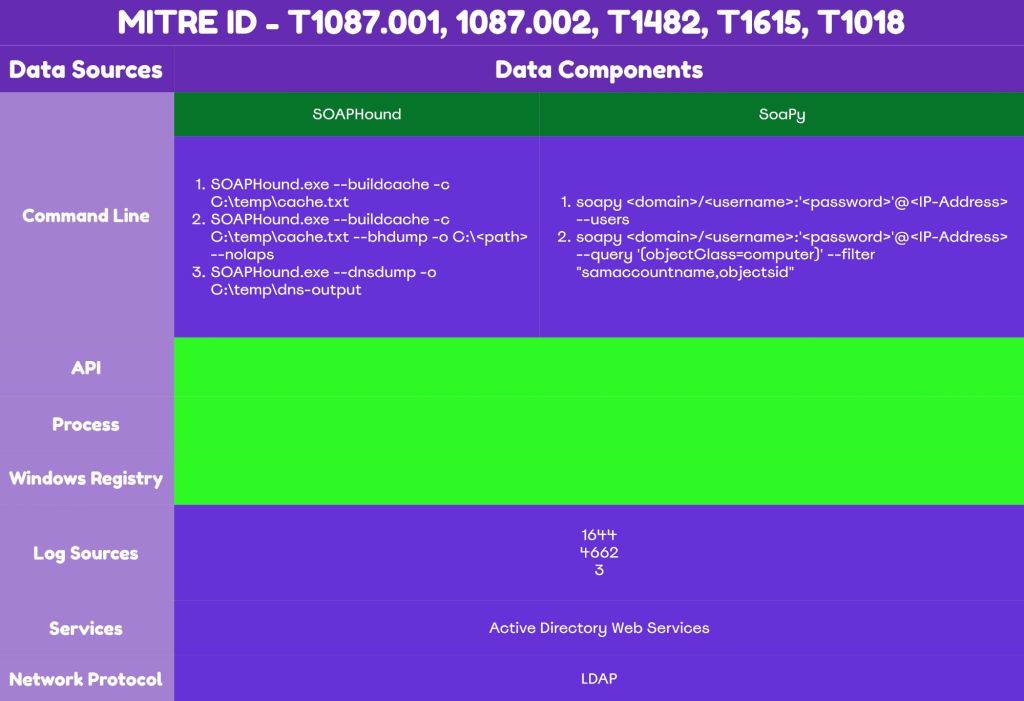
The technique abstract is defined below:
Detection
The nature of the technique Active Directory enumeration via ADWS, is considered stealthy as it doesn’t introduce many detection opportunities for the defenders. By default visibility is missing as SOAP messages are not captured in Windows event logs. It is recommended that organizations should assess during purple team operations whether visibility exists in their domain and engineer rules to identify attack indicators. Threat actors would typically conduct active directory collection at an early stage of a cyber attack once initial access has been established on the network. Organizations that have tuned defenses towards active directory enumeration activities could identify and isolate the threat prior of any impact to business operations.
Windows Events
According to Microsoft documentation modification of the Field Engineering registry key can enhance Directory Service and LDS visibility. Changing the value from 0 to 5, will cause all events including debugging and configuration changes to be logged.
HKEY_LOCAL_MACHINE\SYSTEM\CurrentControlSet\Services\NTDS\Diagnostics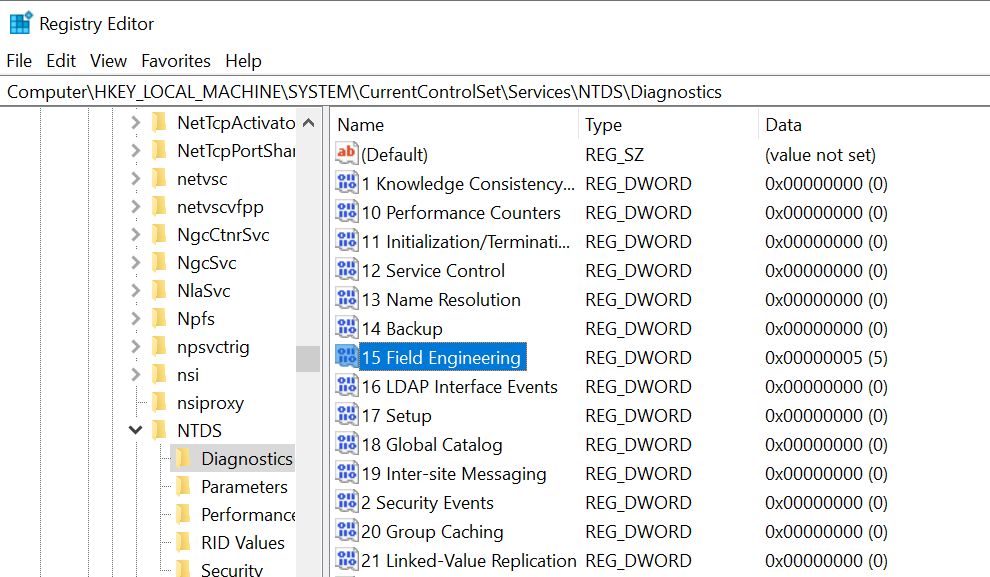
From a defensive perspective this will enable the Event ID 1644 to be generated under the Directory Service logs when a threat actor will attempt to utilize Active Directory Web Services for domain enumeration.
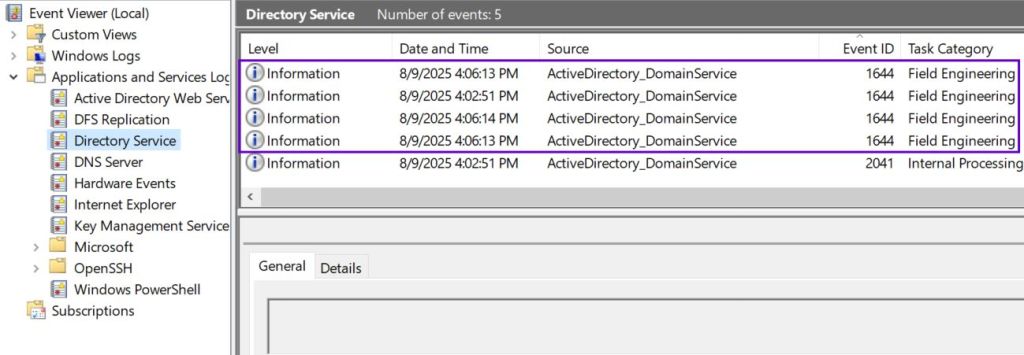
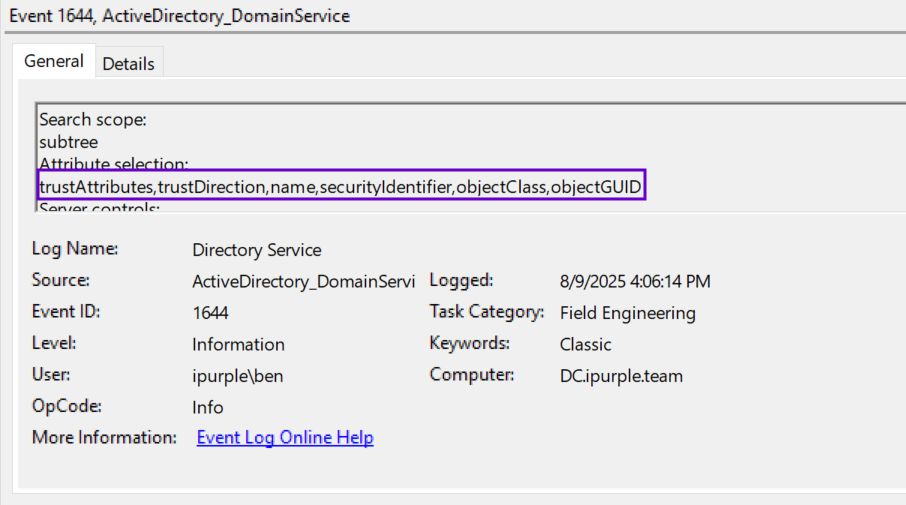
Both SOAPHound and SoaPy utilise LDAP filters and attributes embedded in SOAP messages. The Event ID 1644 can capture the LDAP queries. Even though the source IP address is not captured, the user who executed the query is visible and can be used to track and isolate a compromised host.

Decoys
Deception technologies, if tuned correctly can provide an effective method to detect active directory enumeration. Even if a deception control is missing, companies can still create manually organizational units and accounts that will trigger an alert when these objects are accessed or read. Creation of a decoy Organizational Unit (OU) and a decoy account is trivial and requires to enable the advanced features view in Active Directory Users and Computers.
Active Directory Users and Computers --> View --> Advanced Features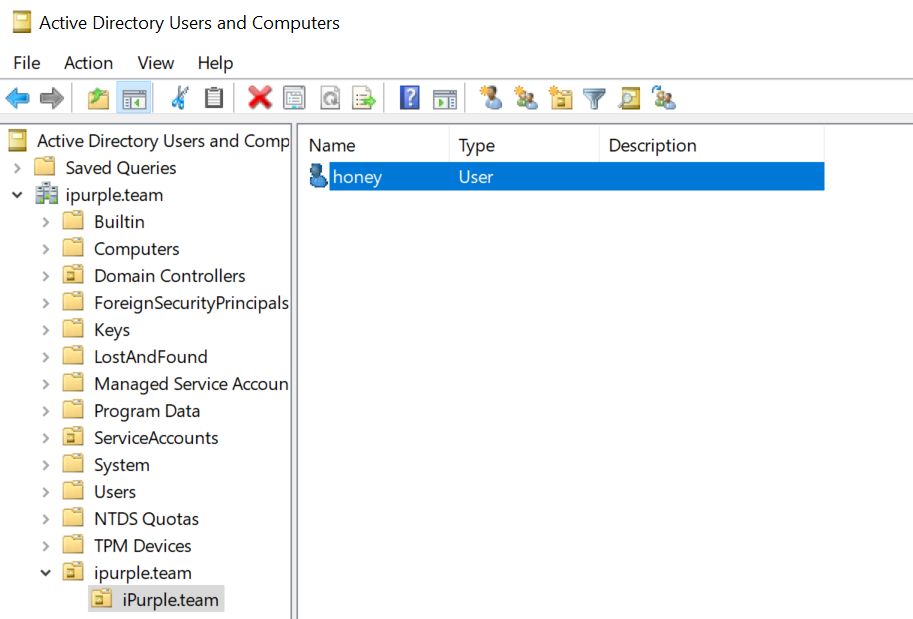
Active directory enumeration tools attempt to access and read object properties as part of their standard behaviors. Configuring an auditing entry for the Everyone group with the permission Read all properties will have as a result to capture enumeration activities under Windows Event ID 4662.


From the moment that a threat actor access these objects during enumeration the following events will be generated.


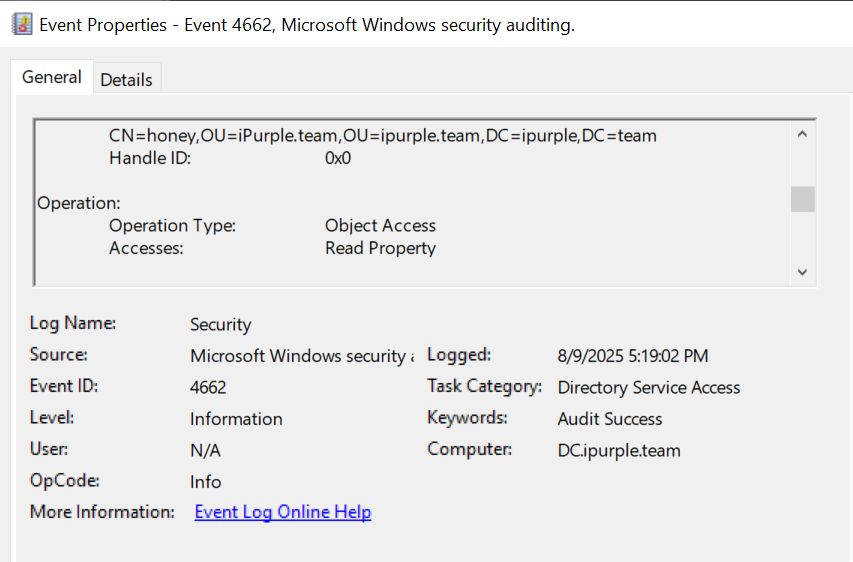
Network Connection
Active Directory Web Services is running on port 9389. Connections attempting to bind to the domain controller on this port from other assets should be an indication of a suspicious activity. However,
Organisations should evaluate existing controls that have the ability to monitor network connections and apply rules to detect activities on port 9389. Sysmon Event ID 3 can capture network connections. The following rule can identify connections to port 9389.
<Sysmon schemaversion="4.90">
  <EventFiltering>
    <NetworkConnect onmatch="include">
      <Rule name="Detect Traffic to Actice Directory Web Services">
        <DestinationPort>9389</DestinationPort>
      </Rule>
    </NetworkConnect>
  </EventFiltering>
</Sysmon>
Sysmon can be installed with the parameter -i and the path of the configuration file. The -c parameter is used to update the configuration file with the above rule.
Sysmon64.exe -i config.xml
Sysmon64.exe -c config.xml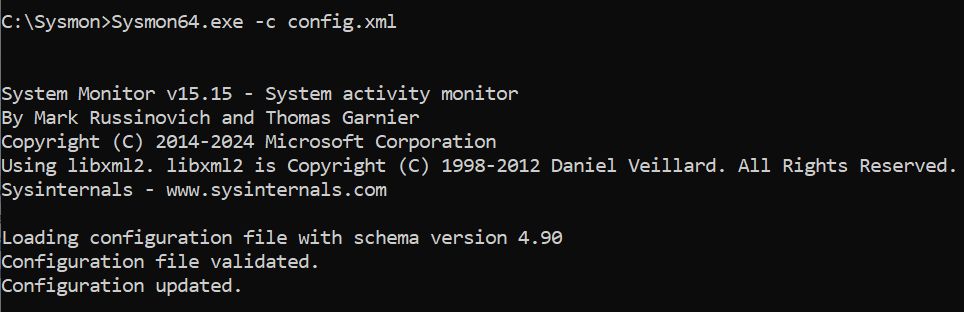
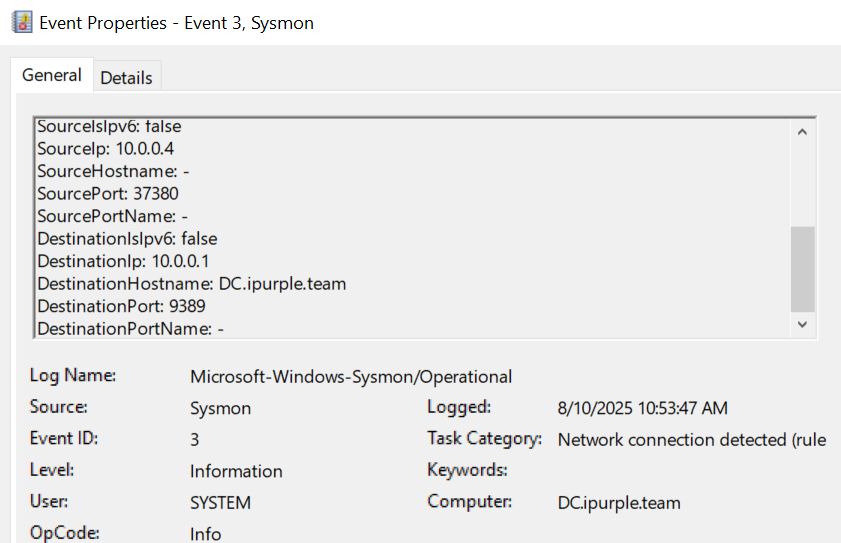
Network connections on port 9389 will be recorded on Sysmon Event ID 3. The event will also log the source IP address and could be correlated with the User field of Windows Event ID 1644 to identify the user and the executed queries. Organizations should assess if this was legitimate traffic or escalate the behavior to an incident.
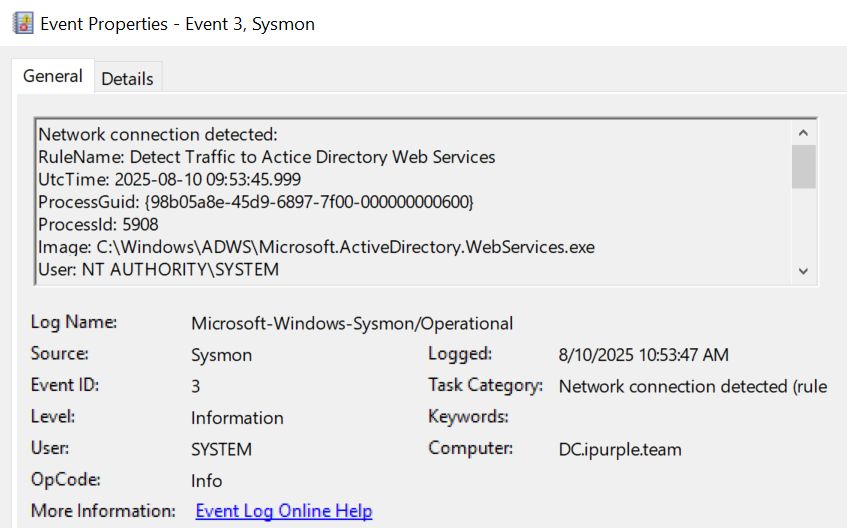
The following table summarizes the different data sources and data components that defenders could utilise to detect Active Directory enumeration via ADWS.
| Data Source | Data Components | Detects |
|---|---|---|
| Windows Events | 1644 | LDAP Queries |
| Windows Events | 4662 | Read Property |
| Sysmon | 3 | Network Connection |
Utilization of Active Directory Web Services for enumeration of domain objects doesn’t provide a high volume of detection opportunities. Organizations should evaluate their current control stack and develop a detection strategy based on the available data sources. It is recommended prior of any rule deployment to observe traffic and events associated to the technique and understand what it is considered normal in their domain. Log correlation is also needed to increase the confidence level that a recon activity is performed in the network. A targeted purple team operation can also aid defenders to find blind spots and increase insights related to capability of existing controls.
 Purple Team
Leave a comment