
The Bind Link API enables Administrators to create transparent mappings from a virtual path to a backing path (local or remote). The Bind Link feature was introduced in Windows 11 and according to Microsoft it should be used to improve application compatibility by making files stored in a network share appear as local or in scenarios where an application requires files from a different location to appear in a new location without copying the files. It is possible to abuse the feature of bind links to force the redirection of the folder containing the EDR files to a folder that a threat actor has write access to perform evasion.
Playbook
In Windows based systems, applications are typically installed in Program Files, Program Files (x86) and Program Data. Endpoint Detection and Response systems are no exception and are also installed in the above folders. File writing is restricted to the EDR folders to prevent abuse and tampering of the normal EDR operations.
TwoSevenOneT released a proof of concept called EDR-Redir that uses the bindflt.sys driver to redirect the EDR folder to a different folder with write access in order to allow tampering the EDR or execute code. The execution requires the location of the virtual path, the location of the backing path and the exception path (i.e. EDR folder) if the target is to abuse Microsoft based applications. The tool has been developed in C++ and it could be executed from the command line or from the command and control console.
shell EDR-Redir.exe "C:\ProgramData\Microsoft" C:\temp\ipurple "C:\ProgramData\Microsoft\Windows Defender"
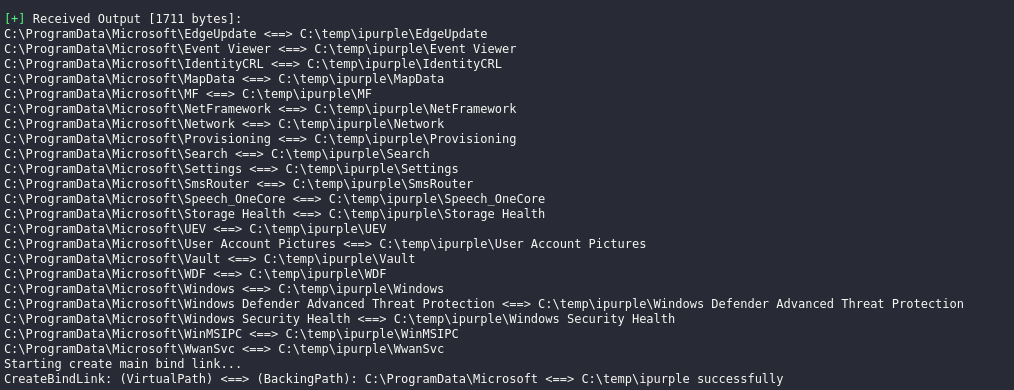
Information about the bind links folders will appear in the console. The folders inside C:\ProgramData\Microsoft will be also re-created in the backing path folder (ipurple).
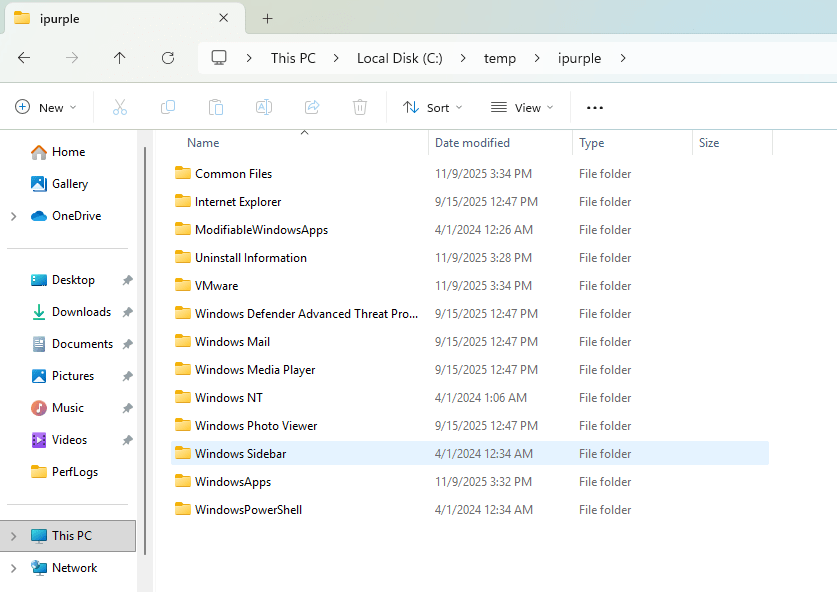
The image below demonstrates that after the redirection the Windows Defender has an arbitrary parent folder.
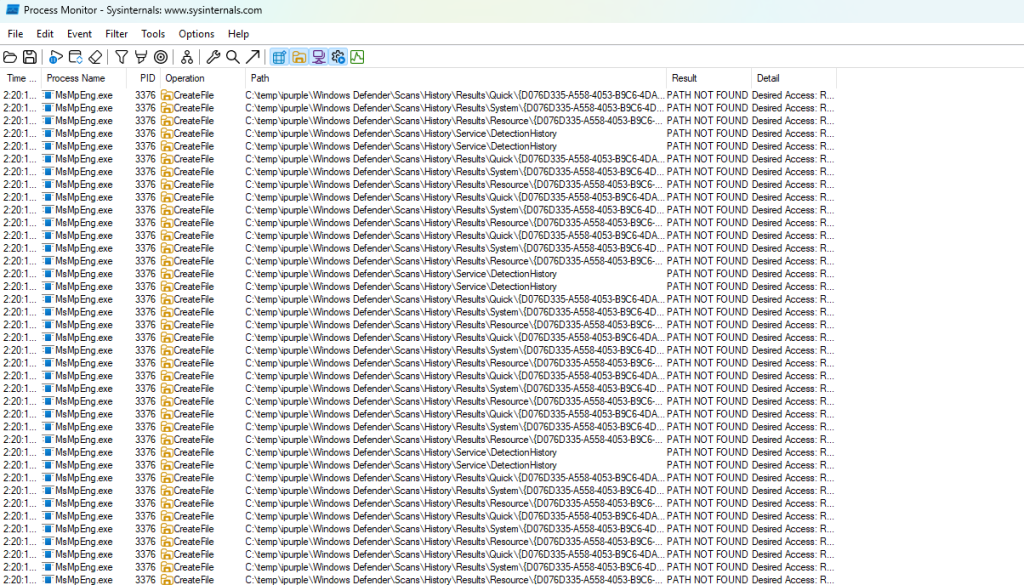
In scenarios where the goal is to tamper the operations of the EDR, threat actors could use the path where the EDR is installed (virtual path) and the backing path only to create the bind link.
EDR-Redir.exe "C:\ProgramData\Microsoft\Windows Defender" C:\temp\ipurple
This would cause the folder that is under the control of the threat actor to contain the same files as the legitimate EDR folder.

Threat actors can utilise this method to drop a malicious DLL into th fake folder that mimics a legitimate EDR module to conduct DLL hijacking and establish persistence or plant an arbitrary executable that will run code under the context of the EDR.
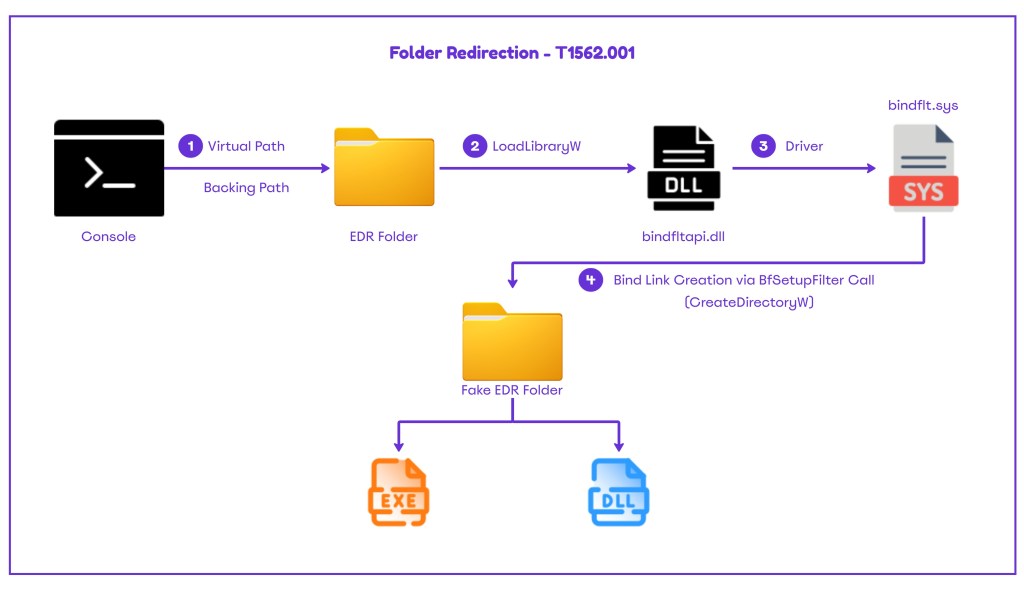
The playbook to emulate the activity of the EDR evasion via folder redirection can be found below:
[[Playbook.Folder Redirection]]
id = "1.0.0"
name = "1.0.0 - Folder Redirection"
description = "EDR Evasion via Folder Redirection"
tooling.name = "EDR-Redir"
tooling.references = [
    "https://github.com/TwoSevenOneT/EDR-Redir"
]
executionSteps = [
    "shell EDR-Redir.exe <VirtualPath> <BackingPath>"
]
executionRequirements = [
    "Local Administrator"
]
The technique abstract displays the indicators that SOC teams could use to detect the activity.
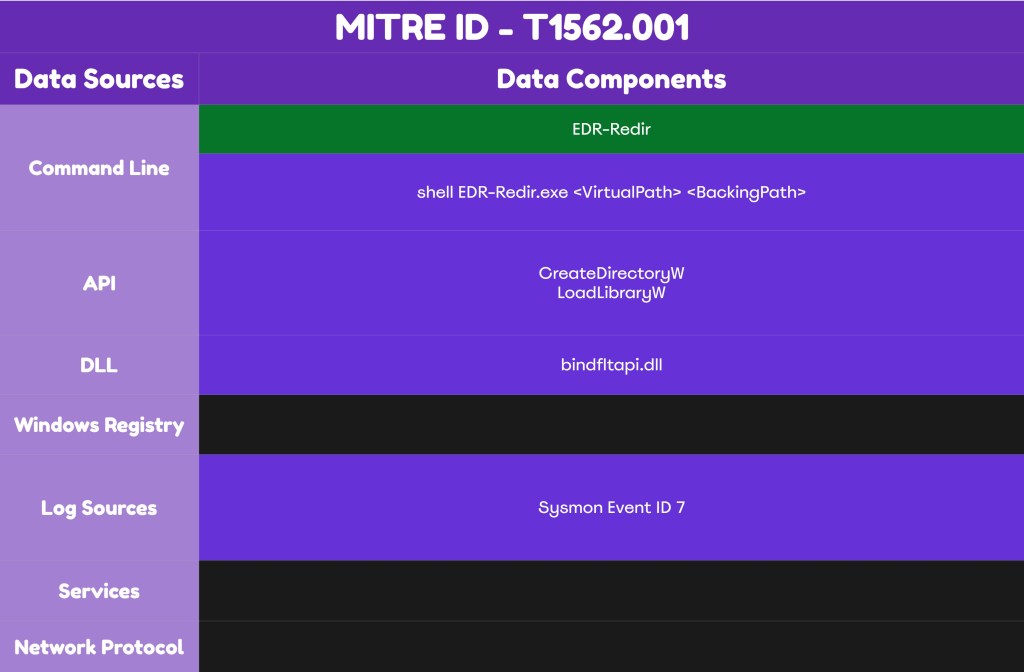
Detection
The technique of the folder redirection relies on the Bind Link API. Therefore, it is recommended to investigate if the implementation of the EDR supports monitoring of the bindflt driver that is used to perform the directory mapping. Alternatively, organizations should assess whether it is feasible to deploy Sysmon to enhance visibility about image load events. Correlation should be also used to validate if there are valid use cases in their environment that utilise the bindfltapi.dll to reduce the noise.
Signature
Threat actors of low sophistication might utilize the proof of concept that is available from the GitHub repository. The EDR-Redir is not signed by a trusted authority and therefore most EDR’s might prevent direct execution.
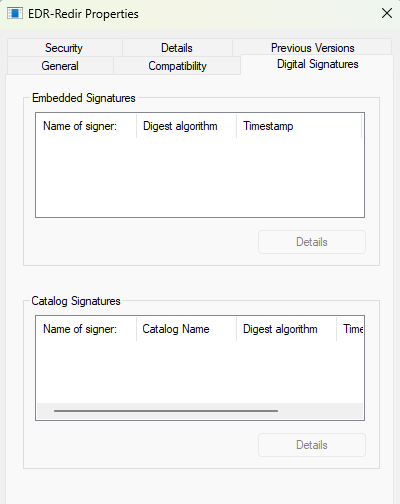
Advanced adversaries might be able to perform code signing and therefore detection should be focused on alternative methods.
API
According to the source code the creation of the directories is performed via the CreateDirectoryW API. There are no notable use cases of threat actors that utilize this API to create directories in Windows and by default this activity is highly unlikely to be reflected as malicious by the endpoint detection and response systems.
bool CreateProxyFolder(const std::wstring& folderPath)
{
    if (CreateDirectoryW(folderPath.c_str(), nullptr))
    {
        std::wcout << L"Folder created: " << folderPath << std::endl;
        return true;
    }
The other API that it is used to load the required DLL is the LoadLibraryW and further details are disclosed below.
DLL
Bind Links are performed via the bindfltapi.dll. The proof of concept uses the LoadLibraryW API to load the bindfltapi.dll. When the DLL loads, there are two calls that are associated with the bind link creation and deletion.
HMODULE hBindflt = LoadLibraryW(L"bindfltapi.dll");
if (hBindflt)
{
    MyCreateBindLink = (PtrCreateBindLink)GetProcAddress(hBindflt, "BfSetupFilter");
    MyRemoveBindLink = (PtrRemoveBindLink)GetProcAddress(hBindflt, "BfRemoveMapping");
The Windows Bind Filter Driver bindflt.sys that enables the Bind Link API is stored in the drivers folder within System32. Similarly, the bindfltapi.dll is also part of the System32.
C:\Windows\System32\bindfltapi.dll
C:\Windows\System32\drivers\bindflt.sys
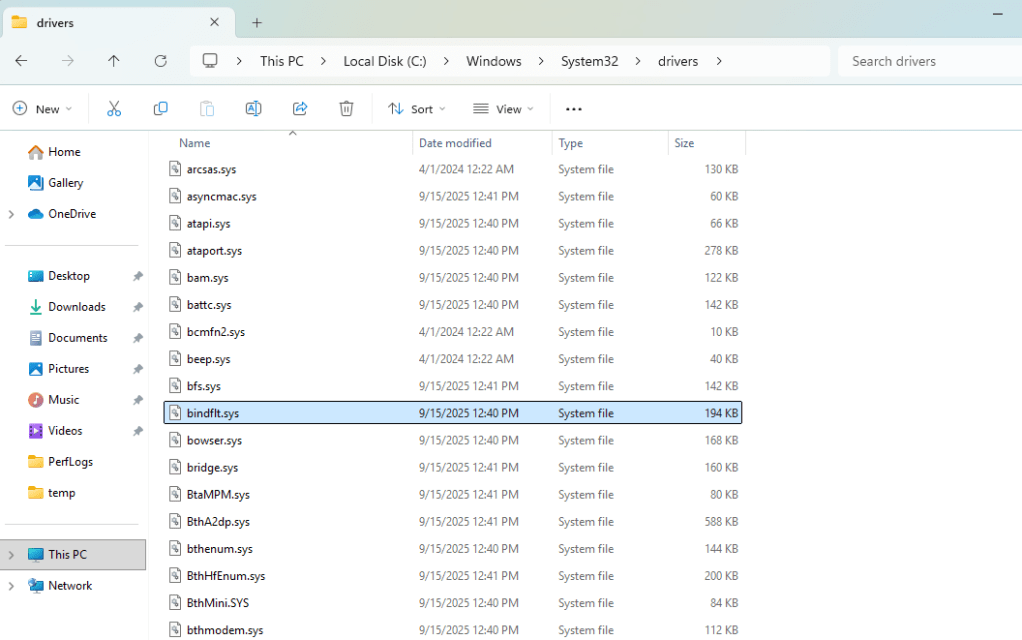
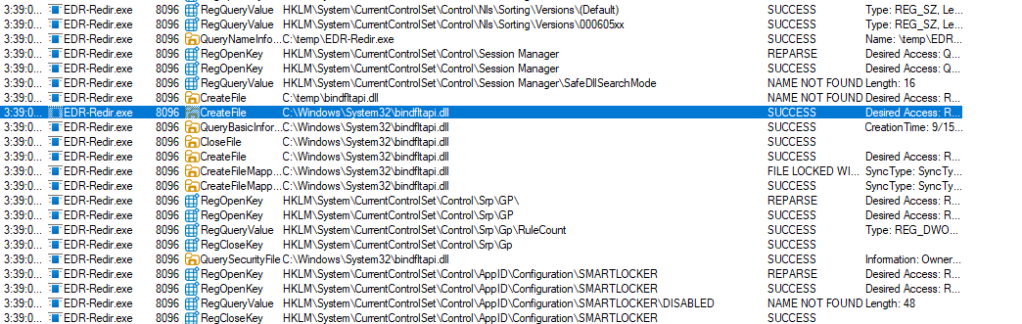
It is also confirmed from the process monitor that the EDR-Redir loads the bindflt.dll from the System32.
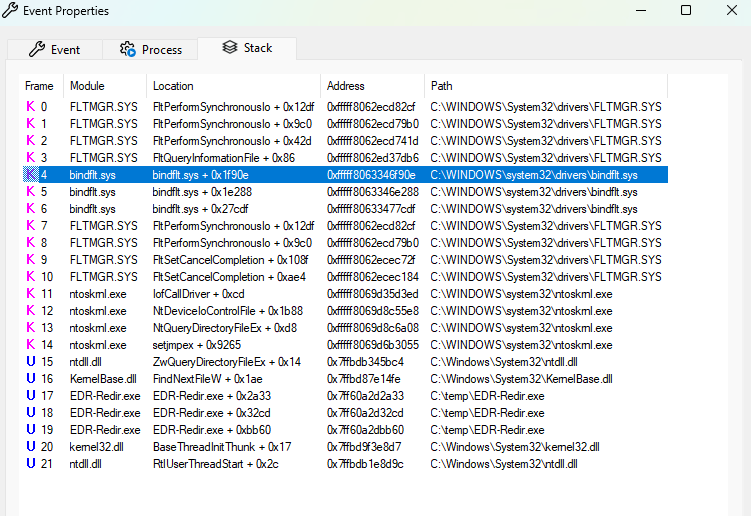
Looking at the process stack the kernel driver is also used by the tool.
Sysmon has the capability to capture image load events under Event ID 7. Organizations should review whether developers or administrators are using bind links in their ecosystem to reduce false positives when building detection’s. The following Sysmon rule can detect processes that utilize the bindfltapi.dll. Usage of the DLL consists a high indicator that the folder redirection technique has been executed in the environment.
<EventFiltering>
  <!-- Image loaded (Event ID 7): bindfltapi.dll -->
  <ImageLoad onmatch="include">
    <!-- Match by loaded module name -->
    <ImageLoaded condition="end with">\bindfltapi.dll</ImageLoaded>
  </ImageLoad>
</EventFiltering>
Once the above rule is part of the Sysmon configuration file, Sysmon will capture the process that attempts to load the DLL under Event ID 7. This could enable SOC teams to review if the process is trusted and if not to trigger an incident. It should be noted that Sysmon logs should be forwarded into the SIEM and according to the technology detections should be engineered based on this Event ID.

Following the disclosure of the proof of concept the following EDR’s are performing BindFlt monitoring:
| EDR | BindFlt Monitoring |
|---|---|
| CrowdStrike |  |
| SentinelOne | |
| Carbon Black | |
| Defender for Endpoint |  |
SIGMA
title: Suspicious Loading of BindFlt API DLL
id: 9b8e7d42-3e0f-4a1d-9f8f-1d2e3f4a5b6c
status: experimental
description: Detects loading of bindfltapi.dll outside of legitimate Microsoft processes. This DLL is abused for kernel-level directory redirection (EDR evasion).
author: Panos Gkatziroulis
date: 2025-11-20
references:
    - https://github.com/TwoSevenOneT/EDR-Redir
tags:
    - attack.defense-evasion
    - attack.t1562.001
logsource:
    category: image_load
    product: windows
detection:
    selection:
        ImageLoaded|endswith: '\bindfltapi.dll'
    filter_legit:
        Signed: true
        Signature: 'Microsoft Windows'
    condition: selection and filter_legit
falsepositives:
    - Rare legitimate use by Microsoft tools or future Windows features
level: high
The following table summarizes the data sources and data components required to detect the technique of folder redirection.
| Data Source | Data Component | Detects |
|---|---|---|
| API | CreateDirectoryW | Directory Creation |
| API | LoadLibraryW | DLL Loading |
| Sysmon | 7 | Image Load |
The technique of folder redirection can be used to tamper EDR operations in Windows 11 endpoints by specifically mirroring the EDR folder, delete files or execute code under the context of the EDR. Popular endpoint detection and response systems have introduced monitoring for bind link activities. However, SOC teams should investigate if their EDR deployment can reliably detect this activity and deploy additional data sources such as Sysmon to enhance visibility as an interim or permanent solution.
 Purple Team
Leave a comment