

BloodHound is an attack path management solution which can discover hidden relationships in Active Directory by performing data analysis to identify paths in the domain that will lead to lateral movement and domain escalation. Data are retrieved from Domain Controllers and Domain-Joined systems via SharpHound which is the data collector for BloodHound using native Windows API calls and LDAP namespace functions. SharpHound has been developed in C# and enables threat actors or red teams to run it in memory from the implant during operations. However, a PowerShell based version exist which is part of the official SharpHound repository and other variations which are written in Python and Rust.
From defensive point of view when SharpHound is executed there are a number of detection opportunities. A successful detection strategy requires knowledge of how SharpHound operates. The following diagram visualizes the following:
- The execution of SharpHound in an Active Directory environment
- The collection of data which occurs using various protocols such as secure LDAP and DNS on the domain controller
- The collection of data in workstations using RPC over SMB
- The extraction of the collected data in a compressed file (.zip)
- The database connection where retrieved data are stored

During offensive operations SharpHound is utilized as a quick method to collect information in order to identify attack paths in the domain. SharpHound has played a major role in the recent years and has enabled red teams to define their next strategic action to move laterally in the domain.
| No | Method | Command |
| 1 | Collect All | SharpHound.exe -c all -d <domain> –searchforrest |
| 2 | Collect All & Include GPO LocalGroup | SharpHound.exe -c all, GPOLocalGroup |
| 3 | DC | SharpHound –CollectionMethod DCOnly |
| 4 | PowerShell -CSV Extract | Invoke-BloodHound -SearchForest -CSVFolder C:\Users\Public |
| 5 | PowerShell -Collect All | Invoke-BloodHound -CollectionMethod All -LDAPUser <Username> -LDAPPass <Password> -OutputDirectory <Path> |
| 6 | Non-Domain Joined System | bloodhound-python -d <domain> -u <username> -p <password> -gc <domain-controller> -c all |
API’s
Modern EDR’s (Endpoint Detection and Response) can identify execution of SharpHound in the network since the tool exist in the public domain for years. However, threat actors could modify and obfuscate the original SharpHound binary to evade detection or utilize a tool which conducts similar activities. Therefore, reliable detection requires a multi-layer approach (defense in depth) and deep understanding of the inner-workings. Once SharpHound is executed on the system the netapi32.dll is loaded.
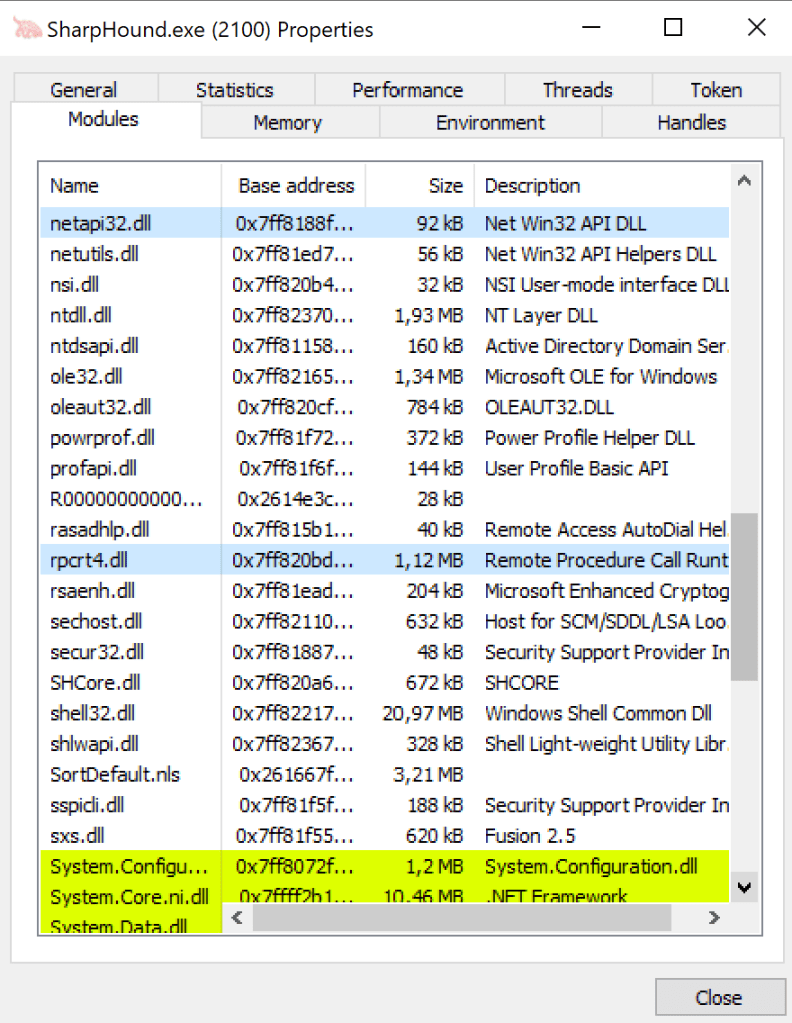
Reverse engineering the DLL with a tool like IDA the exported API’s can be disclosed. SharpHound collects information from hosts in the domain by utilizing the NetSessionEnum API which is called from the srvcli.dll.
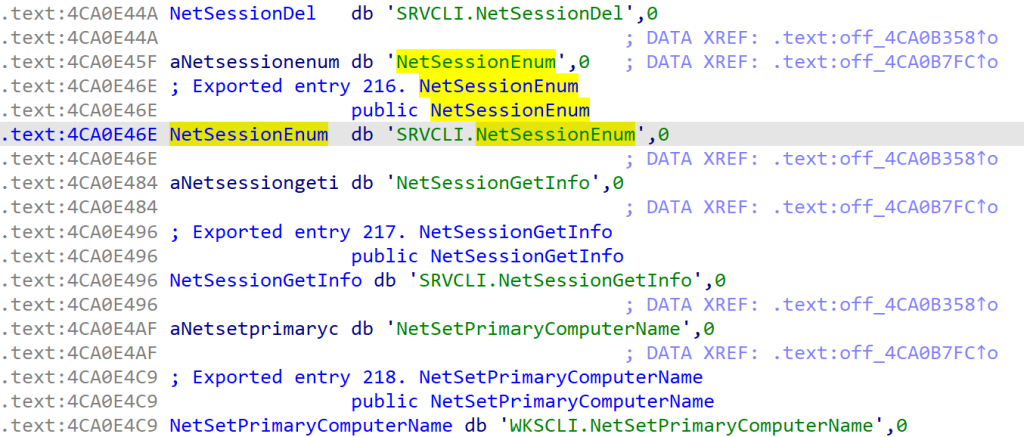
The following image illustrates the workflow of the DLL’s and API’s utilized when SharpHound is executed.

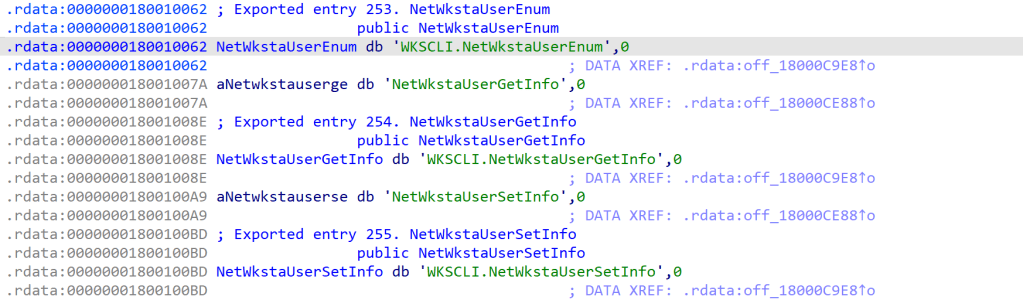
SharpHound also leverages the NetWkstaUserEnum API to enumerate interactive, service and batch logons. This API is also exported from the netapi32.dll.
Registry is also utilized as a method to enumerate session information of interactive logged users. This is performed by utilizing the advapi32.dll and the RegEnumKeyEx API call.
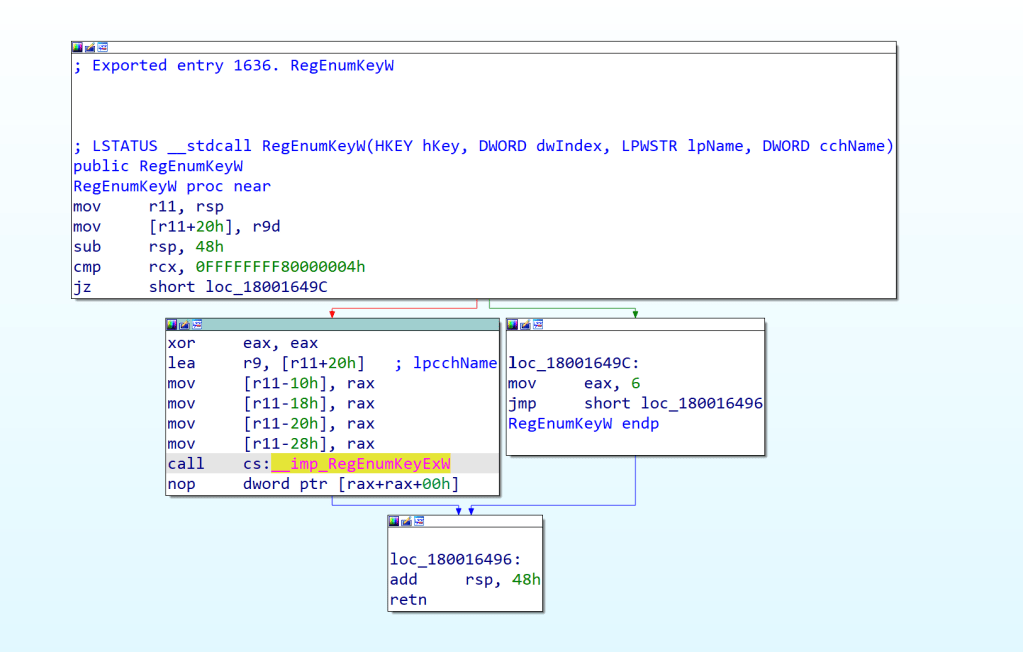
SOC teams should investigate whether their EDR product monitors these API calls to detect active directory reconnaissance at an API level. The following table summarizes some of the Windows API’s which are utilized by SharpHound to conduct the enumeration of sessions and workstations in the domain.
| API | Named Pipe | Function |
|---|---|---|
| NetSessionEnum | \PIPE\srvsvc | Active Remote Logon Sessions |
| NetWkstaUserInfo | \PIPE\wkssvc | Interactive, Service and Batch Logons |
| RegEnumKeyW | \PIPE\winreg | Interactive Logged Users |
Windows Events
Active Directory by default doesn’t have enabled the associated policies that will allow SOC teams to obtain the necessary visibility. The Audit Policy Object Access contains auditing for events related to file shares. Specifically, enabling auditing for Audit File Share and Audit Detailed File Share will enhance the visibility of SharpHound execution via the Event ID’s 5140 and 5145. However, it should be noted that enabling these policies will increase the noise on the network and therefore companies should determine if they can enable these events. Furthermore, developing a detection rule based only on the generation of 5140 and 5145 might not constitute directly execution of SharpHound. Log correlation combined with both command line arguments and other indicators such as DLL’s, named pipes when developing detection rules or during threat hunting can aid towards reliable detection of SharpHound.
GPO--> Advanced Audit Policy --> Audit Policies --> Object Access --> Audit Detailed File Share
GPO--> Advanced Audit Policy --> Audit Policies --> Object Access --> Audit File Share
The event ID 5140 is generated each time a user attempts to access a given share and 5145 for every access attempt to a given shared object. Both event ID’s will also generated on the domain controller during SharpHound execution which performs network share enumeration and also access the group policy preferences. Furthermore, the relative target name of samr, lsarpc, srvsvc and winreg from the same source and from the share name \\*\IPC$ is also a strong indicator of active directory enumeration.


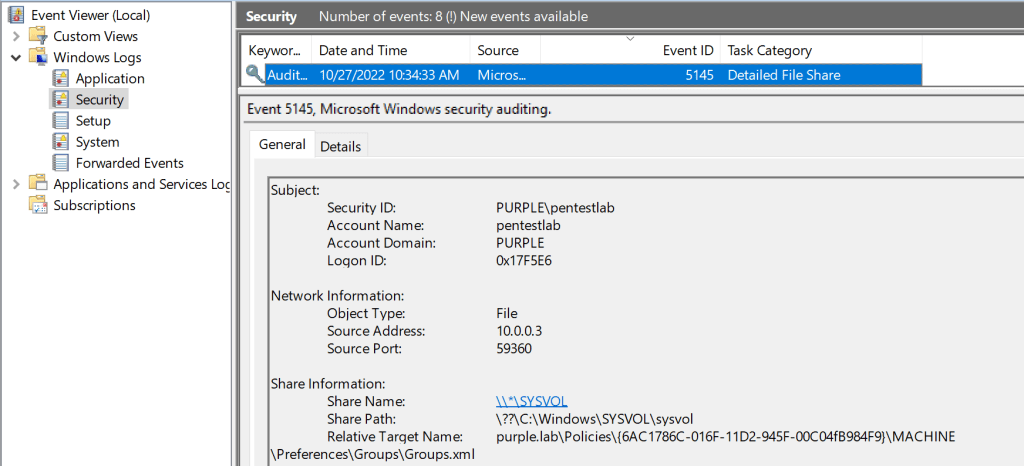
Another group policy which is also not enabled by default is the Active Directory Service Access. This policy enhances the visibility by logging which active directory objects were accessed, by which account and when this activity occurred. The policy can be enabled from the following location:
GPO--> Advanced Audit Policy --> Audit Policies --> DS Access --> Audit Directory Service Access
The Audit Directory Service Access policy is associated with the event ID 4662 and captures information about the active directory object which was accessed. The event ID of 4662 is generated in the workstation. Generation of multiple 4662 events in a short period might be an indicator of active directory enumeration in the domain.
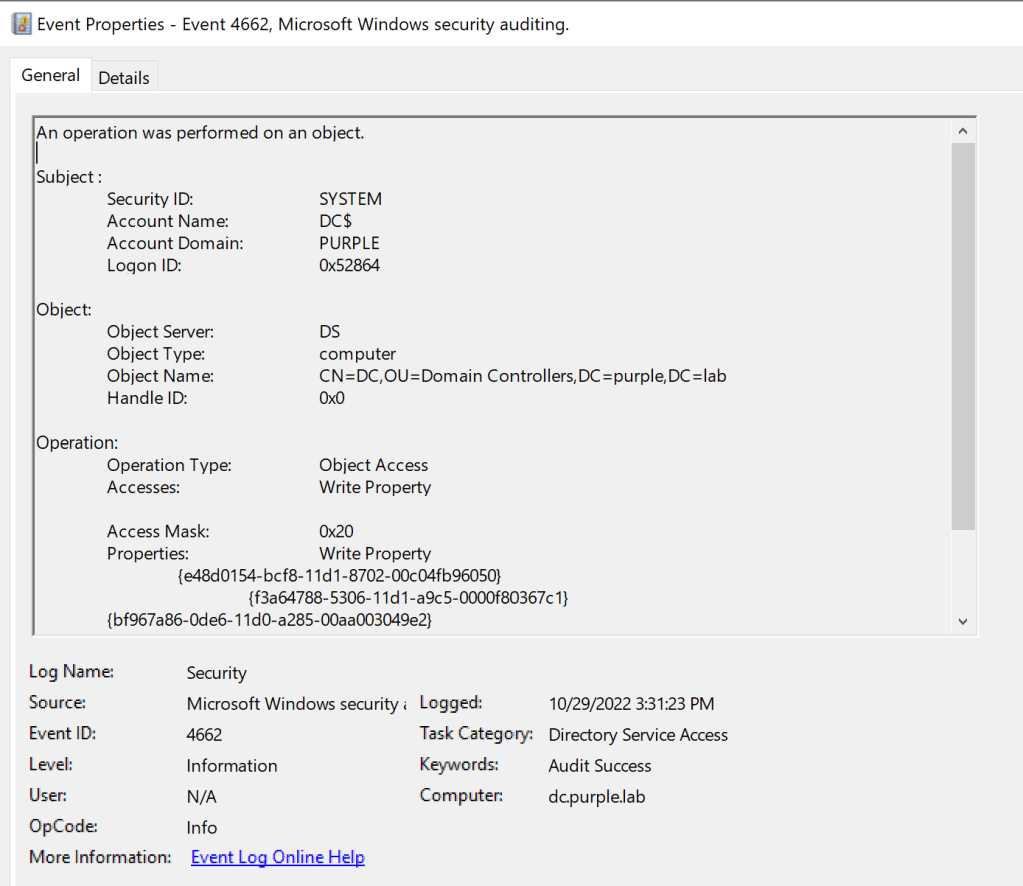
The following table summarizes the event ID’s which are generated by execution of SharpHound:
| Event ID | Category |
|---|---|
| 5140 | File Share |
| 5145 | Detailed File Share |
| 4662 | Directory Service Access |
ETW
SharpHound executes a number of LDAP queries towards the domain controller to enumerate active directory objects such as computer names, groups and user accounts. Microsoft introduced the LDAP event tracing provider (Microsoft-Windows-LDAP-Client) to trace the lightweight directory access protocol communications between windows clients and LDAP servers. The LDAP ETW provider can capture extensive information and therefore LDAP queries issued by SharpHound.
SilkETW is a wrapper for ETW developed by Ruben Boonen which enables defensive teams to monitor different ETW providers to identify attacks. Furthermore, SilkETW supports YARA and therefore developing custom YARA rules can aid towards the detection of SharpHound. However, even if it is used just to enable the LDAP ETW provider can significantly enhance the visibility of LDAP queries. Execution of the following command will enable the LDAP ETW provider from SilkETW:
SilkETW.exe -t user -pn Microsoft-Windows-LDAP-Client -ot eventlog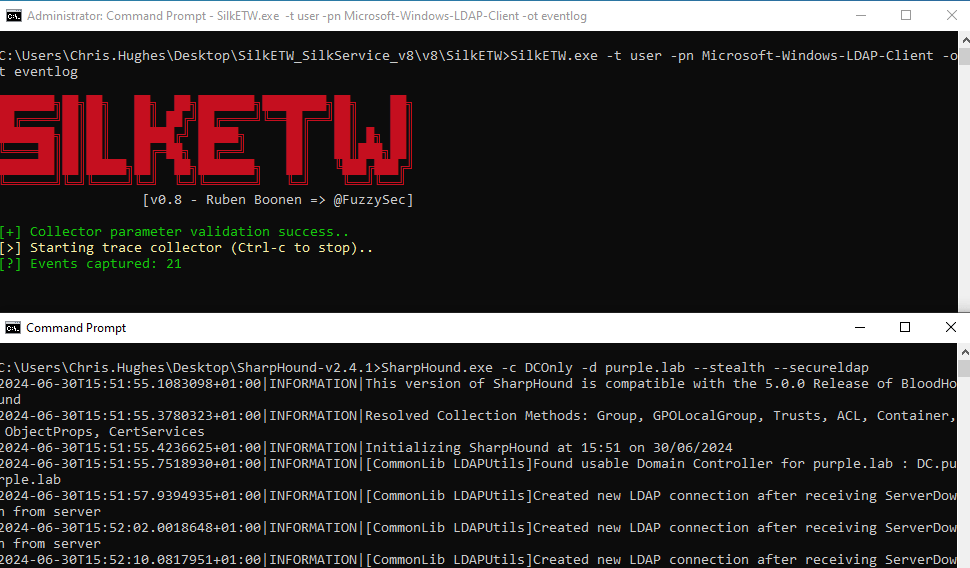
LDAP information and associated queries are captured under event ID 3:

Riccardo Ancarani developed a YARA rule which can detect enumeration of privileged groups. Similarly, when SharpHound is executed privileged groups are being enumerated and therefore could be used as an indicator that enumeration activity has been performed on the network.
rule PrivilegedGroupEnumeration
{
        strings:
                $s1 = "Domain Admins" ascii wide nocase
                $s2 = "Account Operators" ascii wide nocase
                $s3 = "Backup Operators" ascii wide nocase
                $s4 = "DnsAdmin" ascii wide nocase
                $s5 = "Enterprise Admins" ascii wide nocase
                $s6 = "Group Policy Creator Owners" ascii wide nocase
                $s7 = "admincount=1"
        condition:
                any of ($s*)
}
Performing LDAP enumeration via SharpHound with SilkETW enabled and the required flags to point towards the LDAP ETW provider and the YARA rule developed by Riccardo will verify that the enumeration was detected successfully.
SharpHound.exe -c DCOnly -d purple.lab --stealth --secureldapSilkETW.exe -t user -pn Microsoft-Windows-LDAP-Client -ot eventlog -l verbose -y yara -yo all

 Purple Team
Leave a reply to Active Directory Enumeration – ADWS – Purple Team Cancel reply