

Modern web browsers have the capability to store web application based credentials of users in an encrypted format. This functionality has been seen as a security improvement towards the password hygiene of organizations due to the potential prevention of credentials stored in non-encrypted locations. Utilization of the browser based functionality aids towards the overall risk reduction of lateral movement since threat actors have less opportunities to access credentials in plain-text. Furthermore, Red Teams and threat actors have stopped touching the lsass process in order to retrieve credentials since the majority of endpoint detection and response products have sufficient detection capability. Threat actors focus their attacks in other locations where credentials are stored such as the web browsers.
Stealing credentials from web browsers is not a new technique and there are various proof of concepts in the public domain that emulate various attacks. The credentials from web browsers technique is part of the ATT&CK framework under the ID T1555.003. Threat actors will typically hunt for credentials once initial access has been achieved and therefore organizations should prioritize their detection strategy towards credential access to reduce the volume of compromised assets in the event of a breach.
Modern browsers such as Google Chrome and Microsoft Edge utilizing the Data Protection API (DPAPI) to protect secrets such as logins and cookies against theft. DPAPI provides an encryption mechanism for credentials prior to any storage. Browsers with a remember me or save credentials functionality typically utilize DPAPI.
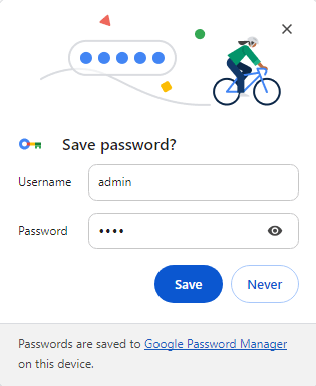
Windows operating systems utilize the CryptProtectData and CryptUnprotectData API to perform the encryption and decryption of data in a DATA_BLOB structure. According to Microsoft documentation the data are encrypted with the logon credentials of the user and can be decrypted only with the logon credentials of the same user and on the same system.
DPAPI_IMP BOOL CryptProtectData(
  [in]           DATA_BLOB                 *pDataIn,
  [in, optional] LPCWSTR                   szDataDescr,
  [in, optional] DATA_BLOB                 *pOptionalEntropy,
  [in]           PVOID                     pvReserved,
  [in, optional] CRYPTPROTECT_PROMPTSTRUCT *pPromptStruct,
  [in]           DWORD                     dwFlags,
  [out]          DATA_BLOB                 *pDataOut
);
Chromium browser store sensitive information in various files inside the AppData folder. The following locations represent where Google Chrome and Microsoft Edge store sensitive information such as Encryption Keys, Cookies and Login details (credentials).
Google Chrome:
C:\Users\<username>\AppData\Local\Google\Chrome\User Data\Local State
C:\Users\<username>\AppData\Local\Google\Chrome\User Data\Default\Network\Cookies
C:\Users\<username>\AppData\Local\Google\Chrome\User Data\Default\Network\Cookies-journal
C:\Users\<username>\AppData\Local\Google\Chrome\User Data\Default\Login Data
C:\Users\<username>\AppData\Local\Google\Chrome\User Data\Default\Login Data-journal
Microsoft Edge:
C:\Users\<username>\AppData\Local\Microsoft\Edge\User Data\Local State
C:\Users\<username>\AppData\Local\Microsoft\Edge\User Data\Default\Network\Cookies
C:\Users\<username>\AppData\Local\Microsoft\Edge\User Data\Default\Network\Cookies-journal
C:\Users\<username>\AppData\Local\Microsoft\Edge\User Data\Default\Login Data
C:\Users\<username>\AppData\Local\Microsoft\Edge\User Data\Default\Login Data-journal
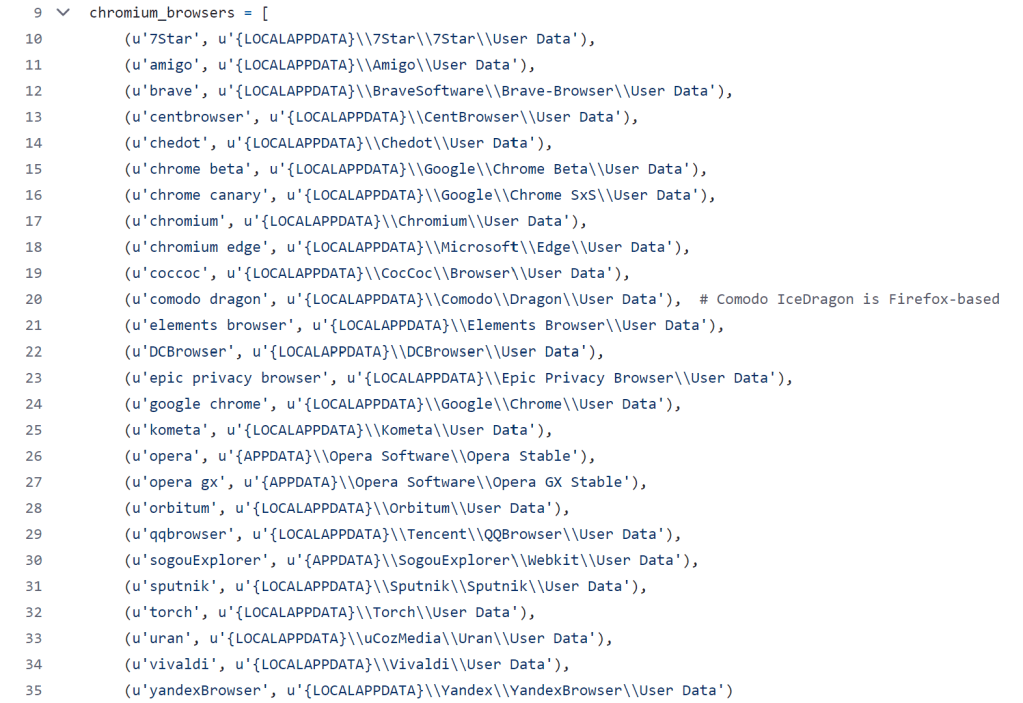
Examination of the Lazagne source code all the locations of Chromium based browsers which store credentials and the tool is accessing upon execution. It should be noted that tooling with similar behavior such as SharpChrome performs similar operations. Therefore defensive teams should not focus their detection efforts on the command line arguments of tooling or other signature based detections but on the overall behavior.
Typically when a user save credentials in a Chromium browser such as Microsoft Edge, the password is stored in an encrypted format since the application utilizes the CryptProtectData API of DPAPI. Similarly, when the browser attempts to decrypt the password the CryptUnProtectData API is utilized.

Playbook
The purple team playbook of the ATT&CK sub-technique credentials from web browsers should cover executions both from domain and non-domain joined systems to enable SOC teams to gather the required telemetry and assess if the current rule-set and defensive technologies have sufficient coverage. The following YAML file contains the schema format of the playbook with the required commands for emulation:
[[Playbook.T1555.003]]
id = "1.0.0"
name = "1.0.0" - "Perform harvesting of credentials stored in browsers"
description = "Part of the SharpDPAPI and targets sensitive information stored in Chromium based browsers such as Chrome, Edge and Brave"
tooling.name = "SharpChrome.exe"
tooling.references = [
    "https://github.com/GhostPack/SharpDPAPI/"
]
executionSteps = [
    "agent> dotnet inline-execute SharpChrome logins"
]

[[Playbook.T1555.003]]
id = "1.1.0"
name = "1.1.0" - "Perform harvesting of credentials stored in browsers from non-domain joined system"
description = "Execution of DonPAPI from a non-domain joined system"
tooling.name = "DonPAPI"
tooling.references = [
    "https://github.com/login-securite/DonPAPI"
]
executionSteps = [
    "donpapi <domain>/<Username>:<Password>@<IP-Address> -o </path>",
]
executionRequirements = [
    "Local Administrator Credentials"
]

[[Playbook.T1555.003]]
id = "1.2.0"
name = "1.2.0" - "Perform harvesting of credentials stored in browsers from non-domain joined system"
description = "Execute dploot from a non-domain joined system"
tooling.name = "dploot"
tooling.references = [
    "https://github.com/Hackndo/lsassy",
    "https://github.com/zblurx/dploot"
]
executionSteps = [
    "lsassy -d <domain> -u <Username> -p <Password> <IP-Address> -m rdrleakdiag -M masterkeys",
    "dploot browser -d <domain> -u <Username> -p <Password> <IP-Address> -mkfile </path>"
]
executionRequirements = [
    "Local Administrator Credentials"
]
As an example SharpChrome has been executed in memory from a command and control framework to retrieve the AES key and perform decryption activities of credentials stored in Chrome.
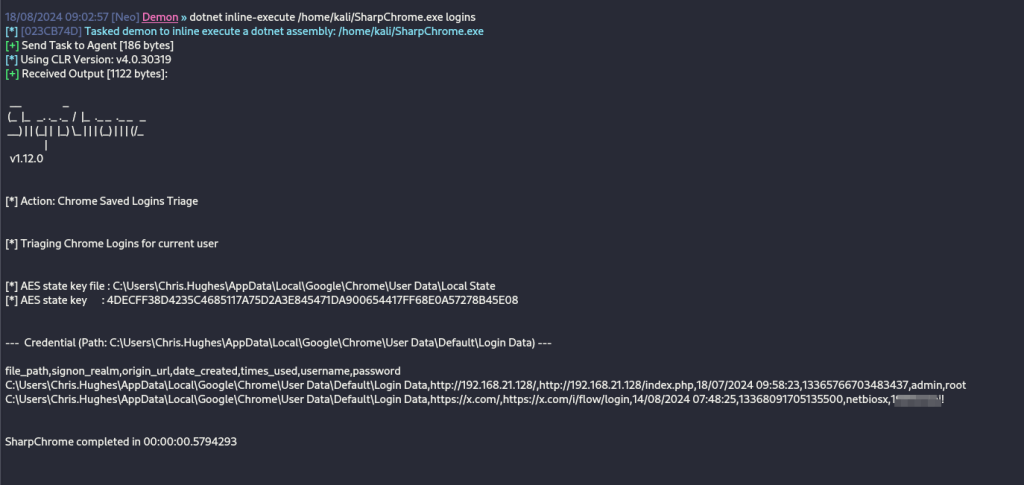
During the exercise it is recommended that purple team operators evaluate in collaboration with the SOC if there are any detections, how the controls operate and if the environment is configured with the necessary visibility. In the event that detection or visibility gaps are identified it is recommended to perform a root cause analysis via active collaboration to ensure proper tuning or development of new detection rules. The following image represent the detection opportunities structured in layers and data components to aid detection efforts.

Detection
The technique of harvesting credentials stored in browsers require a sequence of steps. Initially, the encryption key is retrieved from the Local State file. Browsers store passwords in the Login Data file in an encrypted form and decryption is performed by utilizing the encryption key.
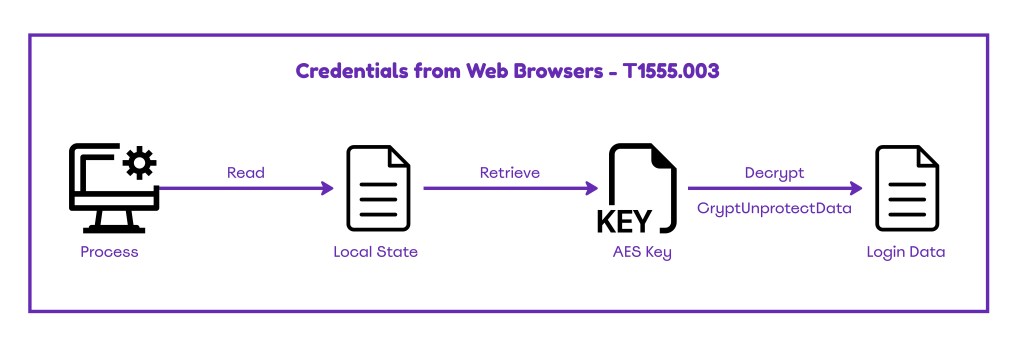
Detection of the credentials stored in browsers requires monitoring of non-browser based processes that access files which store sensitive browser information. Furthermore, the Endpoint Detection and Response should monitor the CryptUnprotectData API. However, it is recommended SOC teams to assess in a UAT environment the volume of data generated prior to any production deployment. ATT&CK framework proposes the following data sources for detection:
| Data Source | Data Component | Detection |
|---|---|---|
| Command | Command Execution | Monitor Command Line Arguments |
| File | File Access | AppData\Local\Google\Chrome\User Data\Default\Login Data |
| Process | OS API Execution | CryptUnprotectData |
| Process | Process Access | Monitor Process Execution Logs |
API
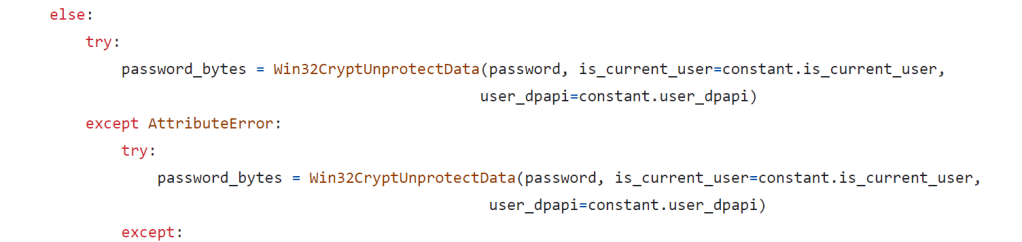
Threat actors are utilizing tooling which attempt to leverage the CryptUnProtectData API to conduct decryption operations of login credentials stored in browsers. Examination of the Lazagne source code discloses the API utilized:
Windows Events
In Active Directory there are various audit policies which can be enabled to enhance telemetry. Process creation events are required to identify anomalous patterns from non-browser based processes which attempt to access files that credentials are stored. However, enabling auditing for process creation will lead to an increased number of events. The group policy Audit Process Creation can be enabled from the following location:
Computer Configuration > Windows Settings > Security Settings > Advanced Audit Policy Configuration > Detailed Tracking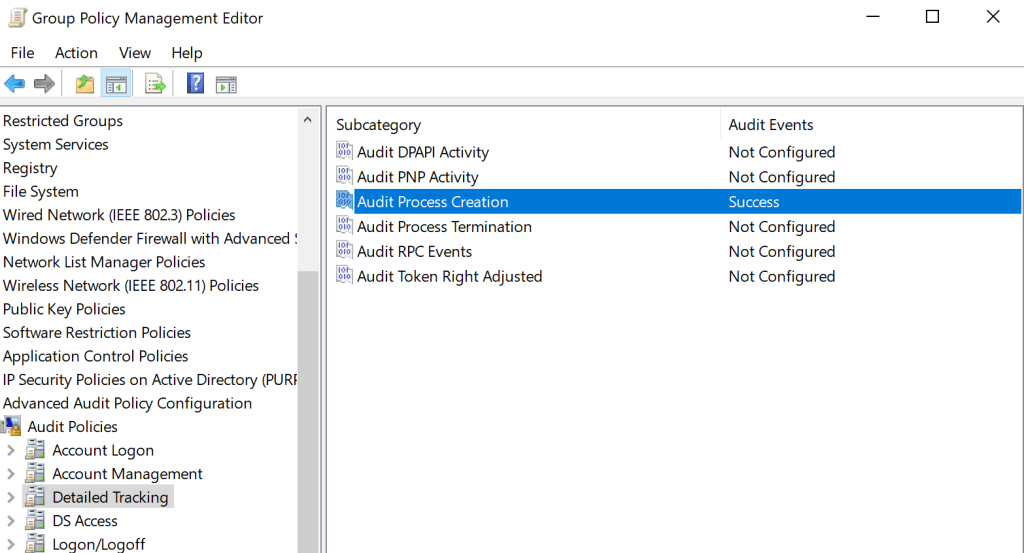
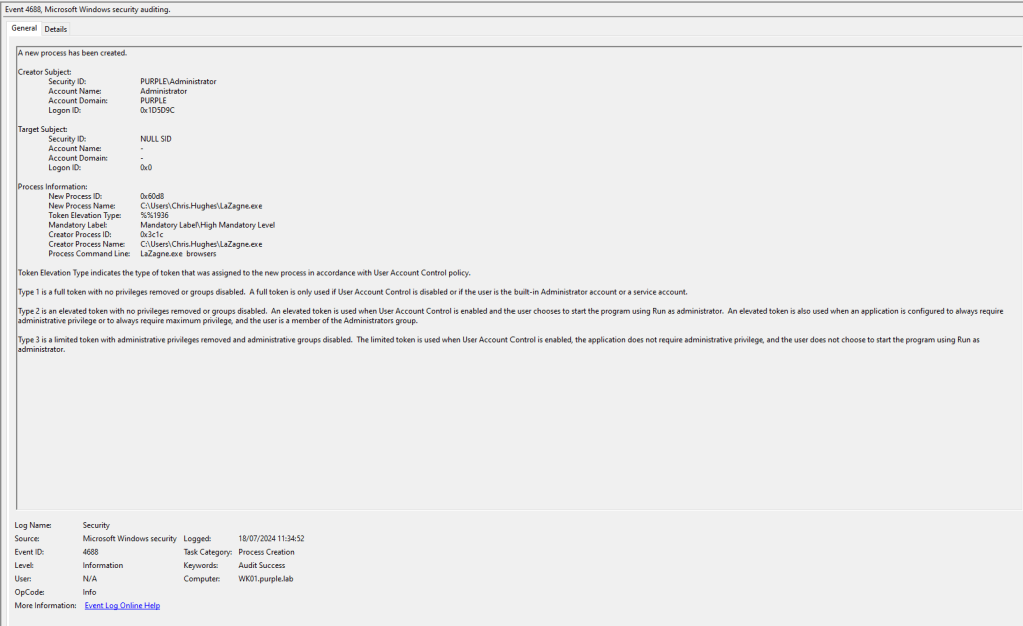
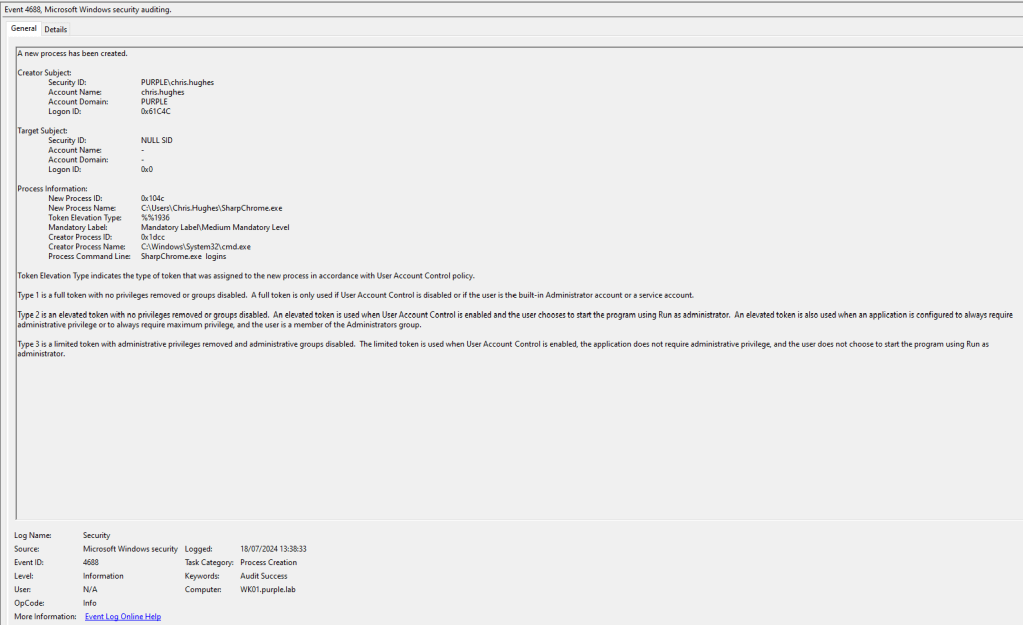
Logging command line arguments can enhance the visibility during threat hunting of arbitrary processes accessing browser login data. Information is captured under the event ID 4688. Adding command line arguments in process creation events can be enabled from the following group object:
Computer Configuration > Policies > Administrative Templates > System > Audit Process Creation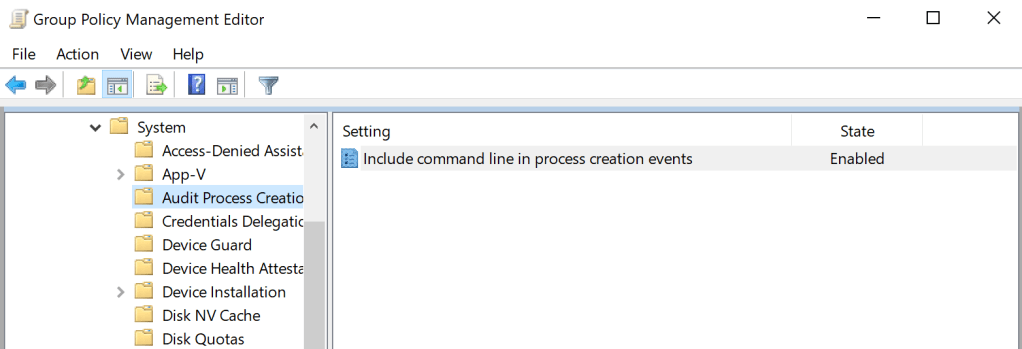
The following images represent the executions of LaZagne and SharpChrome and how the process creation event ID 4688 with command line arguments enabled capture the information. It should be noted that the executions were not conducted in-memory but from the command line.
The common strategy of threat actors to harvest credentials stored in browsers is by accessing a specific path location on the system. For example Microsoft Edge stores credentials in the following location:
C:\Users\<username>\AppData\Local\Microsoft\Edge\User Data\Default\Login DataEnabling monitoring for arbitrary processes (non-browser) attempting to access sensitive file locations can aid towards detection of suspicious activity. The Audit File System group policy is required to be enabled to target sensitive browser locations.
Computer Configuration > Windows Settings > Security Settings > Advanced Audit Policy Configuration > Object Access > Audit File System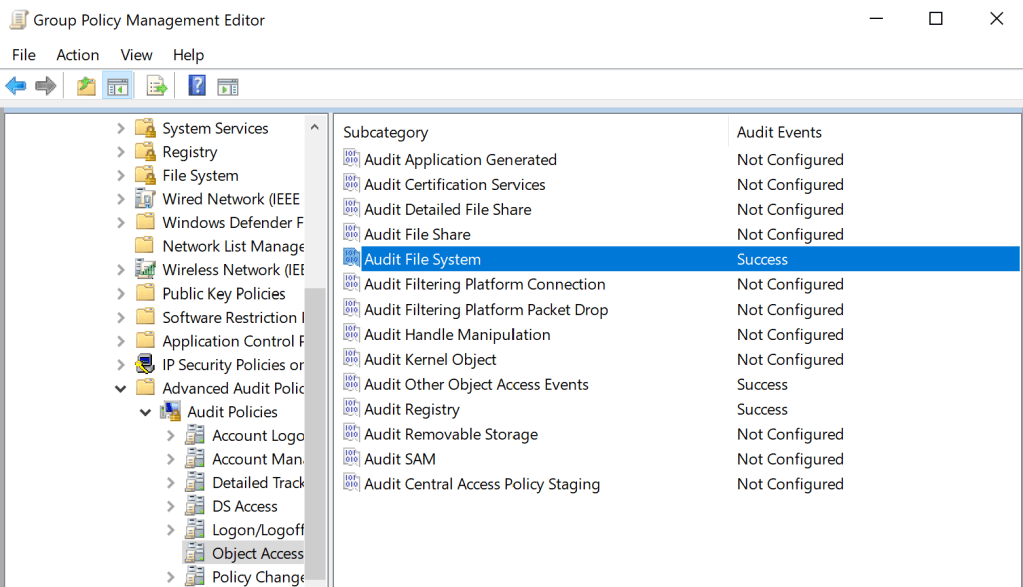

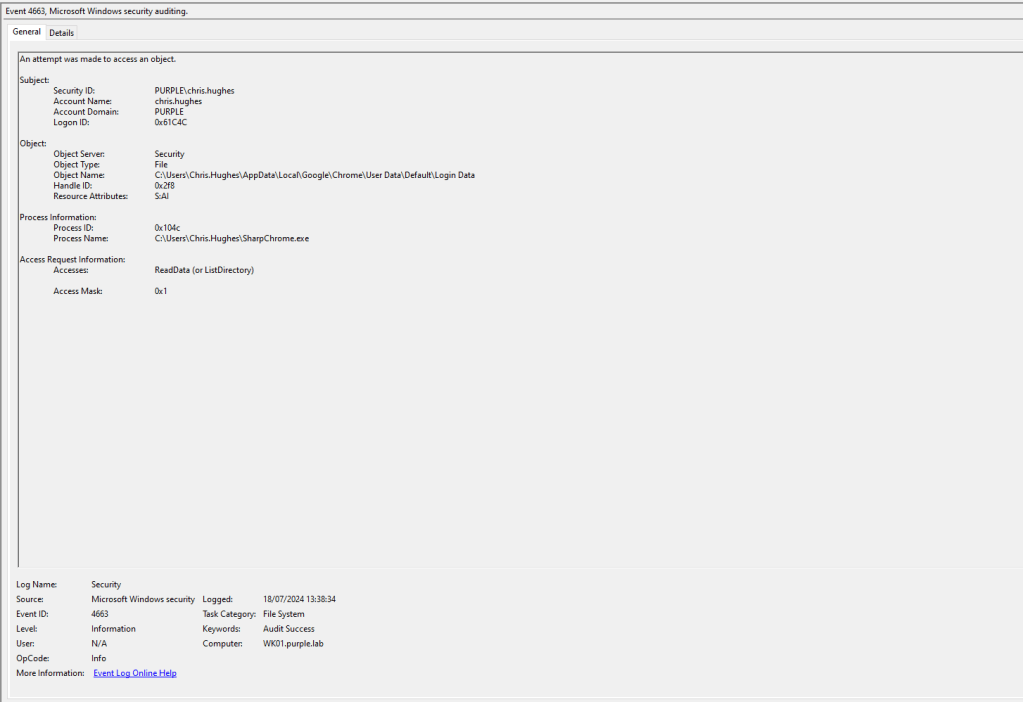
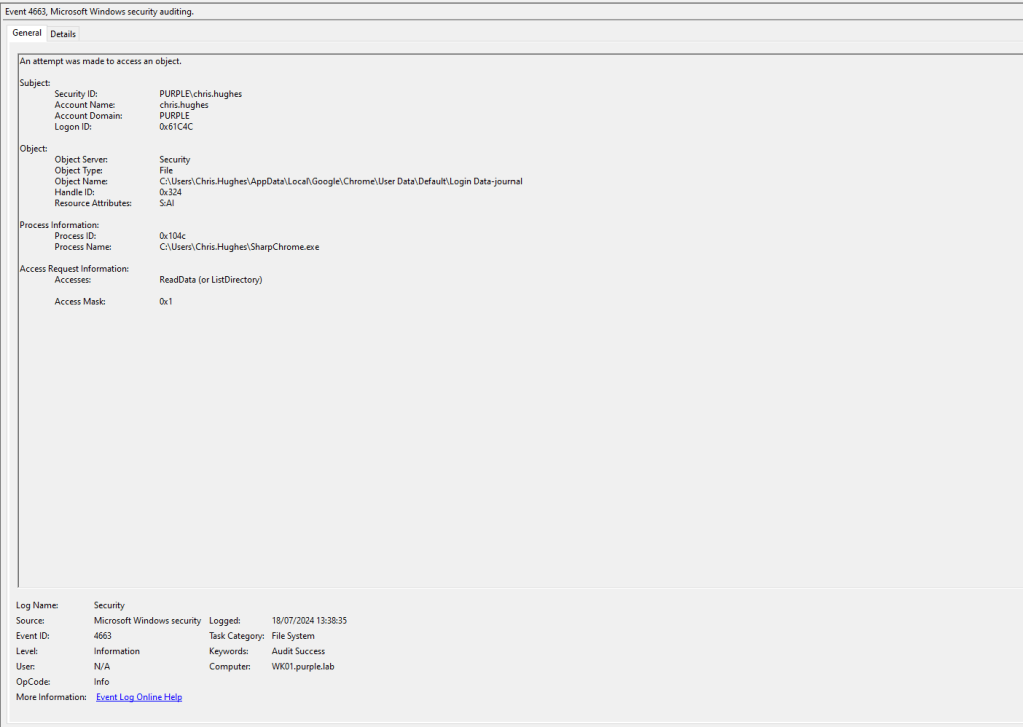
Execution of the offensive tool SharpChrome confirms that access to sensitive locations is captured by the Windows Event ID 4663. It should be noted that the process accessing a browser location is not browser related which consists an anomaly and is a strong indicator that credential dumping via browser has occurred. However, threat actors could inject arbitrary code into a browser process and perform the activity in order to blend in with legitimate traffic. In this condition detection should rely on other indicators.
Microsoft has a group policy to audit event when encryption or decryption calls are performed into the Data Protection Application Interface (DPAPI). However, Microsoft doesn’t recommend to use this policy for detection of malicious activity as it was designed solely for troubleshooting activities. DPAPI events can be enabled from the following group policy object:
Computer Configuration > Windows Settings > Security Settings > Advanced Audit Policy Configuration > Detailed Tracking > DPAPI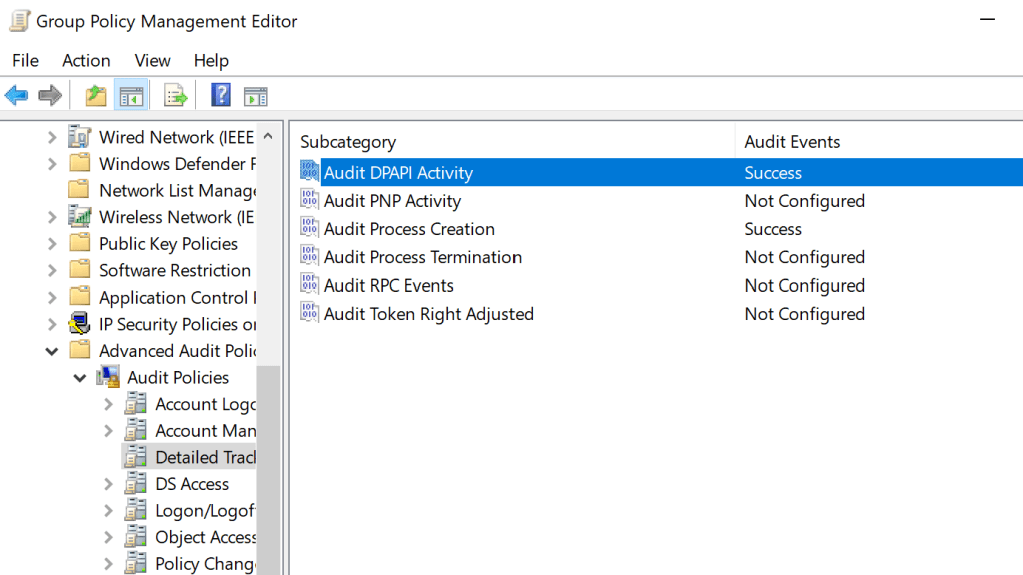
The event ID 4693 capture activities of processes attempted to access the DPAPI master key. The event unfortunately doesn’t contain process information or information about which particular secret was accessed. It should be noted that the execution process ID field in the event 4693 capture the process ID of lsass as it is the process which performs the management of encryption keys for the system. Microsoft to address the limitation of information has introduced a new event ID 16385 (DPAPIDefInformationEvent) which contains the process ID of applications performing DPAPI operations.
Applications and Services Logs > Microsoft > Windows > Crypto-DPAPI
The following image demonstrates the information disclosed in the event ID 16385. Important fields in the event data are:
- OperationType
- DataDescription
- CallerProcessID
When decryption is conducted the SPCryptUnprotect operation is recorded. The DataDescription contains data of the product name. This field could be used to distinguish browser data from other DPAPI data such as the CryptoPrivateKey disclosed in the image below. The CallerProcessID contains the process performing the decryption and can be used for correlation with the process creation event ID 4688 which contains additional details and information.

The event ID 4688 contains the ID of the process which attempts to read browser secrets in hexadecimal form. For example the hexadecimal value 0xaf4 corresponds to the number 2804 in decimal. Correlation with the event ID 16385 can determine an arbitrary activity.

The process ID 2804 is mapped to the process “cmd.exe” which demonstrates an anomalous pattern since the process ID is not associated with a browser based process.

Threat actors could utilize the domain DPAPI backup key (if domain administrator privileges have been obtained) to decrypt the master keys for any domain users which could lead to decryption of passwords stored in browsers. Auditing for domain accounts attempting to access the domain backup key can be enabled from the following location:
Computer Configuration > Windows Settings > Security Settings > Advanced Audit Policy Configuration > Object Access > Audit Other Object Access Events
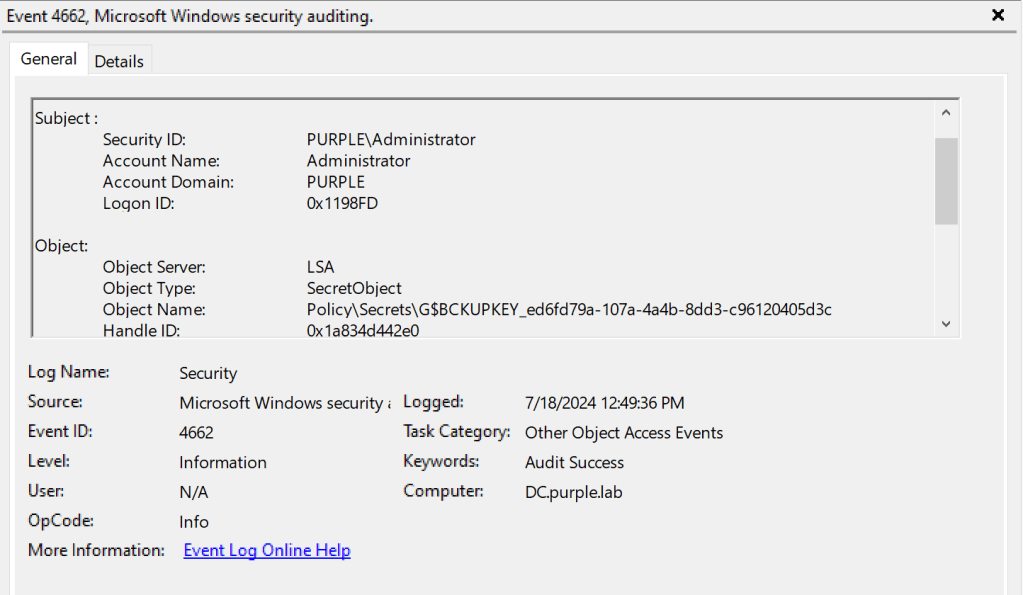
The following table summarizes the event ID’s which could be used to correlate activities and identify arbitrary attempts to retrieve user credentials stored in browsers.
| Event ID | Category |
|---|---|
| 4688 | Process Creation |
| 4663 | File Access |
| 4662 | Object Access |
| 16385 | Crypto-DPAPI |
Detection of the technique Browser Stored Credentials it is not trivial for most organizations due to the volume of logs that are generated if all the associated Windows Events are enabled. However, conducting a targeted purple team operation can assess if the EDR performs any hooking operations against the CryptUnProtectData API, if any Windows Events are missing that could enhance threat hunting efforts and if there are any detection rules which require adjustments or detection engineering efforts should be prioritized towards development of rules that will reliably detect harvesting of browser stored credentials. The following table summarizes the data sources and data components required to detect Credentials from Web Browsers:
| Data Source | Data Components | Detects |
|---|---|---|
| API | CryptUnProtectData | Decryption of passwords |
| Windows Event | 4662 | DPAPI Backup Key |
| Windows Event | 4663 | Browser Login-Data |
| Windows Event | 4688 | Process Creation |
| Windows Event | 16385 | Crypto-DPAPI Operations |
Threat actors changing their approaches from extraction of credentials via LSASS towards other locations which might detections might have missed. It is vital for defensive teams to prioritize detection efforts that will enable early detection of credential access to prevent lateral movement opportunities and minimize impact of a security breach.

 Purple Team
Leave a reply to Measuring Detection Coverage – Purple Team Cancel reply