
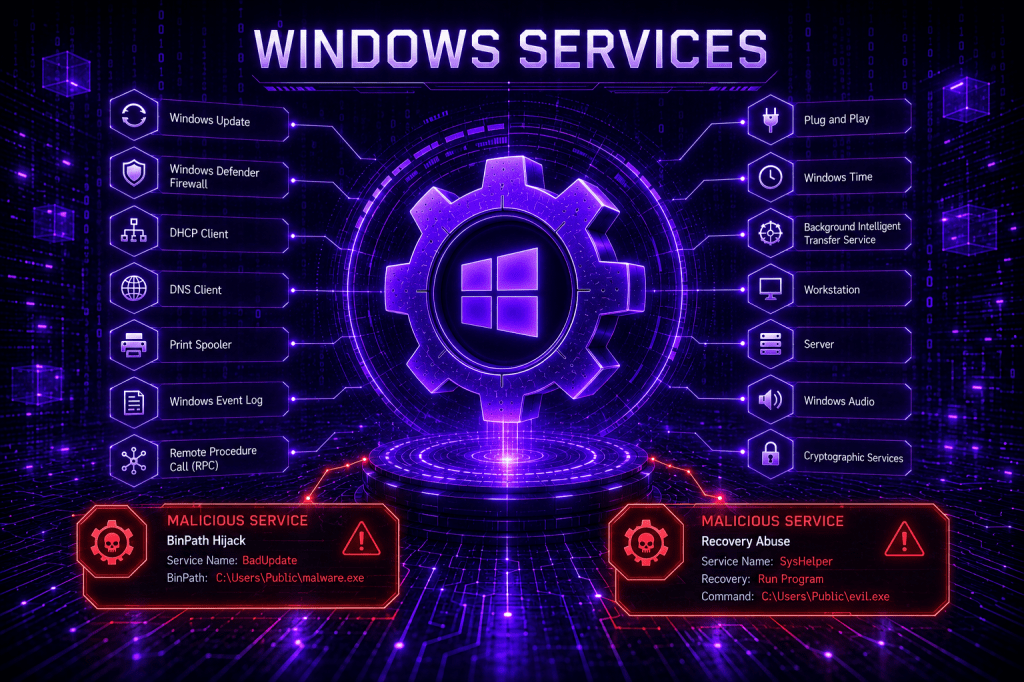
Windows Services are a common target for adversaries because they provide a reliable mechanism for executing code with elevated privileges, maintaining persistence, and blending malicious activity into normal Windows operations. Abusing Windows services for persistence is not a new technique, and most Endpoint Detection and Response can detect malicious modification of services or service creation. Threat actors can hide malicious implants in the service binpath, in the registry, or in the ImagePath of the recovery function. Additional procedures have been disclosed to the public the recent years and organizations should validate their controls and detection rules against multiple procedures to ensure adequate detection coverage.
Playbook
The sc.exe utility is a native windows command-line tool used to communicate with the Service Control Manager. Administrators and threat actors can utilize the binary to create, configure, start, stop, and delete Windows services locally or remotely. When creating a service, the service name, the executable path, and the startup type should be defined by the user. Multiple adversaries have used the sc.exe binary to execute code, establish persistence or run commands with elevated privileges. Executing the command below will create a service called PurpleSvcP1 that upon initiation will run an echo statement and write the text P1 into a file.
sc.exe create PurpleSvcP1 binPath= "C:\Windows\System32\cmd.exe /c echo P1 > C:\Windows\Temp\t1543_p1.txt" start= auto

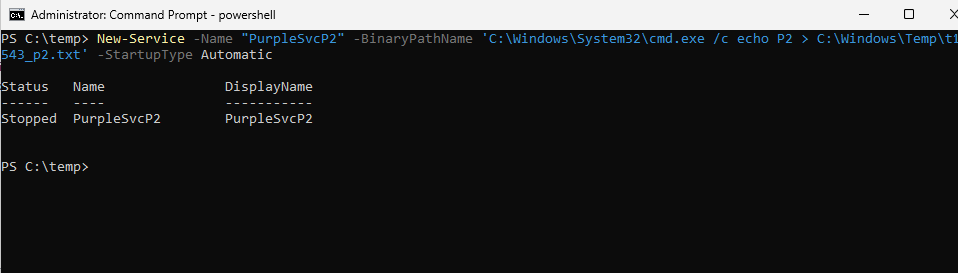
The PowerShell cmdlet New-Service can be utilized to create a new service. The cmdlet follows similar arguments with the sc.exe utility.
New-Service -Name "PurpleSvcP2" -BinaryPathName 'C:\Windows\System32\cmd.exe /c echo P2 > C:\Windows\Temp\t1543_p2.txt' -StartupType Automatic
Start-Service PurpleSvcP2 -ErrorAction SilentlyContinue
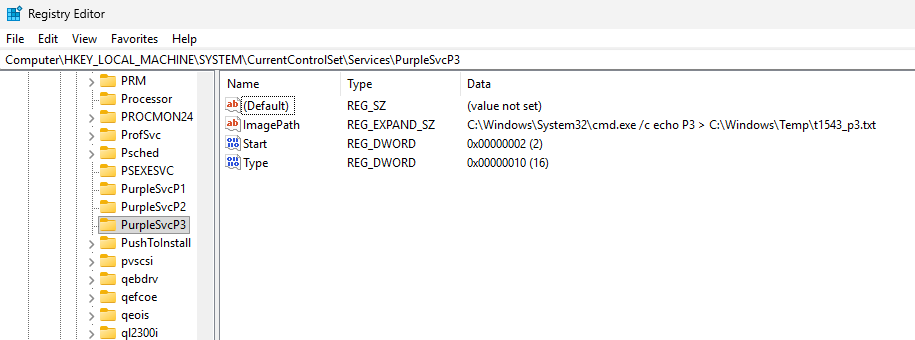
Threat actors could also create services through the registry. It should be noted that services created directly via modification of registry keys are not visible in the Service Control Manager. Executing the following commands will create a service called PurpleSvcP3 that will execute a similar payload as above.
reg add "HKLM\SYSTEM\CurrentControlSet\Services\PurpleSvcP3" /v ImagePath /t REG_EXPAND_SZ /d "C:\Windows\System32\cmd.exe /c echo P3 > C:\Windows\Temp\t1543_p3.txt" /freg add "HKLM\SYSTEM\CurrentControlSet\Services\PurpleSvcP3" /v Type /t REG_DWORD /d 16 /freg add "HKLM\SYSTEM\CurrentControlSet\Services\PurpleSvcP3" /v Start /t REG_DWORD /d 2 /f

The service key Type = 16 (0x10 in hexadecimal) in the REG_DWORD is the equivalent of the SERVICE_WIN32_OWN_PROCESS. The value name Start = 2 is the equivalent of SERVICE_AUTO_START and initiates the service automatically at boot.
Binary Modification
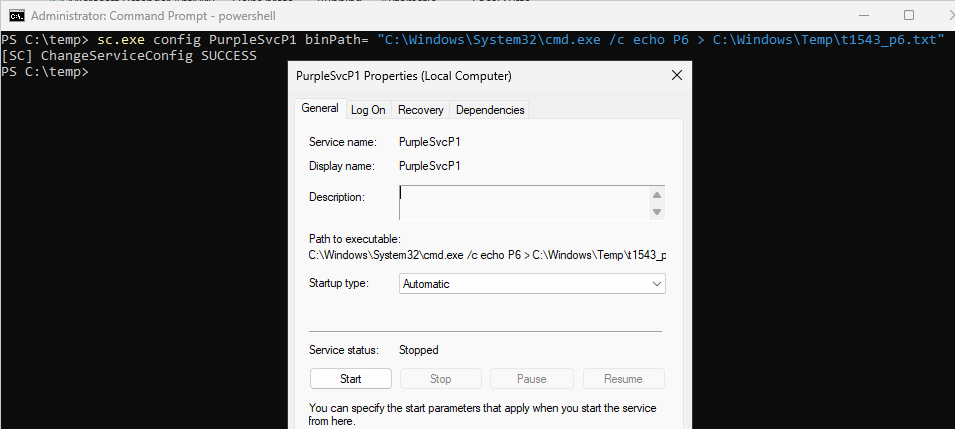
It is also possible to use the config parameter to modify the existing binary path of a legitimate service to execute a malicious payload.
sc.exe config PurpleSvcP1 binPath= "C:\Windows\System32\cmd.exe /c echo P6 > C:\Windows\Temp\t1543_p6.txt"
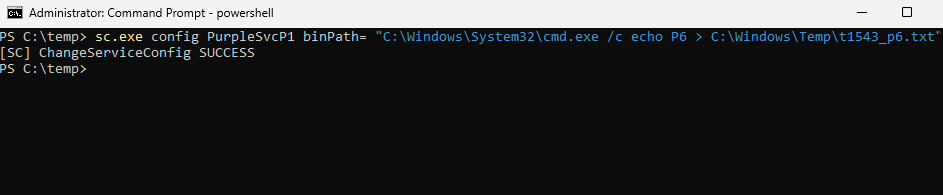
The ImagePath of the service PurpleSvcP1 is changed to run a malicious command.
SDDL
Microsoft introduced in Windows 2000 and later the Security Descriptor Definition Language (SDDL) in otder to provide a textual representation for security descriptors in a more readable format. Grzegorz Tworek was disclosed that the SDDL can be abused to change the permissions of a service enabling standard users to create or modify services. Execution of the commands below creates a new service on the system and modifies the permissions for Interactive Users and Service Logon Users to Deny and gives full control to LocalSystem and Built-in Administrators.
sc.exe create PurpleSvcP10 binPath= "C:\Windows\System32\svchost.exe -k netsvcs" start= demandsc.exe sdset PurpleSvcP10 "D:(D;;DCLCWPDTSD;;;IU)(D;;DCLCWPDTSD;;;SU)(A;;CCLCSWRPWPDTLOCRRC;;;SY)(A;;CCDCLCSWRPWPDTLOCRSDRCWDWO;;;BA)"
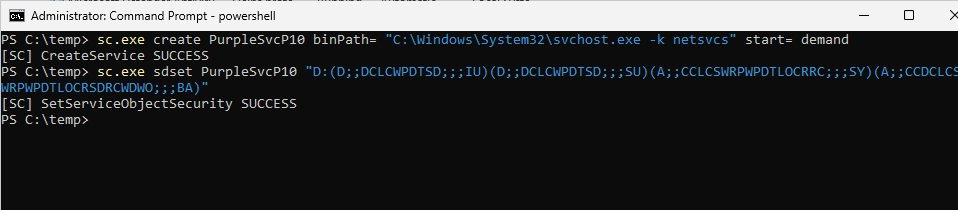
The permissions are used to enable defenders generate telemetry associated with the use of SDDL and not to create a gap on the system by setting the permissions over a service to Everyone.
Recovery
Windows services include a recovery function that defines what the Service Control Manager should do when a service fails unexpectedly. Administrators can configure actions such as restarting the service, rebooting the system, or running a specified command after one or more failures. Threat actors might create or alter a legitimate service to crash, triggering the recovery function to run a program or script. Grimur Grimursson discussed the technique in an article and released a tool called RecoverIt to help abuse the Windows service failure recover function to execute a payload.
Causing a service to crash requires additional research and effort. However, there are some services in Windows shipped by default that are crashing upon starting. The tool svc-crashcheck can start and stop each service individually to determine which services are crashing during execution. The results are recorded both in console and in a file.
svc-crashcheck.exe --wait 3 --exclude "TermService,wuauserv,WinRM,vmic*" --csv results.csv
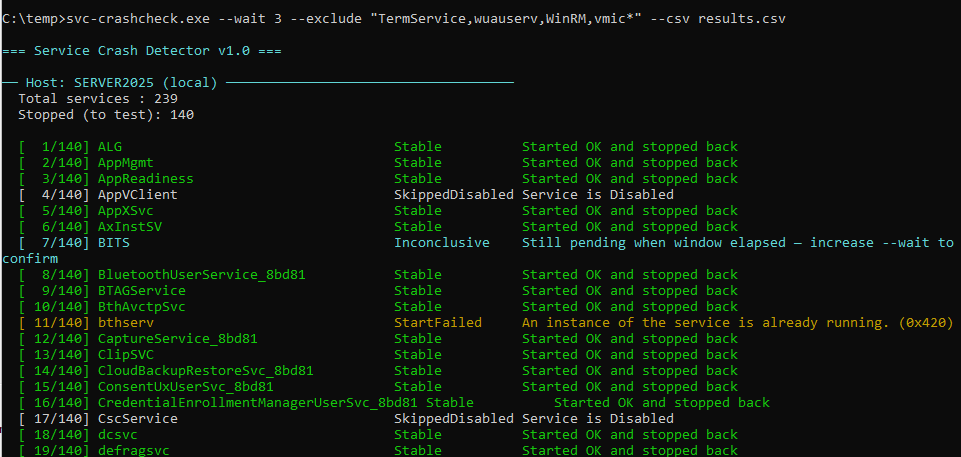
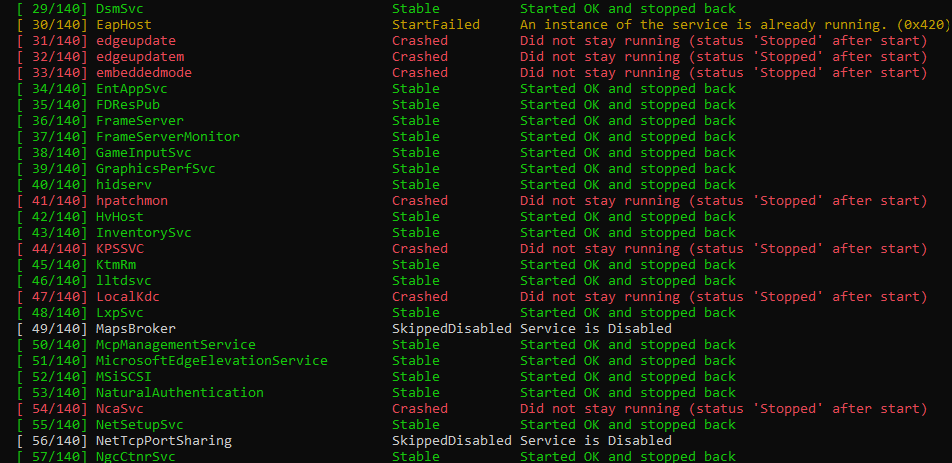
Twelve services have been identified that crash-on-start with one of them confirmed via Windows Event ID 7024.
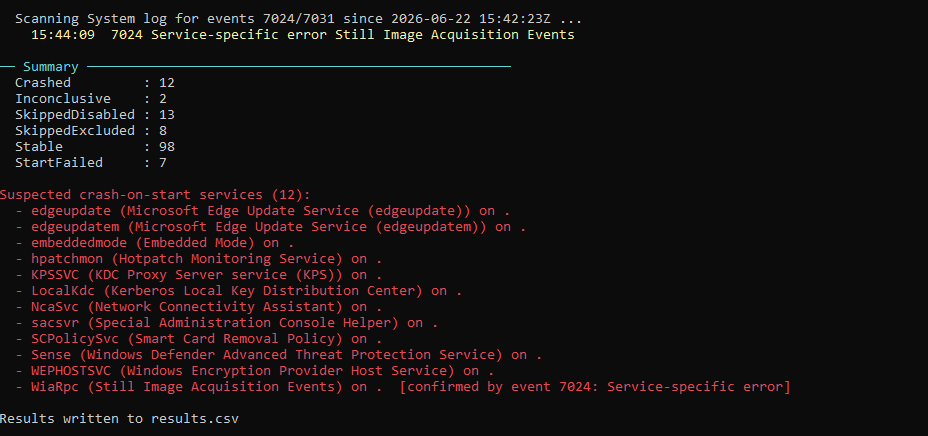
One of the services that is crashed upon execution is the WiaRpc. The RecoverIt proof of concept can be used to modify an action upon service crash.
RecoverIt.exe WiaRpc C:\Windows\System32\cmd.exe /k echo RecoveryText
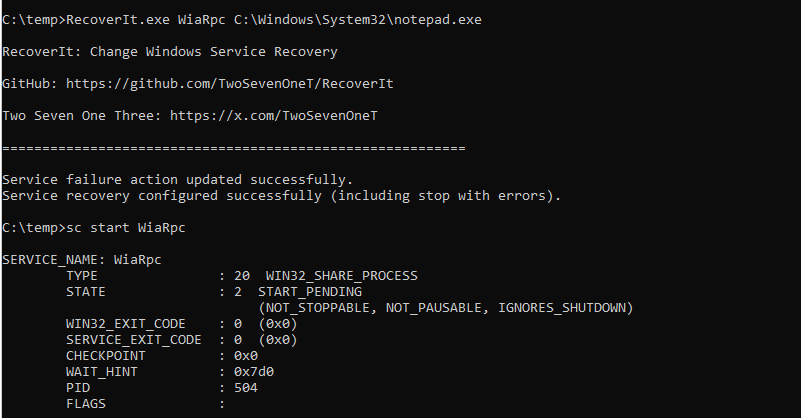
When the WiaRpc starts, the crash causes services.exe to execute an arbitrary command or implant. The technique avoids modification of the original ImagePath of the service that is heavily monitored by defenders.
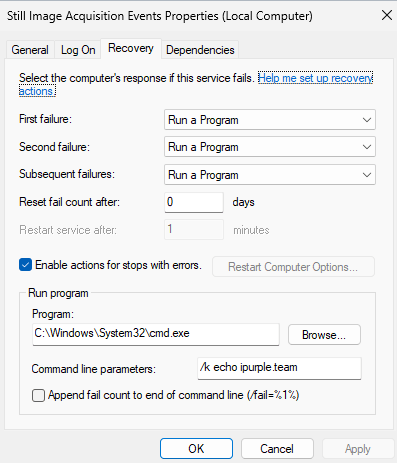
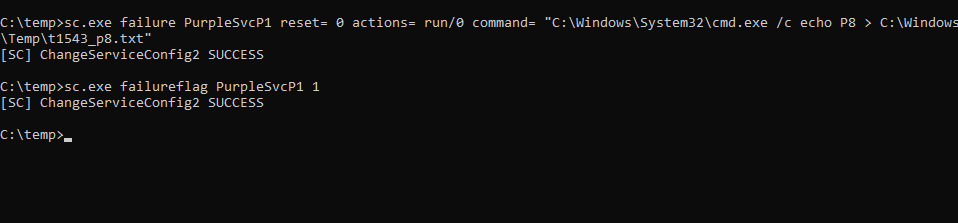
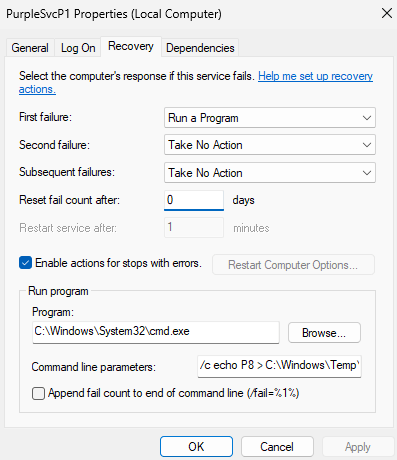
It is also possible to achieve the same result by using the sc.exe utility with the failure flag.
sc.exe failure PurpleSvcP1 reset= 0 actions= run/0 command= "C:\Windows\System32\cmd.exe /c echo P8 > C:\Windows\Temp\t1543_p8.txt"sc.exe failureflag PurpleSvcP1 1
API
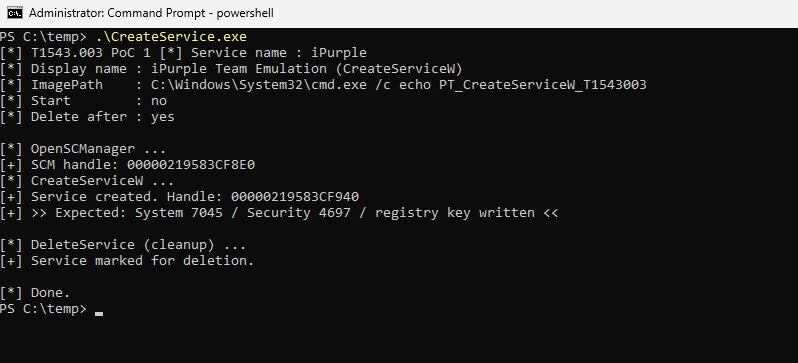
Threat actors could avoid using native Windows binaries or PowerShell cmdlets to create services and use APIs to create and start a service. The proof of concept CreateService.exe implements the OpenSCManager to establish a connection with the service control manager, uses the CreateServiceW API to create the service, and the StartServiceW to initiate the service.
Driver
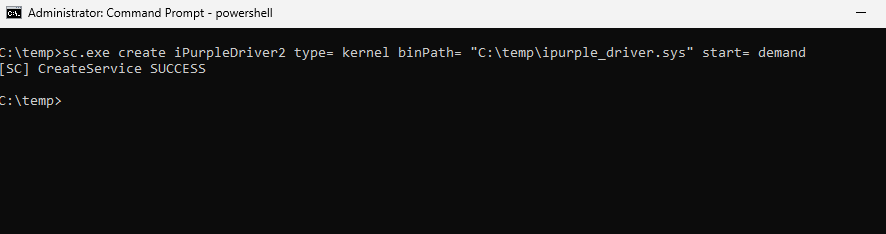
Windows services run the executables defined in the binPath in user-mode (Ring-3) under the service control manager. However, it is possible to create Windows kernel-mode driver service that will load an arbitrary driver into Ring-0. The sc.exe utility can be used with the below parameters:
sc.exe create iPurpleDriver2 type= kernel binPath= "C:\temp\ipurple_driver.sys" start= demandsc.exe start iPurpleDriver2
The table below records all known procedures associated with Windows services:
| No | Procedure |
|---|---|
| 1 | Service Creation |
| 2 | Binary Path Modification |
| 3 | API |
| 4 | Driver |
| 5 | SDDL |
| 6 | Recovery |
The following image displays the diagram of procedures associated with Windows:
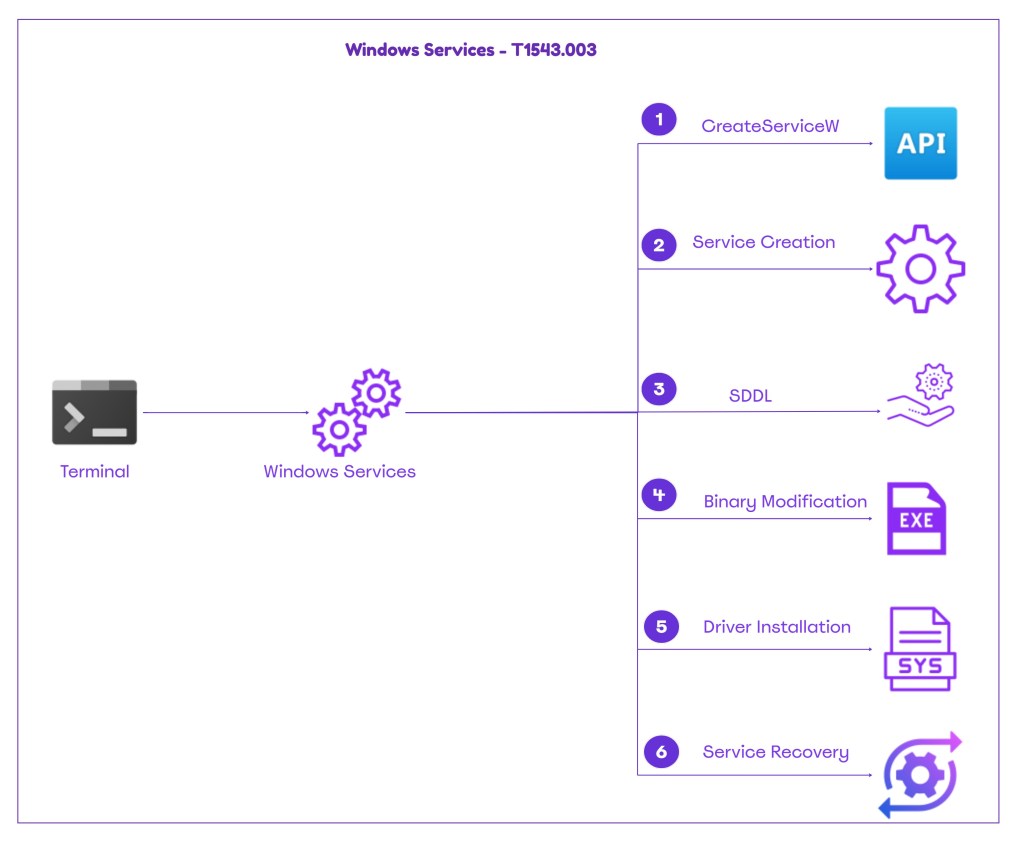
The technique abstract is displayed below:
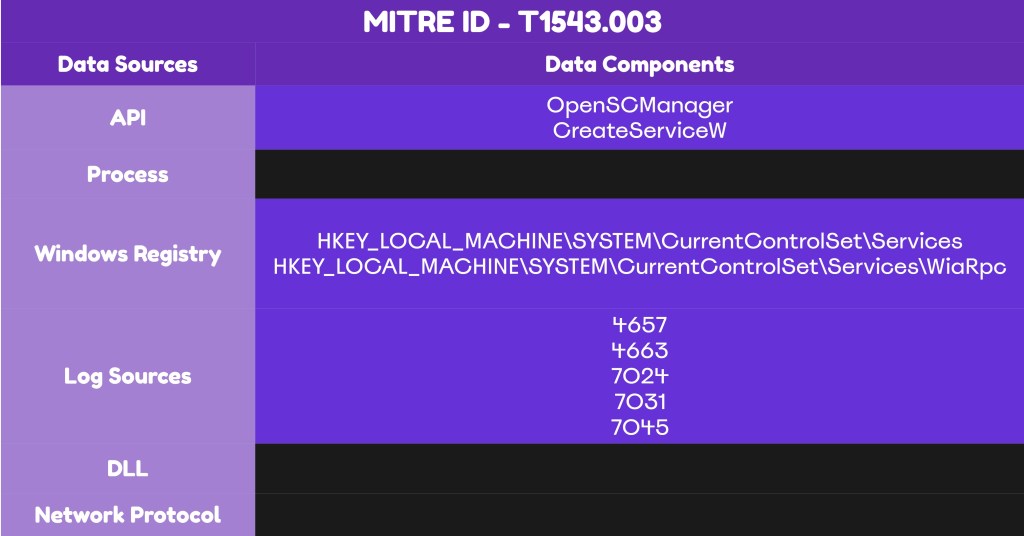
The following playbook captures the playbook of Windows services manipulation:
[[Playbook.T1543.003]]
id = "1.0.0"
name = "1.0.0" - "Service Creation"
description = "Creationof Windows Services for Code execution and Persistence"
tooling.name = "sc"
tooling.references = [
    "N/A"
]
executionSteps = [
    "sc.exe create PurpleSvcP1 binPath= 'C:\Windows\System32\cmd.exe /c echo P1 > C:\Windows\Temp\t1543_p1.txt' start= auto"
]
executionRequirements = [
    "Local Administrator"
]

[[Playbook.T1543.003]]
id = "1.1.0"
name = "1.1.0" - "Binary Path Modification"
description = "Modification of Service Image Path to execute code"
tooling.name = "sc"
tooling.references = [
    "N/A"
]
executionSteps = [
    "sc.exe config PurpleSvcP1 binPath= 'C:\Windows\System32\cmd.exe /c echo P6 > C:\Windows\Temp\t1543_p6.txt'"
]
executionRequirements = [
    "Local Administrator"
]

[[Playbook.T1543.003]]
id = "1.2.0"
name = "1.2.0" - "Service Permissions Tampering"
description = "Modification of Services Permissions"
tooling.name = "sc"
tooling.references = [
    "N/A"
]
executionSteps = [
    "sc.exe sdset PurpleSvcP10 'D:(D;;DCLCWPDTSD;;;IU)(D;;DCLCWPDTSD;;;SU)(A;;CCLCSWRPWPDTLOCRRC;;;SY)(A;;CCDCLCSWRPWPDTLOCRSDRCWDWO;;;BA)'"
]
executionRequirements = [
    "Local Administrator"
]

[[Playbook.T1543.003]]
id = "1.3.0"
name = "1.3.0" - "Recovery Function Abuse"
description = "Abuse of the service Recovery function to execute code"
tooling.name = "RecoverIt"
tooling.references = [
    "https://github.com/TwoSevenOneT/RecoverIt"
]
executionSteps = [
    "RecoverIt.exe WiaRpc C:\Windows\System32\cmd.exe /k echo RecoveryText"
]
executionRequirements = [
    "Local Administrator"
]

[[Playbook.T1543.003]]
id = "1.4.0"
name = "1.4.0" - "Kernel Driver Installation"
description = "Installation of Windows Kernel-Mode Driver Service"
tooling.name = "sc"
tooling.references = [
    "N/A"
]
executionSteps = [
    "sc.exe create PurpleDrvP11 type= kernel binPath= "C:\temp\ipurple_driver.sys" start= demand"
]
executionRequirements = [
    "Local Administrator"
]
Detection
Thret actors were abusing Windows services for years to execute arbitrary commands or payloads. The most common procedures include the service creation and binary path modification, however due to the additional procedures disclosed to the public (Recovery function, SDDL) organizations should develop a detection strategy that covers all known procedures. Manipulation of services for malicious purposes requires minimal effort for adversaries and organizations that have a mature cyber defense capability should be able to detect most of the procedures due to telemetry generated on the assets. Detection coverage should include different data sources such as APIs, registry and system events.
API
Windows provides an API (CreateServiceW) that could be used to create a service on a host. The benefit for adversaries is that by using the CreateServiceW API directly in their malware, they avoid relying on Windows binaries such as sc.exe or PowerShell cmdlets to create a service, both of which are heavily monitored by detection controls. In Windows connecting to the Service Control Manager (SCM) requires obtaining a handle from the OpenSCManager. The handle is a prerequisite for opening, creating, enumerating, or reconfiguring services. At the EDR level the following sequence of APIs should be flagged as malicious:
OpenSCManagerW -> CreateServiceW -> StartServiceW
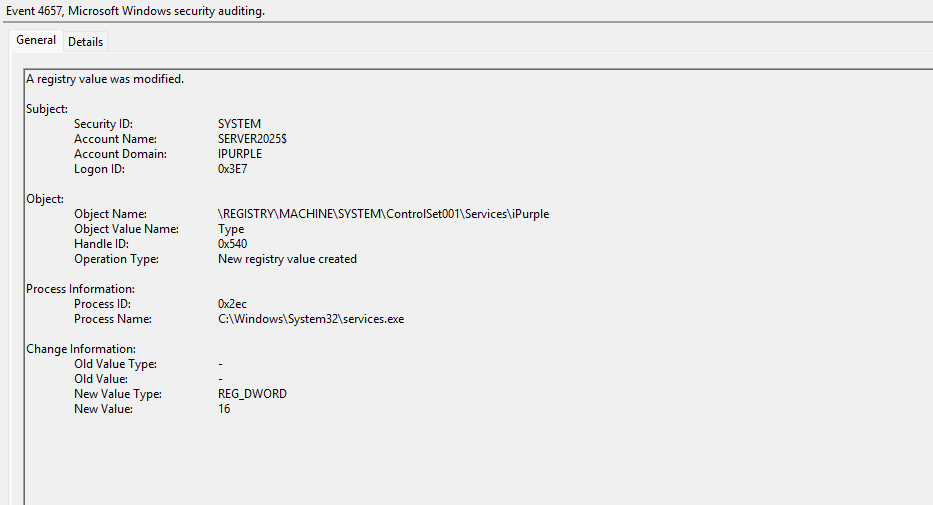
Running a minimal proof of concept that implements the above APIs also generates two event ids (7045 & 4657) because service creation leaves artifacts in the System logs and Registry due to the ImagePath.
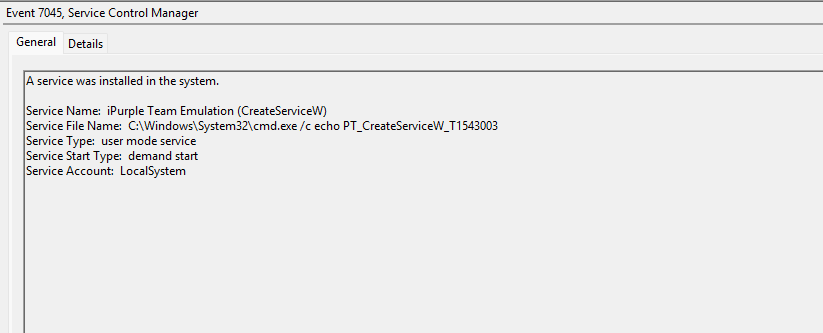
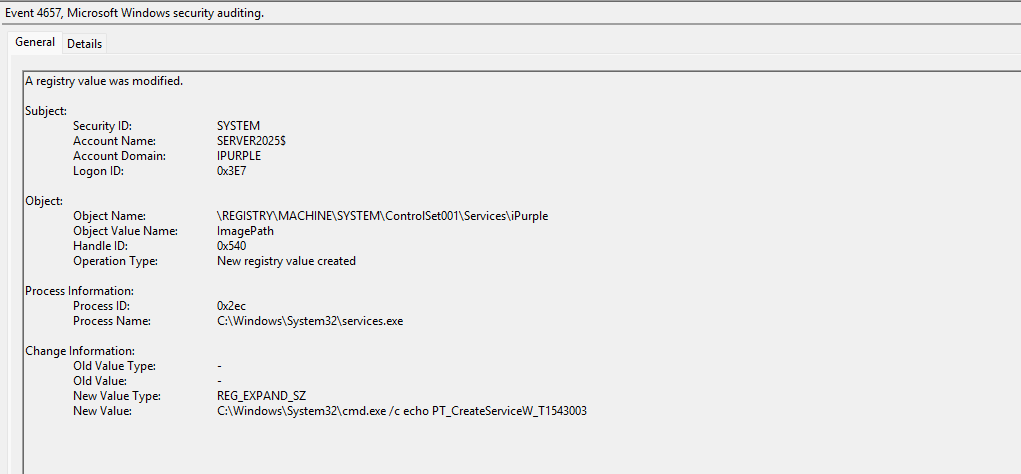
Registry
Windows stores configuration details for installed services in the registry. Specifically, the HKLM\SYSTEM\CurrentControlSet\Services registry key stores the information about services. Services that are created or modified, introduce changes to this registry path. SOC teams should monitor this registry key to identify unauthorized service abuse and potential persistence activities.
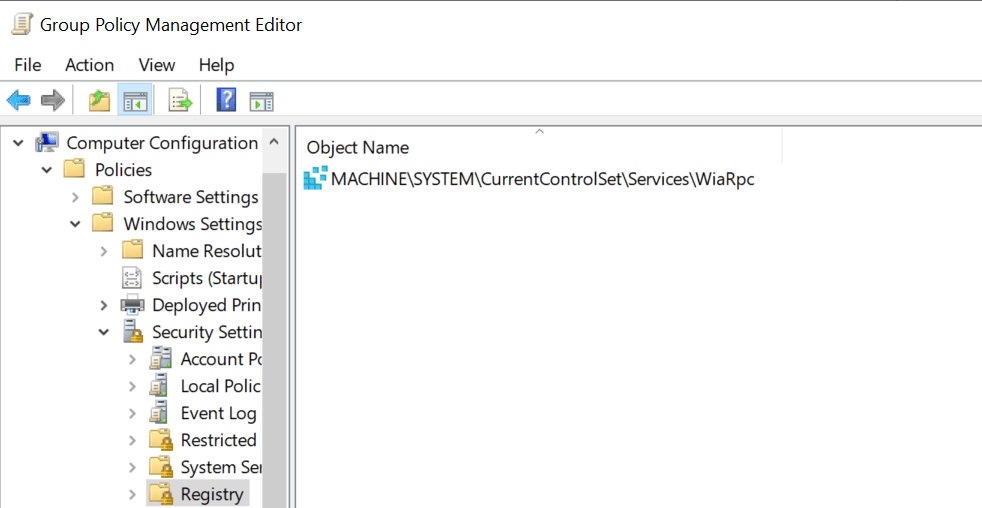
Computer Configuration-> Windows Settings -> Security Settings -> Registry

Enabling auditing for the services registry key increases the volume of logs. However, SOC teams have enhanced visibility about all related-activities to services. Execution of most procedures generates the 4657 and 4663 event ids.
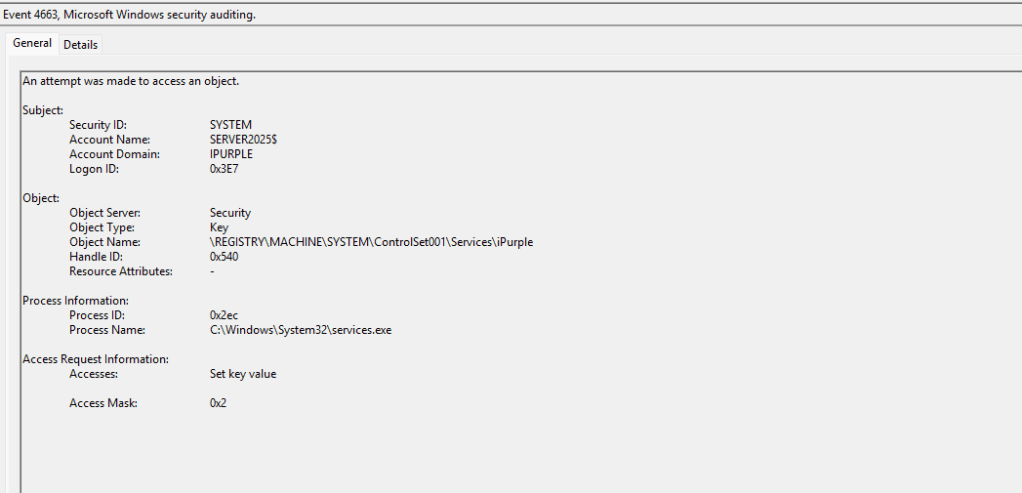
Recovery
Abuse of the Recovery function enables threat actors to execute code without modification of the binPath. The technique requires a service to crash in order to force the initiation of the failure actions. However, services that are crashed generate the following event IDs in the System logs: 7024 and 7031.
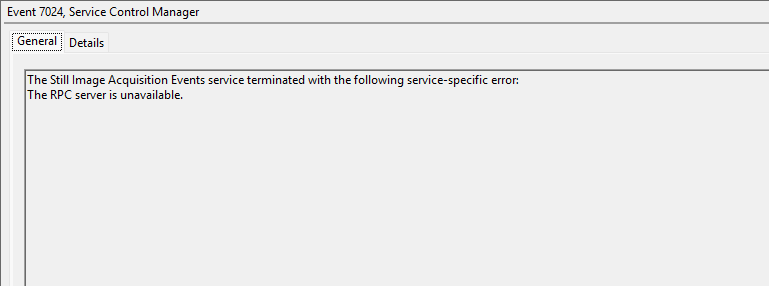
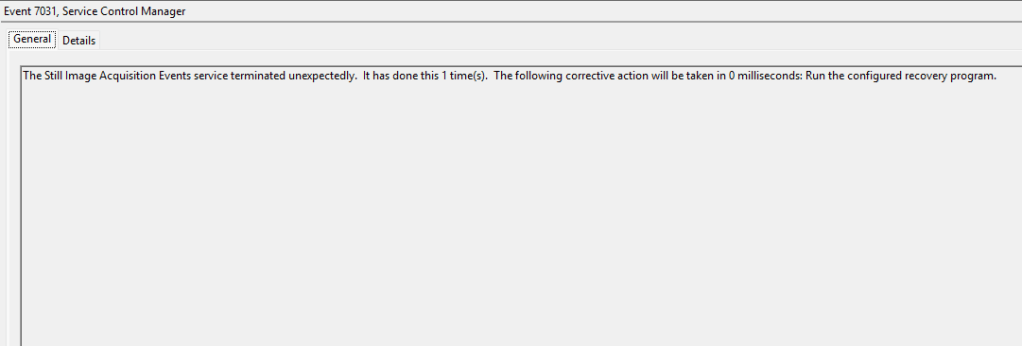
It should be noted that services might crash for various reasons and the above event IDs should not be used on its own as a reliable detection method. SOC teams can investigate which services crash on initiation and develop threat hunting queries targeting these services to filter noise. It should be noted that when the process crashes, an arbitrary process will be created on the asset with services.exe as its parent.
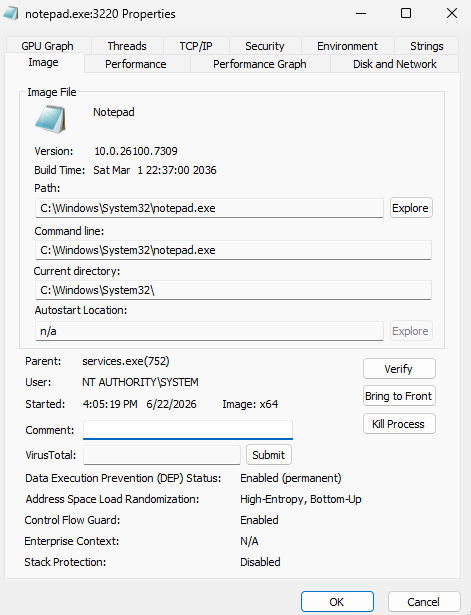
When the recovery function of a service is tampered to execute arbitrary implants, the configuration in the registry is also modified and specifically the keys: FailureActionsOnNonCrashFailures and FailureCommand.
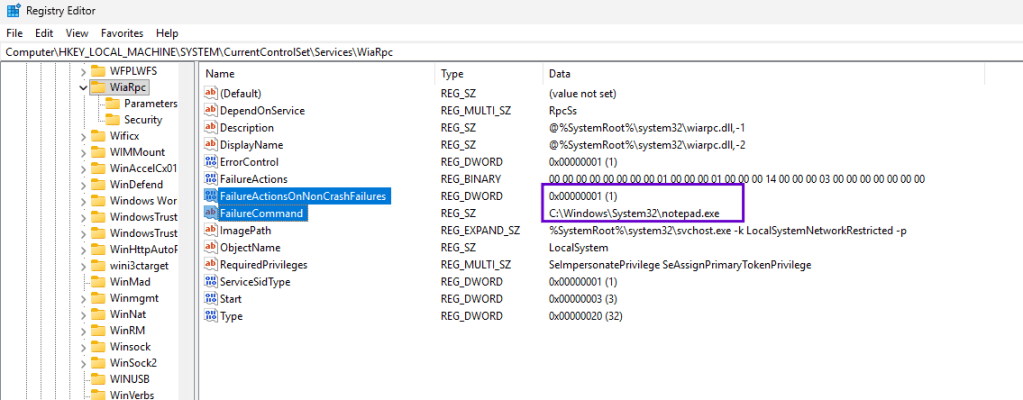
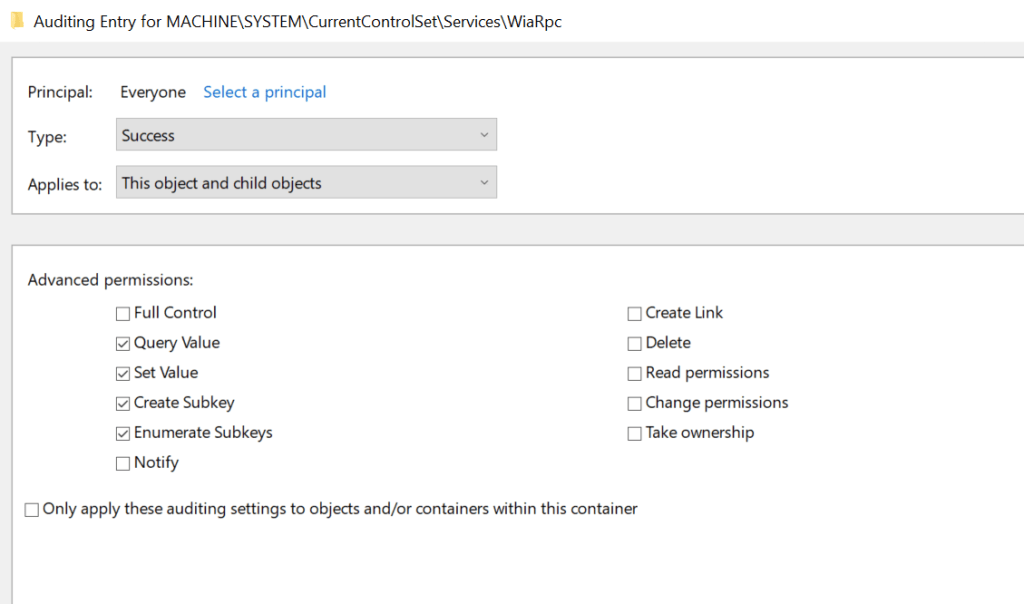
A solid detection strategy for abuse of the services recovery function is to enable auditing for the registry keys of services that crash by default to reduce the attack surface. Once the services that crash have been identified, auditing could be enabled from the Group Policy and specifically the Advanced permissions Query Value and Set Value should be checked.
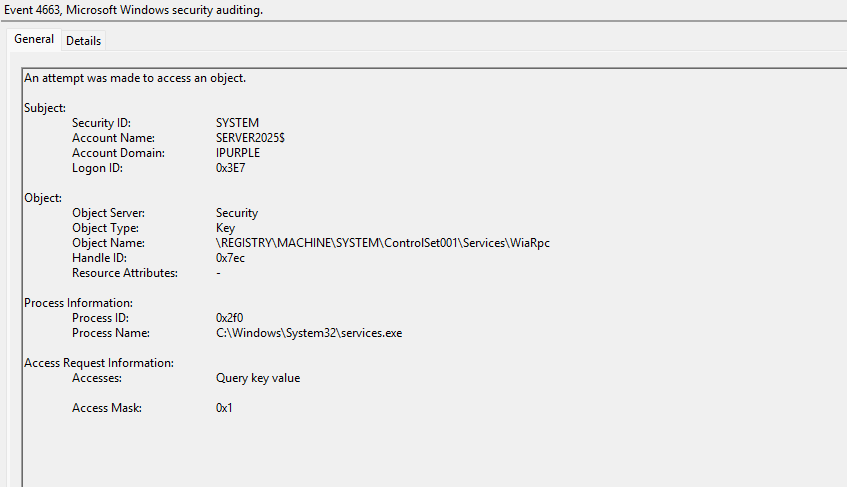
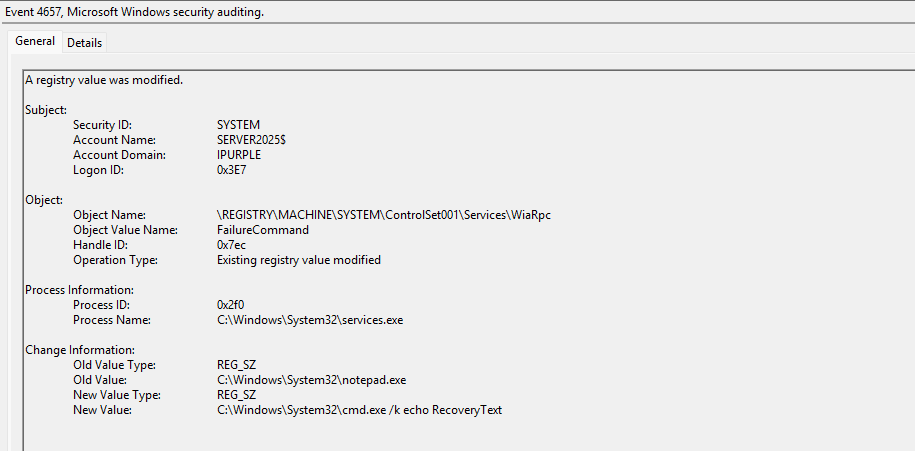
Regardless of which method is used to abuse the Recovery function of a service (manual via sc.exe or via APIs) the FailureCommand registry key of the targeted service will be modified and the process services.exe will also access the registry key.
The arbitrary command will be visible under the event ID 4657.
SIGMA
title: Service Set to Run Recovery Action on Non-Crash Failure
id: c2a7e6b9-4d18-4e3b-8f55-1b9c0a6d3e72
status: experimental
description:
    Sets FailureActionsOnNonCrashFailures=1 so recovery actions fire on a clean
    error-stop, not only a crash.
references:
    - https://github.com/TwoSevenOneT/RecoverIt
author: Panos Gkatziroulis
date: 2026/06/21
logsource:
    category: registry_set
    product: windows
detection:
    selection:
        TargetObject|startswith: 'HKLM\System\CurrentControlSet\Services\'
        TargetObject|endswith: '\FailureActionsOnNonCrashFailures'
        Details: 'DWORD (0x00000001)'
    condition: selection
falsepositives:
    - Some legitimate services enable this flag
level: medium
SIGMA
title: Service Recovery Command Configured (FailureCommand Set)
id: 8f3c1a4e-2b6d-4f0a-9c12-7a4e9d2b1f01
status: experimental
description:
    Modification of a Windows service recovery "run program" command via the
    FailureCommand value, as used by RecoverIt and 'sc failure command='.
    The recovery program executes as SYSTEM (child of services.exe) on failure.
references:
    - https://github.com/TwoSevenOneT/RecoverIt
    - https://www.zerosalarium.com/2026/02/Defense-Evasion-The-service-run-failed-successfully.html
author: Panos Gkatziroulis
date: 2026/06/21
logsource:
    category: registry_set
    product: windows
detection:
    selection:
        TargetObject|startswith: 'HKLM\System\CurrentControlSet\Services\'
        TargetObject|endswith: '\FailureCommand'
    suspicious_details:
        Details|contains:
            - 'cmd.exe'
            - 'powershell'
            - 'pwsh'
            - 'rundll32'
            - 'regsvr32'
            - 'mshta'
            - 'wscript'
            - 'cscript'
            - 'certutil'
            - 'bitsadmin'
            - '\Users\'
            - '\Temp\'
            - '\ProgramData\'
            - '\AppData\'
            - '\\\\'        # UNC payload path
    condition: selection and suspicious_details
falsepositives:
    - Vendor software that configures a legitimate recovery program (baseline per service)
level: high
Windows Defender
DeviceRegistryEvents
| where ActionType == "RegistryValueSet"
| where RegistryValueName =~ "FailureCommand"
| where RegistryKey contains @"\Services\"
| extend ServiceName = extract(@"(?i)\\Services\\([^\\]+)$", 1, RegistryKey)
| extend WasModified = isnotempty(PreviousRegistryValueData) and PreviousRegistryValueData != RegistryValueData
| project Timestamp, DeviceName, ServiceName,
          PreviousValue = PreviousRegistryValueData,
          NewValue = RegistryValueData,
          WasModified,
          InitiatingProcessAccountName, InitiatingProcessFileName,
          RegistryKey, ReportId, DeviceId
| sort by Timestamp desc
Driver
Installation of kernel-mode driver service is also captured under Windows Event ID 7045 because kernel mode drivers are registered as services within Windows. SOC teams could use this event log to identify services pointing to malicious drivers. Event ID 7045 should be correlated also with driver load telemetry, file creation events, code-signing reputation, and registry changes under HKLM\SYSTEM\CurrentControlSet\Services.

The following table summarizes the data sources and data components required to detect this technique:
| Data Source | Data Component | Detects |
|---|---|---|
| API | OpenSCManagerW | Service Control Manager Connection |
| API | CreateServiceW | Creation of Services |
| Windows Events | 7045 | Creation of Services |
| Windows Events | 7031 | Service Termination |
| Windows Events | 7024 | Service Termination |
| Windows Events | 4657 | Registry Modifications |
| Windows Events | 4663 | Access Registry Objects |
In summary abuse of Windows services enables threat actors to execute arbitrary code and blend-in with the environment. The most common procedures adopted by threat actors are the create new service, and binary path modification. Organizations should continously validate their detection coverage throug purple team operations. An effective detection strategy correlates system log and registry key modification events with API detection at the EDR level.


Leave a Reply