
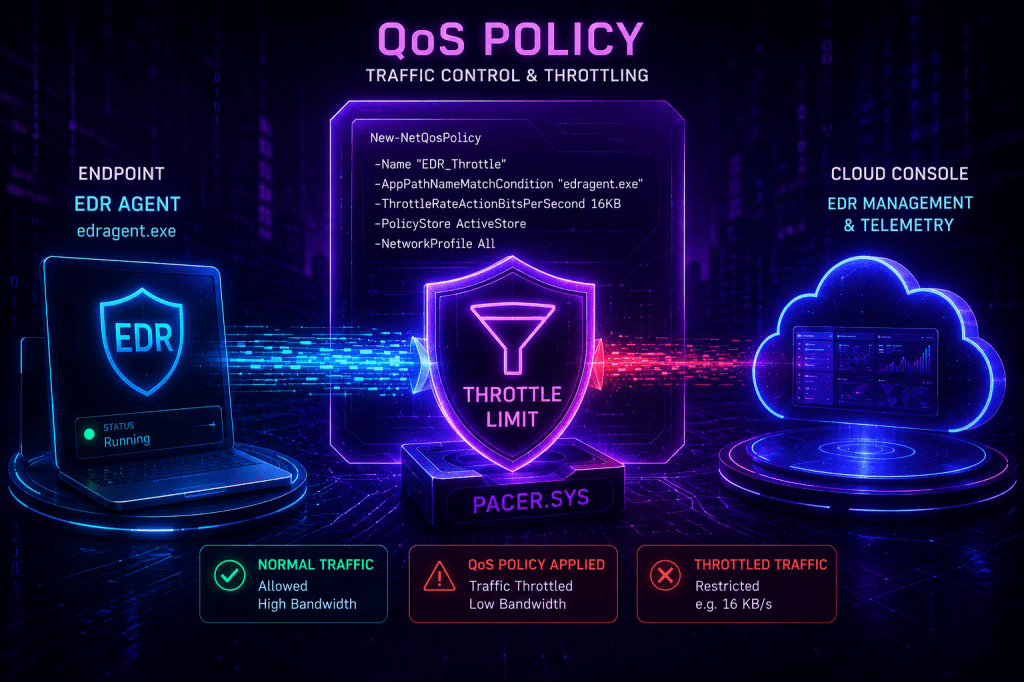
In Windows, a Quality of Service (QoS) policy is a rule that handles outbound network traffic. Specifically, it is used to cap the outbound bandwidth of a process, port, or protocol. Organizations can configure QoS policies through Group Policies, MDM, or PowerShell. Threat actors with elevated privileges on the asset can point a QoS policy at an EDR agent and set the rate to effectively zero, limiting the capability of the agent to generate telemetry in the cloud console.
Playbook
Execution of the following command will create a new QoS policy to limit the bandwidth of the FTP application via PowerShell:
New-NetQosPolicy -Name "FTP" -AppPathNameMatchCondition "ftp.exe" -ThrottleRateActionBitsPerSecond 1MB -PolicyStore ActiveStore
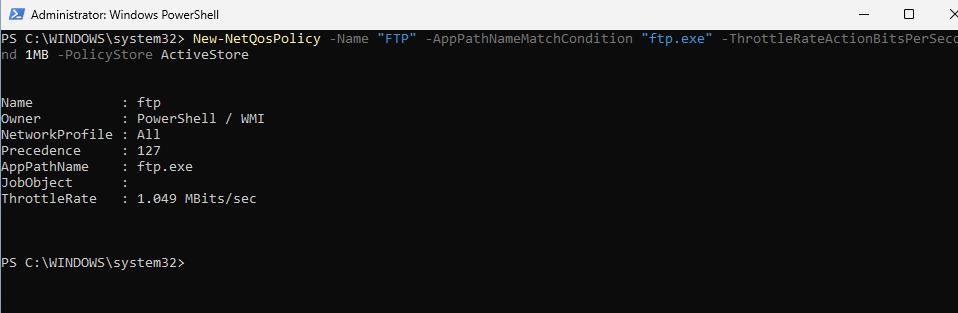
The ThrottleRateActionBitsPerSecond parameter defines the maximum outbound bandwidth limit for traffic that matches the application or the protocol. Grimur Grimursson demonstrated in an article that it is possible to abuse the ThrottleRateActionBitsPerSecond to prevent telemetry generated in the EDR cloud console. It should be noted that the technique doesn’t impair EDR rules, since some EDRs like CrowdStrike have their rules, stack deployed locally in the endpoints. Setting the ThrottleRateActionBitsPerSecond to 1KBps limits bandwidth to 8,000 bits per second disrupting Internet connectivity for many modern applications like EDR. A normal TLS 1.3 HTTPS connection with server authentication only, requires 3-6 KB for a small certificate chain and 6-15 KB for a larger certificate chain. This will cause the EDR agent to timeout since it will not be possible to complete the full TLS handshake due to the bandwidth limitation. The technique is different compared to the EDR Silencing because packets are not dropped but limited due to the very low bandwidth.
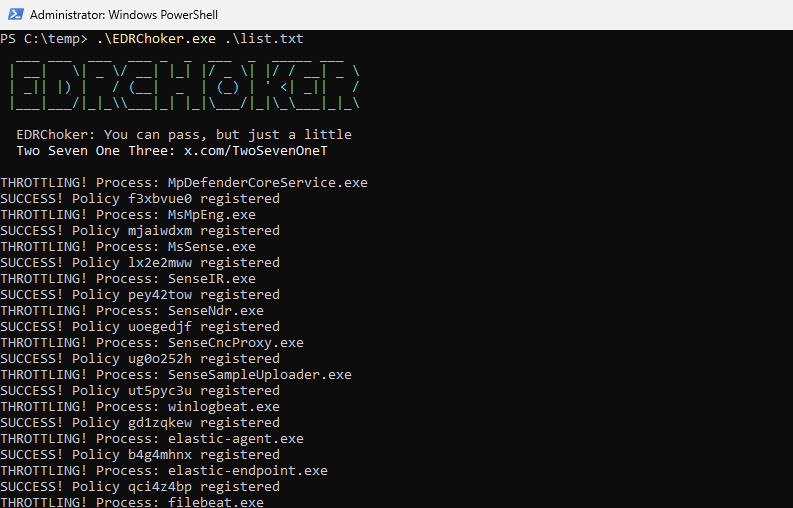
A proof of concept was released called EDRChoker that takes a list of common EDR process names and creates QoS policies that restrict the bandwidth of these processes to 8 bits per second. It should be noted that Administrator-level privileges are required to create Quality of Service policies.
EDRChoker.exe list.txt
According to the code, the proof-of-concept creates the Quality-of-Service policy using WMI. Initially, a connection is established to the CIM namespace where the QoS provider is stored and binds to the NetQoSPolicySettingData class. A new policy object is created, and the owner is set to 1. This is equivalent to the New-NetQoSPolicy -PolicyStore ActiveStore command. The policy name is also randomized using 8 characters length.
        static void CreateThrottleCurlPolicyPureWmi(string procName)
        {
            try
            {
                var scope = new ManagementScope(@"\\.\ROOT\StandardCimv2");
                scope.Connect();

                var managementPath = new ManagementPath("MSFT_NetQosPolicySettingData");
                var policyClass = new ManagementClass(scope, managementPath, null);

                // Construct a raw, detached memory object mapping the exact schema fields
                ManagementObject newPolicy = policyClass.CreateInstance();

                newPolicy["Owner"] = 1;

                string guid = Guid.NewGuid().ToString();
                string policyName = Path.GetRandomFileName().Replace(".", "").Substring(0, 8);
                newPolicy["Name"] = policyName;
The following diagram illustrates how QoS policies can be used to restrict EDR agents reporting back to the cloud console:
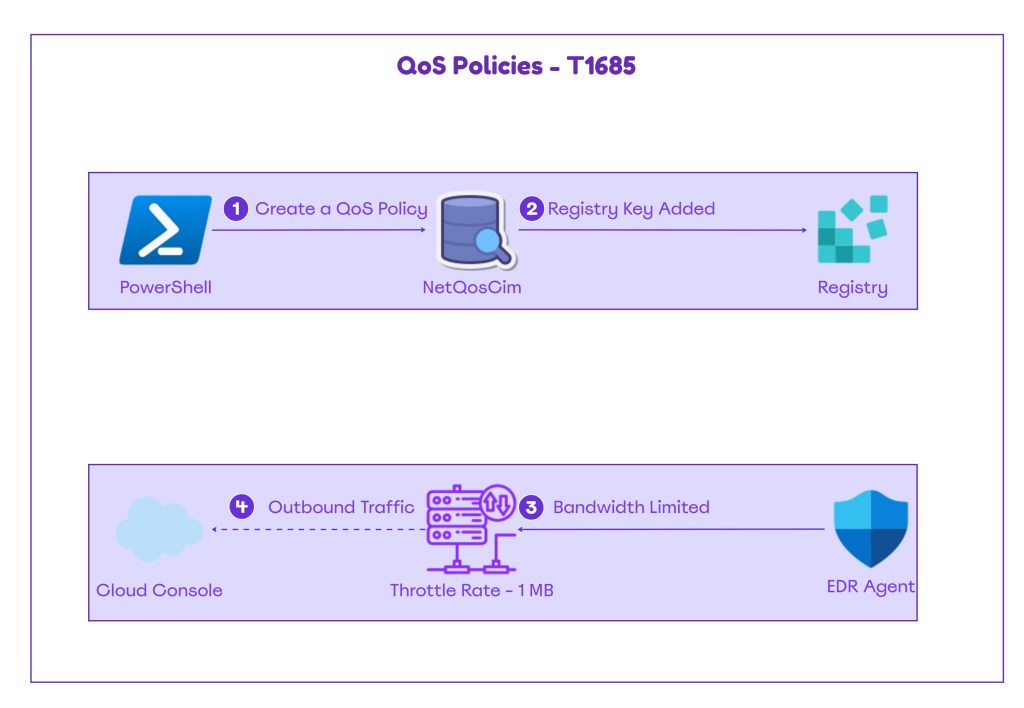
The technique abstract is displayed below:
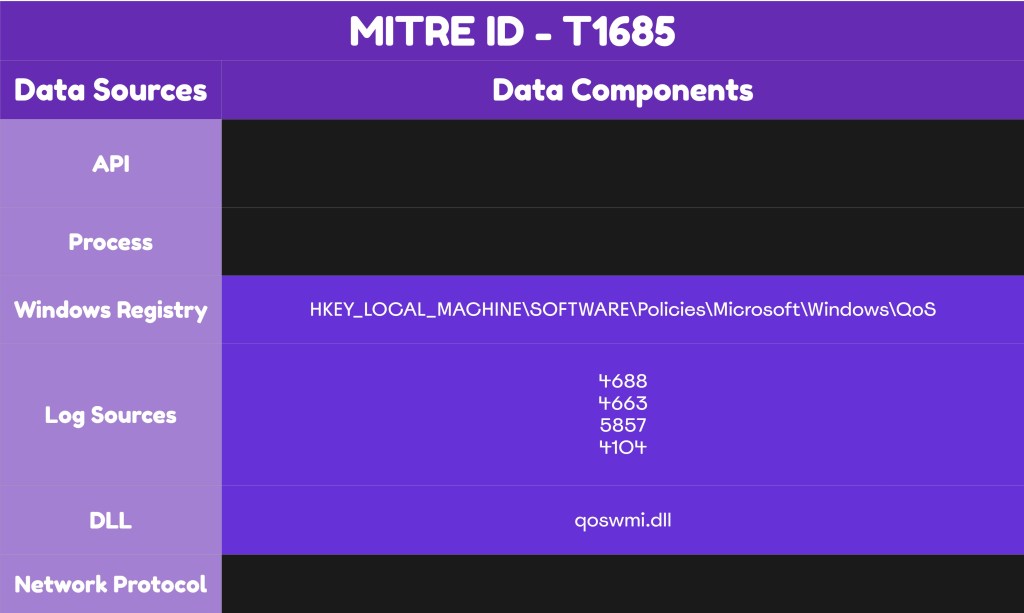
The playbook of the technique can be found below:
[[Playbook.QoS Policies]]
id = "1.0.0"
name = "1.0.0 - QoS Policies"
description = "EDR agent communucation disruption via QoS Policies"
tooling.name = "EDRChoker"
tooling.references = [
    "https://github.com/TwoSevenOneT/EDRChoker"
]
executionSteps = [
    "New-NetQosPolicy -Name "ipurple" -AppPathNameMatchCondition "ipurple.exe" -ThrottleRateActionBitsPerSecond 1MB -PolicyStore ActiveStore"
]
executionRequirements = [
    "Local Administrator"
]
Detection
The technique of abusing QoS policies to restrict EDR agents from communicating back to their cloud server introduces multiple challenges for cyber defense teams. Threat actors could directly abuse the New-NetQoSPolicy cmdlet or utilize WMI to create new policies on the asset. Therefore, there is no need to introduce new binaries on the host. The other challenge is that EDR agents might continue to appear as healthy. It is recommended that SOC teams should not rely on EDR queries to engineer detections, but focus on other suspicious patterns, especially if QoS policies are not used in their environments. Non-persistent Quality of Service policies are stored in ActiveStore, and SOC teams could use the Get-NetQoSPolicy cmdlet to review policies either proactively or reactively during an incident.
Get-NetQoSPolicy -PolicyStore ActiveStore
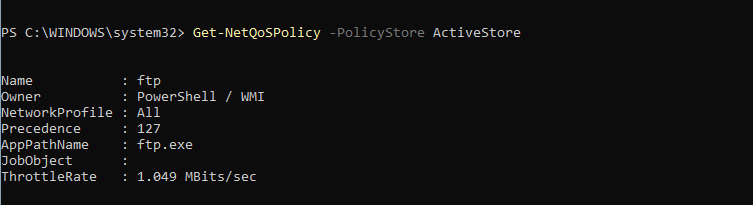
For hosts that might contain multiple policies, the following PowerShell code could be used to format the output in a table using only the Name, PolicyStore, AppPathName, and ThrottleRate.
$stores = @(
    "ActiveStore"
)

$results = foreach ($store in $stores) {
    try {
        Get-NetQosPolicy -PolicyStore $store | Select-Object *,
            @{Name="PolicyStore";Expression={$store}}
    } catch {}
}

$results | Sort-Object PolicyStore, Name | Format-Table Name, PolicyStore, AppPathNameMatchCondition, ThrottleRateActionBitsPerSecond
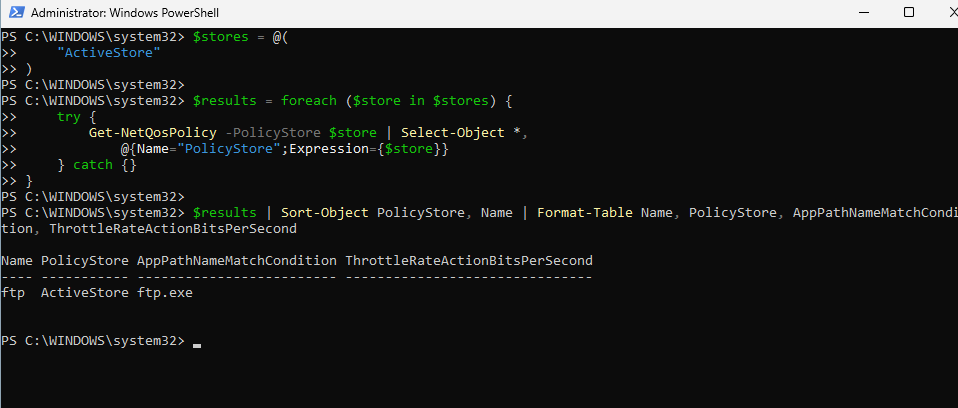
The technique has two methods of execution: PowerShell and WMI. However, the PowerShell cmdlet is just a wrapper for the WMI execution. Organizations should ensure that the required visibility is enabled to ensure PowerShell activities are captured in the logs. From the Group Policy, the settings Turn on Module Logging and Turn on PowerShell Script Block Logging should be enabled.
Computer Configuration → Administrative Templates → Windows Components → Windows PowerShell
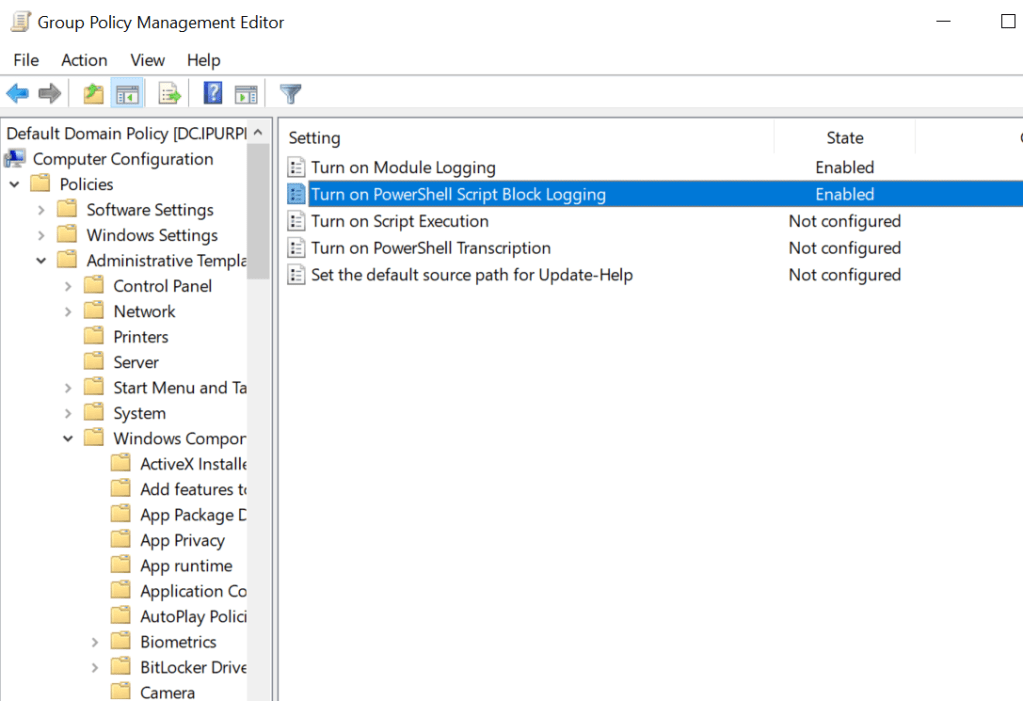
The following command will create a new QoS policy under the name ipurple for testing purposes:
New-NetQosPolicy -Name "ipurple" -AppPathNameMatchCondition "ipurple.exe" -ThrottleRateActionBitsPerSecond 1MB -PolicyStore ActiveStore
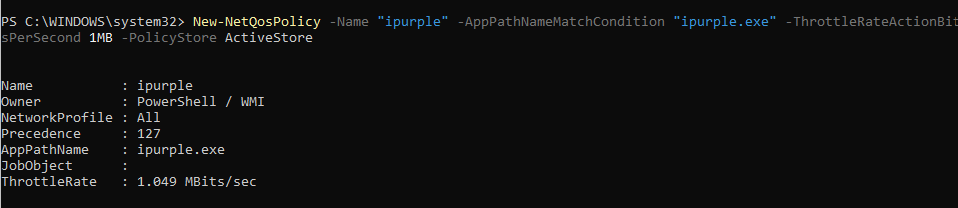
The execution will be captured under the PowerShell event ID 4104. In environments that don’t utilize QoS policies, SOC teams should treat execution of this command as malicious. However, if QoS policies are used, these should be officially recorded and approved to assist with correlation during threat hunting activities. The field ThrottleRateActionBitsPerSecond, which defines the outbound traffic bandwidth, is critical for distinguishing arbitrary QoS policies from legitimate ones.
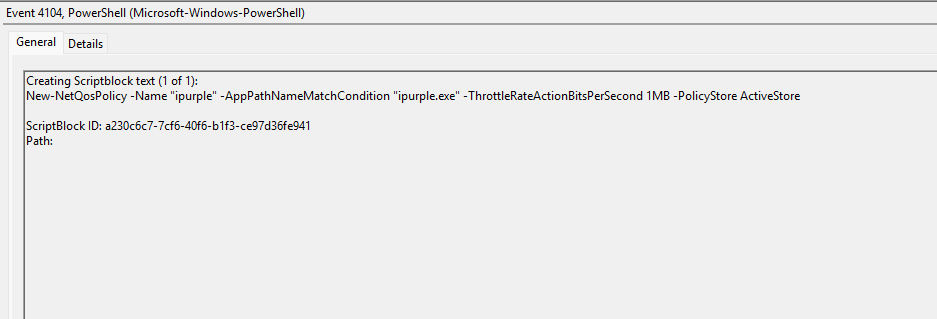
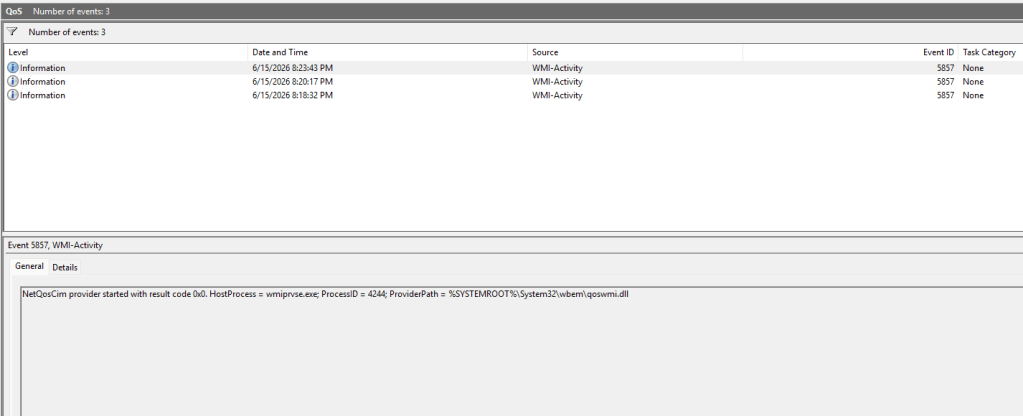
It should be noted that there is no generation of event ID 4103 because the New-NetQoSPolicy is a binary CIM cmdlet that performs no PowerShell pipeline script execution. Another observed behaviour is the loading of the qoswmi.dll into the WmiPrvSE.exe process. This activity is generated when the NetQoSPolicy cmdlet touches the CIM layer to initiate the NetQosCim provider. The event ID 5857 is common between both PowerShell and WMI executions. SOC teams should use this event ID as an indicator of QoS policies abuse.
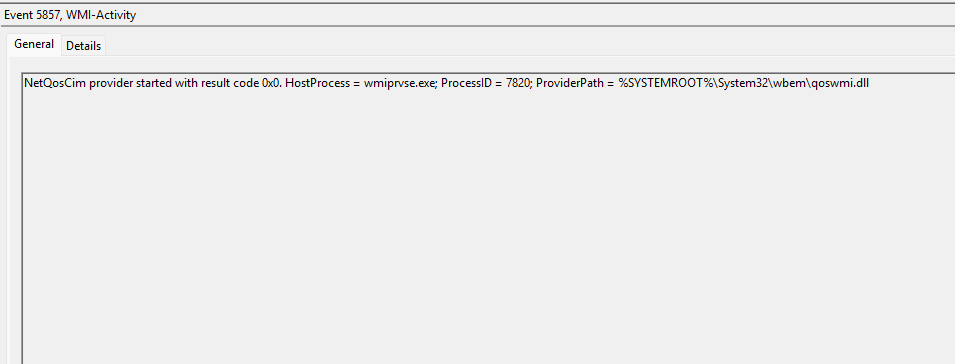
The following PowerShell snippet can be used to query WMI logs that match the NetQosCim provider and qoswmi.dll.
Get-WinEvent -LogName 'Microsoft-Windows-WMI-Activity/Operational' -MaxEvents 5000 |
  Where-Object { $_.Id -eq 5857 -and $_.Message -match 'NetQosCim|qoswmi\.dll' } |
  ForEach-Object {
    $x = [xml]$_.ToXml()
    [pscustomobject]@{
      Time         = $_.TimeCreated
      Provider     = $x.Event.UserData.Operation_StartedOperational.ProviderName
      HostProcess  = $x.Event.UserData.Operation_StartedOperational.HostProcess
      WmiPrvSE_PID = $x.Event.UserData.Operation_StartedOperational.ProcessID
      ProviderPath = $x.Event.UserData.Operation_StartedOperational.ProviderPath
    }
  } | Sort-Object Time -Descending | Format-Table -Auto
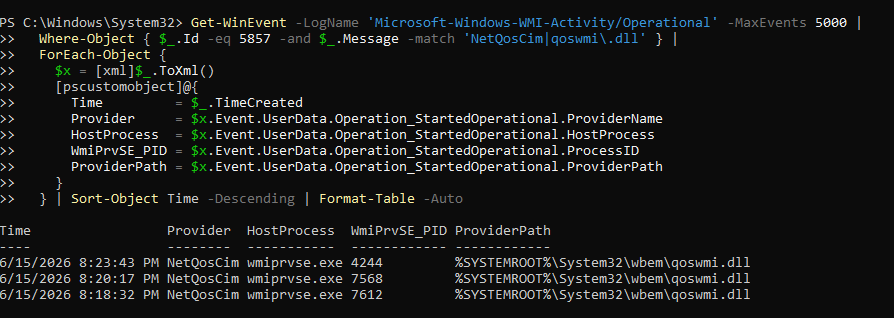
An alternative method is to enumerate all active QoS policies is to query the QoS policy settings using a WMI query.
Get-CimInstance -Namespace root/StandardCimv2 -ClassName MSFT_NetQosPolicySettingData
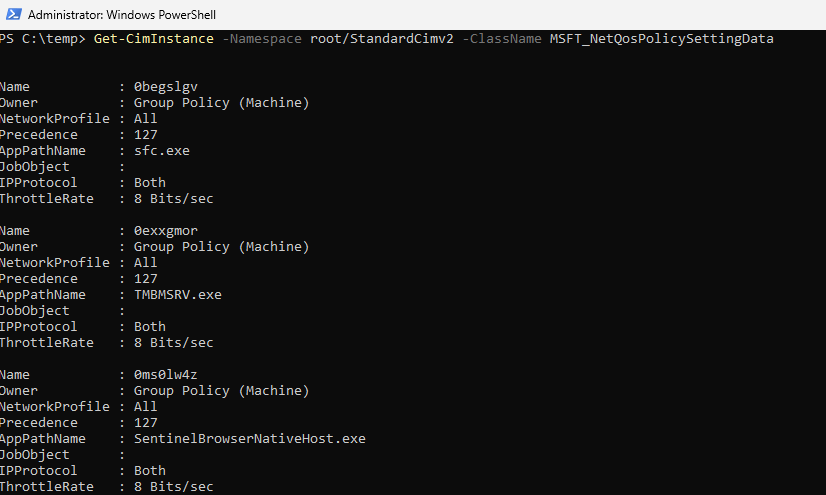
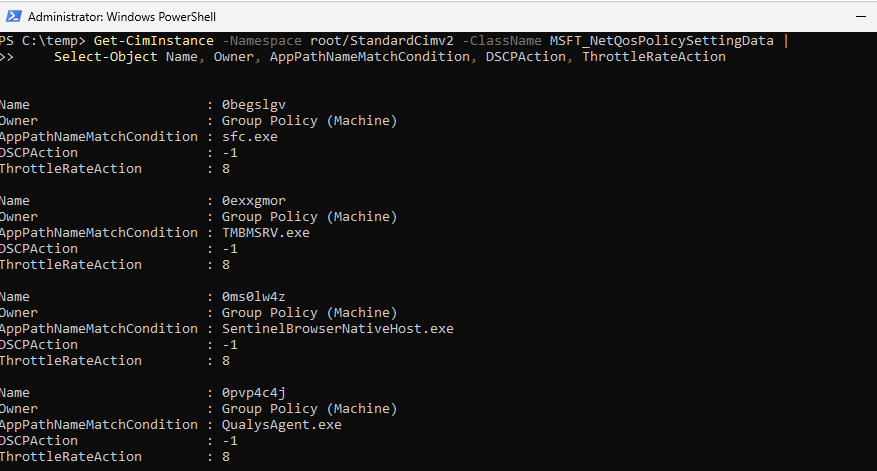
The output could be formatted to target only specific fields:
Get-CimInstance -Namespace root/StandardCimv2 -ClassName MSFT_NetQosPolicySettingData | Select-Object Name, Owner, AppPathNameMatchCondition, DSCPAction, ThrottleRateAction
SOC teams could use the following Windows Event Filter (WEF) to collect only the relevant 5857 event IDs associated with NetQosCim provider to reduce the volume size of WMI events.
<QueryList>
  <Query Id="0" Path="Microsoft-Windows-WMI-Activity/Operational">
    <Select Path="Microsoft-Windows-WMI-Activity/Operational">
      *[System[(EventID=5857)]]
      and
      *[UserData/Operation_StartedOperational[ProviderName='NetQosCim']]
    </Select>
  </Query>
</QueryList>
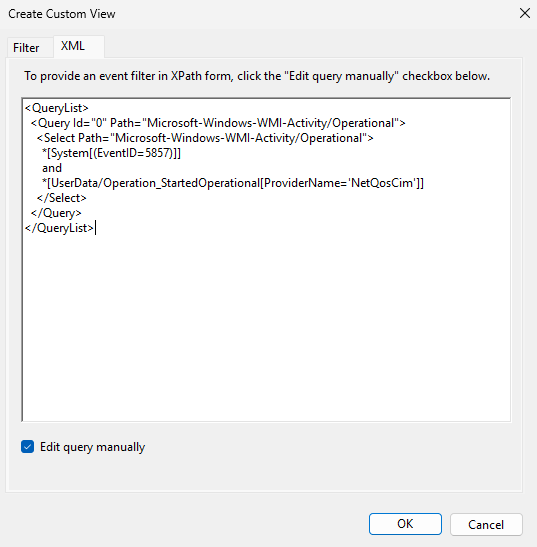
When the filter is loaded in the Windows Events, only the relevant logs will be displayed.
Samir Bousseaden released a fileless WMI remediation called EDRUnChoker that registers a permanent subscription in root\subscription. The tool enumerates every 5 seconds QoS policies on ActiveStore and GPO, and attempts to remove arbitrary policies.
.\Install-EdrChokerWmiDefense.ps1
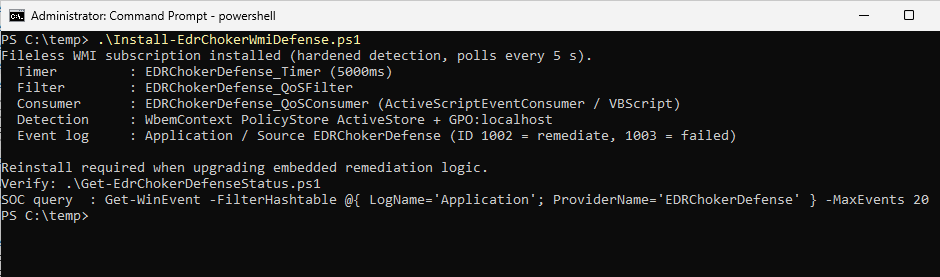
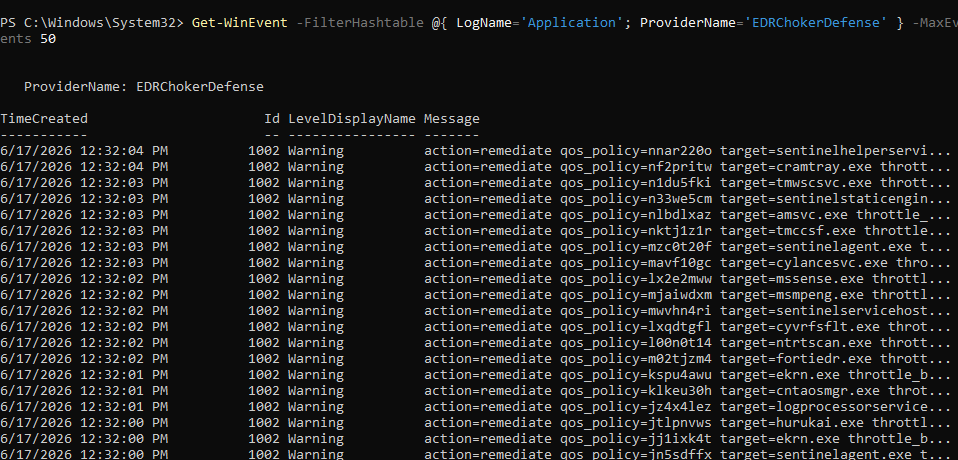
The subscription is visible in the Application logs using the data source EDRChokerDefense.
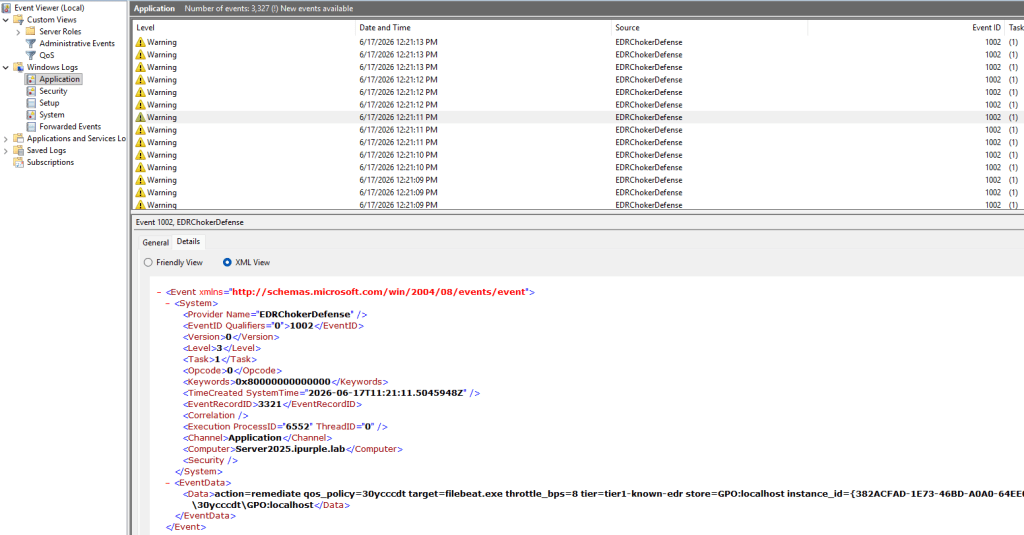
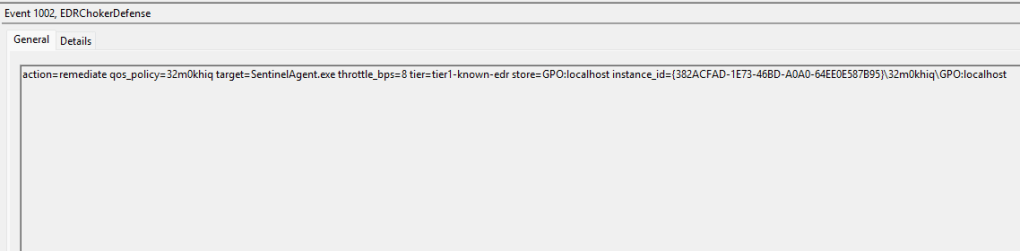
The event ID 1002 captures the malicious QoS policies to aid investigations. The tool contains a known list of EDR processes hardcoded to match the policy with the application name and identify malicious entries.
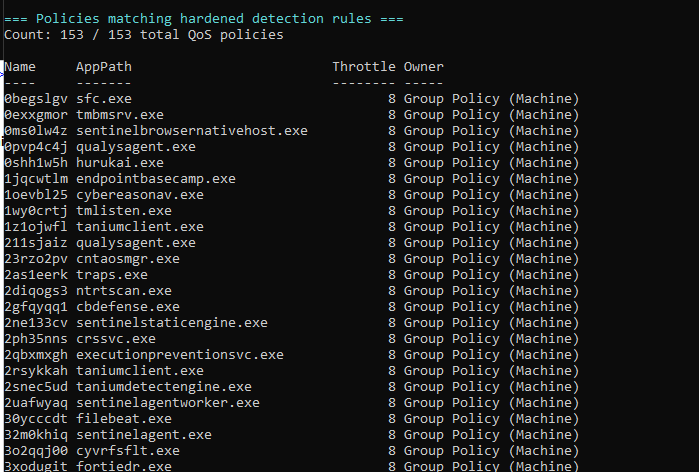
The malicious policies are also displayed in the console. The tool uses two conditions to flag a policy as malicious: Known process names of EDR agents and aggressive throttle rates of ≤ 1 Mbps.
SOC teams can use the following PowerShell command to query events from the provider registered by the proof of concept on the asset.
Get-WinEvent -FilterHashtable @{ LogName='Application'; ProviderName='EDRChokerDefense' } -MaxEvents 50
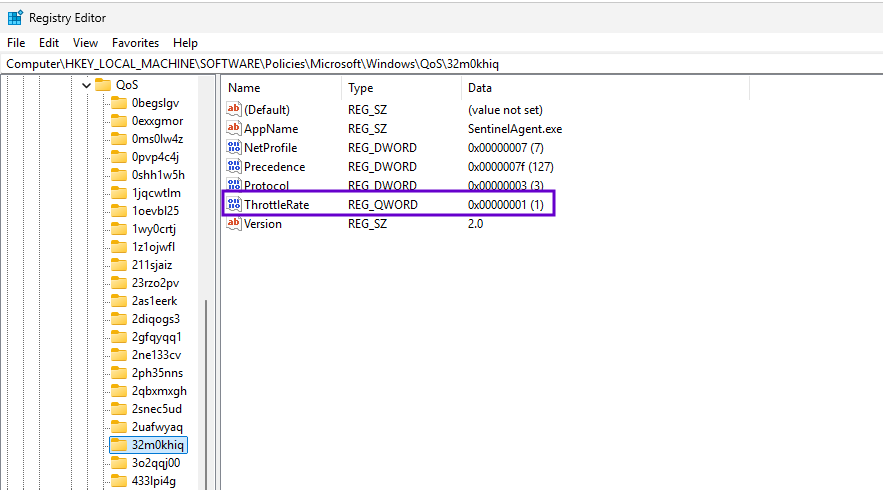
Persistent QoS policies are stored in the registry. It should be noted that when the ActiveStore parameter is used, the QoS policy is stored in-memory and is not permanent. Therefore, monitoring the associated key cannot be used as a reliable detection because registry entries will not be created. However, it can be used to supplement coverage on detecting persistent arbitrary QoS policies. Persistent QoS policies are stored under the following key:
HKEY_LOCAL_MACHINE\SOFTWARE\Policies\Microsoft\Windows\QoS
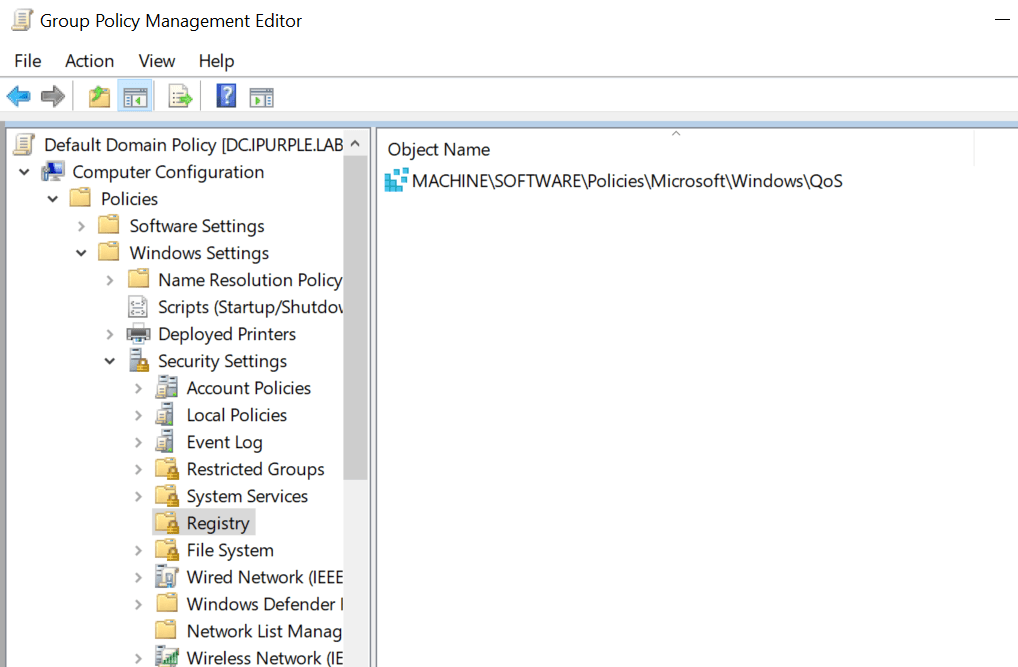
An entry should be created under the Registry container in the Group Policy Management Editor.
The permissions Query Value, Set Value, and Create Subkey should be enabled from the advanced permissions:
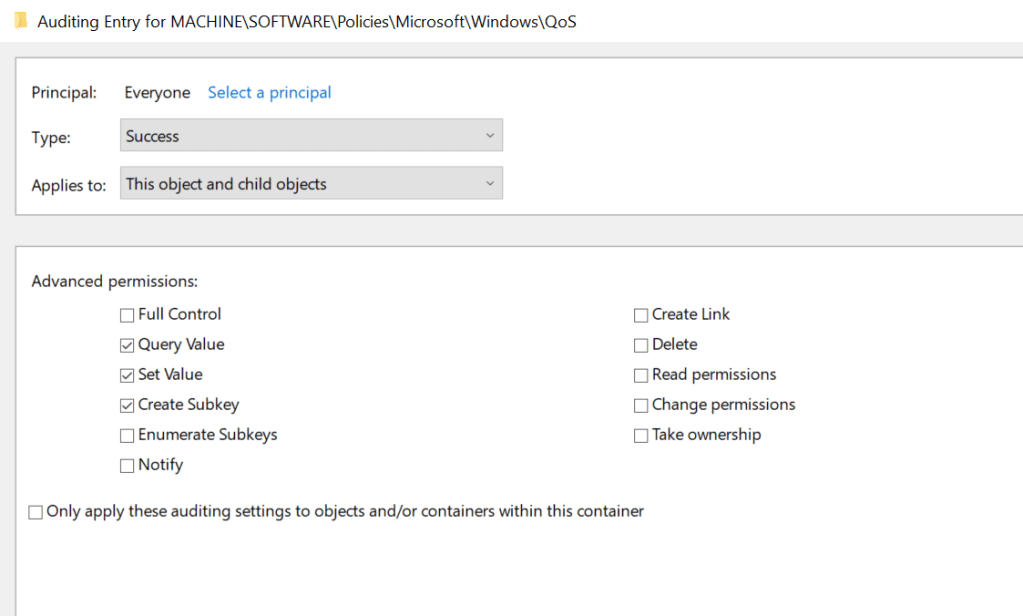
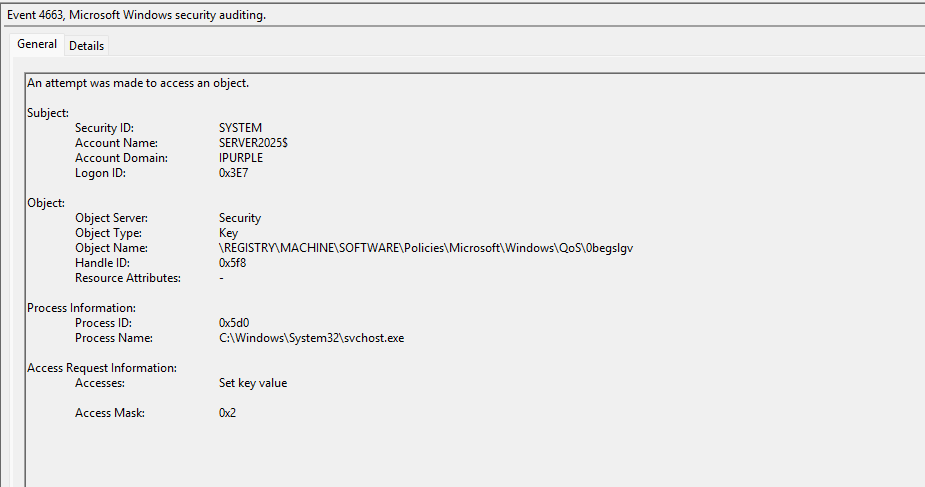
When a persistent Quality of Service policy is created, the event ID 4663 will be generated in the asset. The important field is the Object Name that discloses the name of the QoS policy that could be correlated with ThrottleRate registry key to identify the size of the bandwidth.
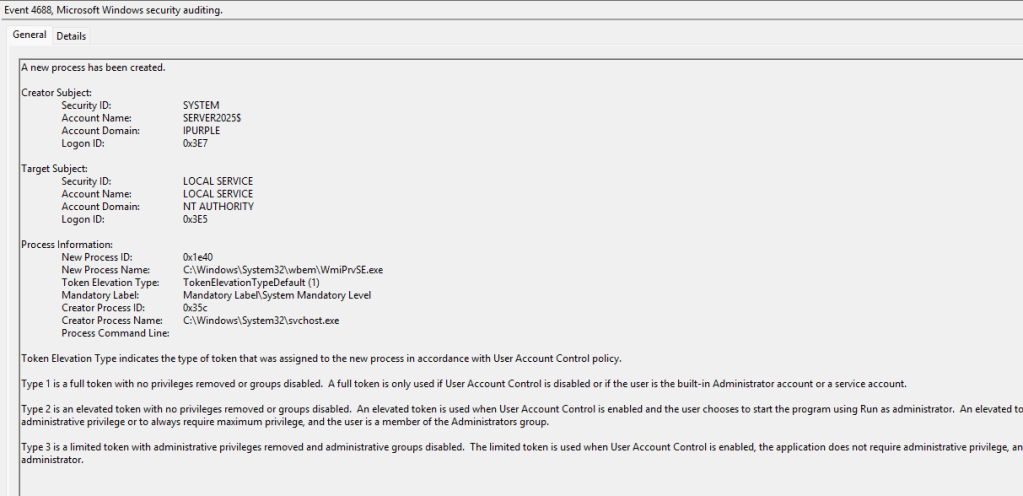
During the creation of the policy, a new process (WmiPrvSE.exe) is spawned by svchost.exe. It should be noted that this process alone is very common, and it should not be included in the overall detection strategy, but as part of enrichment during log correlation.
The following SIGMA rule can be used to detect the behaviour of this technique.
title: Windows NetQosCim WMI Provider Started
id: 1b8c9b87-f70c-40a2-9d06-877fdd0042cc
status: experimental
description: Detects the NetQosCim WMI provider starting through qoswmi.dll.
references:
  - https://github.com/TwoSevenOneT/EDRChoker
  - https://www.zerosalarium.com/2026/06/edrchoker-choking-telemetry-stream-block-edr.html
author: Panos Gkatziroulis
date: 2026-06-14
tags:
  - attack.stealth
  - attack.t1685
logsource:
  product: windows
  service: wmi
detection:
  selection_event:
    EventID: 5857
  selection_structured:
    ProviderName: 'NetQosCim'
    ProviderPath|endswith:
      - '\System32\wbem\qoswmi.dll'
      - '\SysWOW64\wbem\qoswmi.dll'
  selection_message:
    Message|contains|all:
      - 'NetQosCim'
      - 'qoswmi.dll'
  condition: selection_event and (selection_structured or selection_message)
falsepositives:
  - Legitimate QoS policy administration
  - QoS policy inventory scripts
  - Group Policy or Intune-driven QoS activity
level: medium
The following table summarizes the data sources and data components required to detect this technique:
| Data Source | Data Component | Detects |
|---|---|---|
| Windows Events | 4688 | Process Creation |
| Windows Events | 4663 | Registry Modification |
| ETW | 5857 | NetQosCim Provider |
| ETW | 4104 | PowerShell ScriptBlock |
In summary, causing EDR agents to lose connectivity by throttling the bandwidth limit prevents SOC teams from receiving alerts and responding quickly during an attack. EDR agents might still be able to protect endpoints locally, but removing the ability to receive, investigate alerts, and respond could maximize the mean-time-to-detect and mean-time-to-respond for SOC teams. Organizations should avoid creating detection rules with the EDR and focus their detection strategies towards PowerShell and WMI ETW events. Persistent QoS policies can also be detected by monitoring the registry key that stores them. In environments without deployed QoS policies, the most reliable detection involves activities related to the NetQosCim provider.


Leave a comment