

Text template files can contain C# or Visual Basic code that could be compiled and executed at build time. Threat actors can create or modify .tt files to execute code in the context of a trusted process in workstations of developers. Furthermore, threat actors could tamper .tt files and merge them into an organization pipeline to achieve code execution in supply chain compromise scenarios. Execution of text template files is conducting by invoking one of these four binaries:
- TextTransform.exe
- TextTransformCore.exe
- t4.exe
- MSBuild.exe
A pull request was submitted to the LOLBAS project that documented cases for the TextTransform.exe and TextTransformCore.exe. Casey Smith also released the TextTransformer repository that contained examples of abusing TextTransform.exe locally and t4.exe using GitHub actions. However, the local execution of T4 templates via t4.exe and the abuse of .tt files through MSBuild.exe remain largery undocumented and are examined in this article.
Playbook
TextTransform.exe is a Microsoft Visual Studio command-line utility that processes T4 (Text Template Transformation Toolkit) text templates (.tt) to generate text, source code, configuration, or other output. During transformation, C# or Visual Basic control blocks is evaluated and executed. The TextTransformCore.exe is the modern .NET alternative to TextTransform.exe, to process T4 templates.
Threat actors can abuse these utilities to proxy the execution of arbitrary C# payloads.
<#@ template language="C#" #>
<#@ output extension=".txt" #>
<#@ import namespace="System" #>
<#@ assembly name="System.Windows.Forms" #>
<#@ import namespace="System.Windows.Forms" #>
Current date: <#= DateTime.Now.ToString("yyyy-MM-dd HH:mm:ss") #>
<#
	MessageBox.Show("iPurple.team", "iPurple.team", MessageBoxButtons.OK, MessageBoxIcon.Information);
#>

The following code samples can be used to execute a process. The calc.exe is spawned as a child process.
<#@ template language="C#" #>
<#@ assembly name="System.Diagnostics.Process" #>
<#@ assembly name="System.ComponentModel.Primitives" #>
<#@ import namespace="System.Diagnostics" #>
<#
	Process.Start("calc.exe");
#>
<#@ template language="C#" #>
<#@ import namespace="System.Diagnostics" #>
<#
    Process.Start("calc.exe");
#>

The following sample uses Visual Basic as a language instead of C#.
<#@ template language="VB" #>
<#@ import namespace="System.Diagnostics" #>
<#
	Process.Start("calc.exe")
#>

t4.exe
Another binary that can process text templates is the t4.exe. Unlike the TextTransformation.exe binary, t4.exe is not a native Microsoft Visual Studio binary. The binary t4.exe is part of the dotnet-t4 (an open-source, cross-platform .NET global tool) package that can process T4 templates. If the t4 binary is missing, the following command can install it.
dotnet tool install -g dotnet-t4
There are multiple ways to execute text templates via the t4.exe binary. The table below summarizes all the available methods:
| Command | Description |
|---|---|
| t4.exe template.tt | Default Transformation |
| t4.exe -o output.exe template.tt | Set the output path/name |
| t4 -r System.Net.Http.dll template.tt | Adds an assembly reference |
| t4 -u System.Linq template.tt | Adds a C# namespace imports to the generated template class |
| t4 -I ./includes template.tt | Adds an include search directory |
| t4 -p:name=value template.tt | Supplies a session parameter |
| t4 –preprocess -o Template.cs template.tt | Creates C# source code |
The t4.exe binary is stored under the global tool’s directory.

MSBuild.exe
The binary msbuild.exe can also process T4 (.tt) files through the Visual Studio text templating targets. The file Microsoft.TextTemplating.targets defines targets such as transform and loads the T4 build-task assembly to locate registered .tt files, process them, and track generated outputs. The build-task assembly is the Microsoft.TextTemplating.Build.Tasks.dll.
The Microsoft.TextTemplating.targets is typically imported into a C# project file from the Visual Studio MSBuild extensions path. Threat actors could plant malicious text template files into the root directory of a C# project (MessageBox.tt).

The .csproj file is also tampered with the following entries. The <None Include="...\calc.tt"> defines the full path to the arbitrary text template file with key metadata (TextTemplatingFileGenerator). Declaring the expected generated output enables MSBuild to track the generated file. As discussed above, the Microsoft.TextTemplating.targets import loads T4-specific MSBuild targets and tasks to process .tt files.
<ItemGroup>
  <None Include="C:\Users\panag\source\repos\SessionEnumeration\SessionEnumeration\calc.tt">
    <Generator>TextTemplatingFileGenerator</Generator>
    <LastGenOutput>calc.txt</LastGenOutput>
  </None>
</ItemGroup>
  <Import Project="$(MSBuildToolsPath)\Microsoft.CSharp.targets" />
<Import Project="$(MSBuildExtensionsPath)\Microsoft\VisualStudio\v17.0\TextTemplating\Microsoft.TextTemplating.targets" />

Executing MSBuild.exe with the transform flag and by defining the path of the .tt file will cause the code to execute.
MSBuild.exe "C:\Users\panag\source\repos\SessionEnumeration\SessionEnumeration\SessionEnumeration.csproj" /t:Transform /p:TransformFile="C:\Users\panag\source\repos\SessionEnumeration\SessionEnumeration\MessageBox.tt"

Similarly, the following .tt file will execute a calculator.
MSBuild.exe "C:\Users\panag\source\repos\SessionEnumeration\SessionEnumeration\SessionEnumeration.csproj" /t:Transform /p:TransformFile="C:\Users\panag\source\repos\SessionEnumeration\SessionEnumeration\calc.tt"

Threat actors could also populate the .csproj file with multiple references to text template files that could invoked separately.

The following video demonstrated the above scenario where the target .csproj file has been tampered with multiple text template files.
Running a calculator or a message box it is sufficient for a purple team operation. However, it is also possible to fully weaponize .tt files to execute arbitrary code in memory. A proof of concept will not be disclosed to prevent abuse from less sophisticated threat actors.
The diagram of the technique (msbuild) is displayed below:

The playbook of the execution via text templates is displayed below:
[[Playbook.T1127]]
id = "1.0.0"
name = "1.0.0" - "Text Templates"
description = "Code Execution via TextTransform & TextTransformCore."
tooling.name = "N/A"
tooling.references = [
    "N/A"
]
executionSteps = [
    "TextTransform.exe <example.tt>",
    "TextTransformCore.exe <example.tt>"

]
executionRequirements = [
    "None"
]

id = "1.1.0"
name = "1.1.0" - "Text Templates"
description = "Code Execution via t4 binary."
tooling.name = "N/A"
tooling.references = [
    "N/A"
]
executionSteps = [
    "t4.exe <example.tt>"

]
executionRequirements = [
    "dotnet-t4 package"
]

id = "1.2.0"
name = "1.2.0" - "Text Templates"
description = "Code Execution via msbuild."
tooling.name = "N/A"
tooling.references = [
    "N/A"
]
executionSteps = [
    "MSBuild.exe "C:\<folder>\<name>.csproj" /t:Transform /p:TransformFile="C:\<folder>\<name>.tt""

]
executionRequirements = [
    "N/A"
]
Detection
Organizations should treat .tt files as malicious and prevent execution, especially if there are no legitimate use cases. The initial detection indicator is process creation telemetry for binaries capable of processing T4 text templates. Furthermore, the parent-child process should be investigated for suspicious child processes generated from these binaries (for example cmd.exe spawns unsigned binaries).
Processing T4 text templates via msbuild.exe generates an increased volume of temporary files. Monitoring for file creation events within the C:\Users<user>\AppData\Local\Temp directory and correlating this behaviour with process creation, and image load events of text templating related DLLs, is considered a reliable detection approach.
However, the other binaries that can process T4 text templates do not exhibit the same behaviour as msbuild.exe, and detection efforts should focus on process creation events and outbound communication.
The following Sysmon configuration can capture process creation, image load, and file creation events.
<Sysmon schemaversion="4.82">
  <HashAlgorithms>SHA256</HashAlgorithms>

  <EventFiltering>

    <!-- Sysmon Event ID 1: process creation -->
    <RuleGroup name="T4-host-process-create" groupRelation="or">
      <ProcessCreate onmatch="include">
        <Image condition="end with">\TextTransform.exe</Image>
        <Image condition="end with">\TextTransformCore.exe</Image>
        <Image condition="end with">\t4.exe</Image>
        <Image condition="end with">\MSBuild.exe</Image>
      </ProcessCreate>
    </RuleGroup>

    <!-- Sysmon Event ID 3: network connections -->
    <RuleGroup name="T4-host-network" groupRelation="or">
      <NetworkConnect onmatch="include">
        <Image condition="end with">\TextTransform.exe</Image>
        <Image condition="end with">\TextTransformCore.exe</Image>
        <Image condition="end with">\t4.exe</Image>
        <Image condition="end with">\MSBuild.exe</Image>
      </NetworkConnect>
    </RuleGroup>

    <!-- Sysmon Event ID 7: DLL/module loads -->
    <RuleGroup name="T4-host-module-loads" groupRelation="or">
      <ImageLoad onmatch="include">
        <Image condition="end with">\MSBuild.exe</Image>
      </ImageLoad>
    </RuleGroup>

    <!-- Sysmon Event ID 11: file creation/overwrite -->
    <RuleGroup name="T4-host-file-create" groupRelation="or">
      <FileCreate onmatch="include">
        <Image condition="end with">\MSBuild.exe</Image>
      </FileCreate>
    </RuleGroup>

  </EventFiltering>
</Sysmon>
Process Creation
Execution of the TextTransform.exe and t4.exe will generate the following process creation events in Sysmon. SOC teams should engineer detection rules to capture TextTransform.exe and t4.exe processes, especially if T4 text template files are not used by developers across the organization.


When t4.exe processes a .tt text template, it also launches the dotnet.exe process. Specifically, the Roslyn C# compiler (csc.dll) is invoked to compile the C# source code from the template before the output is executed. The response.rsp is the file that contains the generated source path, compiler settings, and assembly references. The execution flow is highlighted below:
t4.exe → dotnet.exe → csc.dll → temporary compiled template → rendered output file

Compiling text templates via msbuild.exe generates different telemetry, since the command line arguments contain the path of the .csproj file, the /t, and /p flags.


The csc.exe C# compiler is also invoked when msbuild.exe is used to compile T4 files.

File Creation
Execution of T4 template files via msbuild.exe is considered extremely noisy compared to the other binaries. Specifically, the msbuild.exe writes multiple temporary files to the following directory. Sysmon event ID 11 can capture file creation events.
C:\Users\<user>AppData\Local\Temp\


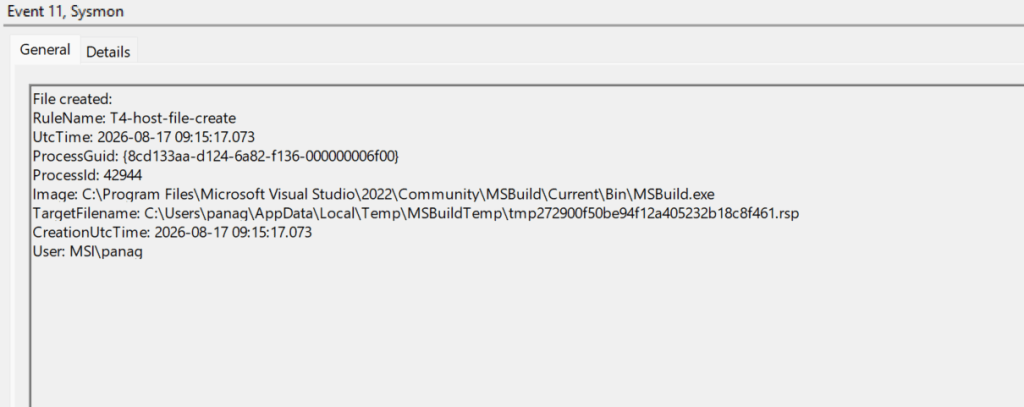
Image Load
Another detection opportunity that is observed only when compiling T4 files via msbuild.exe is that three text templating DLLs are loaded in the process. Execution with msbuild.exe requires explicity importing Microsoft.TextTemplating.targets in the C# project file. Importing this file activates the supporting dependencies:
Microsoft.VisualStudio.TextTemplating.dll,Microsoft.VisualStudio.TextTemplating.Interfaces.11.0.dll, andMicrosoft.VisualStudio.TextTemplating.Sdk.Host.dll.
When msbuild.exe runs with the /t:Transform flag, the above assemblies are loaded to process the .tt file.
<Import Project="$(MSBuildExtensionsPath)\Microsoft\VisualStudio\v17.0\TextTemplating\Microsoft.TextTemplating.targets" />
Therefore, when MSBuild.exe is attempting to load these DLLs, it is an indicator that the C# project file was modified to compile T4 text template files.


The following table sumarizes the data sources and data components required to detect code execution via text template:
| Data Source | Data Component | Detects |
|---|---|---|
| Sysmon | 1 | TextTransform.exe TextTransformCore.exe t4.exe msbuild.exe |
| Sysmon | 7 | msbuild.exe |
| Sysmon | 1 | msbuild.exe |
Organizations should treat text template files as malicious because they can contain C# code that legitimate trusted binaries might execute. Process creation telemetry is required to detect code execution from text template files. The msbuild.exe binary generates multiple detection opportunities (File Creation, Image Load) compared to the other binaries. Organizations should investigate if text templates are used by developers and engineer rules to detect execution at an early stage.


Leave a Reply