
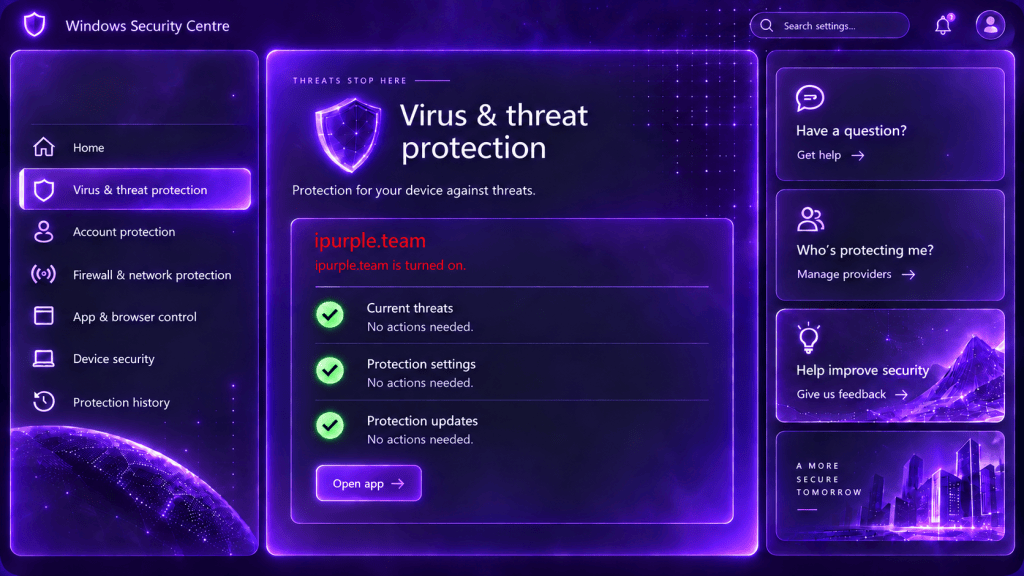
The Windows Security Center collects and presents information about the status of the antivirus control (Windows Defender or 3rd party). When a third-party antivirus is installed, Windows Defender transitions to passive mode to avoid scanning collisions. Threat actors can abuse the Windows Security Center (WSC) API to disable Windows Defender protections by faking the registration of an antivirus product. The technique enables threat actors to degrade the security on endpoints without generating the usual tampering indicators or introduce a driver. It should be highlighted, that the technique affects only on endpoints and not on Windows servers.
Playbook
The Windows Security Center service (wscsvc) is a Windows health monitoring service that collects and presents the security status of the device. The service tracks whether key protection such as antivirus, antispyware, Firewall products, and related security features are enabled, current or reporting problems. The collected information is presented in the Windows Security interface. However, the security center doesn’t itself scan files, block threats, or provide antivirus protection.
Third-party security products register themselves with the service through the Windows Security Center API (wscapi.dll). Once a third-party antivirus is installed, Windows Defender drops into passive mode to avoid collision between two real-time engines.
A proof of concept was released in the public domain by es3n1n called defendnot that registers a fake antivirus product to disable Windows Defender. The tool leverages undocumented Windows Security Center APIs to register a fake antivirus solution to force Windows Defender into a disabled state. Specifically, the proof of concept abuses the IWscAVStatus COM interface to register an arbitrary antivirus and communicate the antivirus product state to Windows Security Center.
namespace defendnot {
    namespace detail {
        constexpr GUID IID_IWscAVStatus = {0x3901A765, 0xAB91, 0x4BA9, {0xA5, 0x53, 0x5B, 0x85, 0x38, 0xDE, 0xB8, 0x40}};
The core functions of the tool are the Register and UpdateStatus. The Register() submits a signed product executable path and display name so the security center can identify the antivirus product. The UpdateStatus() conduct the report update to determine whether the antivirus reports itself as enabled, disabled, expired, or otherwise unhealthy.
 class IWscAVStatus4 : public com::IBaseObject<detail::CLSID_WscIsv, detail::IID_IWscAVStatus4> {
 public:
     virtual HRESULT COM_CALLCONV Register(BSTR path_to_signed_product_exe, BSTR display_name, std::uint32_t, std::uint32_t) = 0;
     virtual HRESULT COM_CALLCONV Unregister() = 0;
     virtual HRESULT COM_CALLCONV UpdateStatus(WSCSecurityProductState state, BOOL unk) = 0;
     virtual HRESULT COM_CALLCONV InitiateOfflineCleaning(std::uint16_t*, std::uint16_t*) = 0;
     virtual HRESULT COM_CALLCONV NotifyUserForNearExpiration(std::uint32_t) = 0;
     virtual HRESULT COM_CALLCONV MakeDefaultProductRequest() = 0;
     virtual HRESULT COM_CALLCONV IsDefaultProductEnforced(std::uint32_t* result) = 0;
     virtual HRESULT COM_CALLCONV UpdateScanSubstatus(WSCSecurityProductSubStatus status) = 0;
     virtual HRESULT COM_CALLCONV UpdateSettingsSubstatus(WSCSecurityProductSubStatus status) = 0;
     virtual HRESULT COM_CALLCONV UpdateProtectionUpdateSubstatus(WSCSecurityProductSubStatus status) = 0;
     virtual HRESULT COM_CALLCONV RegisterAV(std::uint16_t*, std::uint16_t*, std::uint32_t, std::uint32_t) = 0;
     virtual HRESULT COM_CALLCONV UnregisterAV() = 0;
     virtual HRESULT COM_CALLCONV UpdateStatusAV(WSCSecurityProductState state, BOOL unk) = 0;
     virtual HRESULT COM_CALLCONV InitiateOfflineCleaningAV(std::uint16_t*, std::uint16_t*) = 0;
     virtual HRESULT COM_CALLCONV NotifyUserForNearExpirationAV(std::uint32_t) = 0;
 };
However, Microsoft has protections about which processes can call the Register() function. Specifically, the caller process must be running as PPL at the antimalware signer level (PsProtectedSignerAntimalware). Furthermore, the WSC checks the file referenced by path_to_signed_product_exe, to confirm it is signed before accepting the registration. It should be also noted, that WSC is not supported on Windows Servers and therefore, the technique affects only Windows endpoints.
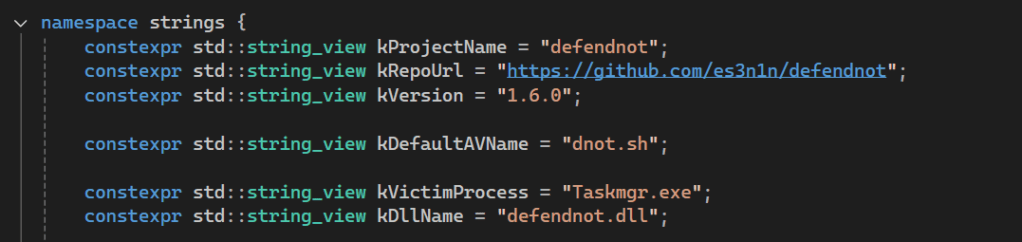
The tool uses the Taskmgr.exe (Windows Task Manager) process as the designated process that meets the criteria to pass the Microsoft validation checks, prior of initiating the antivirus registration process.
namespace strings {
    constexpr std::string_view kProjectName = "defendnot";
    constexpr std::string_view kRepoUrl = "https://github.com/es3n1n/defendnot";
    constexpr std::string_view kVersion = "1.6.0";

    constexpr std::string_view kDefaultAVName = "dnot.sh";

    constexpr std::string_view kVictimProcess = "Taskmgr.exe";
    constexpr std::string_view kDllName = "defendnot.dll";
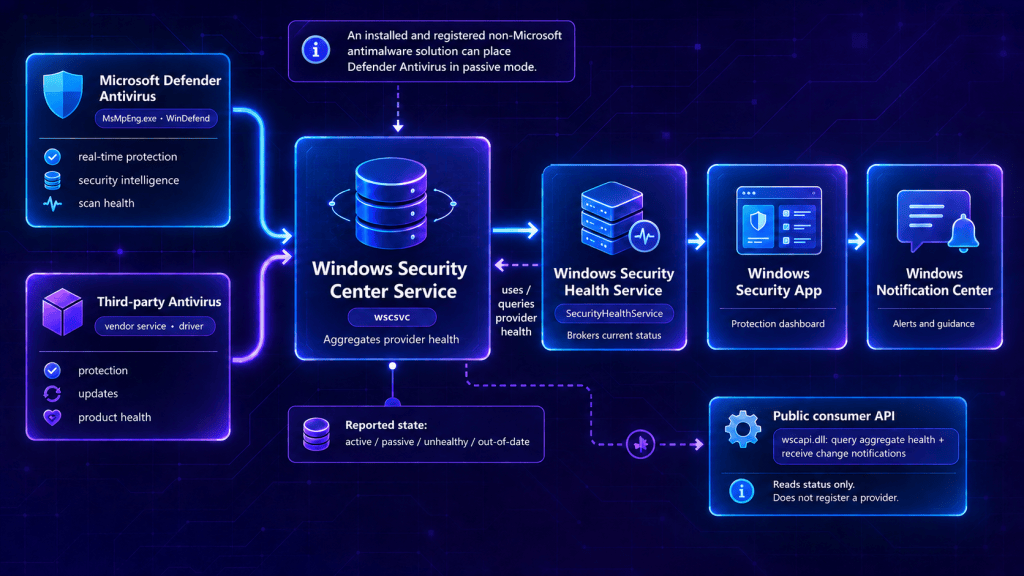
Windows Security Center acts as the proxy between Windows Defender or third-party antivirus products installed on the asset and the components that display whether the device is protected. The Windows Security Center (wscsvc) ingests information from Windows Defender (or third-party providers). Information includes real-time protection, security intelligence updates, and scan health. Specifically, the Windows Security Health Service queries wscsvc for the current provider health and pushes information to the Windows Security Center dashboard. The following diagram visualizes the information flow between antivirus and the Windows Security Center service.
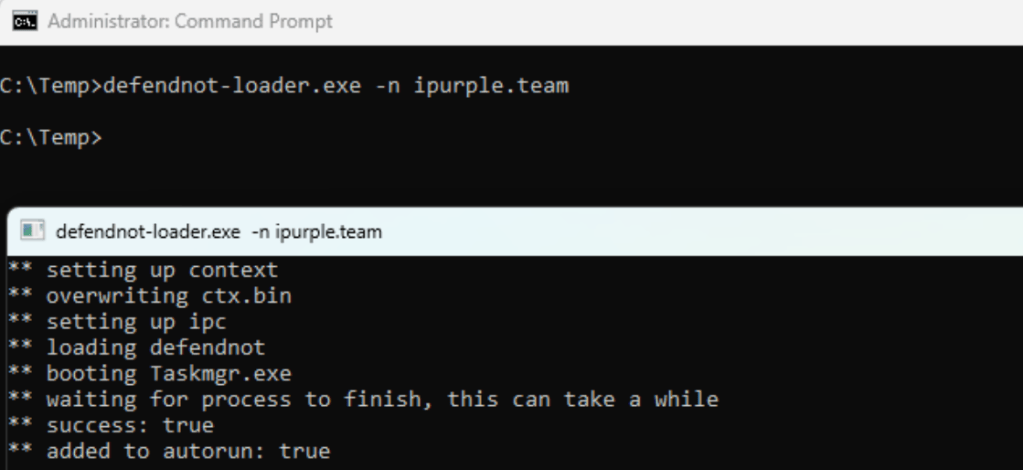
Executing the proof-of-concept mimics the registration of ipurple.team antivirus and forces Windows Defender in passive mode.
defendnot-loader.exe -n ipurple.team
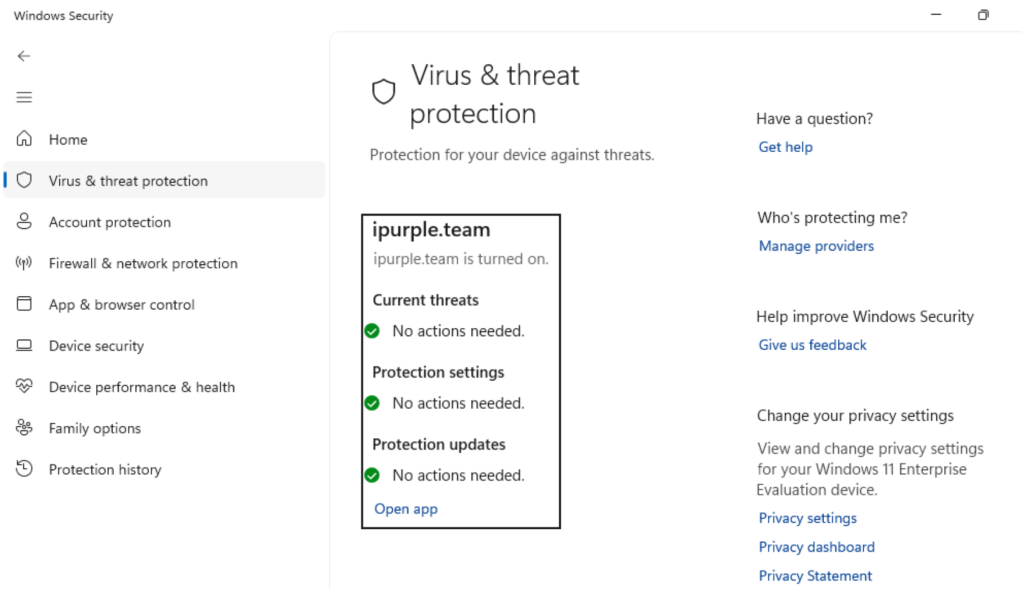
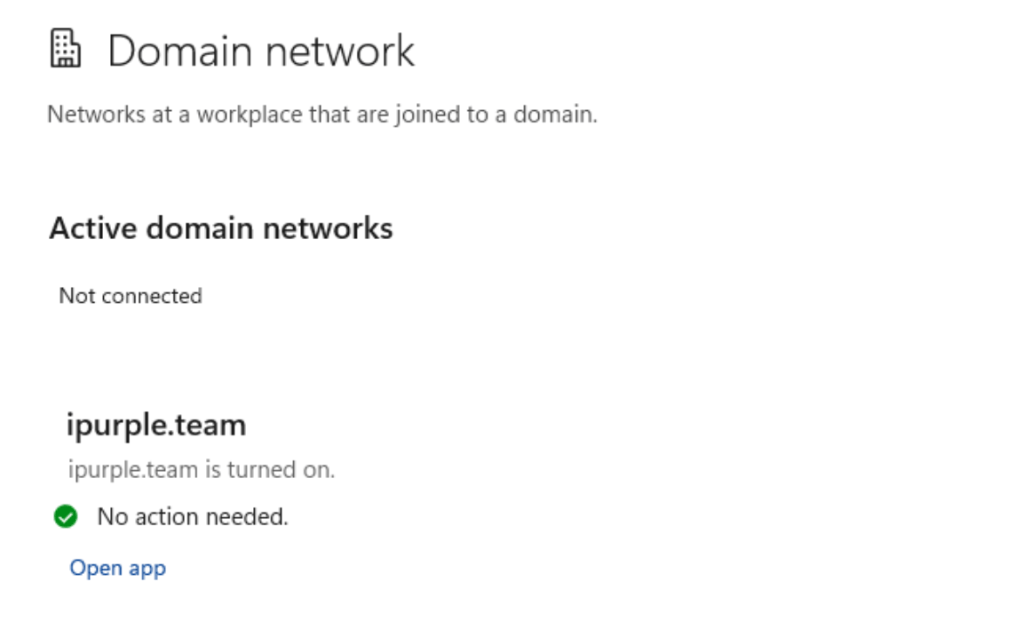
It should be noted that threat actors using the defendnot proof of concept can also register a custom Firewall with the --firewall flag.
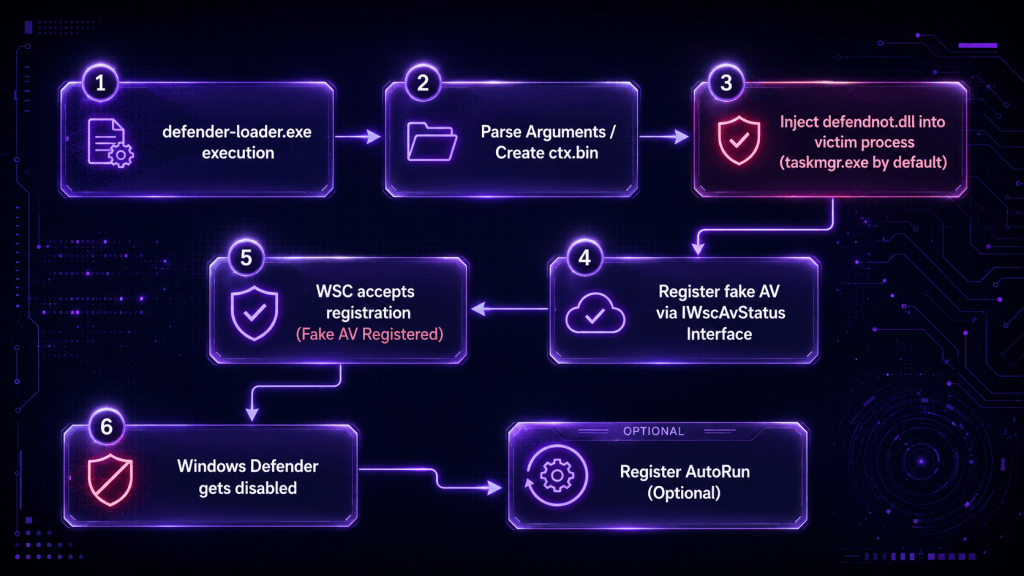
The diagram of abusing the Windows Security Center to disable Windows Defender is demonstrated below:
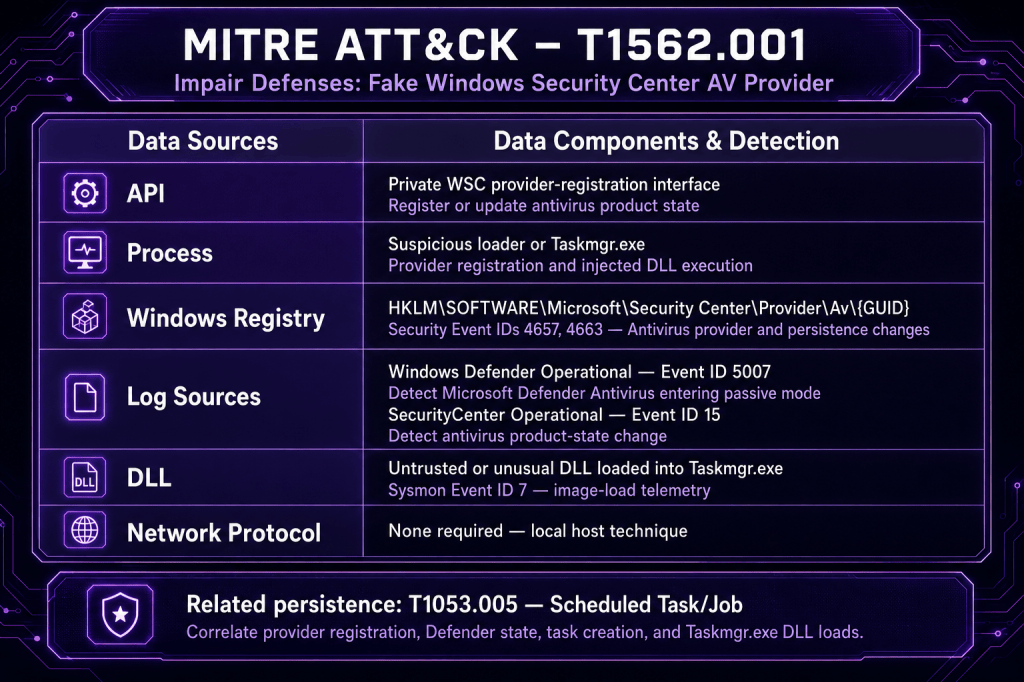
The technique abstract is displayed below:
Detection
Registering a fake antivirus with the operating system is an unconventional way to disable Windows Defender. Therefore, the technique is less visible to SOC teams not because it is stealthy but because it relies on less common data sources. Cyber Defence teams should focus their detection efforts on the registry keys that are part of the technique behaviour, and the related Windows Defender and Application logs. Organizations should collect these logs, forward them to the SIEM, and create detection rules to identify the technique and reduce impact.
Registry
Windows Security Center (WSC) has a registration store for antivirus providers in the registry. Antiviruses registered with the WSC create entries in the following registry location under the Av key. Windows Defender is already registered by default, and the registry entries look similar to the following image.
HKEY_LOCAL_MACHINE\SOFTWARE\Microsoft\Security Center\Provider\Av\{D68DDC3A-831F-4fae-9E44-DA132C1ACF46}
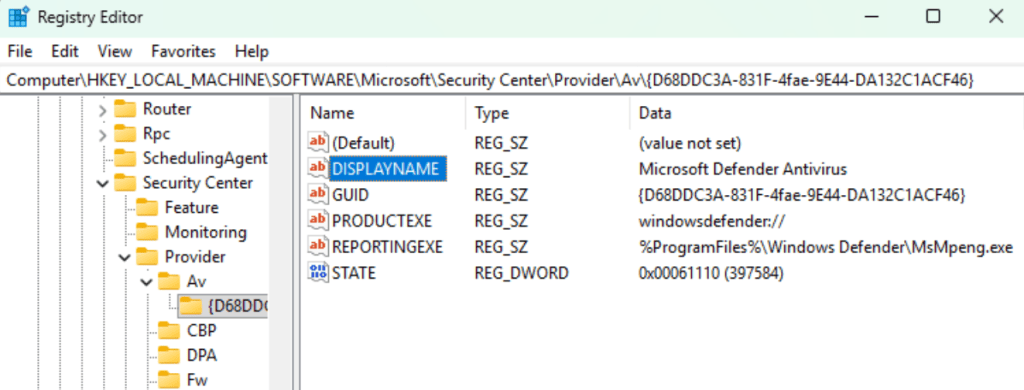
Registration of a fake antivirus generates the following registry entries:
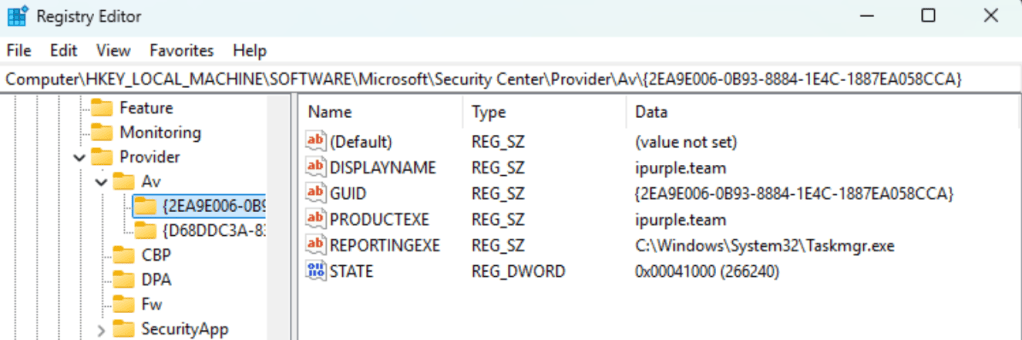
Organizations should enable auditing for all users at the Av registry key to capture registry modifications.
HKLM\SOFTWARE\Microsoft\Security Center\Provider\Av
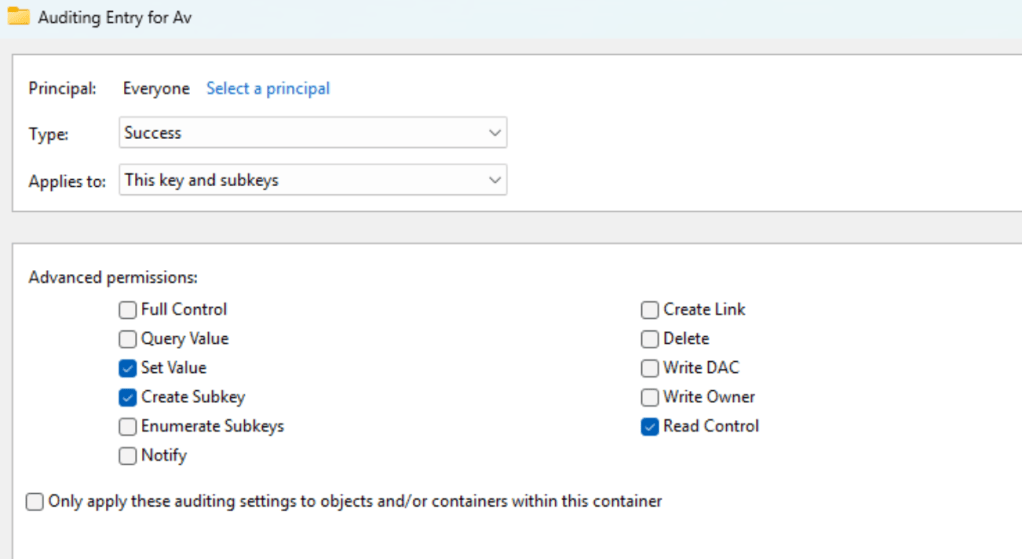
During fake antivirus registration, the targeted registry key is accessed, and registry entries are created under the process svchost.exe. Registry entries associated with antivirus registration should be flagged as malicious. The event IDs 4657 and 4663 are generated during the registration.
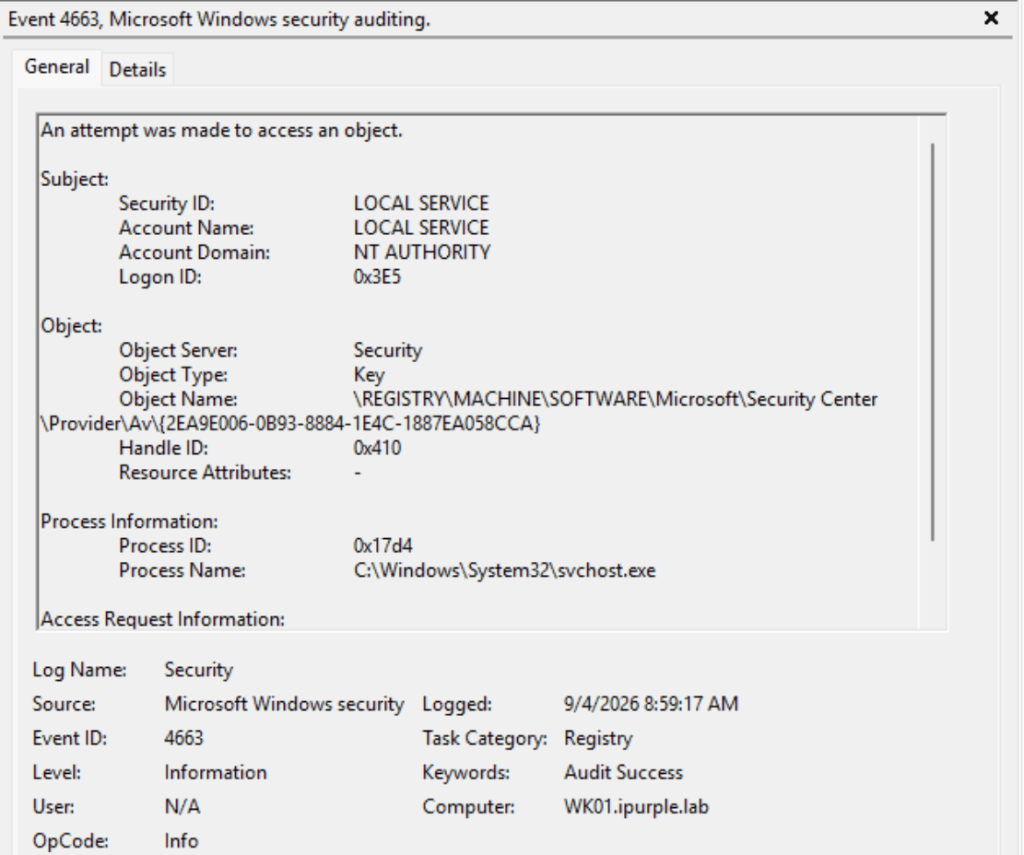
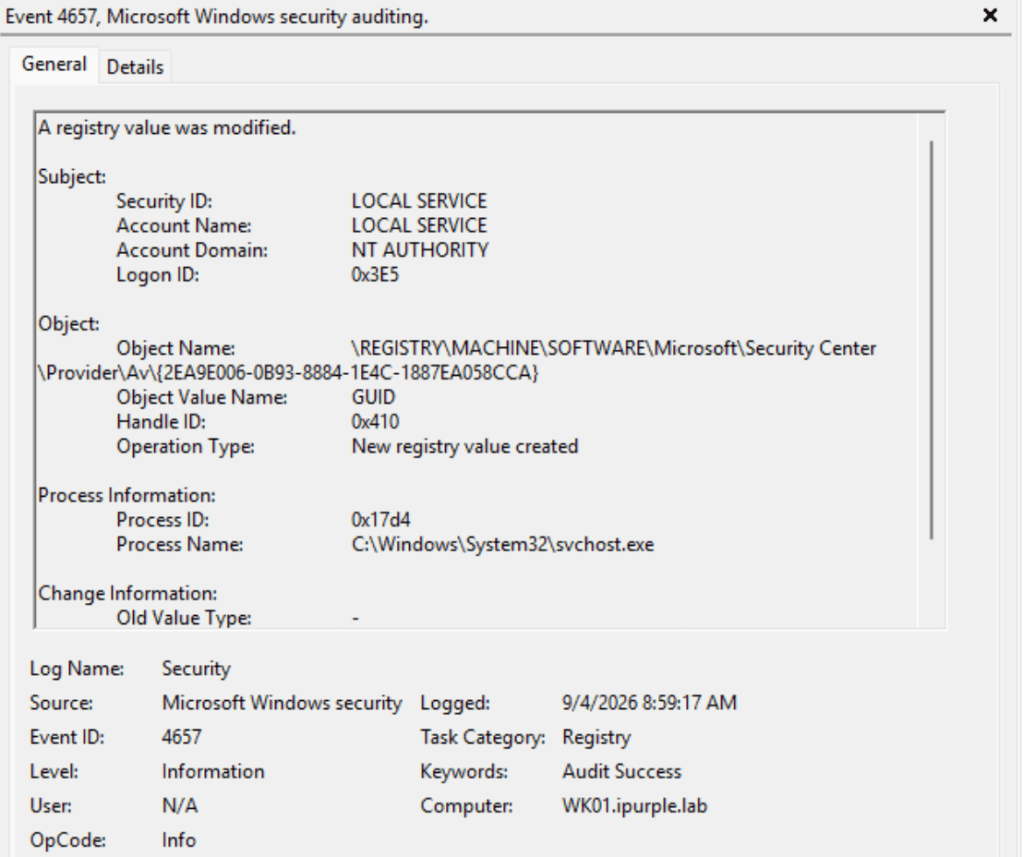
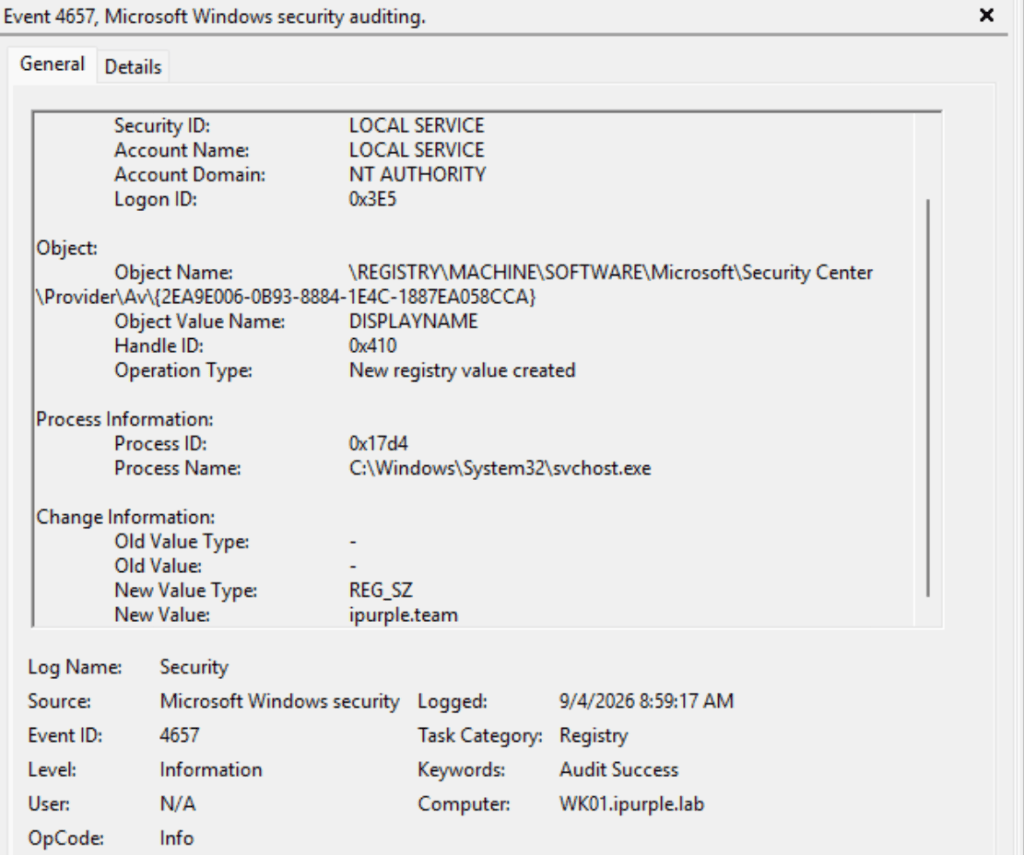
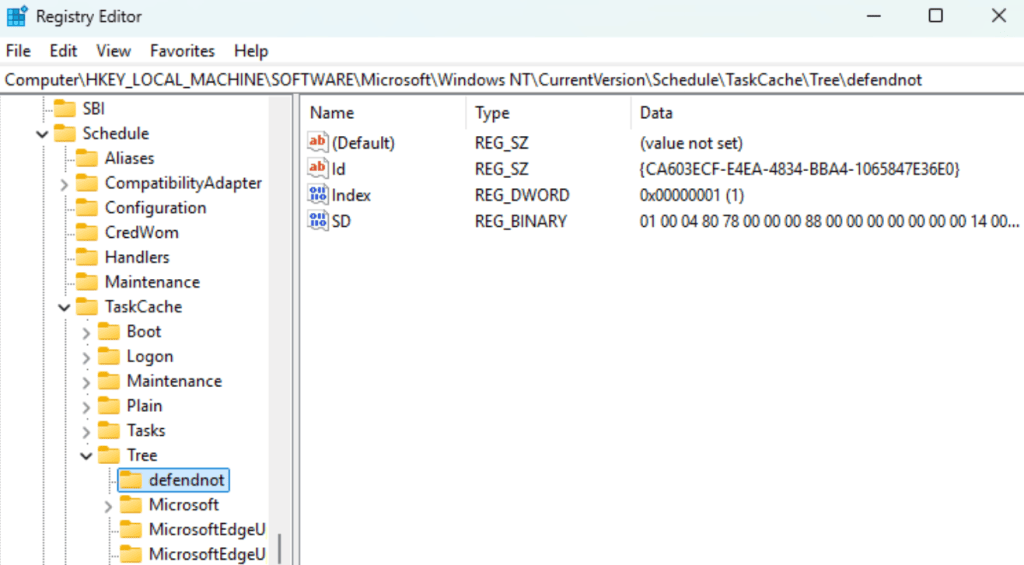
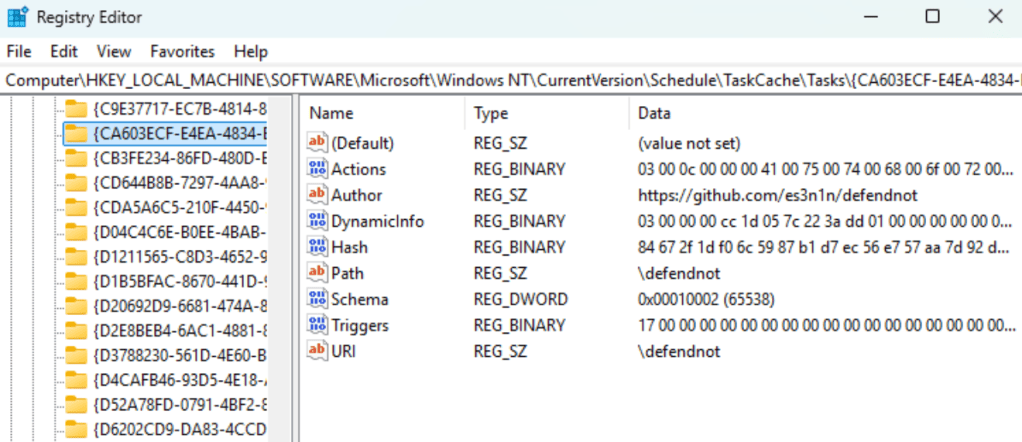
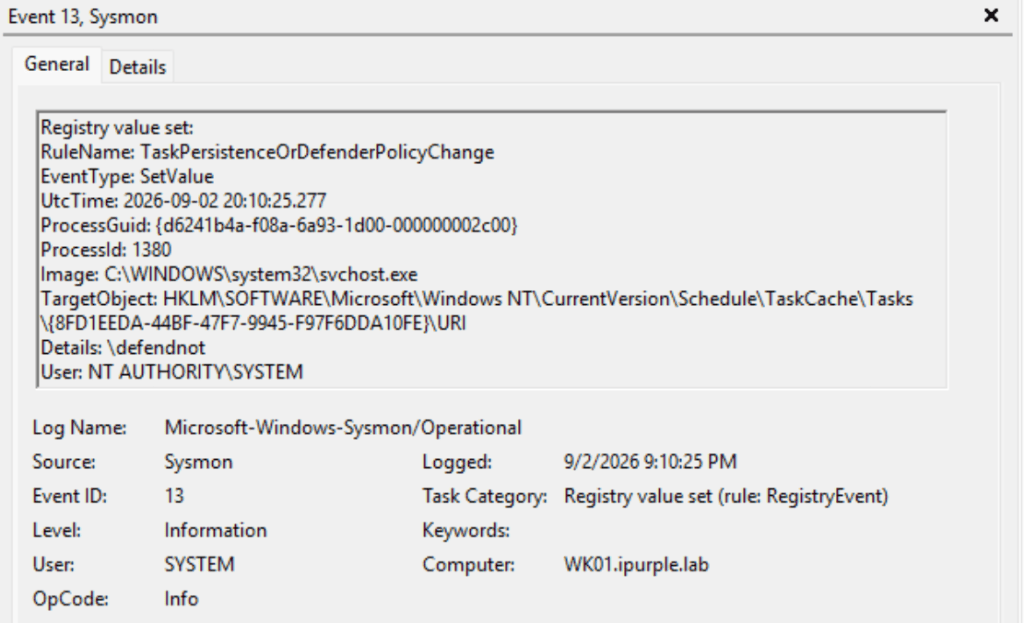
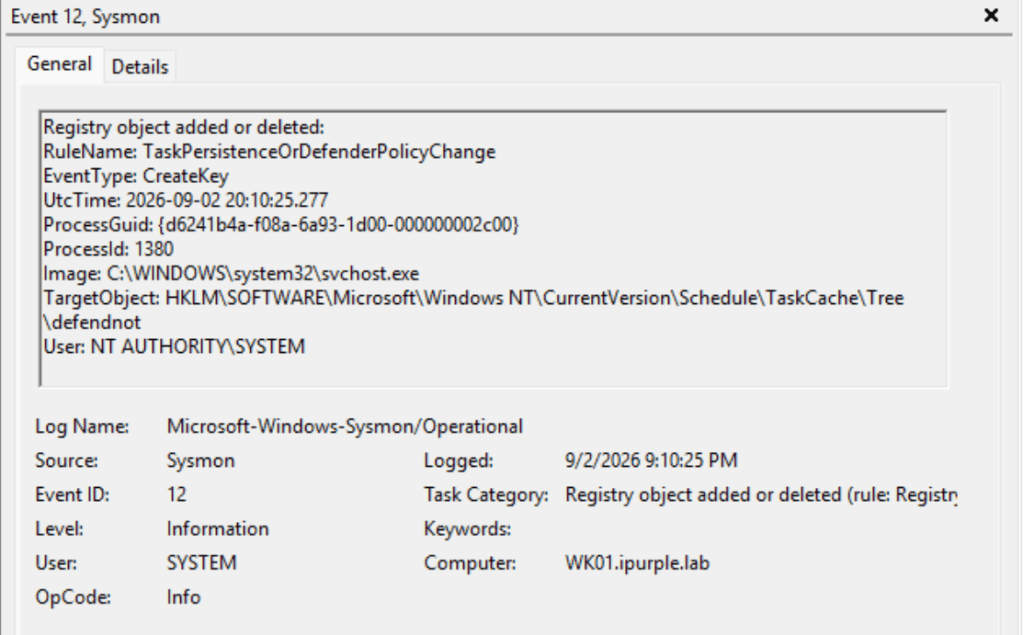
Additionally, defendnot has a persistence mechanism via scheduled tasks. Therefore, registry keys inside the TaskCache\Tree and TaskCache\Tasks are also added and modified.
The following PowerShell query retrieves the antivirus products registered on the asset.
Get-WmiObject -Namespace root\SecurityCenter2 -Class AntiVirusProduct
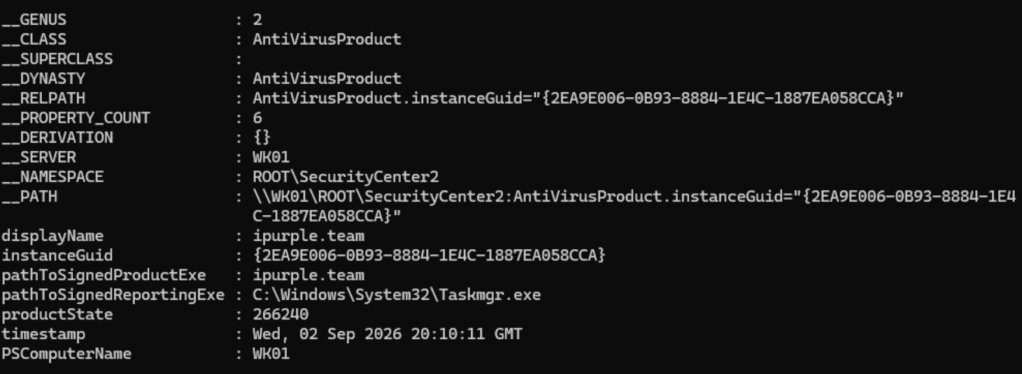
Defender
It should be noted that the registration of another antivirus provider causes Windows Defender to enter in passive mode. The PassiveMode key is modified from 0x00000000 to 0x00000001.
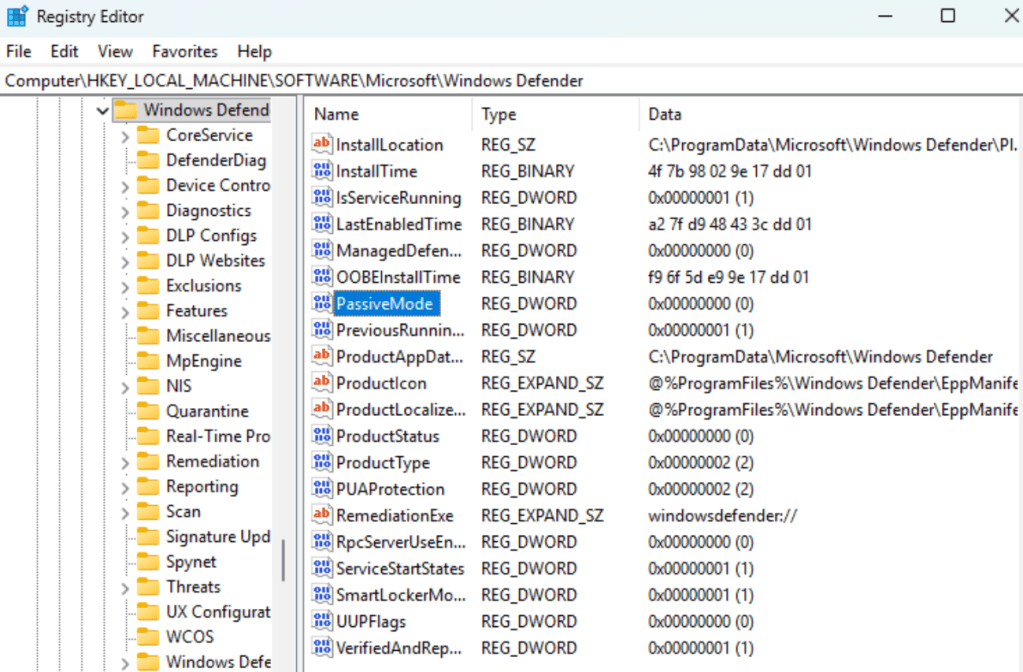
Microsoft has an ETW provider to capture events related to Windows Defender.
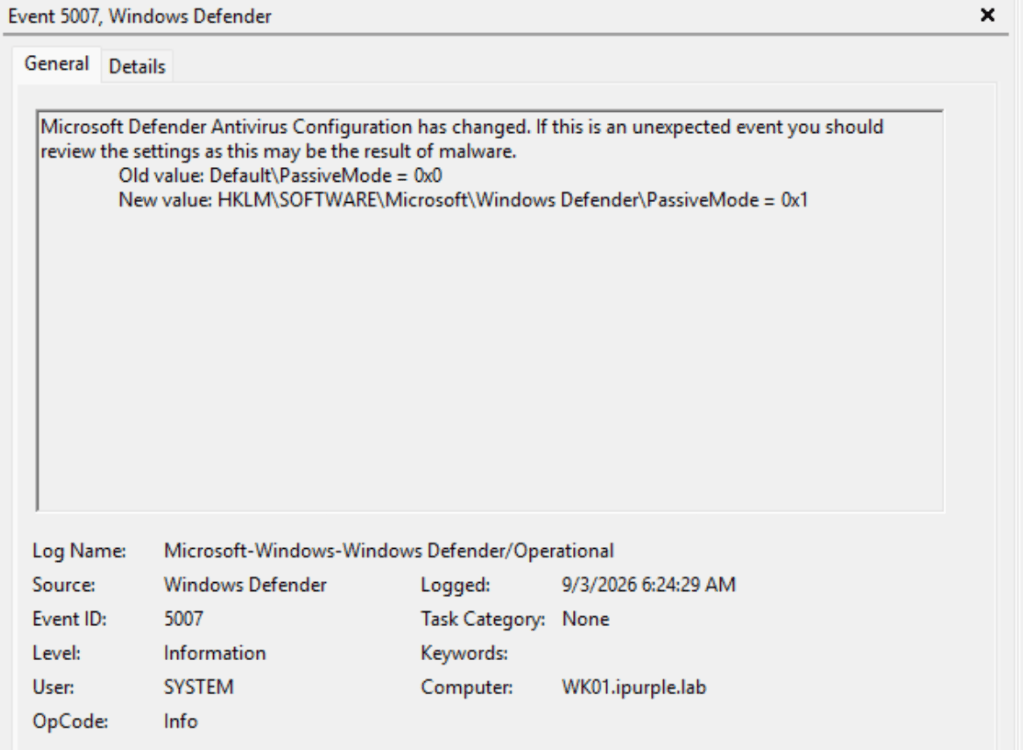
Microsoft-Windows-Windows Defender/Operational
The event ID 5007 captures changes to the configuration of Microsoft Defender. Therefore, when the fake antivirus is registered, Windows Defender will transition to passive mode, causing a modification to the PassiveMode key.
SecurityCenter
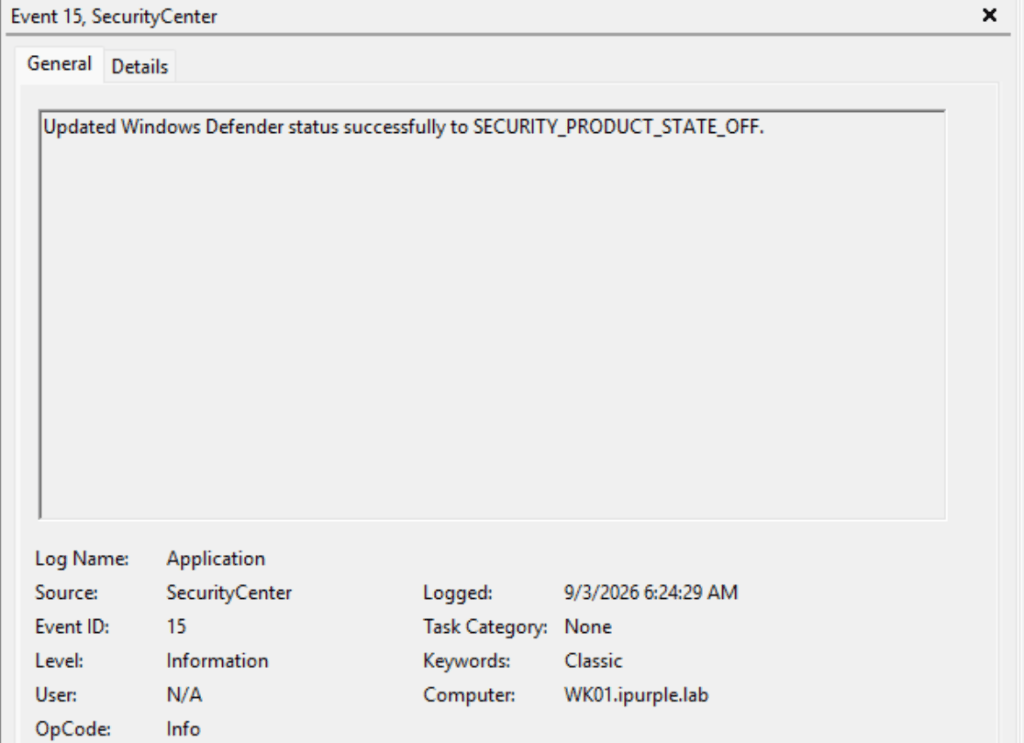
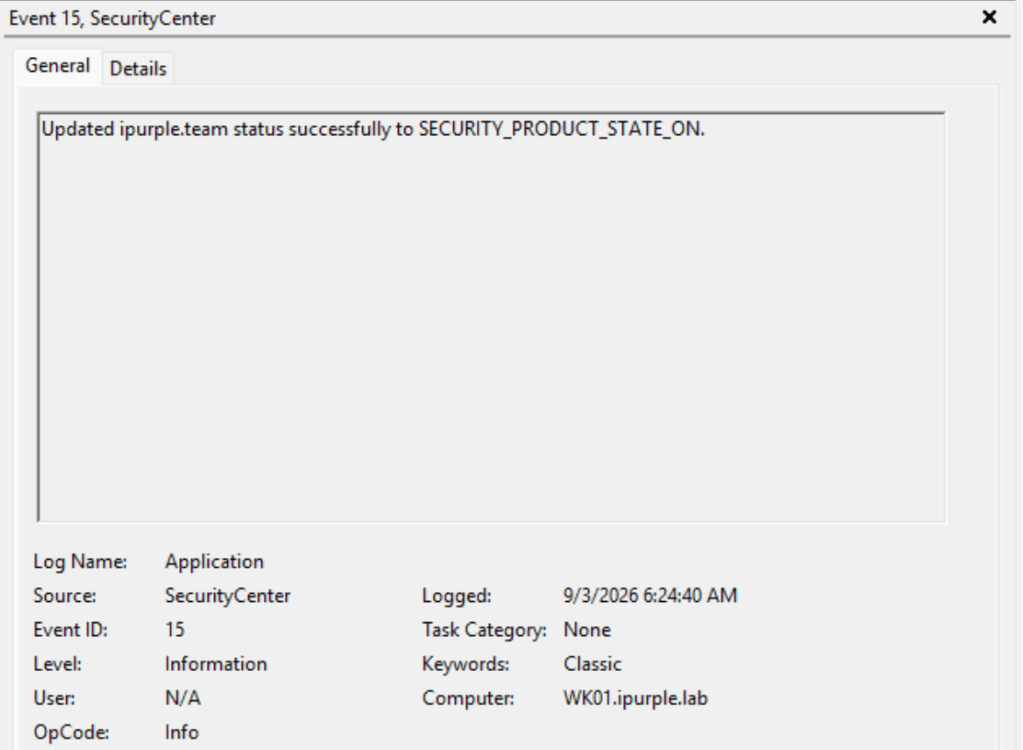
Another data source that records changes to the status of the Antivirus product deployed is the SecurityCenter logs. Specifically, execution of the technique generates two event IDs that captures both the state of the Windows Defender (SECURITY_PRODUCT_STATE_OFF), and the fake antivirus (SECURITY_PRODUCT_STATE_ON).
Kusto
let Lookback = 30d;
let WscAvProvider     = @"\registry\machine\software\microsoft\security center\provider\av\";
let WscAvProviderWow  = @"\registry\machine\software\wow6432node\microsoft\security center\provider\av\";
let DefenderPolicy    = @"\registry\machine\software\policies\microsoft\windows defender\";
let DefenderConfig    = @"\registry\machine\software\microsoft\windows defender\";

let RegistryActivity =
    WindowsEvent
    | where TimeGenerated >= ago(Lookback)
    | where Channel =~ "Security" and EventID in (4657, 4663)
    | extend RegistryPath = tostring(EventData.ObjectName)
    | extend PathLower = tolower(RegistryPath),
             RawLower = tolower(RawEventData)
    | where PathLower startswith WscAvProvider
        or PathLower startswith WscAvProviderWow
        or PathLower startswith DefenderPolicy
        or PathLower startswith DefenderConfig
        // Fallback when WindowsEvent could not parse EventData
        or (isempty(RegistryPath) and (
            RawLower contains WscAvProvider
            or RawLower contains WscAvProviderWow
            or RawLower contains DefenderPolicy
            or RawLower contains DefenderConfig
        ))
    | extend
        RegistryValue     = tostring(EventData.ObjectValueName),
        OldValue          = tostring(EventData.OldValue),
        NewValue          = tostring(EventData.NewValue),
        OperationType     = tostring(EventData.OperationType),
        AccessMask        = tostring(EventData.AccessMask),
        InitiatingProcess = tostring(EventData.ProcessName),
        SubjectUser       = strcat_delim(@"\", tostring(EventData.SubjectDomainName),
                                               tostring(EventData.SubjectUserName)),
        Signal            = iff(EventID == 4657, "Registry value modified",
                                                 "Registry object accessed")
    | project TimeGenerated, Computer, Signal, EventID, Channel, Provider,
              RegistryPath, RegistryValue, OldValue, NewValue, OperationType,
              AccessMask, InitiatingProcess, SubjectUser, EventData, RawEventData;

let StateChanges =
    WindowsEvent
    | where TimeGenerated >= ago(Lookback)
    | where (Channel =~ "Microsoft-Windows-Windows Defender/Operational"
             and EventID in (5001, 5004, 5007, 5010, 5012, 5013))
        or (Channel =~ "Application"
            and Provider in~ ("Security Center", "SecurityCenter")
            and EventID == 15)
    | extend
        OldValueSpaced  = tostring(EventData["Old Value"]),
        OldValueCompact = tostring(EventData["OldValue"]),
        NewValueSpaced  = tostring(EventData["New Value"]),
        NewValueCompact = tostring(EventData["NewValue"]),
        ProductSpaced   = tostring(EventData["Product Name"]),
        ProductCompact  = tostring(EventData["ProductName"])
    | extend
        OldValue    = iff(isnotempty(OldValueSpaced), OldValueSpaced, OldValueCompact),
        NewValue    = iff(isnotempty(NewValueSpaced), NewValueSpaced, NewValueCompact),
        ProductName = iff(isnotempty(ProductSpaced), ProductSpaced, ProductCompact),
        Signal = case(
            EventID == 5001, "Defender real-time protection disabled",
            EventID == 5004, "Defender real-time protection configuration changed",
            EventID == 5007, "Defender configuration changed",
            EventID == 5010, "Defender malware and PUA scanning disabled",
            EventID == 5012, "Defender virus scanning disabled",
            EventID == 5013, "Tamper Protection blocked a Defender change",
            EventID == 15,   "Security Center product state updated",
            "State change")
    | project TimeGenerated, Computer, Signal, EventID, Channel, Provider,
              ProductName, OldValue, NewValue, EventData, RawEventData;

union kind=outer RegistryActivity, StateChanges
| sort by Computer asc, TimeGenerated desc
Sysmon
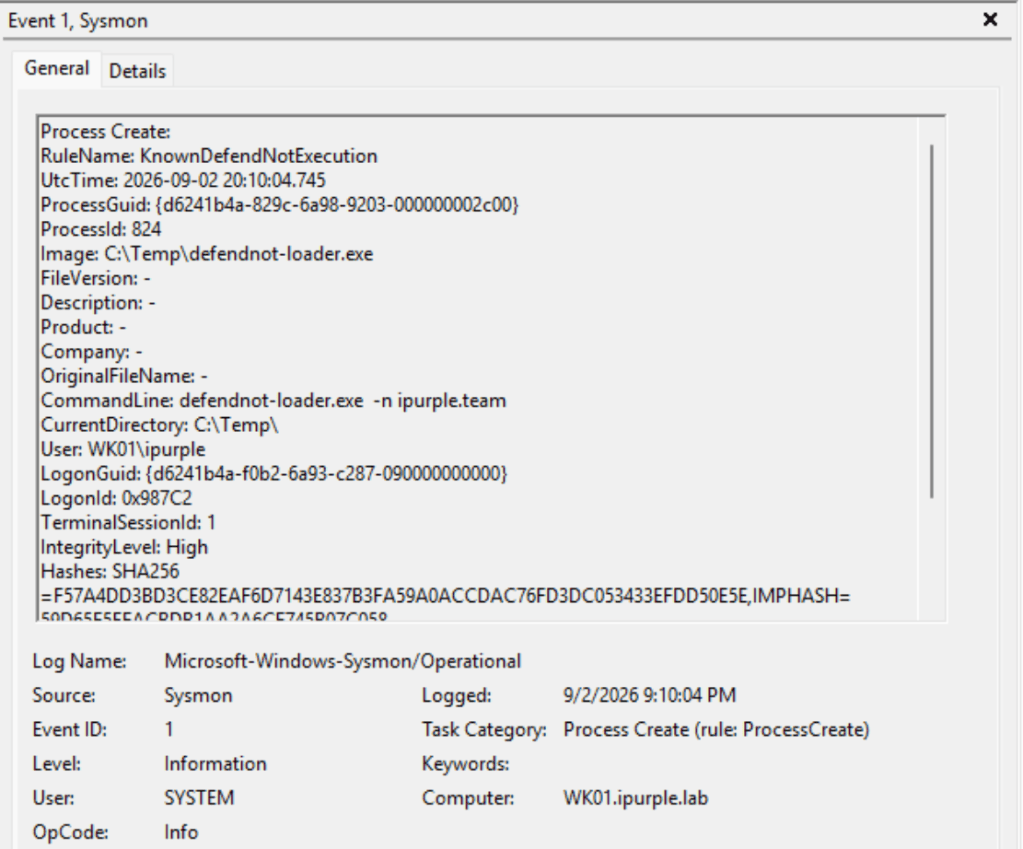
Sysmon can also capture some additional behaviours of the original proof-of-concept similar to what the EDR technology can capture. However, adversaries might change some of the proof-of-concept characteristics to avoid introducing indicators that EDRs could detect trivially. In Sysmon, multiple detection opportunities are captured when the proof-of-concept runs on its default state.
Process Creation
Endpoint Detection and Response systems can capture arbitrary processes created on the assets from unsigned binaries. Sysmon captures process creation events under event ID 1.
Registry Modification
The defendnot tool has a persistence mechanism via a Scheduled Task that runs at system boot with SYSTEM level privileges. This particular behaviour introduces detection opportunities since registry keys in the TaskCache are added and modified.
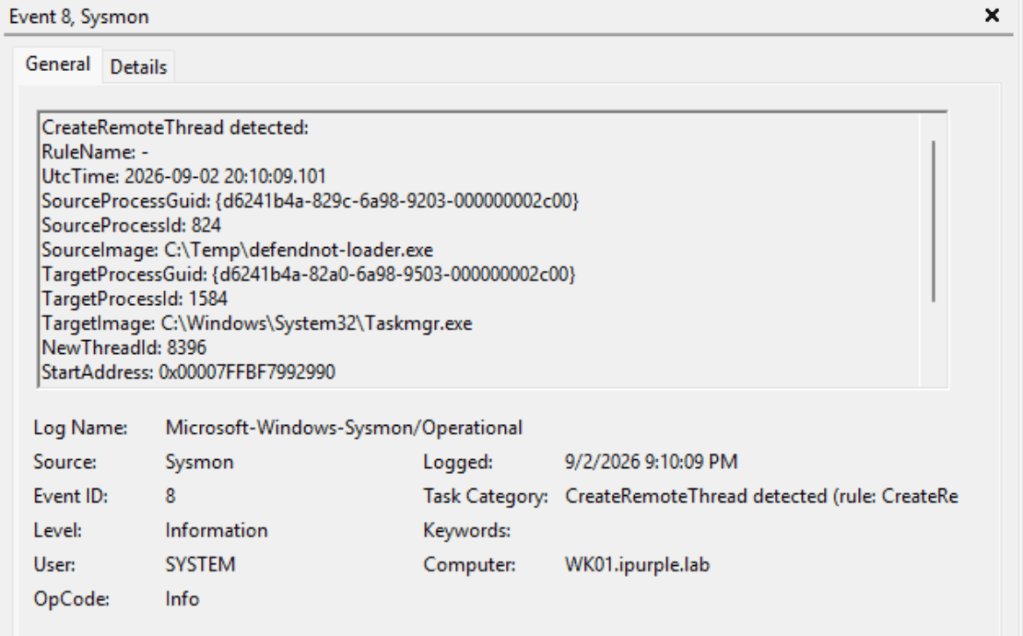
CreateRemoteThread
A remote thread is also created to initiate the taskmgr.exe process which is the target process.
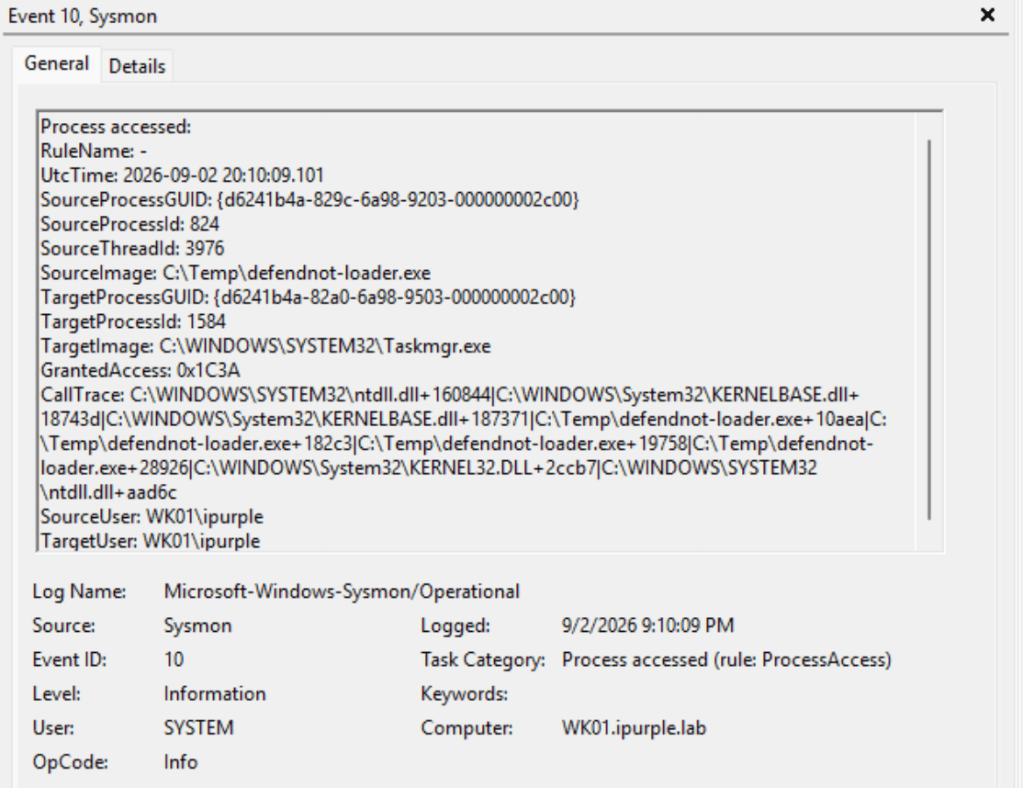
Process Access
Furthermore, defendnot attempts to access the Taskmgr.exe process. This activity is also captured by Sysmon under event ID 10.
File Create
The loader also writes a file on disk called ctx.bin during the initial run. The filename is arbitrary so it should be avoided to develop rules that hunt specifically for this file. The ctx.bin stores the fake antivirus display name, enabled/disabled state, and whether the optional fake Firewall was selected.
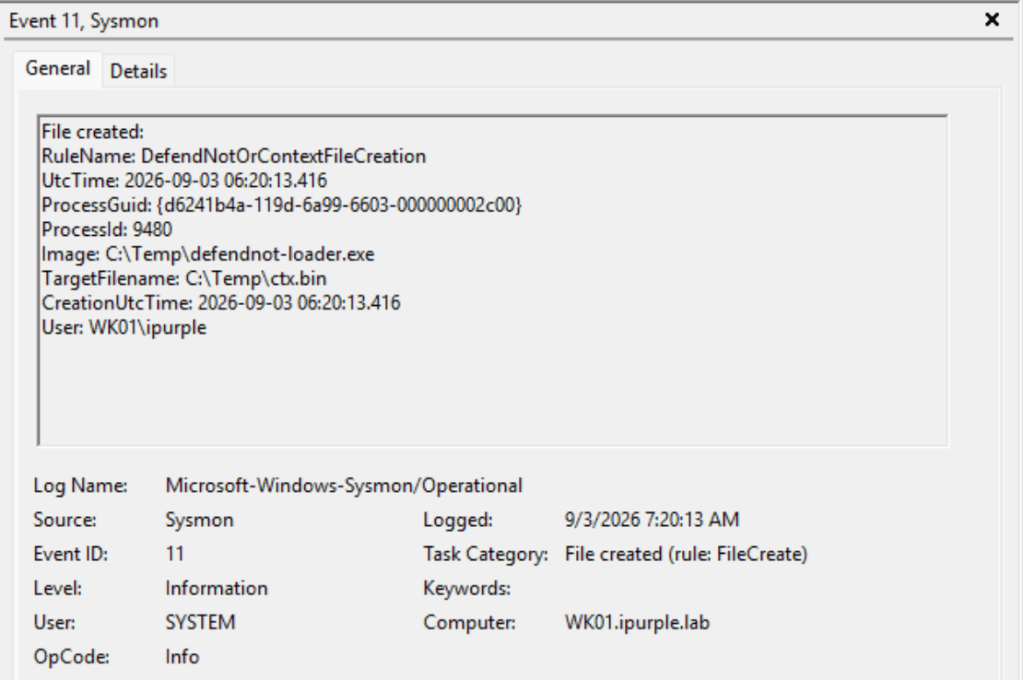
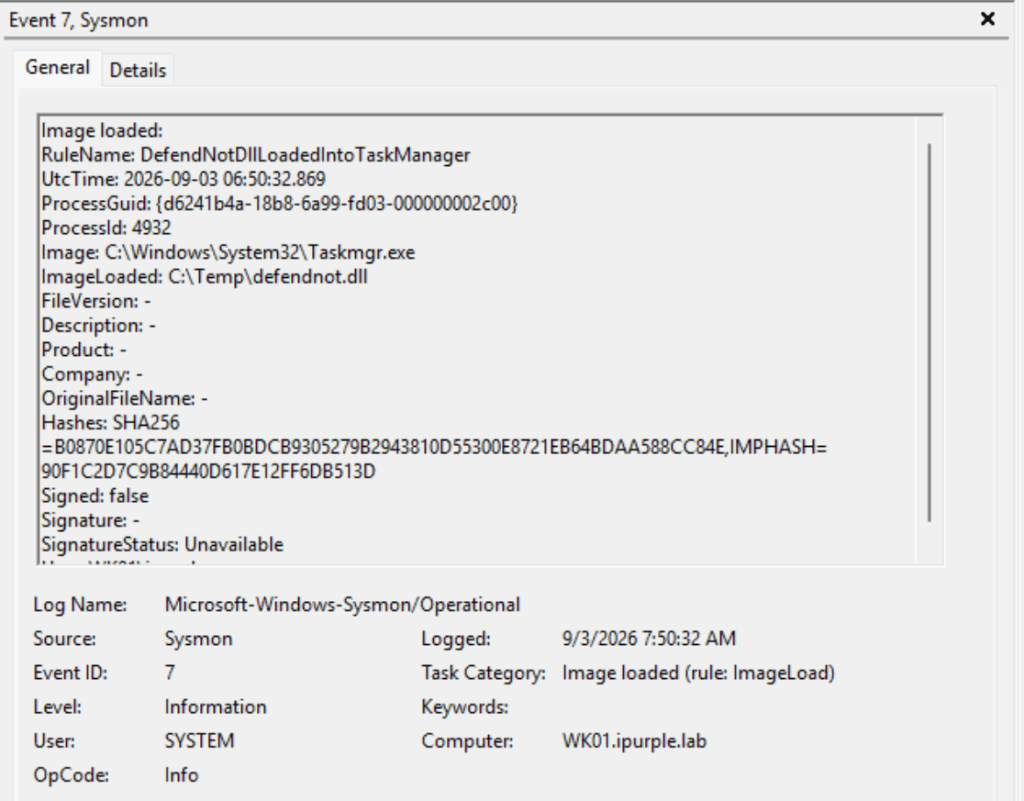
Image Load
Another detection opportunity is to monitor the Taskmgr.exe process for loading arbitrary DLLs.
Sysmon Configuration
<!--
  Focused Sysmon profile for detecting WSC fake-AV registration tooling,
  process injection, scheduled-task persistence, and Defender-policy tampering.

  Use this as a focused supplement to an existing approved Sysmon baseline;
  validate its schema version with the installed Sysmon binary before deployment.
  This file does not enable Windows Security Event 4698. Enable "Audit Other
  Object Access Events" separately to collect that native scheduled-task event.
-->
<Sysmon schemaversion="4.90">
  <HashAlgorithms>SHA256,IMPHASH</HashAlgorithms>
  <EventFiltering>

    <!-- Sysmon Event ID 1: known tooling or installation command lines. -->
    <ProcessCreate onmatch="include">
      <Rule groupRelation="or" name="KnownDefendNotExecution">
        <Image condition="end with">\defendnot-loader.exe</Image>
        <Image condition="end with">\defendnot.exe</Image>
        <OriginalFileName condition="is">defendnot-loader.exe</OriginalFileName>
        <CommandLine condition="contains">defendnot</CommandLine>
        <CommandLine condition="contains">dnot.sh</CommandLine>
      </Rule>
    </ProcessCreate>

    <!--
      Sysmon Event ID 7: retain every DLL loaded into Task Manager, plus generic
      user-writable DLL loads in Task Manager for clear investigative context.
    -->
    <ImageLoad onmatch="include">
      <Rule groupRelation="and" name="AnyDllLoadedIntoTaskManager">
        <Image condition="end with">\Taskmgr.exe</Image>
        <ImageLoaded condition="end with">.dll</ImageLoaded>
      </Rule>
      <Rule groupRelation="and" name="TaskManagerLoadsUserWritableModule">
        <Image condition="end with">\Taskmgr.exe</Image>
        <ImageLoaded condition="begin with">C:\Users\</ImageLoaded>
      </Rule>
      <Rule groupRelation="and" name="TaskManagerLoadsProgramDataModule">
        <Image condition="end with">\Taskmgr.exe</Image>
        <ImageLoaded condition="begin with">C:\ProgramData\</ImageLoaded>
      </Rule>
      <Rule groupRelation="and" name="TaskManagerLoadsTempModule">
        <Image condition="end with">\Taskmgr.exe</Image>
        <ImageLoaded condition="begin with">C:\Windows\Temp\</ImageLoaded>
      </Rule>
    </ImageLoad>

    <!-- Sysmon Event ID 8: high-signal remote-thread creation into Task Manager. -->
    <CreateRemoteThread onmatch="include">
      <TargetImage condition="end with">\Taskmgr.exe</TargetImage>
    </CreateRemoteThread>

    <!-- Sysmon Event ID 10: supports correlation with remote-process injection. -->
    <ProcessAccess onmatch="include">
      <TargetImage condition="end with">\Taskmgr.exe</TargetImage>
    </ProcessAccess>

    <!-- Sysmon Event ID 11: known payload names and ctx.bin written to disk. -->
    <FileCreate onmatch="include">
      <Rule groupRelation="or" name="DefendNotOrContextFileCreation">
        <TargetFilename condition="end with">\defendnot-loader.exe</TargetFilename>
        <TargetFilename condition="end with">\defendnot.exe</TargetFilename>
        <TargetFilename condition="end with">\defendnot.dll</TargetFilename>
        <TargetFilename condition="end with">\ctx.bin</TargetFilename>
      </Rule>
    </FileCreate>

    <!--
      Sysmon Events 12-14: task creation backing data and optional Defender
      policy manipulation. The TaskCache path captures Task Scheduler's own
      Registry representation, including root-level tasks.
    -->
    <RegistryEvent onmatch="include">
      <Rule groupRelation="or" name="TaskPersistenceOrDefenderPolicyChange">
        <TargetObject condition="contains">\SOFTWARE\Microsoft\Windows NT\CurrentVersion\Schedule\TaskCache\</TargetObject>
        <TargetObject condition="contains">\SOFTWARE\Policies\Microsoft\Windows Defender\</TargetObject>
        <TargetObject condition="begin with">HKLM\SOFTWARE\Microsoft\Windows Defender</TargetObject>
      </Rule>
    </RegistryEvent>

    <!-- Sysmon Event ID 22: known public distribution domain. -->
    <DnsQuery onmatch="include">
      <QueryName condition="end with">dnot.sh</QueryName>
    </DnsQuery>

  </EventFiltering>
</Sysmon>
The table below summarizes the data sources and data components required to detect the technique:
| Data Source | Data Component | Detects |
|---|---|---|
| Registry | 4657 | Antivirus Provider & Persistence |
| Registry | 4663 | Antivirus Provider & Persistence |
| Windows Defender | 5007 | Defender Antivirus Passive Mode |
| SecurityCenter | 15 | Antivirus Product State |
In summary, abusing the Windows Security Center API to register a fake antivirus and force Windows Defender in passive state is an uncommon technique. Most of the knowledge that was implemented in the proof-of-concept has been obtained via extended reverse engineering since this API is not publicly documented by Microsoft. There are also no records of threat actors that used this method to impair Windows Defender control.
Organizations can monitor the targeted registry keys and combine those records with logs from the SecurityCenter and Windows Defender to detect arbitrary antivirus registrations on their assets. Signature-based detections or detections that occur via other indicators that the proof-of-concept is using (CreateRemoteThread) should not be correlated directly with the technique, since adversaries can implement different APIs and conduct modifications in the existing signatures. The technique creates detection opportunities only if the related logs are captured and sent to a SIEM to enable the development of threat hunting queries.


Leave a Reply